
Kafka Streams architecture
Kafka Streams architecture explained: how topologies become sub-topologies, tasks, and stream threads, and why the task is your real unit of parallelism.
By Stéphane Derosiaux · Updated October 20, 2026
Understand how a Kafka Streams app actually runs.
You write a topology, a graph of operators, and call streams.start(). What happens next decides how your app scales, how many threads it spins up, and how many internal topics appear on your cluster. Kafka Streams turns that topology into a set of tasks, hands the tasks to threads, and runs the threads inside your own process.
The single idea that makes all of this make sense: the task is the fixed unit of parallelism, and it's bounded by partition count. Get that, and rebalancing, scaling, and "why won't my app go faster" stop being mysteries.
What you'll learn:
- How a topology splits into sub-topologies and tasks
- Why a task maps to exactly one partition of a sub-topology
- How stream threads run tasks, and what the internal consumer/producer do
- Why the topology graph, not you, decides which internal topics exist
From topology to running code
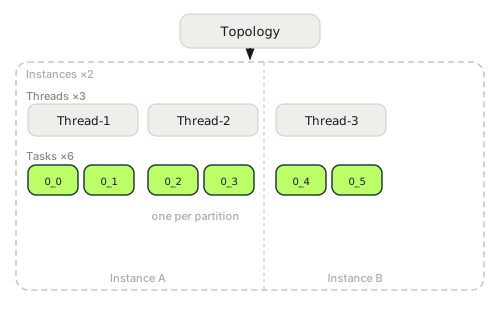
When you build a topology with the DSL, you describe a directed graph: source nodes that read topics, processor nodes that transform records, sink nodes that write topics. builder.build() gives you a Topology object; Topology.describe() prints it. Reading that description is the fastest way to understand what your app will actually do, Matthias Sax's "Nuts and Bolts of Kafka Streams" talk (Current 2023) frames the whole library as exactly this: a graph compiled into runtime units. Worth treating the topology as the source of truth, not the DSL code you typed.
Here is the rough shape of the runtime, top to bottom:
Topology              one graph you define
  └─ Sub-topology     a connected chunk, split at repartition boundaries
       └─ Task        one per partition of the sub-topology's input
            └─ runs inside a Stream Thread
                 └─ inside your JVM process (one of N instances)
Everything below "Topology" is created for you. You don't instantiate a task or schedule a thread by hand, you set num.stream.threads, run more instances, and Kafka Streams does the assignment.
Sub-topologies: where the graph gets cut
A topology isn't always one connected piece. Kafka Streams splits it into sub-topologies wherever data has to be repartitioned, that is, shuffled across the network because a key changed or a repartition was inserted.
Why the cut matters: records inside one sub-topology flow directly, in-process, node to node, no network hop. Crossing from one sub-topology to the next means writing to an internal repartition topic and reading it back. That boundary is also where parallelism is re-decided, because the downstream sub-topology reads a different topic with its own partition count.
A simple stateless pipeline (stream → filter → mapValues → to) is one sub-topology: same key throughout, no shuffle. The moment you re-key and then aggregate, stream → selectKey → groupByKey → count, Kafka Streams cuts the graph at the re-key, because the aggregation needs records grouped by the new key on the right partition. (Re-keying is where a lot of accidental cost hides; see stateless operations.)
Tasks: the fixed unit of parallelism
This is the part to internalize.
A task is the processing for one partition of a sub-topology's input. If a sub-topology reads a topic with 6 partitions, Kafka Streams creates 6 tasks for it, 0_0 through 0_5. Each task owns its partition's records, its own copy of any state stores in that sub-topology, and its own position in the log.
The number of tasks is pinned to the partition count of the input to each sub-topology. It's recomputed at each rebalance, so it only moves if someone changes a topic, and that is not a scaling lever: add partitions under a stateful app and it shuts down with Existing internal topic ...-changelog has invalid partitions and tells you to run StreamsResetter, while a stateless app silently picks up the new tasks at the next rebalance. Either way, the partition count gives you the hard ceiling:
The maximum parallelism of a Kafka Streams app is the largest partition count among its sub-topologies. More threads or instances past that point sit idle.
Two consequences people learn the hard way:
- A 6-partition input topic caps you at 6 tasks for that sub-topology. Spin up 10 instances with 1 thread each and 4 of them have no task to run, they become hot standbys at best, idle at worst.
- A repartition topic with fewer partitions throttles everything downstream of it. If you repartition into 3 partitions mid-pipeline, the downstream sub-topology has at most 3 tasks no matter how wide the source was.
Scaling is its own topic with its own gotchas (uneven assignment, standbys, when to add partitions), see scaling Kafka Streams. The thing to carry here: you scale by tasks, and tasks are pinned to partitions.
Stream threads: who runs the tasks
Tasks are what to do; stream threads are who does it. Each instance of your app runs num.stream.threads threads (default 1), and Kafka Streams distributes the available tasks across all threads across all instances.
A thread runs its assigned tasks in a loop: poll records, push them through the topology, commit. One thread can run several tasks; it processes them in turn, not in parallel within the thread. So your real concurrency is min(total tasks, total threads across all instances).
| Knob | What it changes | Bounded by |
|---|---|---|
num.stream.threads | Threads per instance | CPU cores on the instance |
| Number of instances | Threads across the fleet | N/A |
| Tasks (derived) | Actual parallel work | Max partition count of a sub-topology |
Threads aren't the parallelism story, tasks are. A common pattern is to crank
num.stream.threadsto 16 on a topic with 4 partitions and wonder why nothing got faster. Twelve of those threads have no task. Match threads to the tasks available on each instance, and add partitions if you genuinely need more parallel processing.
The internal consumer and producer
A Kafka Streams app is, underneath, an ordinary consumer group plus producers, you just don't write the consumer loop.
- Internal consumers read your source topics, the repartition topics, and (during recovery) the changelog topics. They belong to one consumer group named after your
application.id. This is why a Streams app shows up inkafka-consumer-groups.shlike any other consumer, and why partition assignment and rebalancing apply to it directly. - Internal producers write to your sink topics, the repartition topics, and the changelog topics that back state stores. With exactly-once enabled, these become transactional producers.
- A restore consumer is a separate, non-group consumer used only to replay changelogs when a task has to rebuild state on a new instance.
Because the whole thing is a consumer group, the same operational levers you know from plain consumers, max.poll.interval.ms, session.timeout.ms, group coordination, govern your Streams app too. A thread that blocks too long in your processing code misses its poll deadline and triggers a rebalance, the same as any consumer.
How the graph decides your internal topics
You never run kafka-topics --create for these, but they appear on your cluster the first time the app starts, prefixed with your application.id:
- Repartition topics, created at each sub-topology boundary where a re-key forces a shuffle. They carry data between sub-topologies. They are not compacted:
cleanup.policy=deletewith infinite retention, and Streams itself purges records once they're consumed. - Changelog topics, created for every state store that has logging enabled (the default;
withLoggingDisabled()skips them), log-compacted so a store can be rebuilt after a crash. Windowed stores getcompact,deletewith a retention derived from the window. (Covered in state stores.)
Two facts that bite later:
- The number and partitioning of these topics come straight from the topology graph. A stateful app with several aggregations and joins can easily triple your topic and partition count on the cluster. Count them before you size the cluster.
- Their names are positional, derived from the operator's position in the graph. An unnamed store or repartition gets a name like
KSTREAM-AGGREGATE-STATE-STORE-0000000001. Insert or reorder an operator and the positions, and therefore the names, shift, which can orphan existing state on an upgrade. Name them explicitly from day one; oneMaterialized.as("agg")names the store, its changelog, and the related repartition topic. Kafka Streams 4.x warns at build time about unnamed internal resources, andensure.explicit.internal.resource.naming(KIP-1111) turns that into a hard error. This is the entire reason topology changes are risky; see evolving a topology.
How does Kafka Streams work under the hood?
You define a topology (a graph of operators); Kafka Streams compiles it into sub-topologies, splits each into tasks bound to input partitions, and runs those tasks on stream threads inside your own JVM process. It is, underneath, an ordinary consumer group plus producers, you just don't write the consumer loop.
Does Kafka Streams need its own cluster to run?
No. Kafka Streams is a library that runs inside your application process, so there is no separate processing cluster, job scheduler, or resource manager to deploy. It only needs a Kafka cluster to read from and write to; you scale it by running more instances.
What is a stream task in Kafka Streams?
A task is the processing for exactly one partition of a sub-topology's input. It owns that partition's records, its own copy of any state stores in the sub-topology, and its own position in the log. The number of tasks equals the input partition count, so it only changes if partitions are added to a topic.
How do tasks, threads, and partitions relate in Kafka Streams?
A task maps to one input partition and is the fixed unit of parallelism; stream threads run the tasks (one thread can run several, in turn). Real concurrency is min(total tasks, total threads across all instances), so the maximum parallelism is the largest partition count among your sub-topologies.
Why does my Kafka Streams app create extra topics on the cluster?
The topology graph decides them. Kafka Streams creates a repartition topic at each boundary where a re-key forces a shuffle, and a compacted changelog topic for every state store with logging enabled (the default). Their names and partition counts come straight from the graph and are prefixed with your application.id.
See it in practice with Conduktor
A Kafka Streams app is a consumer group plus a set of internal topics. Conduktor Console lets you see the repartition and changelog topics your topology created, check their partition counts against what you expected, and watch the consumer group's partition assignment and lag, the signals that tell you whether tasks are balanced and whether a restore is still running after a deploy.
Next steps
- Scaling Kafka Streams, turn the task model into real throughput
- Kafka Streams state stores, the local state each task owns
- Build your first Kafka Streams app, a runnable topology in Java