
Kafka Streams scaling
Kafka Streams scaling and parallelism: why tasks cap your throughput, when extra threads and instances go idle, and the partition trap that corrupts state.
By Stéphane Derosiaux · Updated October 20, 2026
Make a Kafka Streams app go faster, and know when it can't.
The first instinct when a Kafka Streams app falls behind is to add threads or spin up more pods. Sometimes that works. Often it does nothing, because Kafka Streams parallelism is capped by something most config changes can't touch: your partition count. This page is the mental model for scaling Streams correctly, and the one trap (increasing partitions on a stateful app) that turns a scaling attempt into a data-corruption incident.
The architecture page established that the task is the fixed unit of parallelism and that tasks are pinned to partitions. Here we turn that into operational decisions: how many threads, how many instances, what to do with the surplus, and why you can't just bump partitions to scale.
What you'll learn:
- Why total useful parallelism is capped by partition count, not by threads or instances
- When extra threads and instances become idle standbys
- How a narrow repartition topic throttles everything downstream
- Why increasing input partitions on a stateful app breaks key→state mapping
The ceiling: parallelism = max partitions of a sub-topology
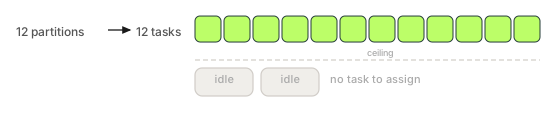
One number governs how far a Kafka Streams app can scale: the largest partition count among its sub-topologies. That's the maximum number of tasks, and tasks are the only thing that runs in parallel.
A quick reminder of the chain (full detail in architecture):
partitions of a sub-topology → tasks (one per partition) → run on stream threads → across instancesYour real concurrency is min(total tasks, total stream threads across all instances). The first term is set by your topics; the second by your config. You can raise the second freely, but the moment it exceeds the first, the extra threads have no task to run and your throughput stops improving. A 12-partition input topic gives you 12 tasks for that sub-topology, and 12 is the hard ceiling for that stage, whether you run it on 1 instance with 12 threads or 12 instances with 1 thread each.
Confluent's writeup on scaling Streams with cooperative rebalancing frames it the same way: you scale Streams by moving tasks onto more threads/instances, and the task count is fixed by partitions at startup.
🚫 "It's falling behind, add more threads (or more pods) and it'll catch up."
Only up to the task count. Once
num.stream.threads × instances≥ the partition count of your busiest sub-topology, every additional thread or instance is idle (or a standby). Past the ceiling, more compute buys you nothing but cost: the fix is more partitions, not more workers, and that has consequences (below).
Threads vs instances: two knobs, one ceiling
You have two ways to add workers, and they trade off differently.
| Knob | Scales | Cost / limit | Failure-domain effect |
|---|---|---|---|
num.stream.threads | Threads within one instance | Bounded by CPU cores on that box | All threads die if the instance dies |
| Number of instances | Threads across the fleet | Bounded by your orchestrator/budget | One instance dying loses only its share |
num.stream.threads is the cheap lever: bump it to use the cores you already paid for on each box. But threads on one instance share that instance's fate, and its memory, which matters because each task carries its own RocksDB state, so 8 threads each running stateful tasks multiply the off-heap footprint on a single box. Scaling out to more instances spreads both the failure domain and the memory, and lets cooperative rebalancing move tasks onto the new instance without a full stop-the-world. The rule of thumb: use threads to fill the cores on each instance, use instances to go wider than one box and to bound per-instance memory, and stop adding either once you hit the task ceiling.
Past the ceiling: idle workers and standbys
When you run more threads/instances than there are tasks, the surplus doesn't share the work: there's no work to share, because a partition is owned by exactly one task at a time. The surplus becomes one of two things:
- Idle, if you have no standby replicas configured: the thread sits in the consumer group holding no active task, doing nothing but consuming a group slot.
- A standby replica, if
num.standby.replicas > 0: the surplus instance keeps a warm copy of another task's state by tailing its changelog, so if the active instance dies, failover is fast instead of a cold state restore.
This is the one good reason to run more instances than tasks: turn the surplus into hot standbys.
num.standby.replicas=1With num.standby.replicas=1, each task has one warm backup on another instance. That's not extra throughput (active and standby never process the same partition in parallel), it's faster recovery. So "more instances than tasks" is wasteful unless you've turned it into standby capacity, in which case you're buying availability, not speed. Be deliberate about which one you're paying for.
The narrow-repartition throttle
The ceiling isn't always your input topic. A sub-topology boundary, created when you re-key and then aggregate or join, writes to an internal repartition topic, and that topic's partition count caps everything downstream of it.
input topic (24 partitions) → 24 tasks ──re-key──► repartition topic (?? partitions) → ?? tasks downstreamIf the repartition topic has fewer partitions than the input, the downstream sub-topology is throttled to that smaller number no matter how wide the source was. By default Kafka Streams sizes a repartition topic to match its source, but you can override it with Repartitioned.numberOfPartitions(...), and a too-small value silently caps downstream parallelism. When the second half of a topology lags while the first half keeps up, check the partition count of the repartition topic between them: that boundary is where parallelism is re-decided.
Unbalanced assignment across instances
Even at the right scale, work isn't always evenly spread. A few ways it goes lopsided:
- Tasks don't divide evenly by instances. 10 tasks across 3 instances is 4/3/3: the instance with 4 does ~33% more work. With stateful tasks, that instance also holds ~33% more RocksDB state and memory. Pick an instance count that divides the task count cleanly when you can.
- Stateful and stateless tasks weigh differently. The assignor balances task count, not load. An instance that happens to land several heavy stateful tasks (large stores, expensive aggregations) is hotter than one holding light stateless tasks, even with equal counts.
- A skewed key space defeats it entirely. Partition assignment is even; traffic may not be. If 80% of your records carry a handful of hot keys that hash to two partitions, the two tasks owning them are saturated while the rest idle. No amount of scaling fixes skew: that's a partitioning/key-design problem upstream, not a Streams config.
Watch per-instance and per-partition consumer group lag: uniform lag means you've hit the genuine throughput ceiling and need more partitions; lag concentrated on one instance or a few partitions means imbalance or key skew, and adding workers won't help.
How to actually scale: size partitions up front
Because parallelism is capped by partition count, the most important scaling decision happens before the app exists: size your input topic partitions for your peak target, with headroom. It's far cheaper to start at 24 partitions and run 6 today than to start at 6 and need 24 next quarter, because raising partition count on a live stateful app is the trap below, not a routine resize.
A practical ordering when an app needs to scale:
- Raise
num.stream.threadsto use the cores already on each instance, up to the task ceiling. Free, no rebalance of partitions across hosts. - Scale out instances toward
instance count ≤ task count, letting cooperative rebalancing move tasks over. Spreads memory and failure domain. - Convert the surplus to standbys (
num.standby.replicas ≥ 1) once instances exceed tasks: you're now buying recovery speed, not throughput. - Only then add partitions, and for a stateful app, treat it as a migration, not a config bump (next section).
The partition-increase trap (stateful apps)
This is the one that turns a scaling attempt into a corruption incident, so it gets its own section.
Kafka routes a record to a partition by hash(key) % partitionCount. Your state stores, and their changelog topics, are partitioned by that exact mapping: key K and all of its accumulated state live together on one partition because they hash to it. Change the partition count and the modulus changes, so K now hashes to a different partition than the one holding its state. The aggregation for K continues on the new partition starting from empty, while its real history sits stranded on the old partition's store.
Kafka Streams has one guardrail here: at the first rebalance after the alter, it compares the new input partition count against the existing internal topics and crashes with a StreamsException: "Existing internal topic <appId>-...-changelog has invalid partitions: expected: 6; actual: 3. Use org.apache.kafka.tools.StreamsResetter tool to clean up invalid topics before processing." Loud, actionable, client shuts down. The corruption goes silent when nothing trips that check: changelog logging disabled (withLoggingDisabled()), the source-topic-as-changelog optimization, or an operator who "fixes" the startup error by manually widening the internal topics too. Then the app reaches RUNNING with no exception and produces wrong results: counts reset, joins miss, aggregates undercount. Verified on Kafka 4.3: with the changelog check bypassed, every key that moved partition restarted its count from empty (and going 3 → 6 partitions moved 7 of 8 sample keys, doubling does not keep keys in place).
| Stateless app | Stateful app | |
|---|---|---|
| Increase input partitions | Mostly safe: more tasks, ordering per key preserved going forward | Breaks key→state mapping: existing aggregations corrupt |
| What it costs | A rebalance | A state migration / reprocess, or wrong answers |
- Reprocess from scratch into a new, wider topic: create the topic at the target partition count, reset the app with the application reset tool (input → earliest, internal topics deleted) so it rebuilds all state under the new mapping. One gap the tool itself warns about: it does not touch local state. Wipe the state directory or call
KafkaStreams#cleanUp()before restarting, or the rebuild silently reuses stale RocksDB data. Viable when your input has full retention. - Plan partition count for peak up front so you never have to do this on a live stateful app: the reason "size partitions for your peak" is rule one of scaling Streams.
The trap is the same if someone widens a repartition topic that backs stateful operators. Streams never resizes a repartition topic on its own (a fixed-size one actually insulates downstream state from input partition increases, since Streams owns the key→partition mapping into it), but an operator with alter rights on internal topics can. Either way, once the count changes, the key→partition mapping that your stores depend on has moved out from under them.
How do I scale a Kafka Streams application?
First raise num.stream.threads to use the cores already on each instance, then scale out to more instances (up to the task count) so cooperative rebalancing spreads memory and failure domain. But both are capped by partition count: once threads × instances reaches the partition count of your busiest sub-topology, more workers do nothing.
What is the maximum parallelism of a Kafka Streams app?
The largest partition count among its sub-topologies. Tasks are the only thing that runs in parallel, there's one task per partition, and real concurrency is min(total tasks, total stream threads). A 12-partition topic gives a hard ceiling of 12 tasks for that stage, no matter how many threads or instances you add.
Why are some of my Kafka Streams instances idle?
Because you're running more threads/instances than there are tasks, and a partition is owned by exactly one task at a time. The surplus sits idle unless you set num.standby.replicas > 0, which turns it into warm standby copies for faster failover: availability, not throughput.
Can I add partitions to a running stateful Kafka Streams app?
Not safely. Kafka routes keys by hash(key) % partitionCount, and your state stores are partitioned by that exact mapping; changing the count sends a key to a different partition than the one holding its state. Streams usually catches the mismatch at the next rebalance and crashes with a StreamsException telling you to run the reset tool; if nothing trips that check (changelog logging disabled, internal topics widened by hand), aggregations and joins go silently wrong instead. The correct path is to reprocess into a new wider topic with the application reset tool, or size partitions for peak up front.
Why is one Kafka Streams instance lagging while the rest keep up?
Lag concentrated on one instance or a few partitions is imbalance or key skew, not a throughput ceiling; adding workers won't help. Uneven task division (10 tasks over 3 instances) or a few hot keys hashing to two partitions saturate those tasks. Uniform lag across all partitions is the real ceiling; that needs more partitions.
See it in practice with Conduktor
Scaling Streams is a question of tasks, partitions, and how evenly work is spread. Conduktor Console shows the consumer group's partition assignment across instances and per-partition lag, so you can see at a glance whether you've hit the real throughput ceiling (uniform lag), have idle instances past the task count, or have lag piling up on a few skewed partitions that more workers won't fix.
Next steps
- Kafka Streams architecture: the task and thread model this page scales
- Slow rebalances: what happens to tasks every time you add or remove an instance
- State restore time & standby replicas: the cost of moving stateful tasks, and how standbys hide it