
Kafka Streams aggregations
Kafka Streams aggregation explained: groupByKey vs groupBy, count, reduce, aggregate, and why you get a continuous stream of updates, not one result.
By Stéphane Derosiaux · Updated October 20, 2026
Learn how to aggregate a stream, and why the output surprises people.
Aggregation is where Kafka Streams earns its keep: turning a firehose of events into running counts, sums, and rollups per key. You group records, then fold them into a result: a count of orders per customer, a sum of payments per account, the latest reading per sensor.
The mechanics are three method calls. The surprise is the output shape: an aggregation does not emit one answer per key, it emits a stream of revisions to that answer, and in production a record cache decides how many of those revisions you actually see. Get that mental model right and the rest is detail.
What you'll learn:
groupByKeyvsgroupBy, and the repartition topic the second one createscount,reduce, andaggregate: when to reach for each- Why an aggregation emits a continuous stream of intermediate updates, not one final result
- How
Materializedcontrols the store and changelog behind the result
Group first, then aggregate
Every aggregation in the DSL starts by grouping a KStream into a KGroupedStream. You have two ways to do it, and the difference is not cosmetic: it decides whether Kafka Streams writes a repartition topic.
// Records are already keyed by what you want to group on → no repartition
KGroupedStream<String, Order> byCustomer = orders.groupByKey();

// Group by something other than the current key → re-keys → repartition topic
KGroupedStream<String, Order> byProduct =
    orders.groupBy((key, order) -> order.productId());
groupByKey() keeps the existing record key. Records for the same key are already on the same partition (that is how they were produced), so Kafka Streams can aggregate them in place. No extra topic, no extra hop.
groupBy(...) picks a new key. Records for the new key are scattered across partitions, so Kafka Streams must shuffle them: it writes every record back to an internal repartition topic keyed by the new value, then reads it back so each key lands on one partition. That is a full round-trip through the broker: extra produce, extra fetch, extra storage.
Prefer
groupByKeywhen you can. If your records are already keyed correctly, don't re-key them just to read more naturally. A needlessgroupBydoubles the write volume for that branch of the topology and adds a topic to operate. When you do need it, name the repartition topic withGrouped.as("...")so it survives topology edits; see evolving a topology. Left unnamed, the repartition topic borrows the aggregation store's positional name (KSTREAM-AGGREGATE-STATE-STORE-0000000007-repartition), so one shifted index renames the store, its changelog, and the repartition topic in a single edit.
count, reduce, aggregate
Once grouped, you fold the records. The DSL gives you three operators, from least to most flexible.
| Operator | What it does | When to use |
|---|---|---|
count() | Counts records per key | "How many orders per customer" |
reduce(...) | Combines two values of the same type into one | Running max, latest-wins, sum of a numeric stream |
aggregate(...) | Folds records into a result of a different type | Anything reduce can't express: stats objects, lists, custom accumulators |
count is the trivial case: KTable<String, Long> ordersPerCustomer =
orders.groupByKey().count();reduce takes two values of the same type and returns one of that type. Good for "keep the most expensive order seen per customer":
KTable<String, Order> biggestOrder = orders
    .groupByKey()
    .reduce((current, incoming) ->
        incoming.amount() > current.amount() ? incoming : current);
aggregate is the general fold. You supply an initializer (the starting value, called once per key) and an adder (how each new record updates the running result). The result type can differ from the input type, which is what makes it strictly more powerful than reduce:
KTable<String, OrderStats> stats = orders
    .groupByKey()
    .aggregate(
        OrderStats::new,                              // initializer: empty accumulator
        (key, order, agg) -> agg.add(order),          // adder: fold one record in
        Materialized.<String, OrderStats, KeyValueStore<Bytes, byte[]>>as("order-stats")
            .withValueSerde(orderStatsSerde));        // store + serde for the new type
The aggregate value type is no longer your input type, so the default value serde no longer applies: you must declare a serde for the accumulator via Materialized.withValueSerde(...), or the very first record written to the store throws a StreamsException with a ClassCastException at its root. It fails immediately on the store write, not on a later emit, and since Kafka 3.x the message spells out the fix: "A serializer (StringSerializer) is not compatible to the actual value type (OrderStats). Change the default Serdes in StreamConfig or provide correct Serdes via method parameters." (Serde mismatches are their own rabbit hole; see serde errors.) Also, the initializer runs once per key, not once per record; the adder runs for every record.
Aggregating several streams at once: cogroup
When one aggregate is fed by several input streams (orders, refunds, and adjustments all folding into one balance per customer), don't N-way join them first. cogroup folds multiple grouped streams into a single result, each stream with its own adder, sharing one state store and one output KTable:
KTable<String, Balance> balance = orders.groupByKey().cogroup(applyOrder)
    .cogroup(refunds.groupByKey(), applyRefund)
    .cogroup(adjustments.groupByKey(), applyAdjustment)
    .aggregate(Balance::new, Materialized.as("balance"));
The initializer runs once, each source keeps its own adder, and there's no intermediate join or second store. Available since Kafka 2.5 (KIP-150).
The output is a stream of updates, not one answer
An aggregation returns a KTable, and a KTable is a changelog: the latest value per key. Every time a record updates a key's running result, that updated result is a new entry in the changelog.
So if you do this:
orders.groupByKey().count().toStream().to("order-counts");…and ten orders arrive for customer-42, you do not get one record (customer-42, 10) on order-counts. You get a sequence of refinements: (customer-42, 1), (customer-42, 2), … up to (customer-42, 10): one output per input, each superseding the last. The aggregation continuously revises its answer as data flows in. There is no "the input is done now" moment, because the stream is unbounded.
This trips up people who expect SQL GROUP BY semantics, where you get one row per group at the end. A streaming aggregation has no end. It emits an ever-improving estimate of the answer, forever.
The record cache modulates how many updates you see
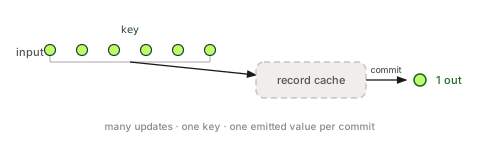
In production you usually see fewer updates than inputs, which makes the behavior look inconsistent if you don't know why. Kafka Streams puts a record cache in front of each store (sized by statestore.cache.max.bytes, formerly cache.max.bytes.buffering). Updates to the same key coalesce in that cache and are only forwarded downstream when the cache fills or on the next commit, governed by commit.interval.ms. So between commits, ten updates to customer-42 may collapse into one or two emitted records: you see the value jump from 3 to 9, skipping the values in between.
This is why the same topology behaves differently in two places:
| Environment | Cache | What you observe |
|---|---|---|
| Production (default cache + commit interval) | On | Coalesced updates: intermediate values skipped |
Cache disabled (statestore.cache.max.bytes=0) | Off | Every single update emitted, one output per input |
TopologyTestDriver in tests | Off | Every update emitted, your test sees more records than prod |
🚫 "I counted, and the aggregation emits one final result per key."
It emits a continuous stream of intermediate results. The record cache and
commit.interval.msonly decide how many of those intermediate results escape, they never turn the stream into a single final answer.
The cache is an optimization for emission volume, not a correctness boundary. Never rely on it to deduplicate or to "wait for the final value." If you genuinely need one result per key per time bucket, a closed window with a single answer, that is a different mechanism entirely: you bound the aggregation in time with windowing and gate emission with suppress. Those pages cover the trap in full; the one-line version is that suppress(untilWindowCloses(...)) holds back every update until the window closes on stream-time, and gets it wrong in subtle ways on quiet streams.
Deletes, tombstones, and the result table
Because the result is a KTable, it speaks the table dialect, including deletes. When a key's aggregate is removed (for example a filter() on the result table dropping a row, or an adder returning null to delete the key), Kafka Streams emits a tombstone, a record with a null value, to signal "this key is gone." If you call toStream() on the result and forward it onward, those null values flow with it, and code that assumes every value is non-null will throw an NPE. One removal that does not tombstone: window retention expiry. When a window ages out, Kafka Streams drops the old store segments locally and forwards nothing downstream, so don't build on expiry tombstones that never come.
This is the same table semantics that govern filter and mapValues on any KTable: tombstones are special and your value functions may not even run for them. The full treatment lives in KStream vs KTable vs GlobalKTable, worth reading before you push an aggregation result downstream.
Rolling up to several time resolutions
A dashboard often needs the same metric at more than one granularity, per minute, per hour, per day. There are three ways to build that, and the right one depends on whether your reads or your writes dominate.
- Independent stores from the raw stream. Run a separate aggregation per resolution, each reading the source topic. Simple, but you re-read the raw stream once per resolution and maintain that many changelogs, the most expensive option, and rarely worth it.
- Cascade smallest to largest. Aggregate to the finest bucket, then aggregate that result up to the next (minute → hour → day), each
KTablefeeding the next. Every resolution is pre-materialized and cheap to read, at the cost of a chain of stores and changelogs. Reach for this when reads are heavy and you want each resolution ready to serve. - Keep only the finest store, roll up on read. Materialize just the smallest bucket and sum the range at query time (via interactive queries or your serving layer). Cheapest to maintain, one store, one changelog, at the cost of work per read. Reach for this when writes dominate and reads are occasional.
The decision is the usual streaming trade-off in miniature: pre-compute and store (read-heavy) versus store less and compute on demand (write-heavy).
Where the result lives
Every aggregation is stateful: the running result for each key has to be kept somewhere between records. That somewhere is a state store, and you configure it with Materialized:
KTable<String, Long> counts = orders
    .groupByKey()
    .count(Materialized.as("orders-per-customer")); // named, queryable, stable changelog
Naming the store does three things at once: it gets a stable changelog topic (so a topology edit doesn't orphan the state), it becomes queryable from your service via interactive queries, and it shows up under a name you can recognize on the cluster instead of a positional one like KSTREAM-AGGREGATE-STATE-STORE-0000000003. Since Kafka 4.3 you can make this a guardrail: set ensure.explicit.internal.resource.naming=true and the app refuses to start with any unnamed internal topic or store. The store, its off-heap RocksDB memory, and the restore-on-restart cost are covered in state stores.
How do I aggregate records in Kafka Streams?
Group the stream first with groupByKey() or groupBy(...) to get a KGroupedStream, then fold it with count(), reduce(...), or aggregate(...). The result is a KTable holding the running result per key, backed by a state store you configure with Materialized.
What is the difference between aggregate, reduce, and count?
count() just counts records per key; reduce(...) combines two values of the same type into one; aggregate(...) is the general fold that can produce a result of a different type via an initializer and an adder. Reach for aggregate whenever the output type differs from the input or reduce can't express it.
What is the difference between groupBy and groupByKey?
groupByKey() keeps the existing record key, so records are already co-located and no repartition is needed. groupBy(...) picks a new key, which forces a shuffle through an internal repartition topic, so prefer groupByKey and only re-key when you genuinely must group on a different field.
Why does my Kafka Streams aggregation emit so many intermediate updates?
An aggregation returns a KTable, which is a changelog, so it emits a revised result on every input record rather than one final answer. In production a record cache (statestore.cache.max.bytes) and commit.interval.ms coalesce some updates, so you see fewer than one output per input, but never a single final value.
How do I compute an average with Kafka Streams?
Use aggregate(...) with an accumulator that tracks both the running sum and the count, then derive the average with a mapValues on the resulting KTable. You can't do it with reduce because the accumulator type (sum and count) differs from the input record type.
See it in practice with Conduktor
An aggregation creates internal topics, a changelog for the store, and a repartition topic if you used
groupBy. Conduktor Console lets you see those topics, check the changelog's size and compaction, and watch consumer group lag, so you can tell whether a stalled aggregation is a restore in progress or a genuine backlog.
Next steps
- Windowing, bound aggregations in time with tumbling, hopping, and session windows
- The suppress() trap, get one final result per window without losing data on quiet streams
- State stores, where aggregation results live, and why they bite in production