
Kafka topics: choosing the replication factor and partition count
Kafka replication factor vs partitions: partition count drives parallelism, replication factor drives durability. Sizing best practices and ordering rules.
By Stéphane Derosiaux · Updated October 21, 2026
Learn how to choose optimal replication and partitioning settings
Replication factor and partition count directly affect performance, availability and scalability. Wrong values mean throughput ceilings or data loss during failures.
What you'll learn:
- How to select the appropriate replication factor for your use case
- How to calculate the right number of partitions for throughput requirements
- Trade-offs between fault tolerance, performance, and resource usage
- Production-ready configuration patterns
Replication factor
The replication factor determines how many copies of your data are maintained across the Kafka cluster.
How replication works
- Each topic partition has one leader and zero or more followers
- All reads and writes go through the leader
- Followers replicate data from the leader
- If a leader fails, one of the followers becomes the new leader
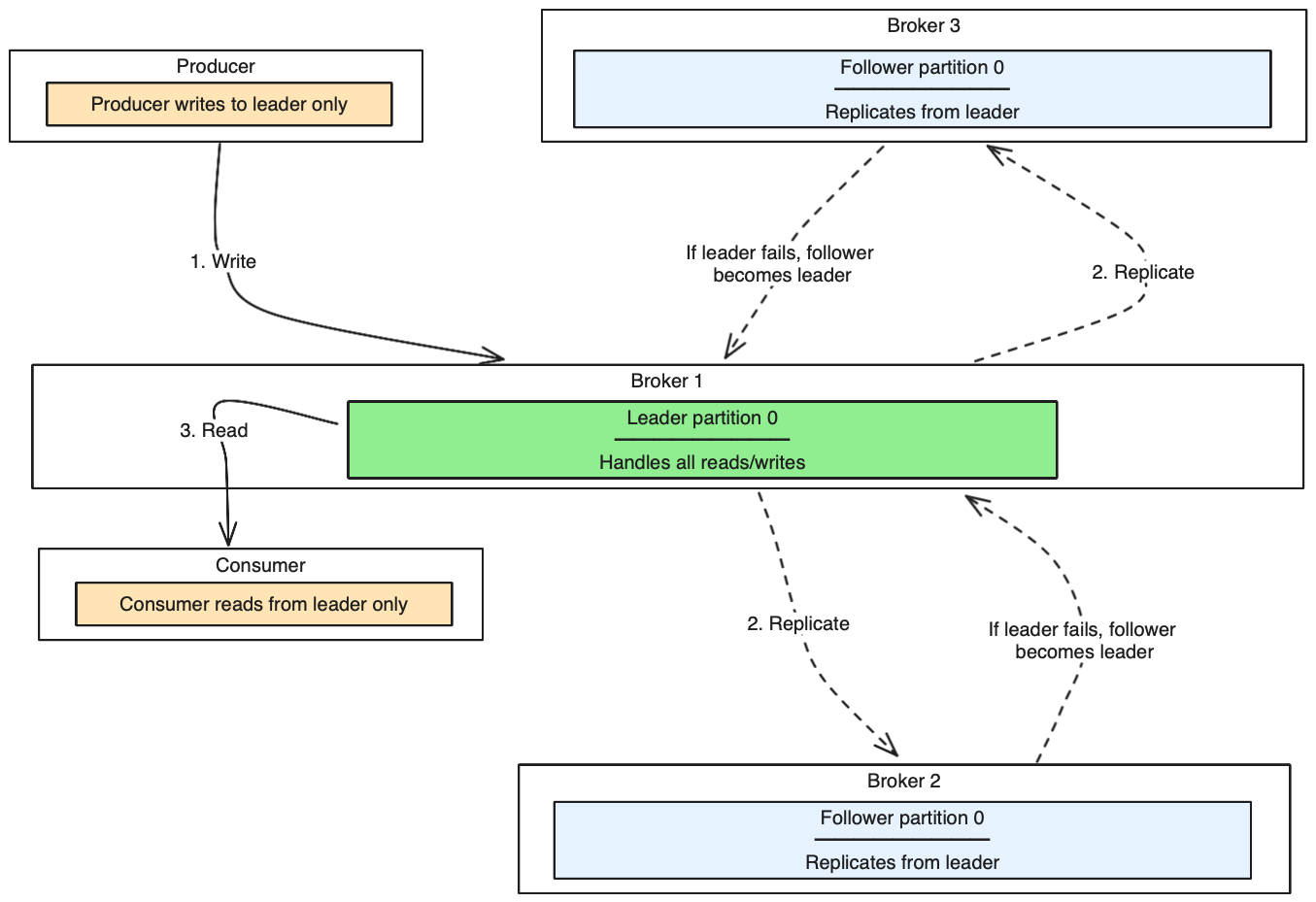
Replication architecture diagram
This diagram shows how Kafka replicates data across brokers for fault tolerance:
Key concepts:
- Replication factor 3 means one leader + two followers
- In-sync replicas (ISR) are followers that are caught up with the leader
- If leader fails, one ISR becomes the new leader
- Producers can wait for ISR acknowledgment for durability (configure with
acks=all)
Choose replication factor
For production environments:
- Minimum: 3 (recommended)
- Common: 3-5 depending on cluster size and requirements
- Maximum: Generally not more than 5-7
For development/testing:
- Minimum: 1 (acceptable for non-critical data)
- Recommended: 2-3 for realistic testing
Decision tree: Choose your replication factor
Use this decision tree to determine the right replication factor for your topic:
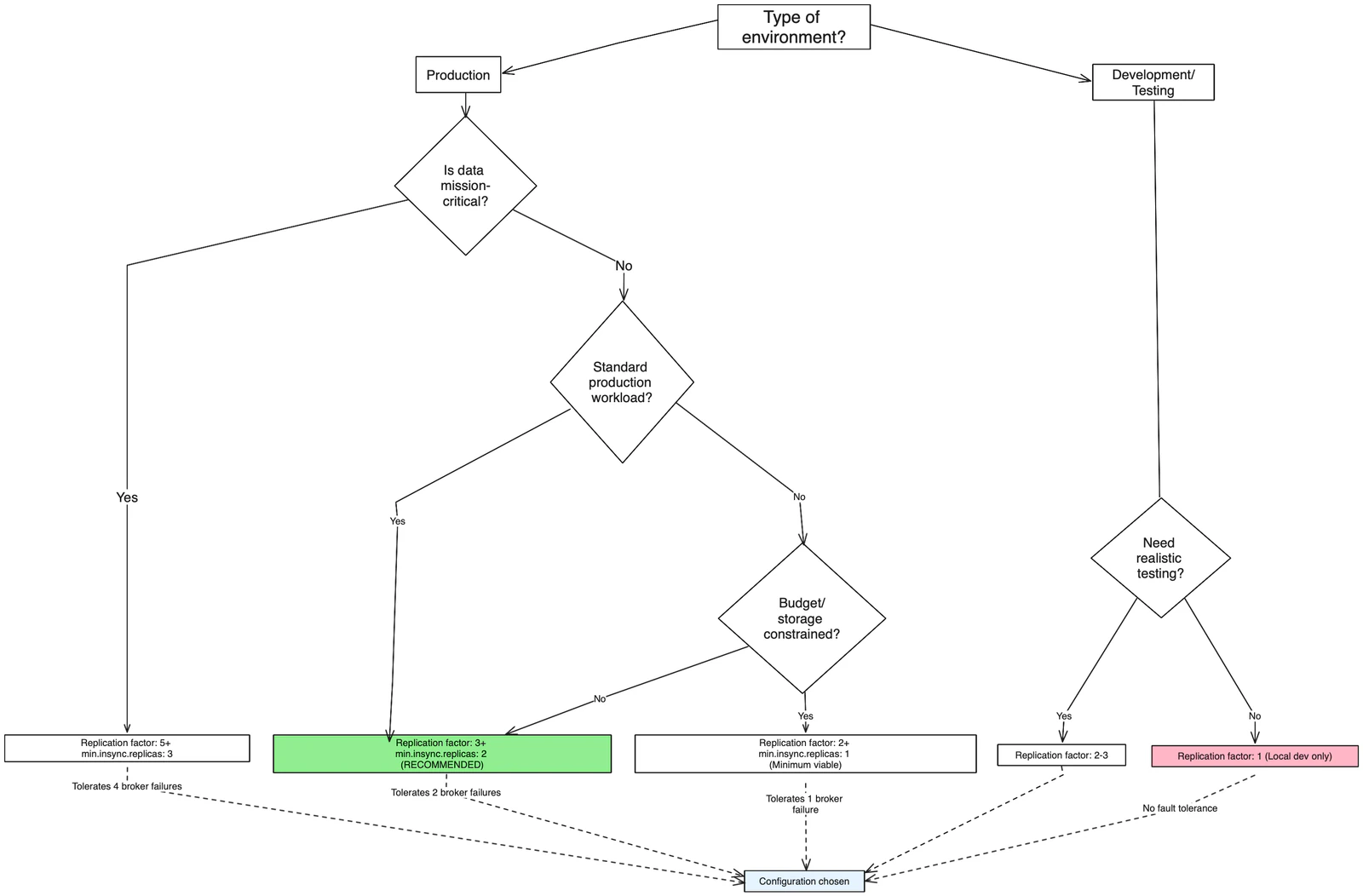
Recommended starting point: For most production workloads, start with replication factor 3 and
min.insync.replicas=2. This provides a good balance between fault tolerance, performance, and resource usage.
Replication factor considerations
Fault tolerance formula
With replication factor
N, you can tolerate up toN-1broker failures while maintaining data availability.
- Replication factor 1: No fault tolerance (data loss if broker fails)
- Replication factor 3: Tolerates 2 broker failures
- Replication factor 5: Tolerates 4 broker failures
Trade-offs:
- Higher replication factor:
- ✅ Better fault tolerance and availability
- ✅ Higher data durability
- ❌ Increased storage requirements
- ❌ Higher network overhead
- ❌ Increased replication lag
- Lower replication factor:
- ✅ Lower storage costs
- ✅ Reduced network overhead
- ❌ Reduced fault tolerance
- ❌ Higher risk of data loss
Partition count
Partitions enable Kafka to scale and parallelize data processing across multiple brokers and consumers.
How partitions work
- Topics are divided into partitions
- Each partition is an ordered, immutable sequence of messages
- Partitions are distributed across brokers
- Consumers can process partitions in parallel
Choose partition count
Starting recommendations:
- Small topics (< 1GB/day): 1-3 partitions
- Medium topics (1-10GB/day): 6-12 partitions
- Large topics (> 10GB/day): 20+ partitions
Decision tree: Choose your partition count
Use this decision tree to calculate the optimal number of partitions:
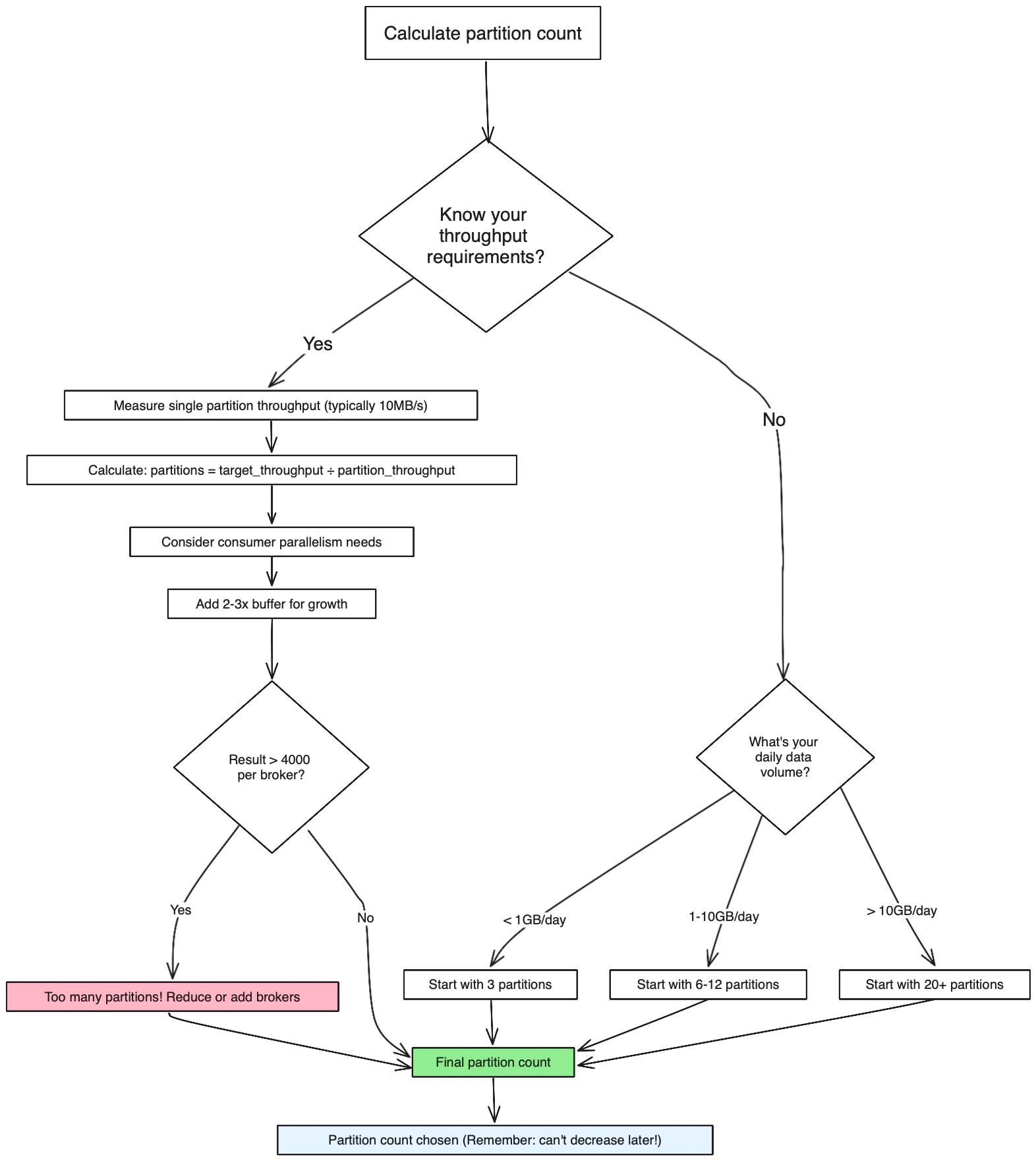
Production recommendation: Start with 6-12 partitions for most new topics, then scale based on observed throughput. Plan for 2-3x your expected peak load to accommodate growth.
Factors to consider:
1. Throughput requirements
Partitions needed ≥ Target throughput / Single partition throughputExample: If you need 100MB/s and each partition handles 10MB/s, you need at least 10 partitions.
2. Consumer parallelism
- Maximum consumers in a consumer group = Number of partitions
- More partitions = More potential parallelism
- Fewer partitions = Less parallelism but simpler management
3. Broker distribution
- Partitions should be evenly distributed across brokers
- Each broker should handle a reasonable number of partitions
- Avoid having too many partitions per broker (recommended: < 4000)
Partition count considerations
Trade-offs:
- More partitions:
- ✅ Higher potential throughput
- ✅ Better parallelism for consumers
- ✅ Better load distribution
- ❌ More overhead (file handles, memory)
- ❌ Longer leader election times
- ❌ More complex partition management
- Fewer partitions:
- ✅ Lower resource overhead
- ✅ Simpler management
- ✅ Faster leader elections
- ❌ Limited throughput potential
- ❌ Less consumer parallelism
Best practices
Plan for growth
Partition planning
Start with enough partitions to handle 2-3x your expected peak throughput. It's easier to start with more partitions than to add them later.
Partitions cannot be decreased after topic creation, so plan for growth:
- Estimate peak throughput needs for the next 2-3 years
- Add 50-100% buffer for unexpected growth
- Consider data retention and storage requirements
Production recommendations
Replication factor:
- Use replication factor 3 for most production workloads
- Use replication factor 5 for critical data that cannot tolerate loss
- Never use replication factor 1 in production
Partition count:
- Start with 6-12 partitions for most new topics
- Scale up based on observed throughput requirements
- Aim for 10-100MB per partition per day as a rough guideline
Performance testing
Before finalizing partition and replication settings:
- Test with realistic data volumes
- Measure single partition throughput
- Test consumer group scaling
- Monitor resource usage (CPU, memory, disk I/O, network)
- Test failure scenarios (broker failures, network partitions)
Monitor and adjust
Key metrics to monitor:
- Throughput per partition
- Consumer lag by partition
- Broker resource utilization
- Replication lag
- Leader election frequency
Partition limits
Be aware of cluster-wide partition limits:
- Each broker has limits on total partitions (typically 2000-4000)
- ZooKeeper has metadata overhead for each partition
- Too many partitions can impact cluster stability
Common patterns
High-throughput topics
# Large topic with high replication for critical data
kafka-topics --create \
  --topic high-throughput-topic \
  --partitions 24 \
  --replication-factor 3 \
  --bootstrap-server localhost:9092
Low-volume, critical topics
# Small topic with high replication for critical data
kafka-topics --create \
  --topic critical-events \
  --partitions 3 \
  --replication-factor 5 \
  --bootstrap-server localhost:9092
Development/testing topics
# Simple topic for development
kafka-topics --create \
  --topic dev-topic \
  --partitions 1 \
  --replication-factor 1 \
  --bootstrap-server localhost:9092
See it in practice with Conduktor
Conduktor Console provides a visual interface for creating and managing topics with guided configuration for replication factor and partition count. View real-time metrics for throughput per partition, consumer lag, and broker distribution to validate your configuration choices.
The Insights dashboard analyzes cluster efficiency and load imbalance, identifying topics with sub-optimal partition allocation or uneven data distribution across partitions.
Next steps
- Configure log retention to manage storage effectively
- Understand min in-sync replicas to configure write durability
- Explore topic configuration for additional settings