
Kafka Streams Processor API and punctuators
The Kafka Streams Processor API gives you manual state, custom routing, and punctuators for timeouts and flushes when the high-level DSL isn't enough.
By Stéphane Derosiaux · Updated July 23, 2026
Learn when to drop below the DSL, and how.
The Kafka Streams DSL, map, filter, groupBy, join, covers most stream processing cleanly. Then you hit a problem it can't express: emit a record only if a follow-up event doesn't arrive within 30 seconds, deduplicate on a business key, route different records to different topics by content, or flush an aggregate on a wall clock instead of on input. For those, you drop one layer down to the Processor API: the imperative core that the DSL itself is built on.
This is not a lower-level dialect of the same thing. The Processor API hands you three capabilities the DSL deliberately hides: direct read/write access to a state store, explicit control over where each record goes (context.forward()), and a scheduled callback that fires on a timer (context.schedule() with a Punctuator). The cost is that you now own correctness, there is no operator doing the right thing for you.
What you'll learn:
- What
process(),Processor, andProcessorContextgive you over the DSL - How to attach a state store and read and write it directly
- How
context.forward()routes records and how punctuators fire on a schedule - The
STREAM_TIMEvsWALL_CLOCK_TIMEdistinction that decides whether your timer ever fires
Where the DSL ends
The DSL is a closed set of operators. Each one is stateless or wires up its own state store and decides for you when to emit. That is exactly what you want until your requirement doesn't map onto any operator. Reach for the Processor API when you need:
- Custom windowing or timeouts, "alert if a session hasn't closed in N minutes", "expire a pending order after a deadline". The DSL's windows close on stream-time; a timeout on a quiet key needs a wall-clock timer the DSL doesn't expose.
- Deduplication on a business key, there's no
dedup()operator. You keep seen-keys in a store and drop repeats yourself (see deduplication). - Content-based routing to many outputs,
split()/branch()handles fixed predicates; dynamic "send to the topic named in this field" wantscontext.forward()to a chosen child. - Manual emit timing, buffer updates and flush them on a timer rather than per-record or on cache eviction.
If your logic does fit the DSL, stay there. The DSL gets co-partitioning, repartition topics, store naming, and exactly-once wiring right for free. The Processor API makes all of that your job.
DSL or Processor API, the decision. Default to the DSL. Drop to the Processor API for a specific operator that the DSL can't express, and use
process()/processValues()to splice it into an otherwise-DSL topology, you do not have to rewrite the whole app in one style. Reserve a fully hand-builtTopologyfor the rare case where the entire graph is custom. Mixing is the norm, not a compromise.
process(), Processor, and ProcessorContext
A Processor<KIn, VIn, KOut, VOut> is a small object with three methods: init, process, and close. You splice it into a DSL pipeline with process() (or processValues() when you only touch the value and want to keep the key for repartition purposes):
KStream<String, Order> orders = builder.stream("orders");

orders.process(
    () -> new DedupProcessor(),   // ProcessorSupplier: a fresh instance on every get()
    "dedup-store"                 // names of state stores this processor connects to
);
The ProcessorContext you receive in init is the seam to the runtime. Through it you reach the connected state stores, forward records downstream, schedule punctuators, read record metadata (recordMetadata() for topic/partition/offset), and commit (context.commit() requests a commit; the runtime decides when).
Since Kafka 3.3 (KIP-820), process() returns a KStream and chains like any other DSL operator: whatever you context.forward() flows straight into the next step, so .to(...) works right after it. The real difference between the two: process() may change the key, so a downstream stateful operation triggers a repartition; processValues() fixes the key and avoids it.
Connecting and using a state store
A processor's store is not implicit. You build and register it, then connect it by name. The store is local, partitioned, and (if persistent) changelog-backed exactly like any DSL store, see state stores.
// 1. Build the store and add it to the topology
StoreBuilder<KeyValueStore<String, Long>> dedupStore =
    Stores.keyValueStoreBuilder(
        Stores.persistentKeyValueStore("dedup-store"),
        Serdes.String(),
        Serdes.Long());
builder.addStateStore(dedupStore);

// 2. In the processor, fetch it by name in init()
public class DedupProcessor implements Processor<String, Order, String, Order> {
    private ProcessorContext<String, Order> context;
    private KeyValueStore<String, Long> store;

    @Override
    public void init(ProcessorContext<String, Order> context) {
        this.context = context;
        this.store = context.getStateStore("dedup-store");
    }

    @Override
    public void process(Record<String, Order> record) {
        Long seenAt = store.get(record.key());
        if (seenAt != null) {
            return;                          // duplicate: drop it, emit nothing
        }
        store.put(record.key(), record.timestamp());
        context.forward(record);             // novel key: pass it on
    }

    @Override public void close() {}
}
This unbounded store will grow forever, the missing piece is a punctuator that purges old keys. That's the next section, and it's also the difference between a toy and a production processor.
context.forward() for custom routing
In the DSL, where a record goes is implicit in the operator chain. In a processor you say it. context.forward(record) sends to all downstream children; you can also forward different records to different named children for content-based routing:
if (order.amount() > LARGE_THRESHOLD) {
    context.forward(record, "to-review");
} else {
    context.forward(record, "to-auto-approve");
}
You can forward zero records (a filter), one (a map), or many (a flatMap) per input, and you can forward from inside a punctuator, not only from process(). That last point is what makes timed emission possible. One caveat: recordMetadata() is empty during a punctuation, because there is no current record; guard it before use.
context.schedule() and punctuators
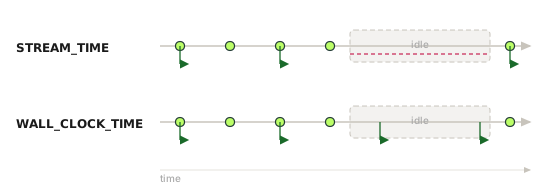
A Punctuator is a callback you register with context.schedule(interval, type, punctuator). It fires on a schedule independent of input records, which is the whole reason to use it, it lets a processor act when nothing is arriving. The PunctuationType decides what "schedule" means, and getting this wrong is the most common Processor API mistake.
PunctuationType | Fires when | Fires on idle input? | Use it for |
|---|---|---|---|
STREAM_TIME | Stream-time advances past the interval; stream-time is the highest timestamp of records the task has processed | No. It freezes the moment input stops | Logic that must track event time (event-time windowing, watermark-like flushes) |
WALL_CLOCK_TIME | The system clock passes the interval, evaluated on each poll() loop, regardless of input | Yes | Timeouts, periodic flush, purging state on quiet streams |
STREAM_TIME is driven only by records the task actually processes. Stream-time is the maximum timestamp seen so far, and it freezes entirely when input stops, so on an idle stream your STREAM_TIME punctuator never fires. This is the same mechanism that makes suppress() emit nothing on idle input. (A single quiet partition does not stall it under default config: max.task.idle.ms defaults to 0, and a positive value only makes the task wait up to that bound.) If your job is "flush or time out even when the stream is silent", you need WALL_CLOCK_TIME. Here's the dedup processor completed with a wall-clock punctuator that expires keys older than a TTL, so the store stays bounded even if some keys never reappear:
@Override
public void init(ProcessorContext<String, Order> context) {
    this.context = context;
    this.store = context.getStateStore("dedup-store");

    // Fire on the wall clock so purging happens even when input is quiet.
    this.cancellable = context.schedule(
        Duration.ofMinutes(1),
        PunctuationType.WALL_CLOCK_TIME,
        this::purgeExpired);
}

private void purgeExpired(long now) {
    long cutoff = now - TTL_MS;
    try (KeyValueIterator<String, Long> all = store.all()) {
        while (all.hasNext()) {
            KeyValue<String, Long> entry = all.next();
            if (entry.value < cutoff) {
                store.delete(entry.key);
            }
        }
    }
}
Note now passed to the punctuator is wall-clock millis here; under STREAM_TIME it would be the current stream-time instead. Two scheduling surprises: the first STREAM_TIME fire happens on the first record processed, without waiting out the initial interval, and a stream-time jump across several intervals produces a single punctuation at the new time, not one call per missed boundary. The schedule call returns a Cancellable, hold onto it.
🚫 "The punctuator runs on its own timer thread, so a slow one is harmless."
A punctuator runs inline on the stream thread, in the same loop as process(), the two are never concurrent. So a slow punctuator doesn't just delay itself: it blocks record processing, holds up the consumer poll(), and delays commits. Iterate too long over a large store and you can blow max.poll.interval.ms and trigger a rebalance. Keep punctuator work cheap, evict in bounded batches, and push heavy work off-thread rather than doing it in the callback. (This is also why wall-clock punctuation is "best effort": its granularity is bounded by how long a processing iteration takes.)
Cancel punctuators in close()
A scheduled punctuator is tied to the task: its punctuation queue is a per-task field, dropped with the task when it closes, so an uncancelled punctuator cannot outlive a rebalance or fire against a store the task no longer owns. Cancel in close() anyway: it is the mirror of init(), and it is the only way to stop a conditional or re-scheduled punctuator inside a live task:
@Override
public void close() {
    if (cancellable != null) {
        cancellable.cancel();
    }
}
close() runs when the task is revoked or the app shuts down. Treat it as the mirror of init(): release schedules and any resources you opened, and do not close the state store yourself, the runtime owns its lifecycle.
A note on manual commit
Under the default at-least-once guarantee, context.commit() lets a processor request an offset commit at a logical boundary, for example after a punctuator has flushed a batch downstream. It is a request, not an immediate commit; the runtime still commits on its own interval. Under exactly-once it still works: commit() requests closing the current transaction earlier than commit.interval.ms (which defaults to 100ms under EOS), but the transaction boundary remains the runtime's, so there is even less reason to call it (see exactly-once). Don't reach for the Processor API just to control commits, reach for it for state, routing, or timers, and let the processing guarantee handle atomicity.
When should I use the Processor API instead of the DSL in Kafka Streams?
Default to the DSL and drop to the Processor API for a specific requirement it can't express: custom windowing or timeouts on quiet keys, deduplication on a business key, content-based routing to dynamic outputs, or buffering and flushing on a timer. The DSL gets co-partitioning, repartition topics, store naming, and exactly-once wiring right for free, so only take on that responsibility where you need the control.
Do I have to rewrite my whole Kafka Streams app to use the Processor API?
No. Splice a single processor into an otherwise-DSL topology with process() or processValues() and keep the rest in the DSL. Mixing the two is the norm; reserve a fully hand-built Topology for the rare case where the entire graph is custom.
How do I access a state store directly from a processor?
Build the store with a StoreBuilder and register it via builder.addStateStore(...), then in the processor's init() fetch it by name with context.getStateStore("store-name"). The store is local, partitioned, and changelog-backed exactly like any DSL store; connect its name when you call process(...).
How do I schedule a punctuator in Kafka Streams?
Call context.schedule(interval, type, punctuator) in init() and hold the returned Cancellable so you can cancel it in close(). A punctuator fires on a schedule independent of input records, which is what lets a processor act when nothing is arriving, for example purging expired keys from a state store.
What is the difference between STREAM_TIME and WALL_CLOCK_TIME punctuation?
STREAM_TIME advances only with records the task actually processes, it is the maximum timestamp seen so far, so it freezes when input stops and the punctuator never fires on an idle stream. WALL_CLOCK_TIME fires off the system clock on each poll() regardless of input, so use it for timeouts, periodic flushes, and purging state on quiet streams; both run inline on the stream thread, so keep the work cheap.
See it in practice with Conduktor
A Processor API app is still a consumer group writing to internal topics. When you add a manual state store, Kafka Streams creates its changelog topic behind the scenes. Conduktor Console lets you find that changelog, watch its size and compaction, and track the consumer group lag that tells you whether a punctuator-driven flush is keeping up or falling behind.
Next steps
- Deduplication in Kafka Streams, the canonical Processor API use case, end to end
- State stores, RocksDB, changelogs, and the memory that bites
- When suppress() emits nothing, the stream-time stall, the DSL version of the same trap