
Evolving a Kafka Streams topology without losing state
Why a Kafka Streams topology change breaks state: positional internal names, naming operators to stay safe, and when the reset tool is required.
By Stéphane Derosiaux · Updated July 23, 2026
Learn why a topology change breaks your app, and how to ship one safely.
You add one filter in the middle of a working Kafka Streams app, deploy it, and the app either refuses to start with a restore error or comes up with an aggregation that has silently reset to zero. Nothing in your diff touched state. The cause is almost never your code: it's that Kafka Streams names its internal topics by an operator's position in the topology, and you just shifted every position downstream of that filter.
This is the single most under-documented way to break a stateful Streams app, and it's entirely preventable, but only if you do the right thing from the first commit, not after the incident.
What you'll learn:
- Why internal store, changelog, and repartition topic names are positional, and what shifts them
- How to name every stateful operator so a refactor stops renaming your state
- Which topology changes are safe rolling deploys, and which require a full reset
- How to snapshot
Topology#describe()and diff it in CI before a deploy ships
Internal names are positional
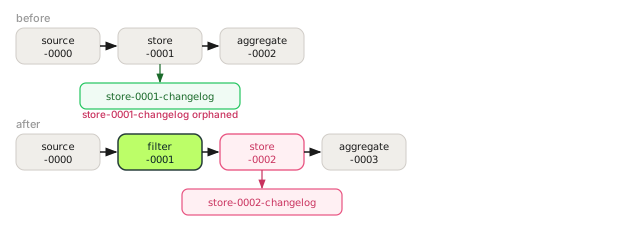
When you build a topology, Kafka Streams assigns every processor, store, and internal topic an autogenerated name. Call topology.describe() on a simple count-and-output app and you get this: real node names from the DSL, with the Topologies: header and the -->/<-- edge lines trimmed for readability:
Sub-topology: 0
    Source: KSTREAM-SOURCE-0000000000 (topics: [in])
    Processor: KSTREAM-AGGREGATE-0000000002 (stores: [KSTREAM-AGGREGATE-STATE-STORE-0000000001])
    Processor: KTABLE-TOSTREAM-0000000003 (stores: [])
    Sink: KSTREAM-SINK-0000000004 (topic: out)
Look at the numbers. KSTREAM-SOURCE-0000000000, then -0000000001 for the store, -0000000002 for the aggregate processor, and so on. They are assigned by a global counter as the builder walks your topology in declaration order. The store name KSTREAM-AGGREGATE-STATE-STORE-0000000001 is what gets baked into the changelog topic name your cluster actually holds:
<application.id>-KSTREAM-AGGREGATE-STATE-STORE-0000000001-changelogThe same positional scheme names repartition topics (...-repartition) and the internal stores behind joins. None of these names come from anything you wrote. They come from where in the graph the operator sits.
Now insert one stateless operator upstream of the aggregate:
builder.<String, String>stream("in")
    .filter((k, v) -> v != null)     // <-- new operator, takes position 0000000001
    .groupByKey()
    .count()                         // store is now 0000000002, was 0000000001
    .toStream()
    .to("out");
Every counter after the filter shifts by one. The aggregate's store becomes KSTREAM-AGGREGATE-STATE-STORE-0000000002, and its changelog becomes ...-STATE-STORE-0000000002-changelog. On the next start, the app looks for a store named ...0000000002, finds an empty changelog (the old ...0000000001-changelog still holds all your data, now orphaned), and either restores nothing or fails consistency checks. Your running count is gone, sitting in a topic no operator references anymore. Reorder two branches and you get the same effect: positions move, names move, state is stranded.
🚫 "It's an internal refactor: I can rearrange my topology freely between deploys."
That assumption is exactly what strands state. A refactor that touches the order or count of operators rewrites the names Kafka Streams uses to find its own data. The DSL gives you no warning at compile time and, with stateless inserts, often none at startup either. The app just restarts its aggregations from scratch. It doesn't even reprocess old input to rebuild them: the consumer group's committed offsets survive the change (the group id is your unchanged application.id), so the new store only counts records that arrive after the redeploy.
Name everything, from day one
The fix is not to freeze your topology: it's to stop letting the position be the identity. Give every stateful piece an explicit, stable name, so its changelog/repartition/store name no longer depends on where it sits in the graph. Do this on the very first version, because retrofitting names onto an app that already has state in production is itself a breaking change (the names move from positional to explicit: see the reset section).
| What | How to name it | What it stabilizes |
|---|---|---|
| Materialized store (count/aggregate/reduce) | Materialized.as("orders-per-customer") | The store name and its -changelog topic |
| Repartition (after a re-key) | Grouped.as("by-customer") or Repartitioned.as("by-customer") | The -repartition topic name |
| Stream-stream join | StreamJoined.with(...).withName("o-p").withStoreName("o-p-store") | The join's internal stores and changelogs |
Any operator (for describe() readability) | Named.as("dedupe-step") | The processor node name in the topology graph |
builder.<String, String>stream("in")
    .filter((k, v) -> v != null, Named.as("drop-nulls"))
    .groupByKey(Grouped.as("by-key"))
    .count(Materialized.as("event-count"))   // changelog: <app-id>-event-count-changelog
    .toStream()
    .to("out");
Now the store is event-count and its changelog is <application.id>-event-count-changelog, regardless of how many operators you add before or after it. You can insert a filter, add a branch, or reorder steps, and the count keeps finding its state. This is what naming a state store buys you beyond tidiness, and it's the foundation everything below depends on.
Since Kafka 4.1 you can make this a hard rule: set ensure.explicit.internal.resource.naming to true (KIP-1111) and building a topology with any auto-named internal topic or store throws a TopologyException listing the offenders. With the config off, recent versions still log a build-time WARN naming every unnamed changelog, so the signal is in your logs either way.
The capability is old and stable: explicit operator naming landed in KIP-307, and the DSL topology naming guide in the Apache docs is the canonical reference. Bill Bejeck's Optimizing Kafka Streams Applications walks through how naming interacts with topology optimization. Treat all three as required reading before your first stateful deploy.
Naming alone doesn't let you move a store between operators. A stable name keeps the changelog name fixed when positions shift around it. It does not migrate data if you change the operator's semantics: switching
count()toaggregate(), or changing a join's window, produces state that is incompatible regardless of the name. Naming protects against accidental renames, not against genuinely different computations.
Optimization can reshape the topology too
Naming protects you from accidental position shifts in your code. One more thing can restructure the topology underneath you: the topology.optimization config. It defaults to NO_OPTIMIZATION, but when enabled it rewrites the logical plan before it becomes a physical topology: for example reusing a source topic directly as a KTable's changelog (skipping a separate changelog topic), merging repartition topics that feed multiple downstream operators, and collapsing a stream-stream self-join onto a single store. Accepted values are none, all, or a comma-separated list of granular flags: reuse.ktable.source.topics, merge.repartition.topics, and single.store.self.join.
The catch for this page: turning optimization on or off (or upgrading to a version that adds a new optimization) can change which internal topics exist and how they're wired, which is its own kind of topology change. Pin the specific flags you want in production rather than all, so a library upgrade doesn't silently restructure your internal topics out from under your running state. As always, verify the new plan with topology.describe() (see below) before you deploy.
Which changes are safe, and which need a reset
Not every topology change is dangerous. Group the changes you make into three buckets.
Safe as a rolling deploy (names stable, state semantics unchanged):
- Adding, removing, or editing a stateless operator (
map,filter,mapValues,peek) when stores and repartitions are explicitly named. - Changing the logic inside a stateless lambda.
- Adding a brand-new, independently named stateful sub-topology that reads existing topics: the old state is untouched; the new store restores from its own (initially empty) changelog.
Needs care (same name, different computation):
- Changing what a named stateful operator computes (count → sum, new window size, new join type). The changelog name is stable but its contents no longer mean what the new code expects. You usually need a new store name and a controlled rebuild.
Requires the reset tool (the operator identity or input semantics changed and old state must be discarded):
- You shipped without explicit names and now need to add them: the positional names are abandoned, so the old changelogs are orphaned and you must start clean.
- You changed the meaning of the computation enough that replaying from the existing changelog would be wrong.
- You want to reprocess input topics from the beginning under a new topology.
For that last bucket, Kafka ships kafka-streams-application-reset. It does three different things to three kinds of topic:
kafka-streams-application-reset \
  --application-id orders-aggregator \
  --input-topics in \
--bootstrap-server broker:9092| Topic kind | What the tool does |
|---|---|
Input topics (you pass --input-topics) | Resets the app's consumer offsets to earliest so it reprocesses from the start |
Intermediate topics (user-managed topics that are both an output and an input of the app, the old through() pattern, removed in Kafka 4.0; pass them via --intermediate-topics, deprecated in 4.x) | Skips to the end (seeks to the current offset) so old in-flight data isn't reprocessed |
Internal topics (changelog, repartition, including topics created by .repartition()) | Deletes them so they're recreated cleanly on next start |
- Stop every instance first. The tool resets offsets and deletes internal topics; if any instance is still running and committing, you get a corrupted, half-reset state. Scale the deployment to zero, run the tool, then scale back up.
- Triple-check the
--application-id. The application ID is the prefix for all of an app's internal topics and its consumer group. A typo that happens to match another app's ID will delete that app's changelogs and reset its offsets. There is no undo. This is the same footgun that makes a carelessapplication.iddangerous when building your first app.
After a reset, also wipe the local state directory (state.dir) on every instance, or each one will try to reuse stale local RocksDB data that no longer matches the deleted changelogs.
Catch the break in CI, not in production
You don't want to discover a positional shift from a 3am restore failure. The topology is fully describable before it ever runs: topology.describe() returns a TopologyDescription whose toString() is the untrimmed version of the block at the top of this page, Topologies: header and edge lines included. Snapshot it and diff it.
@Test
void topologyMatchesSnapshot() {
    Topology topology = OrdersApp.buildTopology();
    String actual = topology.describe().toString();
    String expected = Files.readString(Path.of("src/test/resources/topology.txt"));
    assertEquals(expected, actual);   // fails if any internal name or wiring changed
}
Commit topology.txt alongside the code. When a pull request changes the topology, this test fails and prints a diff of the old vs new description, including any shifted ...0000000002 names. A reviewer then makes a deliberate call: is this a safe rolling change, or does it need the reset tool and a maintenance window? The point is that the decision happens in review, with the diff in front of you, instead of after the deploy when the state is already orphaned. This snapshot lives naturally inside your Kafka Streams test suite, which already runs the topology through TopologyTestDriver.
The same discipline pays off when you scale. Repartition topic names and partition counts are part of the topology, so a change that alters them interacts with how tasks are assigned across instances. See scaling and parallelism.
How do I change a Kafka Streams topology without losing state?
Give every stateful operator an explicit, stable name with Materialized.as(...), Grouped.as(...), or StreamJoined.withName(...) so its changelog and repartition topic names stop depending on the operator's position. With names fixed, you can insert, remove, or reorder operators around it and the store keeps finding its state.
Why does my Kafka Streams app fail to start or reset state after a code change?
Kafka Streams names internal stores, changelogs, and repartition topics by an operator's position in the topology, assigned by a global counter in declaration order. Insert or reorder one operator and every downstream name shifts, so the app looks for a renamed changelog, finds it empty, and either restores nothing or fails consistency checks: your old data is orphaned in a topic nothing references.
Which Kafka Streams topology changes are safe versus need a reset?
Safe rolling deploys: adding or editing a stateless operator, changing logic inside a stateless lambda, or adding a new independently named stateful sub-topology. A reset is required when you add explicit names to an app that shipped without them, change what a named operator computes, or want to reprocess input topics from the beginning.
When do I need the kafka-streams-application-reset tool?
Use it when an operator's identity or input semantics changed and the old state must be discarded: for example after retrofitting names onto a positional app, or to reprocess inputs from the start. It resets input-topic offsets to earliest, skips intermediate topics to the end, and deletes internal changelog/repartition topics; stop every instance first and triple-check the --application-id, as there is no undo.
How do I detect an incompatible topology change before deploying?
Snapshot topology.describe().toString() to a committed file and assert against it in a test, so any shifted internal name fails the build with a diff. A reviewer then decides in code review whether the change is a safe rolling deploy or needs the reset tool, instead of discovering it from a restore failure in production.
See it in practice with Conduktor
When a topology change orphans state, the evidence is in the topics. Conduktor Console shows the changelog and repartition topics your app created, so you can spot a stale
...-STATE-STORE-0000000001-changelogthat nothing reads anymore, confirm the new changelog is filling, and watch the consumer group lag that tells you whether a restore is still running after a deploy. Conduktor doesn't run your Streams app; it gives you the view of the internal topics and offsets the reset tool acts on.
Next steps
- Test your Kafka Streams topology: snapshot
describe()and diff it in CI - Kafka Streams state stores: why naming a store keeps its changelog stable
- Build your first Kafka Streams app: where
application.idbecomes your topic prefix and group ID