
Debugging a Kafka Streams join that produces nothing
Kafka Streams join not working? Why a join silently produces nothing or drops records (co-partitioning, table timing, null keys) and how to debug it.
By Stéphane Derosiaux · Updated October 20, 2026
Find out why your join drops records.
Your join compiles, the app starts clean, both input topics have data, and the output is empty, or it emits for some keys and silently swallows the rest. There is no exception in the logs. No "join failed" line. The DSL made the join a one-liner, and that one line is producing nothing.
The hard truth about Kafka Streams joins is that most of their failure modes are silent. A join carries a contract (co-partitioning, timing, key semantics) and breaking that contract usually drops records with no error at all. This page is the debug session: the handful of reasons a join produces nothing, how to confirm each one, and the fix. The join types themselves are covered in joins; this is the "why is mine broken" companion.
What you'll learn:
- Why broken co-partitioning is usually silent, and the one condition that makes it throw
- Why a KStream-KTable join drops records when the table isn't ready yet
- The null-key skip that makes a join "break after an upgrade"
- A diagnostic order: what to inspect, in what sequence, when a join is empty
Most join failures throw nothing. A misconfigured join is far more likely to silently emit zero records than to raise an exception. Don't wait for an error to tell you something's wrong. If the output is empty or partial, walk the checklist below.
1. Not co-partitioned (silent more often than you'd think)
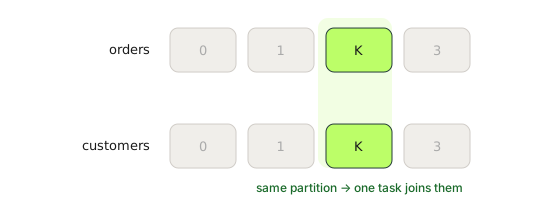
Every join except the GlobalKTable join requires both sides to be co-partitioned: same partition count, and the same key landing on the same partition number on both topics. A join task owns one partition number from each side and matches keys within that partition only. If acct-42 lands on partition 3 on one side and partition 7 on the other, the two halves never meet in the same task.
The two ways to break co-partitioning fail differently, and both can be silent:
| Violation | Detected? | Symptom |
|---|---|---|
| Partition-count mismatch | Only if the topology has a repartition topic | TopologyException: ... Topics not co-partitioned on the first rebalance; otherwise silent |
| Partitioner mismatch (same count) | No | No exception. Wrong or empty results, indefinitely |
TopologyException: Invalid topology: ... Topics not co-partitioned: [{topicA=2, topicB=3}] during the first rebalance, not while building the topology. But the check lives inside repartition-topic setup, and it is skipped entirely when the topology contains no repartition topics (verified on Kafka 3.9 and 4.3). A bare join of two source topics, exactly the naive case, starts clean, runs as many tasks as the larger topic has partitions, and the extra partitions join against nothing. Any re-keying anywhere in the topology brings the check back for every join. The fix is the same either way: make the partition counts match, usually by repartitioning the smaller-partitioned side (see below), since you can't shrink a topic in place. Partitioner mismatch: the silent one. This is the failure that costs an afternoon. Both topics have, say, 12 partitions, so the count check passes. But they were written by different producers using different partitioning logic: a custom partitioner on one side and the default murmur2 hash on the other, or the same logical key serialized two different ways so the hash differs. Kafka Streams cannot see how upstream producers partitioned the data. It trusts that co-partitioning holds, finds no matching keys in the same partition, and emits wrong or empty output with no warning whatsoever.
🚫 "Both topics have the same partition count, so my join is co-partitioned."
Same count is necessary, not sufficient. If the two sides were produced by different applications (different key serializers, or a custom partitioner on one side), keys can be mis-aligned even with matching counts, and the join is silently empty. Kafka Streams cannot detect producer-side partitioning, so it never warns you.
How to check it. Two things, in order:
- Partition counts. Compare the partition count of both input topics directly. Don't assume the absence of a
TopologyExceptionrules this out: the check only runs when the topology contains a repartition topic. - Partitioning. Harder, because it's a property of whoever produced the data. Ask: were both topics written by the same application with the same key serializer and default partitioner? If either side has a custom partitioner, or the two sides come from different producers, assume mis-alignment until proven otherwise. A quick empirical check: pick a key you know exists on both sides and confirm the records for it actually sit on the same partition number on each topic.
The fix. When you can't guarantee upstream partitioning, repartition one (or both) sides explicitly before the join, forcing the data through Kafka Streams' own partitioner so co-partitioning is restored:
KStream<String, Order> aligned =
    orders.repartition(Repartitioned.with(Serdes.String(), orderSerde));
// now join _0_ instead of _1_
Name the repartition topic (Repartitioned.as("...")) so its name stays stable across topology edits. See evolving a topology.
2. KStream-KTable: the stream arrives before the table is populated
A KStream-KTable join is asymmetric: only a record on the stream side triggers a lookup, and it looks up the table value as it exists at that moment. If the stream record for a key is processed before the table has been populated for that key, the lookup finds nothing and the record is silently dropped: no error, no log line, no output, not even a tick on the dropped-records-total metric.
This shows up most on startup and after a restart. Both the stream topic and the table's source topic are consumed concurrently, and nothing guarantees the table side is read first. If the stream races ahead, early records miss a table that hasn't caught up. The symptom is distinctive: records are dropped near the start of processing (or just after a restart) and then the join works fine once the table has caught up, so a backfill or a cold start "loses the first few minutes."
The lever is max.task.idle.ms, which controls how long a task will wait for a lagging input before processing what it already has. The current semantics (Kafka 3.0+, KIP-695) are a trichotomy, and the default is 0:
max.task.idle.ms | Behavior |
|---|---|
-1 | Never idle: process whatever is locally buffered, even at the cost of out-of-order processing |
0 (default) | Don't wait for new producer records, but do fetch data already sitting on the brokers before processing; idle only while caught up |
> 0 | Additionally wait up to N ms for producers to send records when the task is caught up but an input is empty |
# Let a task wait up to 5s for a lagging input so the table side can catch up
max.task.idle.ms=5000
When the idle deadline passes and the task processes anyway with an empty input, Kafka Streams increments the enforced-processing-rate / enforced-processing-total task metrics (DEBUG recording level) and logs, at TRACE:
Continuing to process although some partitions are empty on the broker. There may be out-of-order processing for this task as a result. Partitions with local data: [...]. Partitions we gave up waiting for, with their corresponding deadlines: {...}. Configured max.task.idle.ms: ...
If that line appears (enable TRACE on the relevant logger) or the metric climbs, a task is giving up on a lagging input, exactly the condition behind dropped or out-of-order join results.
This reduces the drop window; it does not eliminate it. A table side that is genuinely far behind still loses the race. If the table is large and slow to bootstrap, also consider whether the data belongs in a GlobalKTable (fully bootstrapped before processing starts) instead, covered in KStream, KTable & GlobalKTable.
3. Null keys are skipped (the join that "broke after an upgrade")
Records with a null key have always been skipped before a join rather than processed: a null key cannot be co-partitioned or looked up. What did change in Kafka 2.7 (KAFKA-10277) is the KStream-GlobalKTable join: it started dropping records whose key mapper returns a null join key. That is the real "our join started dropping data after we upgraded" story, with no code change to explain it. Kafka 3.7 (KIP-962) relaxed the null-key skip for left and outer joins (the joiner is now called with null for the missing side), but inner joins still drop null-key records. So this is your cause mainly on an inner join, or on any join before 3.7.
To confirm: check what fraction of your input has null keys. If it's meaningful and those records used to produce output (and you're on an inner join, or pre-3.7), this is your cause. The fix is to assign a key with selectKey before the join so the records survive and join on something real:
KStream<String, Event> keyed =
    events.selectKey((k, v) -> v.getAccountId());   // give null-keyed records a real key
4. Stream-stream join: the window or grace is too tight
A KStream-KStream join only matches records whose timestamps fall within the join window of each other. If your window is narrower than the real-world delay between the two events (a click that arrives 12 minutes after an impression, against a 10-minute window), the match never happens and both records pass through unjoined. With an inner join, that's silent: no output for the pair.
Two timing factors to check:
- Window width. Is the duration you pass to the
JoinWindows.ofTimeDifference...factories (ofTimeDifferenceWithNoGrace,ofTimeDifferenceAndGrace) actually wide enough for how far apart your two events arrive in practice? Measure the real gap; don't guess. - Grace. Newer windowed operators default to no grace (
ofTimeDifferenceWithNoGrace). There is no per-record lateness check in the join itself: grace extends how long each side's join store retains candidates, so once stream time on both sides moves past the window, a late record finds nothing left to join. No error, no drop log. If one side routinely arrives late, set grace deliberately. The stream-time and grace mechanics are the same ones that govern windowing.
If you genuinely need to catch pairs that arrive far apart, widen the window, but know that a wider window means both sides are buffered in state for longer, which is real memory and disk cost, not a free knob.
5. Foreign-key join: out-of-order updates and null foreign keys
The KTable-KTable foreign-key join (joining on a field inside the value, since Kafka 2.4) has two edges that produce confusing-but-not-broken behavior:
- "Detected out-of-order KTable update" warnings. The FK join routes updates through a pair of internal subscription and response topics so that a change on either side updates the result both ways. Under reordering, Kafka Streams logs the "Detected out-of-order KTable update" WARN, but the WARN is detection only: with default (non-versioned) stores the stale update is still applied, last write by offset wins. What actually protects the FK result is a hash check: stale subscription responses are discarded by comparing a hash of the current table value, logged only at TRACE and counted in
dropped-records-total. Versioned stores (Kafka 3.5+, KIP-914) are what make a table skip stale updates outright. A flood of these warnings is still worth investigating as a sign of heavy reordering or a struggling FK join at scale. - Null foreign-key semantics. If the foreign-key extractor returns null for a record, there is nothing to join against. For a left join in particular, the result for a null foreign key has surprised people relative to how they read the docs, so don't assume; test the null-FK path explicitly with a record whose extracted key is null and assert what comes out.
FK joins are powerful but heavier than same-key joins (those internal topics carry real traffic). Treat them as the tool for genuine foreign-key relationships, not a default. The full picture is in joins.
How to diagnose, in order
When a join produces nothing, resist guessing. Walk it top-down:
- Did the app throw on the first rebalance? If you saw
TopologyException: ... Topics not co-partitioned, it's a partition-count mismatch, and the message prints each topic's count. Fix counts and you're done. No exception does not clear you: the check is skipped when the topology has no repartition topics, so keep going. - Compare partition counts of both input topics. Equal is necessary but not sufficient.
- Question the partitioning. Same producer, same key serializer, default partitioner on both sides? If not, suspect a silent partitioner mismatch and repartition one side.
- Is it empty everywhere, or only at the start / after restart? Start-only drops on a KStream-KTable join point straight at the table-not-ready timing trap: tune
max.task.idle.ms. - Check for null keys on the input, especially if the join "broke after an upgrade."
- For stream-stream joins, check timestamps and window width: are the two events actually arriving within the window of each other?
- Inspect the internal topics. A join with re-keying creates internal repartition topics; a foreign-key join creates subscription and response topics (
KTABLE-FK-JOIN-SUBSCRIPTION-REGISTRATION-<n>-topicand...-RESPONSE-<n>-topicin 4.x, unless you name the join). Their existence, partition counts, and lag tell you whether records are even reaching the join, and whether one side is starving the other.
Steps 2, 3, and 7 are all questions about topics (partition counts, partitioning, and the internal topics Kafka Streams created), which is why the cluster view matters here more than the application logs.
Why does my Kafka Streams join produce no output?
Most join failures are silent: no exception, just zero or partial records. Walk the checklist: confirm both sides are co-partitioned (equal partition counts and the same partitioner), check whether a KStream-KTable join is racing a not-yet-populated table, and check for null keys. The cause is usually a broken co-partitioning contract, not a bug.
What causes the "not co-partitioned" TopologyException?
The two join input topics have different partition counts. Kafka Streams checks this during the first rebalance, but only when the topology contains at least one repartition topic; a bare join of two source topics skips the check and starts cleanly. Fix it by making the counts match, usually by repartitioning the smaller-partitioned side, since you can't shrink a topic in place.
Why does my join return empty results even though both topics have the same partition count?
Equal counts are necessary, not sufficient. If the two sides were written by different producers (different key serializers, or a custom partitioner on one side), the same key can land on different partition numbers, so the join task never finds matches. Kafka Streams can't see producer-side partitioning, so it never warns you; repartition one side through Streams' own partitioner.
Why does my KStream-KTable join drop records at startup?
A KStream-KTable join looks up the table value as it exists the moment the stream record arrives. On startup both topics are read concurrently, so if the stream races ahead of a not-yet-populated table, early records find nothing and are silently dropped. Raise max.task.idle.ms so the task waits for the table side to catch up, or use a GlobalKTable which fully bootstraps first.
Why did my join start dropping records after an upgrade?
Null-key records have always been skipped before joins because a null key can't be co-partitioned. What changed in Kafka 2.7 (KAFKA-10277) is that KStream-GlobalKTable joins started dropping records whose mapped join key is null. Kafka 3.7 (KIP-962) relaxed the null-key skip for left and outer joins, but inner joins still drop null-key records. Assign a real key with selectKey before the join so those records survive.
See it in practice with Conduktor
A join's failure usually shows up at the topic level, not in your app logs. Conduktor Console lets you compare the partition counts of both join inputs side by side, inspect the internal repartition and subscription topics Kafka Streams created, and watch per-partition consumer group lag on each input, so you can tell whether records are reaching the join at all, and whether one side is starving the other.
Next steps
- Joins: the four join types and what each one needs from you
- KStream, KTable & GlobalKTable: the stream-vs-table model behind every join
- Serde errors: the other silent way a join produces wrong or no output