
What is Kafka Streams?
Kafka Streams is a Java library for stream processing on Apache Kafka. Learn what it is, how it works, when to use it, and when to pick another tool.
Understand what Kafka Streams is, and what it isn't.
Kafka Streams is a Java library for processing data that lives in Apache Kafka. You add it as a dependency, write a topology, and your own application becomes the stream processor. There is no separate cluster to deploy, no job to submit, no scheduler to babysit: the processing runs inside your service, next to your business logic.
That single design choice (a library, not a platform) explains almost everything about how Kafka Streams behaves in production, for better and for worse. This guide covers both.
What you'll learn:
- What Kafka Streams is and how it differs from the plain consumer API
- Why being a library (not a cluster) shapes how you run it
- What you can realistically build with it
- When Kafka Streams is the right tool, and when it isn't
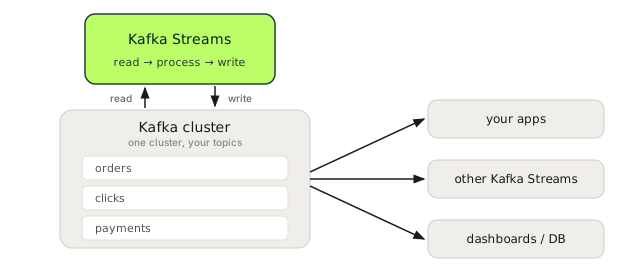
A library, not a cluster
Most stream processors (Flink, Spark Structured Streaming) are systems you stand up and submit jobs to. Kafka Streams inverts that. It is a org.apache.kafka:kafka-streams JAR on your classpath. Your app reads from topics, transforms records, and writes to topics, all through a fluent API:
StreamsBuilder builder = new StreamsBuilder();
builder.<String, String>stream("orders")
    .filter((key, order) -> order.contains("\"status\":\"PAID\""))
    .to("paid-orders");

KafkaStreams streams = new KafkaStreams(builder.build(), props);
streams.start();
That is a complete, runnable stream processor, with one catch in props: since Kafka 3.0, default.key.serde and default.value.serde have no default value, so set them (along with application.id and bootstrap.servers) or the app throws a StreamsException at startup:
Properties props = new Properties();
props.put(StreamsConfig.APPLICATION_ID_CONFIG, "order-filter");
props.put(StreamsConfig.BOOTSTRAP_SERVERS_CONFIG, "localhost:9092");
props.put(StreamsConfig.DEFAULT_KEY_SERDE_CLASS_CONFIG, Serdes.String().getClass());
props.put(StreamsConfig.DEFAULT_VALUE_SERDE_CLASS_CONFIG, Serdes.String().getClass());
It scales the same way any Kafka consumer scales: run more instances, and Kafka's consumer group protocol spreads the partitions across them. No resource manager, no cluster, no YARN.
The trade-off is ownership. Because Kafka Streams runs inside your process, you own its memory, its state on local disk, its restarts, and its rebalances. A Flink operator hands those concerns to a cluster; a Kafka Streams developer carries them.
"For 80 to 90 percent of stream-processing use cases, either Kafka Streams or Flink will work. The real question is the deployment model and who operates it." — paraphrasing a recurring theme from Kafka maintainers on the deployment-model trade-off
More than the consumer API
You could write all of this with a raw Kafka consumer and producer. People do, and then slowly reinvent Kafka Streams badly. The library gives you, for free, things that are tedious and error-prone to hand-roll:
- Stateful operations: aggregations, counts, and joins backed by a local store that survives restarts (covered in state stores).
- Event-time windowing: group records by when they happened, not when they arrived (windowing).
- Exactly-once processing: the read-process-write cycle made atomic with one config flag (exactly-once).
- Automatic scaling and fault tolerance: partitions, tasks, and state move between instances without you writing rebalance code.
The unit you work with is the stream (KStream, an unbounded log of events) and the table (KTable, the latest value per key). Understanding the difference between those two is the single most useful concept in the library. See KStream vs KTable.
What you can build
Kafka Streams fits a specific shape of problem: continuous, per-record processing of Kafka data, by the team that owns the application.
- Enrichment: join an event stream against reference data (a
KTableof users, products, accounts). - Real-time aggregations: counts, sums, and rollups per key and per time window (fraud scoring, usage metering, leaderboards).
- Materialized views: turn a changelog into a queryable table you can read directly from your service via interactive queries.
- Event-driven microservices: services that react to events and emit new ones, with state and ordering handled for you.
- AI agent memory: materialize a multi-agent conversation into a queryable context store that LLM agents read in real time (Kafka Streams for AI agents).
When not to use Kafka Streams
Being honest about the boundaries saves you a painful migration later:
- You're not a JVM shop. Kafka Streams is Java/Scala only. If your team lives in Python or Go, a plain consumer or Flink's Python API is a better fit.
- You want someone else to operate the state. Large local state (RocksDB) means slow restores and rebalances that can stall migrated tasks for minutes while their state rebuilds. If you don't want to own that, a managed cluster engine moves the burden off your team.
- Your sources aren't Kafka. Kafka Streams reads and writes Kafka, full stop. Pulling from a database, a queue, and an HTTP API into one job is Flink's territory.
- It's a one-line stateless filter. A single
filterwith no state is sometimes just a consumer with three lines of code. Don't add a framework for it.
Kafka Streams vs Flink vs ksqlDB. This is the most common question newcomers ask, and most comparisons answer it dishonestly. We wrote a vendor-neutral one: Kafka Streams vs Flink vs ksqlDB.
What this guide covers
This is a full course, built around the problems people actually hit, sourced from years of questions on the Confluent forum, Stack Overflow, and conference talks, not just the happy path.
Foundations: architecture · KStream, KTable & GlobalKTable · stateless operations · your first app · aggregations · state stores · windowing · joins · exactly-once
In production (where the bodies are buried): slow rebalances · state restore time · RocksDB tuning · why you still see duplicates · the suppress() trap · joins that drop data · serde errors · evolving a topology · dead letter queues · deduplication · scaling · testing
What is Kafka Streams used for?
Kafka Streams is a Java library for continuous, per-record processing of data in Apache Kafka: enrichment, real-time aggregations, materialized views, and event-driven microservices. The processing runs inside your own application, reading from topics and writing to topics, with no separate cluster to deploy.
Is Kafka Streams a database?
No. Kafka Streams is a stream-processing library, not a database. It can maintain local state (a KTable backed by a state store) and expose it for lookups, but the durable source of truth stays in Kafka topics, not in Kafka Streams.
What is the difference between Kafka and Kafka Streams?
Kafka is the distributed log that stores and moves the data; Kafka Streams is a client library that processes that data. They are complementary, not competitors: Kafka Streams reads from and writes to Kafka topics and runs as part of your application.
When should I use Kafka Streams instead of Kafka Connect?
Use Kafka Connect to move data between Kafka and external systems, and Kafka Streams to transform data already in Kafka. If your job is "get data in or out", that is Connect; if it is "filter, join, aggregate, or reshape records", that is Streams.
Does Kafka Streams replace the Kafka consumer and producer APIs?
It is built on top of them, not a replacement. Kafka Streams gives you stateful operations, event-time windowing, exactly-once, and automatic scaling for free, things that are tedious to hand-roll on the raw consumer and producer. For a one-line stateless filter, a plain consumer can still be simpler.
See it in practice with Conduktor
A Kafka Streams app is, under the hood, a consumer group plus a set of internal topics. Conduktor Console lets you watch its consumer group lag, inspect the changelog and repartition topics it creates, and confirm partition assignment, the signals you need when a Streams app misbehaves. One quick fingerprint: a Streams app's group reports its partition assignor as
stream, which tells it apart from plain consumer groups at a glance.
Next steps
- Flink SQL with your Kafka permissions: querying topics as tables without a second access model
- Kafka Streams architecture: topologies, tasks, and threads
- KStream vs KTable vs GlobalKTable: the core mental model
- Build your first Kafka Streams app: a runnable WordCount in Java