
Kafka Streams monitoring
Kafka Streams monitoring done right: consumer lag, app state, thread ratios, RocksDB memory, and how to expose the metrics that predict trouble.
By Stéphane Derosiaux · Updated July 23, 2026
Learn which Kafka Streams metrics actually matter, and how to expose them.
A Kafka Streams app emits hundreds of metrics. Most dashboards copy the JVM template, heap, GC, thread count, and then go dark exactly when the app falls over. The signals that predict a Streams incident are different ones: consumer group lag, the app's own state, the thread-level ratios, and RocksDB's off-heap memory. None of those live on a stock JVM dashboard.
This page is the shortlist: what to watch, why, and how to get each number out of the process.
What you'll learn:
- Why consumer lag and the app's
Stateare your first two signals - The built-in metric groups worth alerting on (thread, task, processor-node, state-store)
- Recording levels, and why the RocksDB metrics you want are off by default
- JMX-to-Prometheus vs in-app Micrometer, and the sidecar trap
Start where the app is blind: consumer lag
Under the hood a Kafka Streams app is a consumer group. It reads input topics, and the gap between the latest offset on those partitions and the offset the app has committed is consumer lag, the single most honest measure of whether the app is keeping up.
Lag is also where two of the most common Streams failures show up first:
- A rebalance parks processing while partitions move; lag climbs on the affected partitions, then drains once the group stabilizes.
- A state restore after a deploy or failover blocks a task until its changelog has replayed; lag on that task's partitions stays pinned high for the whole restore.
Watch lag per partition, not just the group total. A single hot or stuck partition (a skewed key, one task restoring) is invisible in the sum but obvious per-partition. The metric on the consumer is records-lag-max (in the consumer-fetch-manager-metrics group), but the cleaner source is the broker-side committed-offset gap, which is what an external lag monitor reads.
Lag alone won't tell you why. Rising lag means "behind," not "broken." Pair it with the app
Stateand the rebalance/restore signals below, climbing lag during aREBALANCINGstate is a rebalance; climbing lag duringRUNNINGwith a restore in progress is a restore; climbing lag during a healthyRUNNINGstate is a genuine throughput shortfall (scale out, see scaling).
The app's own state: the StateListener
Kafka Streams exposes a coarse lifecycle state (CREATED, REBALANCING, RUNNING, then PENDING_SHUTDOWN/NOT_RUNNING on a clean close, PENDING_ERROR/ERROR on a fatal failure), and you should treat transitions into and out of it as first-class alerts. Register a StateListener:
streams.setStateListener((newState, oldState) -> {
    // Export newState as a gauge; alert if REBALANCING persists too long,
    // or on any transition to ERROR.
    stateGauge.set(newState.ordinal());
    if (newState == KafkaStreams.State.ERROR) {
        pageOncall("Streams app entered ERROR");
    }
});
The actionable rule: a brief REBALANCING is normal (every deploy causes one). A REBALANCING state that persists, minutes, not seconds, means a rebalance storm or a long restore, and that is page-worthy. A transition to ERROR means the instance hit a fatal condition (all stream threads died, or the global stream thread died) and has shut itself down; nothing is being processed.
There is also a per-thread state and, for restores specifically, a dedicated listener covered below.
The built-in metric groups worth your attention
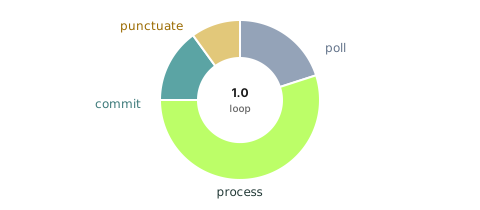
Streams publishes metrics through JMX in a handful of groups. You do not need all of them. These are the ones that earn dashboard space.
| Group | Metric | What it tells you |
|---|---|---|
stream-thread-metrics | process-rate, poll-rate, commit-rate | Throughput of each stream thread |
stream-thread-metrics | process-latency-avg, commit-latency-avg, poll-latency-avg | Where a thread spends its time |
stream-thread-metrics | process-ratio, commit-ratio, poll-ratio, punctuate-ratio | Fraction of the loop spent in each phase, the fastest read on health |
stream-task-metrics | process-rate, commit-rate | Per-task throughput (a task = one partition of a sub-topology) |
stream-task-metrics | enforced-processing-rate | How often Streams force-processed despite an empty input buffer |
stream-processor-node-metrics | process-rate | Throughput at a single operator, finds the slow node in a topology |
stream-processor-node-metrics | record-e2e-latency-avg / -max | End-to-end latency from source-record timestamp to this node (KIP-613) |
stream-state-metrics | put-rate, get-rate, fetch-rate, flush-rate | State store access rates |
- The phase ratios (
process-ratio/commit-ratio/poll-ratio/punctuate-ratio) sum to roughly 1.0 and tell you what the thread is actually doing. A thread spending most of its time incommit-ratiois over-committing (lowercommit.interval.mspressure or EOS overhead); highpunctuate-ratiomeans a punctuator is eating the loop, and because punctuators run on the stream thread, that directly starves processing. enforced-processing-rate(a task metric, recorded at DEBUG) counts the times a multi-input task gave up waiting for a slow input and processed anyway aftermax.task.idle.ms. With the defaultmax.task.idle.ms=0it fires every time one input buffer is empty, so a non-zero, climbing value is routine; the metric only becomes a signal once you raise the idle time, and then it correlates with out-of-order join surprises.record-e2e-latency(KIP-613) measures from the record's timestamp to when a node processes it. Useful, with a caveat: because the start point is the record timestamp, it inflates for late-arriving data and for records that sat buffered before a long commit interval, it is latency-since-the-event-happened, not latency-since-arrival.
The state-store and RocksDB metrics
For stateful apps, the state store is where memory and disk pressure build, and the RocksDB metrics are the only window into the off-heap world your JVM dashboard can't see. Two recording-level tiers matter here (the INFO gauges from KIP-607, the DEBUG statistics from KIP-471):
| Metric | What it shows | Recording level |
|---|---|---|
size-all-mem-tables | Off-heap write-buffer (memtable) memory in use | INFO |
block-cache-usage | Off-heap block-cache memory in use | INFO |
total-sst-files-size | On-disk size of the store's SST files | INFO |
write-stall-duration-avg / -total | Time writes were stalled by compaction backpressure | DEBUG (statistics) |
block-cache-data-hit-ratio | Read-cache effectiveness | DEBUG (statistics) |
block-cache-usage and size-all-mem-tables are the numbers to sum across stores and compare against the container's memory limit, that comparison is what catches an impending OOMKilled (see the myth below). total-sst-files-size trending up without bound is the "disk fills silently" failure mode. A non-zero write-stall-duration-total means RocksDB is throttling your writes during compaction, a sign the write-buffer budget is undersized. Tuning all of these is its own topic: RocksDB tuning. 🚫 "My JVM heap dashboard is green, so the Streams app is healthy."
That dashboard is measuring the wrong memory. RocksDB, block cache, memtables, index and filter blocks, lives off-heap, outside -Xmx, so the heap graph stays flat right up to an OOMKilled with no Java stack trace. And health for a Streams app isn't a heap number at all: it's lag draining, State at RUNNING, restores completing, and block-cache-usage / size-all-mem-tables staying inside the container budget. Build the dashboard around those, not heap and GC.
Recording levels: most useful metrics are off by default
Streams gates metric cost behind metrics.recording.level:
# INFO (default): thread/task rates, record-e2e-latency, the INFO-level RocksDB memory & disk gauges
# DEBUG: per-processor-node metrics, enforced-processing-rate, RocksDB stall/hit-ratio stats
# TRACE: everything
metrics.recording.level=DEBUG
The default is INFO. That gives you lag-adjacent thread/task rates, the INFO-level RocksDB gauges (block-cache-usage, size-all-mem-tables, total-sst-files-size), and, usefully, record-e2e-latency, which is the one processor-node metric reported at INFO rather than DEBUG. The rest of the per-processor-node metrics, enforced-processing-rate, and the RocksDB statistics (write-stall-duration-avg/-total, *-hit-ratio) are DEBUG, and the RocksDB statistics carry real overhead, so enable them deliberately when you're chasing a problem rather than leaving them on everywhere.
One trap: the metric names are registered regardless of the recording level. At INFO, the DEBUG-tier metrics still show up as MBeans and in metrics(), they just read 0 or NaN forever. A dashboard can scrape a metric that silently never records, so verify the level, not just the metric's presence.
Getting the numbers out: JMX vs Micrometer
Streams metrics are JMX MBeans. Two ways to ship them to Prometheus, with a real trade-off:
| Approach | How | The catch |
|---|---|---|
| Prometheus JMX Exporter | Run the exporter as a Java agent (-javaagent) or sidecar; it scrapes MBeans and exposes /metrics | Sidecar cannot see custom metrics, anything you register inside the app (your own StateListener gauge, business counters) isn't a JMX MBean it knows to scrape unless you also expose it via JMX |
| Micrometer in-app | Bind KafkaStreamsMetrics to a Micrometer registry inside the process; expose /actuator/prometheus | One registry for Streams metrics and your custom gauges; the natural fit with Spring Boot |
// Micrometer: one registry for Streams metrics + your own StateListener gauge
new KafkaStreamsMetrics(streams).bindTo(meterRegistry);
Run the JMX Exporter as a -javaagent (not a separate-process sidecar) if you go that route, same JVM, so it sees the MBeans. For most apps that already have a metrics registry, the in-app Micrometer binding is less fragile and keeps custom and built-in metrics in one place.
The restore signal: StateRestoreListener
When a task restores its store from the changelog, processing for that task is blocked, and from the outside it looks like a stuck partition with high lag. The StateRestoreListener makes the restore observable so you can tell "restoring" apart from "broken":
streams.setGlobalStateRestoreListener(new StateRestoreListener() {
    public void onRestoreStart(TopicPartition tp, String store, long start, long end) {
        log.info("Restoring {} for {}: {} records to replay", store, tp, end - start);
    }
    public void onBatchRestored(TopicPartition tp, String store, long offset, long n) { /* progress */ }
    public void onRestoreEnd(TopicPartition tp, String store, long total) {
        log.info("Restore complete for {}: {} records", store, total);
    }
});
If you'd rather watch the logs, raise the org.apache.kafka.streams.processor.internals.StoreChangelogReader logger to DEBUG, it narrates restore progress. Either way, a restore that never reaches onRestoreEnd is the thing to chase; that's covered in state restore time.
Which Kafka Streams metrics matter most?
Start with consumer-group lag per partition and the app State (via a StateListener). Then the thread-level phase ratios (process/commit/poll/punctuate), per-task process-rate and enforced-processing-rate, and for stateful apps the RocksDB gauges block-cache-usage, size-all-mem-tables, and total-sst-files-size. Heap and GC are the least useful signals for Streams.
How do I know a rebalance or restore is happening?
A rebalance shows as the app State going to REBALANCING and lag climbing then draining on the moved partitions. A restore shows as a task pinned with high lag while its StateRestoreListener fires onRestoreStart but not yet onRestoreEnd; raising the StoreChangelogReader logger to DEBUG narrates it in the logs.
JMX or Micrometer for Kafka Streams metrics?
Both read the same underlying metrics. The Prometheus JMX Exporter (run as a -javaagent, not a separate-process sidecar) needs no code but can't see custom metrics you register in-app. Micrometer binds KafkaStreamsMetrics inside the process, so your own gauges and the built-in metrics share one registry, the simpler choice if you already have a registry, and the default with Spring Boot.
How do I monitor RocksDB memory in Kafka Streams?
Watch the INFO-level gauges block-cache-usage and size-all-mem-tables (off-heap memory) and total-sst-files-size (disk), summed across all stores on the instance, against the container's limit, not the JVM heap, which never reflects RocksDB. Enable DEBUG statistics for write-stall-duration-avg/-total to catch compaction backpressure.
Why is my heap healthy but the container gets OOMKilled?
RocksDB's block cache, memtables, and index/filter blocks are off-heap and not bounded by -Xmx, so the heap graph stays flat while off-heap memory grows past the container limit and the Linux OOM killer terminates the process with no Java stack trace. Bound RocksDB with a shared cache and track block-cache-usage / size-all-mem-tables.
See it in practice with Conduktor
Most of the signals above are properties of the consumer group and the internal topics behind your app. Conduktor Console shows consumer-group lag per partition, the partition assignment across your instances, and the changelog and repartition topics Streams creates, so you can tell a rebalance from a restore from a genuine throughput shortfall without instrumenting anything inside the app.
Next steps
- RocksDB tuning, bound the off-heap memory the gauges above are watching
- Slow rebalances, why the
REBALANCINGstate persists, and how to fix it - State restore time, why a task stays pinned with high lag, and how to speed it up