
Kafka Streams RocksDB tuning
Tune Kafka Streams RocksDB memory: why off-heap block cache and write buffers cause OOMKilled, the per-partition math, a shared cache, and disk limits.
By Stéphane Derosiaux · Updated July 23, 2026
Bound RocksDB memory and disk before it bounds your container.
The state store page told you RocksDB lives off-heap and that your container gets OOMKilled while the JVM heap looks fine. This page is the fix in full: where every byte of that off-heap memory goes, the arithmetic that makes it explode on an instance owning many partitions, the RocksDBConfigSetter that actually caps it, and the disk failure mode nobody warns you about until the volume is full.
This is the deep version. If you haven't read why RocksDB memory is invisible to -Xmx, start with state stores; here we assume you already know it's a native C++ library and pick up from there.
What you'll learn:
- Exactly which RocksDB structures consume off-heap memory, and which knob bounds each
- The per-partition, per-store math that turns a "small" budget into a container OOM
- A production
RocksDBConfigSetterwith a strict shared cache + write buffer manager - How disk fills up, and the native-library traps on Alpine and ARM
Where the off-heap memory actually goes
"RocksDB uses off-heap memory" is true but useless for tuning. You need to know the four structures that hold it, because each one has a different default and a different knob.
| Structure | What it holds | Default (per store, per partition) | Bounded by |
|---|---|---|---|
| Block cache | Uncompressed data blocks read from SST files | 50 MiB (Streams override; RocksDB's own default is 32 MiB) | LRUCache capacity |
| Write buffer (memtable) | In-memory writes not yet flushed to disk | 16 MiB × up to 3 buffers | WriteBufferManager |
| Index & filter blocks | Per-SST-file index + bloom filters for lookups | grows with data on disk | folded into block cache if you opt in |
| Table readers / iterators | Open file handles, pinned blocks during reads | grows with open files | max.open.files |
LRUCache. The write buffers are the silent one: every store gets its own 16 MiB memtable (up to three, so it can keep taking writes while flushing filled ones), and that allocation is not counted against the block cache unless you wire a WriteBufferManager to the same cache object. The index and filter blocks are the trap that grows over time. By default they live outside the block cache and expand as your data on disk grows: a store that was fine at 1 GiB of SST files can drift past its memory budget at 50 GiB purely from filter blocks. The fix is setCacheIndexAndFilterBlocks(true), which moves them into the block cache so they count against (and are evicted by) your capacity limit. The trade-off: index/filter lookups can now miss the cache and re-read, so you pin the top-level index with setPinTopLevelIndexAndFilter(true) to keep the hot part resident.
The math that gets you OOMKilled
Here is the arithmetic that turns "50 MiB, that's nothing" into a dead container. RocksDB allocates one instance per partition, per store. The off-heap footprint of a single instance, with Streams defaults, is roughly:
block cache        50 MiB
+ write buffers     3 × 16 MiB = 48 MiB
+ index/filter     (grows with on-disk data, unbounded by default)
≈ 98+ MiB per partition per store, before index/filter growth
Now multiply by what an instance actually owns. Tasks are pinned to partitions (architecture), so an instance assigned many partitions runs many RocksDB instances at once:
| Instance owns | Stores in topology | RocksDB instances | Off-heap floor (~100 MiB each) |
|---|---|---|---|
| 10 partitions | 1 | 10 | ~1 GiB |
| 20 partitions | 2 | 40 | ~4 GiB |
| 30 partitions | 3 (e.g. an aggregation + two joins) | 90 | ~9 GiB |
-Xmx, on top of the JVM's own overhead. Set a 4 GiB container limit with -Xmx2g thinking you've left 2 GiB of headroom, and the OOM killer fires the moment a rebalance hands this instance a fat slice of partitions. Windowed stores make it worse: a windowed store keeps multiple segments open (one RocksDB instance per active segment), so the partition count above is really partitions × open segments. 🚫 "My heap is healthy and GC is calm, so the app has enough memory."
The heap graph cannot see RocksDB. Off-heap block cache, write buffers, and filter blocks live in native memory; they show up in container/cgroup memory metrics and
OOMKilledevents, never in your JVM heap dashboard.
The fix: one shared cache for the whole instance
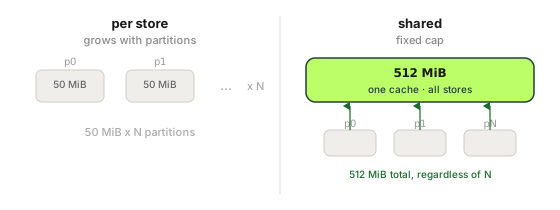
The default model gives every store its own cache and its own write buffers, so memory scales with partition count. The fix is to give all stores on an instance a single shared LRUCache and a single WriteBufferManager, both with a strict capacity. Now the off-heap ceiling is a constant you choose, not a function of how many partitions got assigned.
This RocksDBConfigSetter is the production-grade version of the snippet in the state store page: same idea, but with the strict-capacity flag, write buffers charged to the cache, and index/filter blocks folded in:
public class BoundedMemoryRocksDBConfig implements RocksDBConfigSetter {

    // ONE budget for ALL RocksDB instances on this app instance (not per store).
    // Size it from your container limit, leaving room for -Xmx + JVM overhead + page cache.
    private static final long TOTAL_OFF_HEAP_BYTES = 512L * 1024 * 1024; // 512 MiB
    private static final long TOTAL_MEMTABLE_BYTES = 128L * 1024 * 1024; // subset for write buffers

    // strictCapacityLimit=true => RocksDB throws rather than exceeding the cap.
    private static final Cache CACHE =
        new LRUCache(TOTAL_OFF_HEAP_BYTES, -1, /* strictCapacityLimit */ true);
    // WriteBufferManager charged against the SAME cache => memtables count toward the cap.
    private static final WriteBufferManager WRITE_BUFFER_MANAGER =
        new WriteBufferManager(TOTAL_MEMTABLE_BYTES, CACHE);

    @Override
    public void setConfig(String storeName, Options options, Map<String, Object> configs) {
        BlockBasedTableConfig table = (BlockBasedTableConfig) options.tableFormatConfig();
        table.setBlockCache(CACHE);
        // Charge index + filter blocks to the cache so they can't grow unbounded.
        table.setCacheIndexAndFilterBlocks(true);
        table.setPinTopLevelIndexAndFilter(true);
        options.setWriteBufferManager(WRITE_BUFFER_MANAGER);
        options.setTableFormatConfig(table);
    }

    @Override
    public void close(String storeName, Options options) {
        // CACHE and WRITE_BUFFER_MANAGER are shared across all stores; never close them per store.
    }
}rocksdb.config.setter=com.example.BoundedMemoryRocksDBConfigThree points that matter and are easy to get wrong:
strictCapacityLimit=truemakes the cap real, and loud. Without it, theLRUCachecapacity is advisory: RocksDB treats it as a hint and overshoots under load. With it, an allocation that would exceed the cap fails as aRocksDBExceptionsurfacing on the read or iteration that triggered it, which can kill the stream thread. That is the tradeoff: a loud failure you can alert on instead of the OOM killer. The official Kafka memory-management example deliberately passesstrictCapacityLimit=falseand reserves a high-priority share of the cache for index/filter blocks instead; pick strict when you prefer the exception over the silent overshoot.- The
WriteBufferManagermust point at the sameCache. That's what makes memtable memory count against the single budget. Pass a separate cache and you've just split your budget in two without realising it. - Never
close()the shared objects per store.close()is called once per store; the cache and write buffer manager arestaticand shared, so closing them when one store shuts down would pull the rug out from every other store on the instance.
The Confluent "How to Tune RocksDB for Your Kafka Streams Application" blog walks the same shared-cache pattern and the individual Options knobs in more depth; it's the canonical reference and worth reading before you start moving numbers.
Native memory fragmentation: reach for jemalloc
Even with a strict cap, you may watch resident memory (RSS) creep above the sum of your configured limits and never come back down. That's usually not a leak: it's allocator fragmentation. RocksDB does a lot of variously-sized native allocations and frees; the default glibc malloc arena can hold onto freed pages rather than return them to the OS, and under a churning workload RSS ratchets upward.
The standard mitigation is to swap the allocator for jemalloc, which fragments far less under this pattern:
# In the container, point the dynamic linker at jemalloc before the JVM starts
export LD_PRELOAD=/usr/lib/x86_64-linux-gnu/libjemalloc.so.2  # path is distro/arch-specific (arm64: /usr/lib/aarch64-linux-gnu/...)
java -Xmx2g -jar your-streams-app.jar
This is not a tuning knob you turn for speed: it's a fix for the "RSS keeps growing and OOMs after a few days" failure that a strict cache cap alone doesn't solve. If your container memory climbs slowly over hours/days while the configured RocksDB budget is constant, fragmentation is the first thing to rule out.
Verify real usage: don't trust the math
The arithmetic above gives you a floor, not the truth. Measure the actual footprint two ways:
On disk, point du at the state directory (state.dir, default ${java.io.tmpdir}/kafka-streams, typically /tmp/kafka-streams on Linux). One subdirectory per task, named <application.id>/<task-id>. Streams itself logs a WARN at startup when state.dir resolves inside the OS temp dir, because the OS can clear it under your checkpoint files. Set it explicitly in production:
du -sh /tmp/kafka-streams/<application.id>/*    # per-task on-disk size
du -sh /tmp/kafka-streams/<application.id>      # total local state
In memory, watch the container's cgroup memory, not the JVM heap. On the host or via your orchestrator's metrics, the number to alert on is container memory working set approaching the limit: that's what the OOM killer reads. If working set tracks well above -Xmx + your configured RocksDB budget, you have either uncapped index/filter growth or allocator fragmentation, in that order of likelihood.
Kafka Streams also surfaces RocksDB's own internals as metrics (KIP-607), reported on the state-store (stream-state-metrics) level. The size/usage ones are property-based and available at the INFO recording level (free to turn on); the ratio and stall ones come from RocksDB statistics (KIP-471) and need metrics.recording.level=DEBUG. Mind the trap: the DEBUG metric names are registered even at INFO, but they record nothing (0.0/NaN) until you raise the level.
| Metric | Tells you | Level |
|---|---|---|
size-all-mem-tables, block-cache-usage, block-cache-pinned-usage | Off-heap memory in use: sum them (plus estimate-table-readers-mem) for a live total | INFO |
block-cache-capacity | The per-store cache cap actually in effect: the quickest check that your shared-cache config took (50 MiB per store on defaults) | INFO |
total-sst-files-size | On-disk state size: your disk-fill early warning | INFO |
write-stall-duration-avg, write-stall-duration-total | RocksDB is back-pressuring writes; compaction can't keep up | DEBUG |
memtable-hit-ratio, block-cache-data-hit-ratio (plus -index- and -filter- variants) | Read efficiency: low ratios mean reads are going to disk | DEBUG |
du still answer the two questions that matter most (am I about to be OOMKilled and am I about to fill the disk), but these metrics tell you why before it happens. When the disk fills up instead
Memory gets the headlines; disk is the quieter outage. Local state on RocksDB grows from two directions:
- The data itself. A store with no TTL grows forever. Windowed stores are bounded by retention; plain key-value aggregations are bounded only by your key space: an unbounded key space (per-request IDs, per-session keys with no cleanup) grows without limit until the volume is full.
- Compaction overhead. RocksDB is an LSM tree: writes land in new SST files and a background compaction merges and rewrites them. During compaction the old and new files coexist, so peak disk usage is meaningfully higher than steady-state. Provision headroom above your resting size, not at it.
When the disk fills, the symptom is a flush or compaction failing with an I/O error, the stream thread dying, and (because the changelog is intact on the broker) the task trying to restore elsewhere, moving the disk-fills problem to the next instance. The local store and the changelog topic are different things: the changelog is compacted and lives on the brokers (bounded by your key space, retained as the source of truth for state restore); the local RocksDB files live on the instance's disk and carry compaction overhead on top. Size the broker side for compacted state, and the instance disk for state plus compaction headroom.
The native-library traps: Alpine and ARM
RocksDB ships as a precompiled native library in the rocksdbjni JAR that kafka-streams pulls in as a dependency. That bites in two environments.
Alpine / musl. On Kafka 2.x-era rocksdbjni the bundled binary was linked against glibc only. Alpine Linux uses musl libc, so the app started, built its topology, and then died the instant it touched a state store with:
java.lang.UnsatisfiedLinkError: .../librocksdbjni... Error loading shared library ld-linux-x86-64.so.2Modern rocksdbjni (bundled since Kafka ~3.1) ships musl-linked natives alongside the glibc ones and detects musl automatically at load time, so current kafka-streams runs on Alpine out of the box. If you're pinned to an old Kafka version there is still no flag: the only fix is a glibc base image (eclipse-temurin:21-jdk on Debian/Ubuntu, not :21-jdk-alpine). On anything recent, verify your version's rocksdbjni ships a musl lib before ruling Alpine out; the crash that only appears at the first stateful operation is a Kafka 2.x story now.
Apple Silicon / ARM. On M1/M2 (arm64) the bundled binary must match the architecture. Modern kafka-streams ships an arm64 RocksDB and works on Apple Silicon out of the box. The historical failure was an older Kafka version with no ARM binary throwing UnsatisfiedLinkError on a Mac; the fix is to be on a current Kafka version rather than to hunt for a workaround. If you target linux/arm64 containers (Graviton), confirm your Kafka version bundles the matching native lib; it does on recent releases, but it's worth verifying rather than assuming.
RocksDB is the default persistent store: a stateful Streams app opens a
RocksDBTimestampedStoreper partition on startup, confirmed on macOS ARM with JDK 21. You don't opt into RocksDB; you opt out of it (to in-memory), and that has its own restore cost.
Why is my Kafka Streams pod getting OOMKilled when the JVM heap looks fine?
RocksDB is a native C++ library, so its block cache, write buffers, and filter blocks live off-heap, invisible to your heap dashboard but counted in container/cgroup memory and OOMKilled events. The fix is to bound RocksDB memory with a RocksDBConfigSetter, not to raise -Xmx.
Why does RocksDB ignore my -Xmx setting?
Because -Xmx only bounds the JVM heap, and RocksDB allocates off-heap (native) memory. Each store gets ~50 MiB block cache plus up to 48 MiB of write buffers per partition by default, and RocksDB runs one instance per partition per store, so an instance owning 30 partitions across 3 stores can sit ~9 GiB off-heap, on top of your heap.
How do I bound total RocksDB memory across all state stores?
Give every store on the instance a single shared LRUCache (with strictCapacityLimit=true) and a single WriteBufferManager pointed at that same cache, wired through a RocksDBConfigSetter. That turns the off-heap ceiling into a constant you choose instead of a function of partition count. Also set setCacheIndexAndFilterBlocks(true) so index/filter blocks count against the cap.
Why does my Kafka Streams memory keep growing slowly over days?
If the configured RocksDB budget is constant but RSS ratchets upward over hours or days, the usual cause is glibc malloc arena fragmentation, not a leak. Swap the allocator to jemalloc via LD_PRELOAD before the JVM starts; it fragments far less under RocksDB's churning allocation pattern.
Why do I get UnsatisfiedLinkError on Alpine?
You're on an old Kafka version. Kafka 2.x-era rocksdbjni bundled a glibc-only binary, and Alpine uses musl libc, so the app died the instant it touched a state store with UnsatisfiedLinkError: ... ld-linux-x86-64.so.2. Modern rocksdbjni (since Kafka ~3.1) ships musl-linked natives and detects musl automatically; on older versions the only fix is a glibc base image (e.g. eclipse-temurin:21-jdk, not -alpine).
See it in practice with Conduktor
RocksDB sizing is ultimately a question of how much state each task holds. Conduktor Console lets you inspect the compacted changelog topics that back your stores: their size on the brokers is a direct proxy for how big each partition's local RocksDB will grow, and the consumer group lag tells you whether a restore is still rebuilding that state after a deploy.
Next steps
- Kafka Streams state stores: the model RocksDB implements, and why memory is off-heap
- State restore time & standby replicas: what happens when that RocksDB state has to be rebuilt
- Slow rebalances: why a rebalance hands one instance the partitions that blow its memory budget