
Why Kafka Streams state restore is slow
Kafka Streams state restore slow? Why a large store takes hours to rebuild, what standby replicas actually cover, and how to keep state across restarts.
By Stéphane Derosiaux · Updated October 20, 2026
Understand and shorten Kafka Streams state restore.
When a Kafka Streams app comes back from a deploy and just sits there (consumer-group lag climbing, no records moving), it's almost always restoring state. Restore is the step where a task replays its changelog topic into a local store before it's allowed to process anything, and for a large store it can take minutes to hours. It's the mechanism hiding behind most "rebalancing is slow" reports, and it deserves its own treatment.
What you'll learn:
- What restore actually is, and why store size sets the clock
- The rolling-restart caveat the docs underplay
- Why persistent volumes are the biggest lever, and the EBS/EFS traps
- What standby and warm-up replicas really cover
What restore is
Every stateful operation in Kafka Streams keeps its running state in a local state store, by default a RocksDB database on the instance's disk. That store is durable not because the disk is, but because every write to it is also appended to a compacted Kafka topic: the changelog.
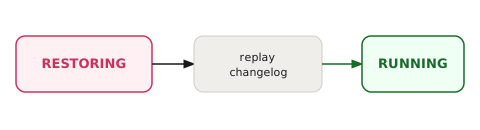
The changelog is the source of truth. So when a task starts on an instance that doesn't already have the store's data on local disk (a fresh pod, a task that just moved here in a rebalance, a node with a wiped disk), Streams must rebuild the store before the task can process a record. It does that by replaying the changelog from the beginning into the local store:
- The task is assigned but enters a
RESTORINGstate, notRUNNING. - A restore consumer reads the changelog topic for that partition, from offset zero.
- Each record is written into the local RocksDB store.
- Once the store has caught up to the tail of the changelog, the task transitions to
RUNNINGand starts processing input.
Processing for that task is blocked for the entire duration of steps 2–3. Because the changelog is log-compacted, it holds only the latest value per key, so its size tracks the size of your state rather than the total volume of updates ever made, which is the only reason restore is bounded at all. (Changelogs for windowed and session stores are the variant: they use cleanup.policy=compact,delete with a retention window sized to your window plus grace, so old windows age out by time rather than by compaction alone.)
You don't have to guess whether a restore is running or how far along it is. Register a StateRestoreListener with streams.setGlobalStateRestoreListener(...): it fires onRestoreStart / onBatchRestored / onRestoreEnd per store partition with the changelog offsets, so you can log or expose live restore progress. Since 4.3, restoration also runs on a dedicated state-updater thread with its own metrics group, stream-state-updater-metrics (active-restoring-tasks, restore-records-rate, active-restore-ratio), so progress is visible on a dashboard without writing a listener. For a deeper trace, raise the org.apache.kafka.streams.processor.internals.StoreChangelogReader logger to DEBUG. From outside the app, the same signal is consumer-group lag on the changelog topics: lag draining toward zero is the restore finishing.
Why a large store means a long restore
Restore time is proportional to how much data has to be read from the changelog and written into RocksDB. A store with a few thousand keys restores in seconds. A store with hundreds of millions of keys does not.
A team running a key-value store with a few hundred million keys saw RocksDB rebuilds of 45 minutes to two hours when bringing the app up cold in a disaster-recovery region, and during that window, nothing processes. That's not a misconfiguration; it's the floor set by the volume of the changelog and the write throughput of RocksDB on that hardware. You can shave it (more on that below), but you cannot make replaying a hundred-million-key changelog instantaneous on local disk.
This is also why restore time, not the rebalance protocol, is usually the real villain when a "slow rebalance" is reported. The rebalance assigns the task in seconds; the restore that follows is what takes the hour. If you've already tuned cooperative rebalancing and the stalls persist, this page is where the fix lives.
The rolling-restart caveat the docs underplay
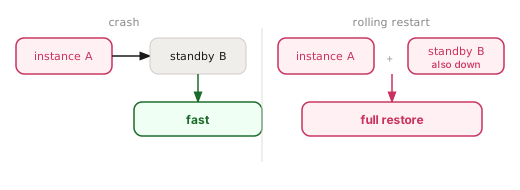
The standard answer to "restore is slow" is "add num.standby.replicas." That's good advice for a crash, and misleading for the most common operational event you'll actually run: a rolling restart.
🚫 "We have standby replicas, so restores during a deploy are instant."
Standby replicas keep a hot, continuously-updated copy of each store on another instance. If an instance crashes, a task can fail over to the standby's host and skip most of the restore, exactly what they're for.
But a rolling restart is not a crash. When you redeploy, each instance leaves the group (or its session times out) and a rebalance reassigns tasks. The instance that comes back up rejoins as what the assignor sees as a candidate for tasks, and if it doesn't already hold the local state for the tasks it's given, it restores them. Worse, while a deploy is in flight, your standbys are also being bounced, so the hot copy you were counting on may not be where you need it at the moment a task needs to fail over. The net effect: a rolling restart can trigger restores even though you "have standbys," because standbys answer "what if a node dies," not "what if I redeploy every node in sequence."
Two things actually address the rolling-restart case:
- Warm-up replicas (KIP-441). When a task must move to a new instance, the assignor restores it in the background as a warm-up before handing over the active task, so the switchover is near-instant. This is the mechanism that makes a moved task non-disruptive, and it's covered in detail on the rebalancing page.
- Keeping the local state across the restart so there's nothing to restore in the first place. This is the bigger lever, and it's mostly an infrastructure decision.
The biggest lever: persistent local state
Restore exists to rebuild state the instance doesn't have locally. The most effective fix is therefore to make sure the instance still has it after a restart.
| Deployment shape | What happens on restart | Restore cost |
|---|---|---|
| Ephemeral pods (emptyDir, no volume) | Local RocksDB disk is wiped; instance comes back with nothing | Full restore from changelog, every restart |
| StatefulSet + persistent volume | RocksDB files survive the pod restart on the attached disk | Restore only the delta missed while down, often seconds |
Deployment with ephemeral storage and a StatefulSet with a volumeClaimTemplate backing a persistent disk. With a persistent volume, a pod that bounces and reattaches its disk finds its RocksDB store intact and only needs to catch up on the changelog records written while it was down. Combined with static membership, the rejoining pod reclaims its old tasks and its old state, and skips both the rebalance and the restore. The traps live in which persistent storage you pick:
- Block storage (EBS-class) is the right default. It behaves like a local disk, gives RocksDB the low-latency random I/O it wants, and survives a pod restart when reattached. The catch is that a block volume is typically bound to one availability zone, so a pod can only reattach it by landing in the same AZ, a constraint your scheduler has to respect.
- Network file storage (EFS/NFS-class) looks convenient and bites. RocksDB is latency-sensitive and assumes local-disk semantics; running its files over a network filesystem adds latency to every store operation and degrades throughput, both at restore time and in steady state. Teams who put RocksDB on shared NFS-style storage also hit
Stale file handleerrors when the underlying handle is invalidated mid-operation, a failure mode you simply don't get on a local or block-attached disk. Avoid it for RocksDB state.
Two more knobs matter at the edges:
state.cleanup.delay.ms(default 600000, 10 min) controls how long Streams waits before deleting the local state directory of a task that has migrated away from this instance. Leave it generous: if a task bounces back to this instance within the window, its state is still on disk and no restore is needed. Set it too aggressively and you throw away local state you'd have reused.acceptable.recovery.lag(default 10000) decides how close a warm-up/recovering store must be to the changelog tail before it's treated as caught up and eligible to become the active task. It's the dial between "hand over sooner, slightly behind" and "wait for fully current."
The exception: a hard crash under exactly-once
Persistent volumes save you from restore on a clean restart. A non-graceful crash under exactly-once is the exception, and it catches people who assumed the disk would save them.
Under exactly_once_v2, the write to the local RocksDB store and the commit of the changelog (and input offsets) are not one atomic transaction spanning RocksDB and Kafka. Through Kafka Streams 4.2, Streams reconciles them with a .checkpoint file that records "this local store is consistent up to changelog offset X", and under EOS that checkpoint is written only on a graceful shutdown. So after a kill -9, an OOMKill, or a node failure, there is no checkpoint, the local store may contain writes from a transaction that was later aborted, and Streams cannot tell clean state from dirty. Its only safe move is to discard the local store and replay the whole changelog, even though the RocksDB files are sitting right there on the persistent disk. Since 4.3 (KIP-1035) the .checkpoint file is gone and changelog offsets live inside the store itself, but the outcome after a hard crash is the same: the store is wiped and the full changelog replays.
The practical consequence: graceful shutdown is a performance feature under EOS. Handle SIGTERM, give the process time to flush and write its checkpoint (on Kubernetes, a large enough terminationGracePeriodSeconds), and a redeploy avoids the wipe. A hard kill forfeits it and pays the full restore.
This is changing. KIP-1035 (managed changelog offsets) shipped in Kafka Streams 4.3, moving offset tracking out of the
.checkpointfile and into the store itself, but on its own it does not stop the crash wipe. KIP-892 (transactional state stores, targeted for 4.4) is the piece that makes the local store transactional, so a crash rolls back cleanly instead of wiping. Until your app runs a Streams version with KIP-892 (it's a client-library feature, not a broker one), treat a hard crash under EOS as a full restore.
Standbys and warm-ups, sized for restore
Pulling the levers together for an app where restore is genuinely painful:
# Keep a hot copy so a CRASH can fail over without a full restore
num.standby.replicas=1

# Move more state in the background when scaling/replacing instances
max.warmup.replicas=2

# How caught-up a recovering store must be before taking over the active task
acceptable.recovery.lag=10000

# Don't discard local state too eagerly when a task moves away briefly
state.cleanup.delay.ms=600000
num.standby.replicas=1 plus persistent volumes plus static membership covers the three events that cause restore: a crash (standby fails over), a rolling restart (persistent disk + static membership reclaims state), and a scale-out (warm-up restores in the background). What it costs is real: extra disk and memory per instance, plus the changelog-consumption traffic to keep every standby current, so reach for standbys when restore time is the bottleneck, not by default.
Where this is heading: remote state stores
The whole reason restore is slow is that state lives on local disk and must be reconstructed from the changelog whenever a task lands somewhere new. The ecosystem's clearest current direction is to break that assumption: remote, object-storage-backed state stores keep state off local disk so a task can attach to existing state almost immediately, making restore near-instant and instances effectively stateless.
Kafka Streams' state-store interface is pluggable, so this is a live area rather than a thought experiment: it's the dominant theme across recent Current and Kafka Summit talks on Streams. We cover where it's going in the future of Kafka Streams.
Why does my Kafka Streams app take so long to start up?
It's almost always restoring state: a task replays its changelog topic from offset zero into a local RocksDB store before it can process a record, and that time is proportional to store size. A store with hundreds of millions of keys can take 45 minutes to two hours to rebuild cold, and nothing processes during that window.
Do standby replicas make restores during a deploy instant?
No. Standby replicas (num.standby.replicas) cover a crash: a task fails over to a host that already holds a hot copy. A rolling restart is not a crash: each rejoining instance restores any tasks it doesn't hold locally, and your standbys are being bounced too. They answer "what if a node dies," not "what if I redeploy every node in sequence."
How do I avoid restore on every restart?
Keep the local state across the restart so there's nothing to rebuild. On Kubernetes that means a StatefulSet with a persistent volume (block storage / EBS-class) instead of ephemeral pods: the RocksDB files survive and only the delta missed while down is restored. Avoid network file storage (EFS/NFS) for RocksDB; it adds latency and triggers Stale file handle errors.
Why does a hard crash under exactly-once trigger a full restore even with a persistent disk?
Under exactly_once_v2 the .checkpoint file that marks the local store consistent is written only on a graceful shutdown (through 4.2; since 4.3 offsets live inside the store, with the same crash behavior). After a kill -9 or OOMKill the store may hold writes from an aborted transaction, and Streams can't tell clean from dirty, so it discards the local store and replays the whole changelog. Handle SIGTERM and allow time to flush.
How is local state rebuilt from the changelog?
Each write to a state store is also appended to a compacted Kafka topic (the changelog), which is the real source of truth. On restore, a restore consumer reads that topic from offset zero and writes each record back into RocksDB until it catches up to the tail; only then does the task move from RESTORING to RUNNING.
See it in practice with Conduktor
A restore is invisible from inside your app logs until you correlate it with the broker. Conduktor Console lets you watch the consumer-group lag that tells you a restore is still in progress after a deploy, inspect the changelog topics behind your stores to see their size and compaction, and confirm partition assignment, so "is it stuck or is it still restoring?" stops being a guess.
Next steps
- Why rebalancing is slow: the event that triggers most restores, and how to tame it
- RocksDB tuning: memory, disk, and write throughput that bound restore speed
- Kafka Streams state stores: how changelogs and local stores work in the first place