
Kafka Streams state stores
How Kafka Streams state stores work: RocksDB vs in-memory, the changelog topic that makes them fault-tolerant, and why they get OOMKilled in production.
By Stéphane Derosiaux · Updated October 20, 2026
Understand how Kafka Streams keeps state, and why it bites in production.
Every stateful operation in Kafka Streams (a count, an aggregation, a join) needs somewhere to keep its running state. That somewhere is a state store: a local, embedded key-value store that lives inside your application process, backed by a Kafka topic so it can survive a crash.
State stores are where Kafka Streams stops being a tidy abstraction and starts having opinions about your memory, your disk, and your restart times. Understanding them is the difference between an app that scales and one that gets OOMKilled.
What you'll learn:
- What a state store is and where it lives
- How the changelog topic makes local state fault-tolerant
- Why RocksDB memory doesn't show up in your JVM heap
- The restore trade-off between in-memory and persistent stores
What a state store is
When you call count(), aggregate(), or reduce(), Kafka Streams creates a state store to hold the result for each key. The store is:
- Local: it lives on the instance (and the disk) of whichever task owns the partition. It is not a shared, remote database.
- Partitioned: there is one store instance per partition of the input. A topic with 12 partitions means up to 12 independent stores, spread across your running instances.
- Embedded, by default it's RocksDB, a fast embedded key-value engine written in C++, running inside your JVM process.
Stateless operations (map, filter, flatMap) need no store. Stateful ones do, and that store is the thing you have to operate.
The changelog topic: how local state survives a crash
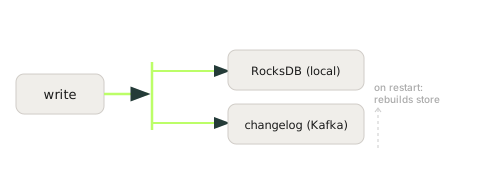
A local store on a single instance sounds fragile, if that instance dies, is the state gone? No. Every write to a state store is also written to a dedicated, compacted Kafka topic called the changelog.
your-app-id-KSTREAM-AGGREGATE-STATE-STORE-0000000001-changelogThis changelog is the source of truth. If a task moves to another instance (a rebalance) or an instance restarts with no local data, Kafka Streams restores the store by replaying its changelog from the beginning before processing resumes. Because the changelog is log-compacted, it only retains the latest value per key, so it stays roughly the size of your state, not the size of all updates ever made.
These topics are created behind your back. Kafka Streams auto-creates changelog (and repartition) topics, named after your
application.idand the operator's position in the topology. A stateful app with several aggregations and joins can triple your topic and partition count. Know they exist before you go counting partitions on your cluster.
This restore step is also the source of one of the biggest operational pains in Kafka Streams: a large store takes a long time to replay. We cover that in state restore time.
The memory that doesn't show up in your heap
Here is the surprise that puts Kafka Streams apps in the postmortem channel.
RocksDB is a native C++ library. Its memory, block cache, write buffers (memtables), index and filter blocks, lives off-heap. Your -Xmx setting does not bound it. Your JVM heap metrics look perfectly healthy right up until the Linux OOM killer terminates the container, and what you get is a silent OOMKilled, not a Java OutOfMemoryError with a stack trace.
🚫 "My heap usage is flat at 60%, so the app has plenty of memory."
It gets worse with scale. There is one RocksDB instance per partition of each store, and each one carries its own default memory budget, a 50 MiB block cache plus write buffers (16 MiB each, up to three). An instance owning 20 partitions of a store is running 20 RocksDB databases, and their off-heap footprints add up far past anything your heap graph shows.
The fix is to bound RocksDB explicitly with a shared cache across all the stores on an instance, via a RocksDBConfigSetter:
public class BoundedMemoryRocksDBConfig implements RocksDBConfigSetter {
    // One shared 64 MiB block cache + write-buffer budget for ALL stores on this instance
    private static final long TOTAL_OFF_HEAP = 64L * 1024 * 1024;
    private static final Cache CACHE = new LRUCache(TOTAL_OFF_HEAP);
    private static final WriteBufferManager WBM = new WriteBufferManager(TOTAL_OFF_HEAP, CACHE);

    @Override
    public void setConfig(String storeName, Options options, Map<String, Object> configs) {
        BlockBasedTableConfig table = (BlockBasedTableConfig) options.tableFormatConfig();
        table.setBlockCache(CACHE);
        table.setCacheIndexAndFilterBlocks(true);
        options.setWriteBufferManager(WBM);
        options.setTableFormatConfig(table);
    }

    @Override public void close(String storeName, Options options) { /* shared objects: do not close per store */ }
}rocksdb.config.setter=com.example.BoundedMemoryRocksDBConfigSizing the off-heap budget, taming memory fragmentation with jemalloc, and the disk-fills-up failure mode are their own topic, see RocksDB tuning.
In-memory vs persistent: the restore trade-off
Kafka Streams also offers in-memory stores (Stores.inMemoryKeyValueStore(...)). They sound faster, and for steady-state reads they are, but they hide a sharp edge.
| Persistent (RocksDB, default) | In-memory | |
|---|---|---|
| Steady-state speed | Fast (off-heap, disk-backed) | Fastest |
| Memory | Off-heap, can spill to disk | On-heap, bounded by -Xmx |
| Restart / failover | Clean restart: restores only the missing delta. Failover to a fresh instance: full replay | Restores the entire store from the changelog, every time |
You materialize a store explicitly, and name it, like this:
.groupByKey()
.count(Materialized.as("orders-per-customer")); // named store: stable changelog, queryable, survives topology edits
Naming matters for more than tidiness: an unnamed store gets a positional name that shifts if you edit the topology, orphaning its state. See evolving a topology.
Querying state directly
You can read a materialized store from your service with interactive queries, which gives you a queryable, real-time view of a Kafka topic without a separate database:
ReadOnlyKeyValueStore<String, Long> store =
    streams.store(StoreQueryParameters.fromNameAndType("orders-per-customer", QueryableStoreTypes.keyValueStore()));
Long count = store.get("customer-42");
With more than one instance, the state is sharded across hosts, so a given key may live on another instance. You ask streams.queryMetadataForKey(...) which instance owns the key, then route the call there. A common gotcha: a query that works with one instance returns InvalidStateStoreException: the state store may have migrated to another instance once you scale to two, that's the routing step you're missing, or a transient rebalance (retry, or serve stale reads with StoreQueryParameters enabled for it).
When local state isn't enough
The whole local-state model, fast, but tied to restore time and instance memory, is exactly what the ecosystem is now trying to move past. Remote, object-storage-backed state stores (the dominant theme across recent Current and Kafka Summit talks) keep state off local disk so restores become near-instant and instances become stateless. Kafka Streams' state store interface is pluggable, so this is an active, real area, not vaporware. We cover the direction in the future of Kafka Streams.
What is a state store in Kafka Streams?
A state store is a local, embedded key-value store inside your application process that holds the running state of stateful operations like count, aggregate, and reduce. There is one store instance per input partition, and each is backed by a Kafka topic so it survives a crash.
What is the difference between RocksDB and in-memory state stores?
The default RocksDB store keeps data off-heap on local disk, so a clean restart only catches up on the missed delta. An in-memory store starts empty on every restart and must replay the whole changelog before processing, so a restart takes multiple minutes for large state.
What is a changelog topic and how does it make state fault-tolerant?
The changelog is a dedicated, log-compacted Kafka topic that records every write to a state store, making it the source of truth. If a task moves or an instance restarts empty, Kafka Streams restores the store by replaying the changelog before resuming, and compaction keeps it roughly the size of the state rather than every update.
Why does my Kafka Streams pod get OOMKilled when the heap looks healthy?
RocksDB is a native C++ library whose block cache, write buffers, and index blocks live off-heap, so your -Xmx does not bound them and the JVM heap graph stays flat. With one RocksDB instance per partition, the off-heap footprints add up and the Linux OOM killer terminates the container with no Java OutOfMemoryError.
Can I plug in a custom or remote state store?
Yes, the state store interface is pluggable, which is why remote, object-storage-backed stores are an active area of development. The goal is to keep state off local disk so restores become near-instant and instances become effectively stateless.
See it in practice with Conduktor
The changelog and repartition topics behind your stores are real Kafka topics. Conduktor Console lets you see them, check their size and compaction, and watch the consumer group lag that tells you whether a restore is still in progress after a deploy.
Next steps
- State restore time & standby replicas, why restarts are slow, and how to speed them up
- RocksDB tuning, bounding memory and disk for real
- Windowing, the most common source of unbounded state growth