
Kafka message compression
Kafka compression explained: pick a compression.type from the snappy, lz4, gzip and zstd compression types. Compare throughput gains and CPU cost.
By Stéphane Derosiaux · Updated October 21, 2026
Learn how to choose and configure Kafka compression algorithms
Kafka producer compression reduces the size of messages before sending them to brokers, improving throughput and reducing network bandwidth at the cost of CPU overhead.
What you'll learn:
- How compression works in Kafka and when to use it
- Characteristics of each compression algorithm (GZIP, LZ4, Snappy, ZSTD)
- How to choose the right algorithm for your use case
- How to monitor compression effectiveness
Why use compression?
Compression provides several benefits in Kafka deployments:
- Reduced network usage: Smaller message sizes mean less data transmitted
- Lower storage costs: Compressed messages take less disk space on brokers
- Improved throughput: More messages can fit in each batch
- Better performance: Particularly beneficial for text-heavy payloads like JSON or XML
Compression is most effective with:
- Text-based formats (JSON, XML, CSV)
- Repetitive data patterns
- Large message payloads (> 1KB)
Compression algorithms
Kafka supports four compression algorithms, each with different performance characteristics:
GZIP
General-purpose compression with high compression ratios but higher CPU usage.
Characteristics:
- Highest compression ratio (smallest message size)
- Slowest compression/decompression speed
- Good for scenarios where network bandwidth is limited
- CPU-intensive
Configuration:
compression.type=gzipLZ4
Fast compression with moderate compression ratios, good balance of speed and size reduction.
Characteristics:
- Very fast compression/decompression
- Moderate compression ratio
- Low CPU overhead
- Good general-purpose choice
Configuration:
compression.type=lz4Snappy
Fast compression optimized for speed with reasonable compression ratios.
Characteristics:
- Fast compression/decompression (slightly slower than LZ4)
- Moderate compression ratio
- Good CPU efficiency
- Popular choice for high-throughput scenarios
Configuration:
compression.type=snappyZSTD (Zstandard)
Modern compression algorithm offering excellent compression ratios with good performance.
Characteristics:
- Excellent compression ratio (better than LZ4/Snappy, approaches GZIP)
- Good compression/decompression speed
- Relatively new (available since Kafka 2.1)
- Tunable compression levels
Configuration:
compression.type=zstdPerformance comparison
Compression ratio comparison
Based on typical JSON payloads:
| Algorithm | Compression ratio | CPU usage | Speed |
|---|---|---|---|
| GZIP | ~75% | High | Slow |
| LZ4 | ~65% | Low | Fast |
| Snappy | ~68% | Low | Fast |
| ZSTD | ~72% | Medium | Medium |
Visual comparison: Compression trade-offs
This comparison shows how different algorithms balance compression ratio and speed:
| Algorithm | Compression ratio | Speed | CPU usage | Best use case |
|---|---|---|---|---|
| GZIP | Highest (~75%) | Slowest | High | Network-constrained environments |
| ZSTD | High (~72%) | Medium | Medium | Balanced choice (RECOMMENDED) |
| LZ4 | Medium (~65%) | Very fast | Very Low | High-throughput scenarios |
| Snappy | Medium (~68%) | Very fast | Low | High-throughput scenarios |
- ZSTD gives the best balance: high compression with reasonable speed (ideal for most workloads)
- LZ4 and snappy prioritize speed over compression (best for real-time/high-throughput)
- GZIP maximizes compression at the cost of speed (best for bandwidth-limited scenarios)
Throughput impact
Compression affects producer throughput in different ways:
Positive impact:
- Faster network transmission due to smaller message sizes
- Higher effective batch sizes (more messages per batch)
- Reduced broker disk I/O
Negative impact:
- CPU overhead for compression on producer side
- Additional latency for compression process
Configuration and tuning
Basic compression configuration
# Enable compression for all messages
compression.type=lz4

# Compression happens at batch level
batch.size=16384
linger.ms=5
Compression at different levels
Compression can be configured at multiple levels:
Producer level (affects all topics):
Properties props = new Properties();
props.put("compression.type", "lz4");
Producer<String, String> producer = new KafkaProducer<>(props);
Topic level (broker-side configuration):
kafka-configs.sh --bootstrap-server localhost:9092 \
  --entity-type topics --entity-name my-topic \
  --alter --add-config compression.type=snappy
Interaction with batching
Compression works at the batch level, so batching configuration matters:
# Larger batches = better compression ratios
batch.size=32768          # 32KB batches
linger.ms=10              # Wait up to 10ms to fill batch
compression.type=lz4      # Fast compression for batches
CPU vs network trade-offs
When to prioritize CPU savings
Choose faster algorithms (LZ4, Snappy) when:
- CPU resources are limited
- High message throughput is required
- Network bandwidth is abundant
- Low latency is critical
When to prioritize network savings
Choose higher compression (GZIP, ZSTD) when:
- Network bandwidth is expensive or limited
- Messages are stored for long periods
- CPU resources are abundant
- Storage costs are a concern
Choose the right algorithm
Decision matrix
For high-throughput, low-latency scenarios:
compression.type=lz4 # Fast compression, low CPU overheadFor network-constrained environments:
compression.type=gzip # Maximum compression, reduce network usageFor balanced performance:
compression.type=snappy # Good compression ratio with reasonable speedFor modern deployments (Kafka 2.1+):
compression.type=zstd # Excellent compression with good performanceDecision tree: Choose your compression algorithm
Use this decision tree to select the optimal compression algorithm based on your requirements:
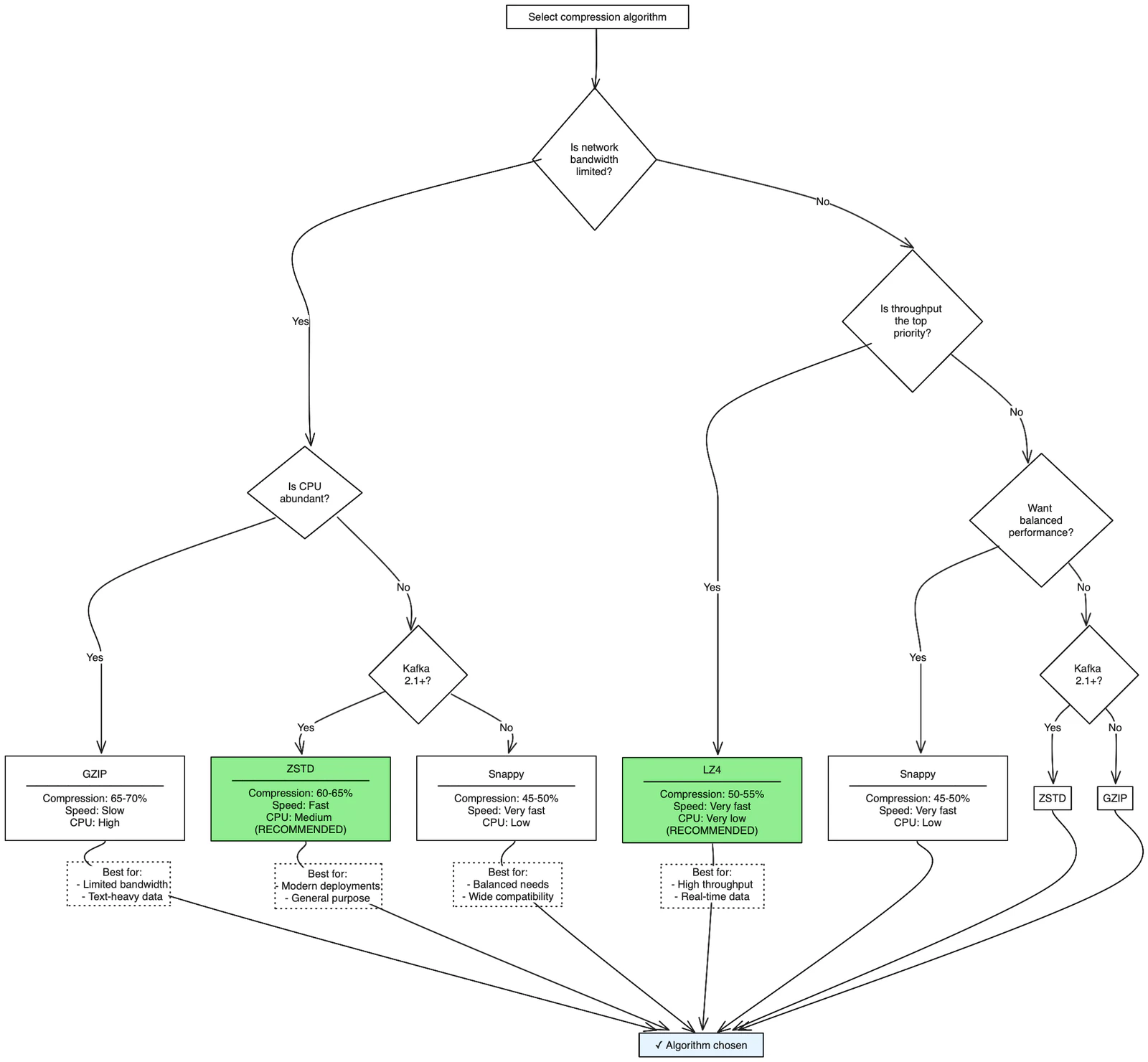
Quick recommendation: For most production workloads, use ZSTD (Kafka 2.1+) for excellent compression with good performance, or LZ4 if maximum throughput is critical.
Monitor compression effectiveness
Key metrics to track
Compression ratio:
compression_ratio = uncompressed_size / compressed_sizeNetwork savings:
network_savings = (1 - compressed_size / uncompressed_size) × 100%CPU impact: Monitor CPU utilization on producer machines before and after enabling compression.
JMX metrics
kafka.producer:type=producer-metrics,client-id=<client-id>
- compression-rate-avg: Average compression ratio
- record-size-avg: Average record size before compression
- batch-size-avg: Average batch size (after compression)
Best practices
Production recommendations
- Start with LZ4: Good balance of speed and compression for most use cases
- Test with your data: Compression effectiveness varies by payload type
- Monitor CPU usage: Ensure compression doesn't become a bottleneck
- Combine with batching: Larger batches compress better
- Consider message format: JSON compresses better than binary formats
Configuration examples
High-throughput producer:
compression.type=lz4
batch.size=65536          # Large batches for better compression
linger.ms=5               # Short linger time for low latency
buffer.memory=67108864    # 64MB buffer for batching
Network-optimized producer:
compression.type=gzip
batch.size=32768          # Reasonable batch size
linger.ms=10              # Allow time for batching
buffer.memory=134217728   # 128MB buffer for larger compressed batches
Balanced producer (recommended starting point):
compression.type=snappy
batch.size=16384          # Default batch size
linger.ms=5               # Low latency
buffer.memory=33554432    # 32MB buffer
Common pitfalls
Mistakes to avoid
- Over-compressing small messages: Compression overhead may exceed benefits
- Ignoring CPU monitoring: Compression can become a producer bottleneck
- Not testing with production data: Compression ratios vary significantly by content
- Using GZIP for high-throughput: May create CPU bottlenecks
- Forgetting about decompression: Consumers also pay CPU cost for decompression
Troubleshooting compression issues
Poor compression ratios:
- Check message format (binary data compresses poorly)
- Verify batch sizes are adequate
- Consider if data is already compressed
High CPU usage:
- Switch to faster algorithm (LZ4 instead of GZIP)
- Monitor producer thread CPU utilization
- Consider reducing compression level if using ZSTD
Increased latency:
- Reduce linger.ms to decrease batching delay
- Use faster compression algorithm
- Monitor end-to-end message latency
Remember that consumers have to decompress messages, which also uses CPU. Consider the total system CPU cost, not just producer-side overhead. Always benchmark compression algorithms with your actual production data, as compression effectiveness varies significantly based on message format, size, and content patterns.
See it in practice with Conduktor
Conduktor Console monitors compression metrics in real-time, showing compression ratios, batch sizes, and CPU impact. View producer performance dashboards to validate your compression configuration choices.
Next steps
- Configure producer batching to maximize compression effectiveness
- Tune custom partitioners for message distribution
- Understand producer acks for durability