
Kafka Cluster: Architecture & How It Works
A Kafka cluster is a set of broker servers that work together to store, replicate, and serve streams of records. Clients connect to any broker, discover the rest of the cluster automatically, and read or write to topic partitions that are spread and replicated across every broker. The cluster is the unit of fault tolerance: individual brokers can fail without losing data or interrupting producers and consumers.
What is a Kafka cluster?
A Kafka cluster is one or more brokers that share a single cluster identity and a common metadata log. Each broker is a JVM process, usually on its own machine or pod, that owns a slice of the total data. Together they present a single logical system to clients: you send records to a topic, and the cluster decides which broker holds which partition.
Three properties make a group of brokers an actual cluster rather than a set of isolated servers:
- Shared cluster ID — every broker in the cluster carries the same
cluster.id, generated once when the cluster is first formatted. A broker with a mismatched ID is rejected. - Shared metadata — the cluster agrees on which topics exist, how many partitions each has, and which broker leads each partition. In Kafka 4.0 this metadata lives in a KRaft controller quorum.
- Coordinated replication — partitions are copied across brokers so that the loss of one broker does not lose data.
A single-broker "cluster" is valid for local development, but production clusters run at least three brokers so replication and quorum can tolerate a failure.
Kafka cluster architecture
Every cluster has two roles: brokers that store partition data and serve client requests, and a controller that manages cluster metadata and partition leadership. Since Kafka 4.0, the controller is a KRaft quorum (a set of controller nodes running the Raft consensus protocol); ZooKeeper has been removed. For the full component breakdown and data flow, see the Kafka architecture diagram.
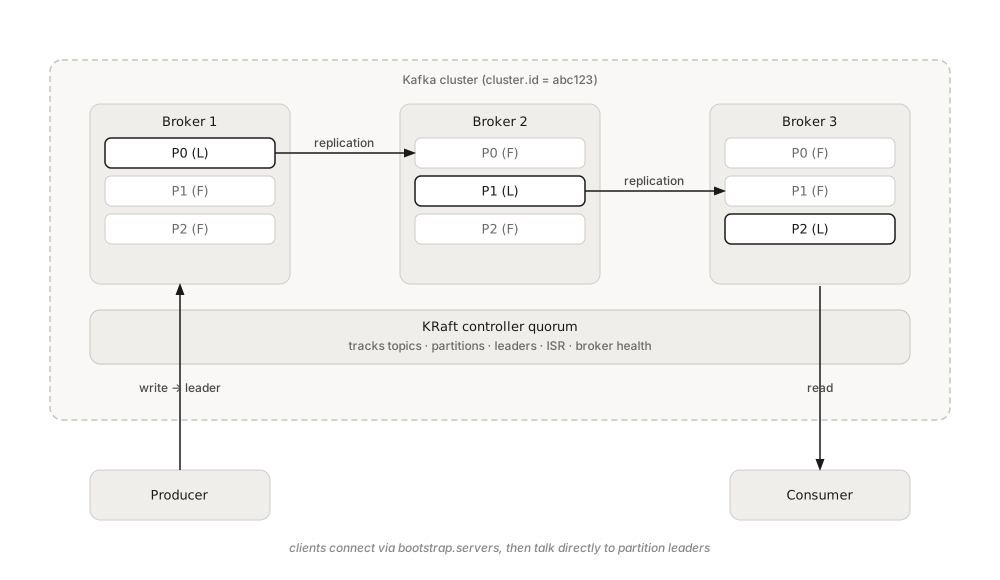
The controller does not sit in the data path. Producers and consumers talk directly to the brokers that lead the partitions they use; the controller only steps in to elect a new leader when a broker fails.
How brokers form a cluster
Brokers find each other through the metadata layer, and clients find the cluster through a bootstrap connection. A minimal KRaft broker configuration references the controller quorum and a unique node ID:
# server.properties (KRaft combined broker + controller)
process.roles=broker,controller
node.id=1
controller.quorum.voters=1@broker1:9093,2@broker2:9093,3@broker3:9093
listeners=PLAINTEXT://broker1:9092,CONTROLLER://broker1:9093
Before first start, the cluster is formatted with a shared ID so all nodes agree on identity:
# generate one cluster ID, reuse it on every broker
KAFKA_CLUSTER_ID=$(bin/kafka-storage.sh random-uuid)
bin/kafka-storage.sh format -t "$KAFKA_CLUSTER_ID" -c config/server.properties
A client only needs one or two reachable brokers in bootstrap.servers; it fetches the full cluster topology from there. You can inspect the live controller quorum with the metadata CLI:
bin/kafka-metadata-quorum.sh --bootstrap-server broker1:9092 describe --statusClusterId: abc123-Kq9...
LeaderId: 2
CurrentVoters: [1, 2, 3]
CurrentObservers: []The LeaderId here is the active controller, not a partition leader. If node 2 dies, the remaining voters elect a new controller within seconds and clients keep operating.
Partitions, replicas, and leadership
The cluster's real job is spreading partitions across brokers and keeping replicas in sync. Each partition has one leader and a set of followers defined by the replication factor. Producers and consumers only ever talk to the leader; followers copy the leader's log and stand ready to take over.
The set of replicas currently caught up with the leader is the in-sync replica (ISR) set. A partition stays available for writes as long as enough replicas remain in-sync, which is why replication factor and min.insync.replicas are cluster-wide durability decisions rather than per-topic afterthoughts. See Kafka Replication and High Availability for how ISR and failover behave under load.
Single cluster vs multiple clusters
One cluster can scale to hundreds of brokers, but teams often run several clusters, one per region, environment, or tenant, for isolation, data residency, or blast-radius control. Kafka does not replicate between clusters on its own; you add tooling such as MirrorMaker 2 to mirror topics across cluster boundaries.
Deciding when to add brokers to an existing cluster versus standing up a new one is a capacity and governance question. Broker count, disk, partition density, and throughput headroom all feed that decision, covered in Kafka Capacity Planning.
Operating a Kafka cluster
A healthy cluster needs continuous visibility into broker health, under-replicated partitions, controller state, and consumer lag. These signals live in JMX metrics that most teams scrape into Prometheus and Grafana, or a dedicated tool. Governance layers such as Conduktor sit in front of one or more clusters to add access control, audit, and a single view across brokers without exposing raw broker internals to every user. The core metrics to watch, and why, are detailed in Kafka Cluster Monitoring and Metrics.
Common day-two operations, rolling restarts, partition reassignment, adding brokers, all run against the cluster as a whole and rely on the controller to rebalance leadership safely.
Summary
A Kafka cluster is the durable, fault-tolerant backbone of a streaming platform: brokers hold replicated partitions, a KRaft controller quorum tracks metadata and leadership, and clients reach everything through a bootstrap connection. Teams size clusters around partition count and throughput, replicate across clusters with MirrorMaker 2, and monitor broker health continuously. Governance and access-control tools like Conduktor operate on top of the cluster to make it safe to share across many teams.
Related Pages
- Kafka Architecture Diagram & Components, the full component and data-flow picture
- What is a Kafka Broker?, the server that stores and serves partitions
- What is a Kafka Partition?, the unit of ordering and parallelism
- Understanding KRaft Mode in Kafka, the ZooKeeper-free controller quorum
- Kafka Replication and High Availability, ISR and failover
- MirrorMaker 2 for Cross-Cluster Replication, mirroring between clusters
- Kafka Capacity Planning, sizing brokers and partitions
- Kafka Cluster Monitoring and Metrics, what to watch in production