
What is a Kafka Broker? Role & Architecture
A Kafka broker is a server process that stores partition replicas and handles read/write requests from producers and consumers. Brokers form a Kafka cluster: multiple brokers collaborate to distribute data, replicate partitions for fault tolerance, and elect partition leaders when failures occur. In Kafka 4.0+, dedicated controller nodes within the cluster manage metadata via KRaft, eliminating ZooKeeper.
What Is a Kafka Broker?
Every record written to Kafka lands on a broker's local disk inside a partition log. Brokers are identified by a unique integer ID within a cluster. When you run a 3-broker Kafka cluster and create a topic with 3 partitions and replication-factor 3, each broker stores a replica of each partition, 9 replica logs total across the cluster.
Brokers expose a single network endpoint (the bootstrap server) that clients use to discover the full cluster topology. After initial connection, clients cache the cluster metadata (which broker leads which partition) and connect directly to the right broker for each request.
Broker Responsibilities
Each broker in a cluster:
- Stores partition replicas assigned to it by the controller, on local disk
- Handles producer requests: receives record batches, writes to the leader partition, acknowledges based on
ackssetting - Handles consumer fetch requests: serves records from local partition logs (or remote tiered storage for older segments)
- Participates in replication: follower brokers pull data from partition leaders and maintain their local replica
- Manages log retention: deletes old segments when time- or size-based retention limits are exceeded, or compacts logs for compacted topics
- Reports metadata to the controller: brokers register themselves and their partition state with the KRaft controller quorum
Cluster Topology and Partition Distribution
Kafka distributes partition replicas across brokers to balance load. For a topic with 3 partitions and replication-factor 3 on a 3-broker cluster:
Topic: transactions (3 partitions, RF=3)

Partition 0:  Leader=Broker 1,  Followers=Broker 2, Broker 3
Partition 1:  Leader=Broker 2,  Followers=Broker 1, Broker 3
Partition 2:  Leader=Broker 3,  Followers=Broker 1, Broker 2
Each broker leads one partition and follows the other two, balanced leadership and balanced storage. This spread is computed by the controller at topic creation time and can be manually reassigned or automatically rebalanced.
For a full picture of how the cluster architecture fits together, see Kafka Architecture: Diagram & Components.
Leader and Follower: How Reads and Writes Flow
For each partition, exactly one broker is the leader at any time. All producer writes go to the leader. Follower brokers replicate from the leader by pulling record batches, writing them to their local logs.
By default, consumers also read from the leader. Kafka 2.4+ introduced fetch-from-follower (via client.rack and broker.rack config): consumers can read from the nearest follower in the same availability zone, reducing cross-AZ network costs.
In-Sync Replicas (ISR) and Durability
The ISR (in-sync replica set) is the subset of followers that have replicated up to within replica.lag.time.max.ms of the leader. Only ISR members are eligible to become the new leader during failover.
Durability is controlled by two complementary settings:
| Setting | Where | Meaning |
|---|---|---|
min.insync.replicas | Topic config | Minimum ISR size required to accept a write |
acks=all (or -1) | Producer config | Wait for all ISR members to acknowledge |
min.insync.replicas=2 and acks=all, a write is only acknowledged after 2 brokers have persisted it. A single broker failure cannot cause data loss. If the ISR shrinks below min.insync.replicas (e.g., due to broker failure and a lagging follower), the partition becomes unavailable for writes until the ISR recovers. This is a deliberate safety trade-off: Kafka prefers to fail writes over risking silent data loss.
For full coverage of replication behavior and failure scenarios, see Kafka Replication and High Availability.
Metadata Management: KRaft Mode (Kafka 4.0+)
Since Kafka 3.3 (GA in 3.5, required in 4.0+), clusters use KRaft (Kafka Raft Metadata protocol) instead of ZooKeeper. KRaft changes how cluster metadata is stored and how the controller election works.
In KRaft mode, dedicated controller nodes (which may also be brokers in combined mode) form a Raft quorum. Cluster metadata, topic configs, partition assignments, broker registrations, is stored in an internal __cluster_metadata topic on the controller nodes. The active controller is the Raft leader. 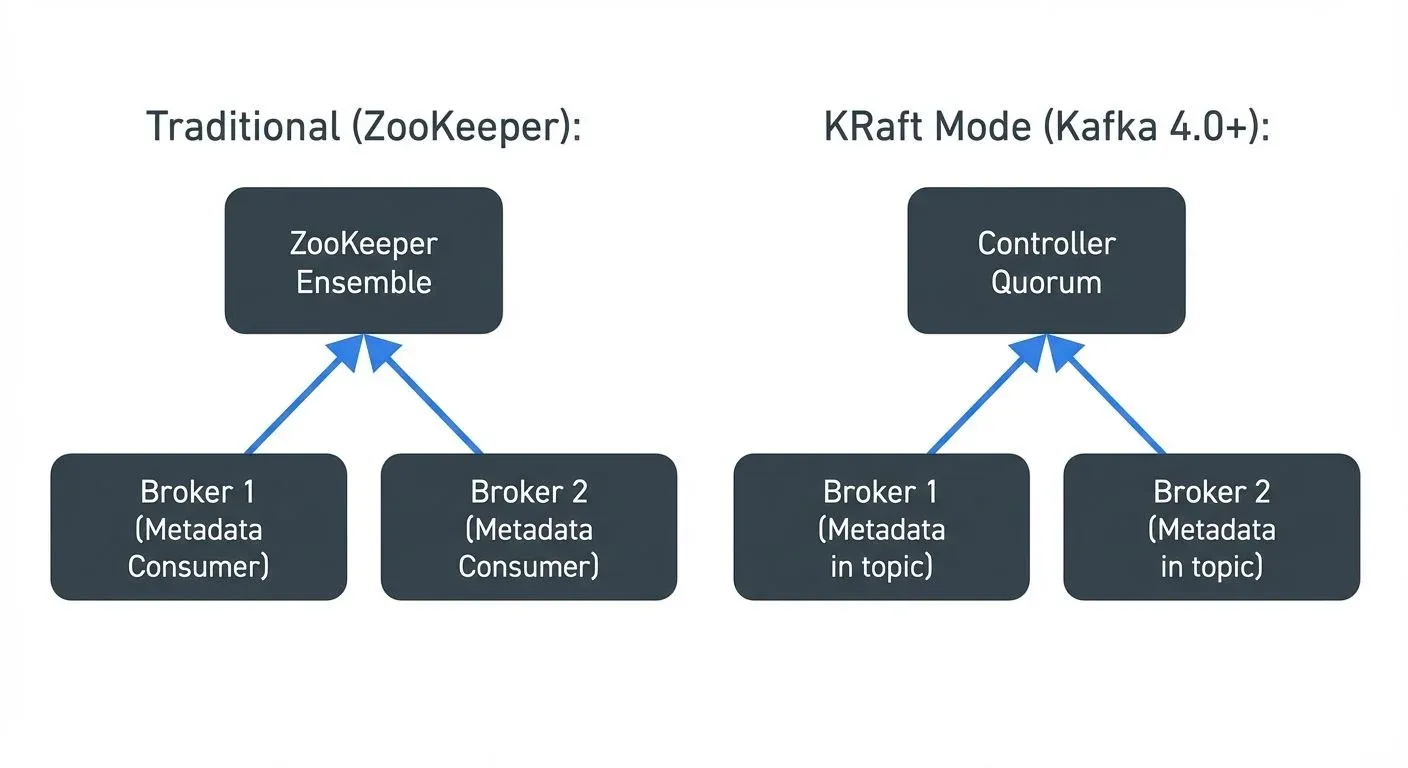
KRaft benefits over ZooKeeper:
- Faster failover: controller election in milliseconds instead of seconds
- Higher scalability: supports millions of partitions per cluster (ZooKeeper topped out around 200K)
- Simpler operations: no external coordination service to deploy, monitor, and upgrade
- Stronger consistency: Raft consensus provides clearer durability semantics than ZooKeeper's ZAB protocol
- Unified security: single authentication/authorization model across the cluster
KRaft deployment modes:
- Separated mode: dedicated controller nodes (no partition storage) + broker nodes, recommended for large clusters
- Combined mode: nodes act as both broker and controller, suitable for development or small clusters
For migration guidance and architecture details, see Understanding KRaft Mode in Kafka.
Scaling Brokers
Brokers scale horizontally. Adding a broker to a cluster:
- The new broker registers with the controller via KRaft metadata protocol
- Existing partition replicas are not automatically moved, you must trigger a partition reassignment (via
kafka-reassign-partitions.shor tooling like Conduktor) - New topics created after the broker joins can have partitions placed on the new broker
Scaling out typically reduces:
- Per-broker disk usage and I/O load
- Per-broker network load from replication and client traffic
Scaling does not automatically solve:
- Hot partitions on existing topics (key skew means one partition gets all the traffic)
- Partition leadership imbalance (use automatic leader rebalancing in Kafka 4.0+)
Tiered Storage: Separating Compute from Storage (Kafka 3.6+)
Kafka 3.6+ introduced tiered storage, which allows brokers to offload older log segments to remote object storage (S3, GCS, Azure Blob Storage) while keeping recent data on local disk. 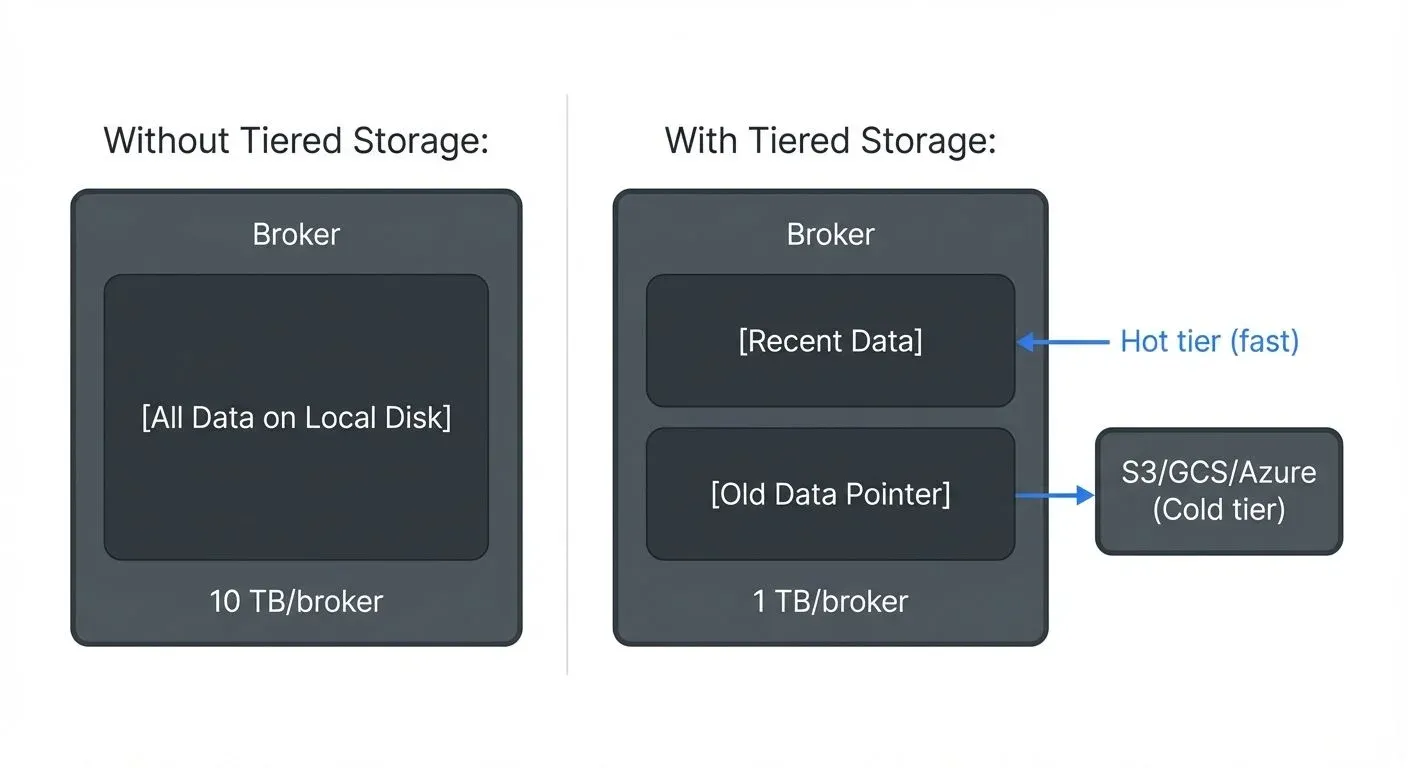
| Tier | Storage | Access |
|---|---|---|
| Hot | Broker local disk | Fast, low-latency |
| Cold | Object storage (S3/GCS/Azure) | Cost-efficient, ~90% cheaper |
This decouples retention from broker disk capacity. Before tiered storage, retaining 6 months of data meant provisioning 6 months of disk on every broker. With tiered storage, brokers only need local disk for recent (hot) data; cold data lives in object storage at a fraction of the cost.
For configuration details, see Tiered Storage in Kafka.
Monitoring Broker Health
Key metrics to watch per broker:
- UnderReplicatedPartitions: partitions where ISR < replication factor, indicates a follower is lagging or a broker is offline
- ActiveControllerCount: exactly 1 across the cluster at all times; 0 or >1 indicates a problem
- OfflinePartitionsCount: partitions with no available leader, causes producer and consumer errors
- RequestHandlerAvgIdlePercent: low values indicate broker CPU saturation
- BytesInPerSec / BytesOutPerSec: per-broker throughput; uneven values indicate partition imbalance
For a comprehensive metrics reference, see Kafka Cluster Monitoring and Metrics.
Managing Brokers with Conduktor
At scale, tracking broker health, partition distribution, and ISR status across multiple clusters becomes operationally demanding. Conduktor provides a UI for visualizing broker assignments, spotting under-replicated partitions, and triggering partition reassignments without CLI commands. See the Brokers Management documentation.
Related Pages
- What is a Kafka Topic?, the logical streams that brokers store
- What is a Kafka Partition?, the physical unit that brokers replicate
- Kafka Architecture: Diagram & Components, full cluster layout with producers, consumers, and controllers
- Kafka Replication and High Availability, ISR mechanics, failover, and durability configuration
- Understanding KRaft Mode in Kafka, deep dive into KRaft controller quorum
- Kafka Cluster Monitoring and Metrics, broker-level metrics and alerting