
What is a Kafka Partition? How They Work
A Kafka partition is an ordered, immutable sequence of records within a topic. Each partition is an independent log stored on a broker, identified by a zero-based integer. Partitions are the unit of parallelism, distribution, and replication in Kafka: they determine how many consumers can read simultaneously, how data is spread across brokers, and how Kafka achieves fault tolerance.
What Is a Kafka Partition?
Every Kafka topic is split into one or more partitions at creation time. While a topic is the logical stream (e.g., user-events), a partition is the physical log (e.g., user-events partition 0, partition 1, partition 2).
Each record in a partition receives a monotonically increasing integer called an offset. Offsets are per-partition, partition 0 has its own offset sequence starting at 0, independent of partition 1.
Topic: user-events (3 partitions)

Partition 0: [offset 0][offset 1][offset 2][offset 3]
Partition 1: [offset 0][offset 1][offset 2]
Partition 2: [offset 0][offset 1][offset 2]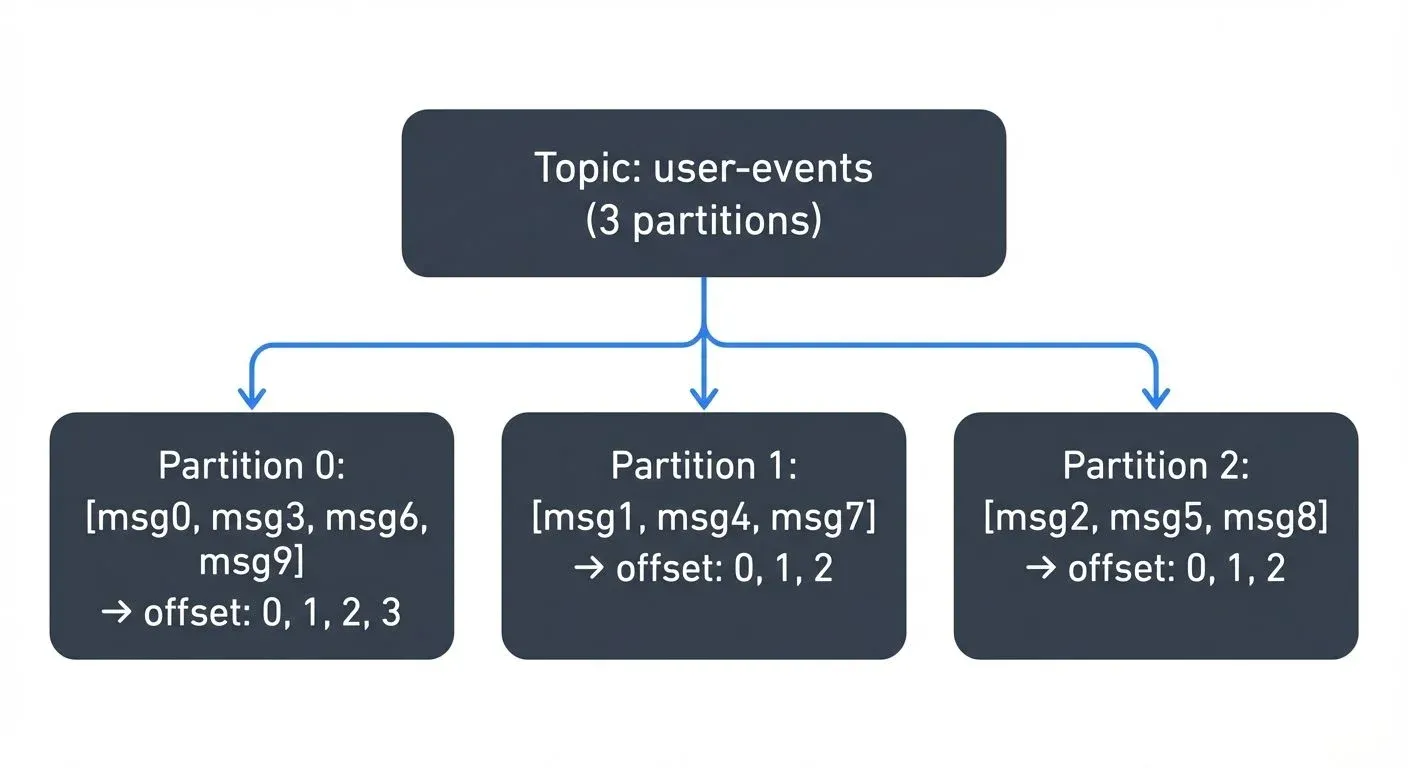
Ordering Guarantees
Kafka guarantees strict ordering within a partition. Records written to partition 0 are always read in the same order they were written. There is no ordering guarantee across partitions of the same topic.
This design choice is intentional: it trades global ordering for horizontal scalability. If your use case requires that all events for a given entity (e.g., a user, an order) are processed in order, route them to the same partition using a consistent key.
Parallelism: How Partitions Enable Scale
Within a consumer group, each partition is assigned to exactly one consumer at a time. This means the number of partitions is the maximum degree of parallelism for consumption:
- 3 partitions → at most 3 consumers in a group can read simultaneously
- 10 partitions → at most 10 parallel consumers
- Adding a 4th consumer to a 3-partition topic leaves the 4th consumer idle
Parallelism for producers is also partition-based: producers write to specific partitions (by key hash, explicit assignment, or round-robin), and throughput scales with the number of partitions that can be written in parallel.
How Records Are Assigned to Partitions
When a producer sends a message, Kafka determines the target partition using one of three strategies:
- Explicit partition: the producer specifies
partition=2, the record goes to partition 2 regardless of the key - Key-based routing (most common): Kafka hashes the record key and maps it to a partition:
hash(key) % numPartitions. All records with the same key always land in the same partition, guaranteeing ordering per key - Round-robin: if no key is provided, records are distributed evenly across partitions for maximum throughput
// Key-based routing, all events for _0_ go to the same partition
ProducerRecord<String, String> record =
    new ProducerRecord<>("user-events", "user-123", eventPayload);

// Explicit partition
ProducerRecord<String, String> record =
    new ProducerRecord<>("user-events", 2, "user-123", eventPayload);
WARN: Changing the partition count after a topic is created breaks key-based routing for existing consumers, because hash(key) % numPartitions maps the same key to a different partition. Plan partition counts before going to production.
Leader and Follower Replicas
Each partition is replicated across multiple brokers for fault tolerance. At any point in time, one replica is the leader and the rest are followers:
- Producers always write to the leader
- Consumers by default read from the leader (fetch-from-follower is configurable for latency optimization in multi-AZ setups)
- Followers continuously replicate from the leader
Partition 0 of topic "transactions":
  Leader:    Broker 1  ← producers write here
  Follower:  Broker 2  ← replicates from Broker 1
  Follower:  Broker 3  ← replicates from Broker 1
In-Sync Replicas (ISR)
The in-sync replica set (ISR) is the subset of replicas that have fully caught up with the leader's log within the threshold defined by replica.lag.time.max.ms. Only ISR members are eligible to become the new leader if the current leader fails.
This is the mechanism behind Kafka's durability guarantee: configure min.insync.replicas=2 on the topic and acks=all on the producer, and a write is only acknowledged after at least 2 ISR members have persisted it. A single broker failure cannot cause data loss under this configuration.
For deep coverage of ISR management and replication strategies, see Kafka Replication and High Availability.
Choosing the Right Partition Count
Partition count is set at topic creation and hard to change safely. Key considerations:
More partitions enable:
- Higher consumer parallelism
- Better throughput distribution across brokers
- Finer-grained load balancing
Too many partitions cause:
- Longer leader election times during broker failures
- Higher memory overhead (each partition has open file handles and in-memory state on the broker)
- Increased latency for end-to-end replication with many followers
- Higher metadata overhead on the controller
A practical sizing formula:
partitions = ceil(target_throughput_MB_s / single_partition_throughput_MB_s)Single-partition throughput is typically 10–50 MB/s depending on hardware, record size, and compression. For most systems, 6–30 partitions per topic is a reasonable range. Start conservatively; you can add partitions later (with the ordering caveat above).
For worked examples and partition key selection patterns, see Kafka Partitioning Strategies and Best Practices.
Partition Distribution Across Brokers
When a topic is created, Kafka distributes partition replicas across brokers to balance load. A 3-partition, replication-factor-3 topic across 3 brokers looks like:
Partition 0: Leader=Broker1, Followers=Broker2, Broker3
Partition 1: Leader=Broker2, Followers=Broker1, Broker3
Partition 2: Leader=Broker3, Followers=Broker1, Broker2
Each broker leads an equal share of partitions. If a broker fails, its partitions elect new leaders from the ISR. Kafka 4.0+ improves automatic partition leadership rebalancing after recovery.
Partitions and Consumer Groups
Consumer group membership is tracked per-partition. When a new consumer joins or an existing one leaves, Kafka triggers a rebalance: partitions are redistributed among active group members. During a rebalance, consumption pauses briefly.
Cooperative rebalancing (available since Kafka 2.4 via CooperativeStickyAssignor) minimizes this pause by only reassigning partitions that need to move, rather than revoking all assignments.
See Kafka Consumer Groups Explained for the full consumer coordination model.
Related Pages
- What is a Kafka Topic?, the logical container that partitions belong to
- What is a Kafka Broker?, where partitions are physically stored and replicated
- Kafka Architecture: Diagram & Components, how partitions fit into the overall cluster design
- Kafka Partitioning Strategies and Best Practices, key selection, custom partitioners, and sizing
- Kafka Replication and High Availability, ISR, replication factor, and failover behavior
- Kafka Consumer Groups Explained, how partitions are assigned to consumers