
Conduktor vs Lenses: Kafka Management Compared
Lenses is a UI and SQL layer over Kafka. Conduktor is the layer that decides who owns what, what gets enforced, and who pays, across every cluster, with security that holds for clients that never open a UI.
Same starting point, different ceiling
Every Kafka tool starts by browsing topics and watching lag, and both do that well. The questions that arrive later are the ones a UI can't answer: who owns this topic, who approved that access, which team drives the bill, and does the masking rule hold for the app that reads Kafka directly.
Lenses 6 reorganized around a central HQ with one Agent per cluster. That gives it a catalog and SQL across clusters; it also means multi-cluster is an Enterprise-tier feature and every cluster adds another Agent to run. Conduktor connects to any number of clusters from one deployment, on every paid plan.
Competitor details last checked against lenses.io pricing and documentation, September 2026.
Where Conduktor and Lenses diverge
Four capabilities that decide the evaluation for most platform teams.
Federated ownership
Application and topic catalogs, guardrails on every request, approval workflows. Lenses stops at topic discovery and approval requests.
Cost attribution
Kafka spend broken down by topic, application, and cluster. Lenses has none, at any tier.
Security on the wire
Gateway encrypts and masks at the protocol level for every client. Lenses masks inside Lenses only.
Automation
Terraform provider, REST API, CLI, and RBAC-scoped MCP. Lenses: CLI, YAML, and MCP.
Conduktor Console vs Lenses: feature comparison
Conduktor Community Edition is free for up to 50 users and 3 clusters. Where a capability needs a paid plan (Team Edition or Enterprise), the note says so.
| Capability | Conduktor Console | Lenses |
|---|---|---|
| Kafka providers | ✓Any Kafka: Apache Kafka, Confluent, Amazon MSK, Redpanda, Aiven, and more | ✓Any Kafka |
| Multi-cluster | ✓Unlimited clusters from one Console deployment (3 in Community, unlimited on paid plans) | ⚠One Agent per cluster under HQ, each with its own database or schema; federated multi-Kafka is an Enterprise-tier feature |
| Free tier | ✓Community Edition: 50 users, 3 clusters, SSO/LDAP, API, CLI, Terraform, and MCP included | ⚠Community Edition: up to 5 users, basic auth |
| Pricing model | ✓Free Community Edition; Team Edition (buy online) and Enterprise (via sales) both include unlimited clusters. See pricing → | ⚠Team Edition from $4,000/year for up to 15 users; multi-Kafka Enterprise is quote-only |
| Authentication | ✓OIDC and LDAP in every tier, including Community | ⚠SSO/SAML from Team Edition; Community is username and password |
| RBAC | ✓Permissions scoped to specific topics, consumer groups, subjects, and connectors; group-level RBAC on paid plans | ⚠IAM-style permissions from Team Edition |
| Developer UX | ✓Browse, filter, produce, replay, and reprocess messages, including from a DLQ; reset offsets with a preview; restart individual connector tasks; Avro, Protobuf, and JSON Schema decoded automatically | ✓SQL Studio to query and produce, reset offsets, restart connector tasks |
| SQL over topics | ⚠Expression, regex, and JSON-field filters in the data explorer, plus a ksqlDB integration; no built-in SQL engine | ✓SQL Studio queries any topic on any connected cluster |
| Stream processing | ✗Console operates Kafka Streams, Flink, and ksqlDB workloads you already run; it doesn't host processors | ✓SQL Processors run stream-processing jobs inside Lenses |
| Monitoring & alerts | ✓Per-member and time-based consumer lag, topic and broker metrics, connector error traces; alerts to Slack, Teams, email, and webhooks (PagerDuty, Datadog, or any endpoint); Prometheus integration | ✓Consumer lag and SQL-based monitoring; alerts to Slack, PagerDuty, Datadog, CloudWatch, and webhooks |
| Infrastructure insights | ✓Health score per cluster, partition skew, stale topics, under-replication risk, VIP topic detection, and CEL-based data quality rules | ⚠Topic-level views; no estate-wide health scoring or stale topic detection |
| Ownership & self-service | ✓Application and topic catalogs, self-service provisioning with automated guardrails, approval workflows for access requests (paid plans) | ⚠Global topic catalog for discovery and topic approval requests; no application ownership model |
| Terraform | ✓Official provider for topics, schemas, connectors, policies, groups, and permissions | ✗No official provider for Lenses resources (Terraform modules exist to deploy Lenses itself); CLI and YAML instead |
| Chargeback | ✓Cost attribution by topic, application, and cluster (paid plans) | ✗Not available |
| Data masking | ⚠Field-level masking in Console masks the Console screen (unlimited on paid plans); masking every client needs Conduktor Gateway, a separate proxy to deploy | ⚠Data policies mask fields inside Lenses only; direct Kafka clients see raw payloads |
| Multi-tenancy | ⚠Virtual clusters with namespace isolation, through Gateway rather than Console alone | ⚠Environments and topic-prefix permissions; no virtual clusters |
| AI assistance | ✓MCP server inside Console, scoped to each user's RBAC: read-only, or write-enabled for low-risk tasks like labelling topics; Skills for coding agents | ✓MCP server |
IncludedPartial or gated behind a higher tierNot available
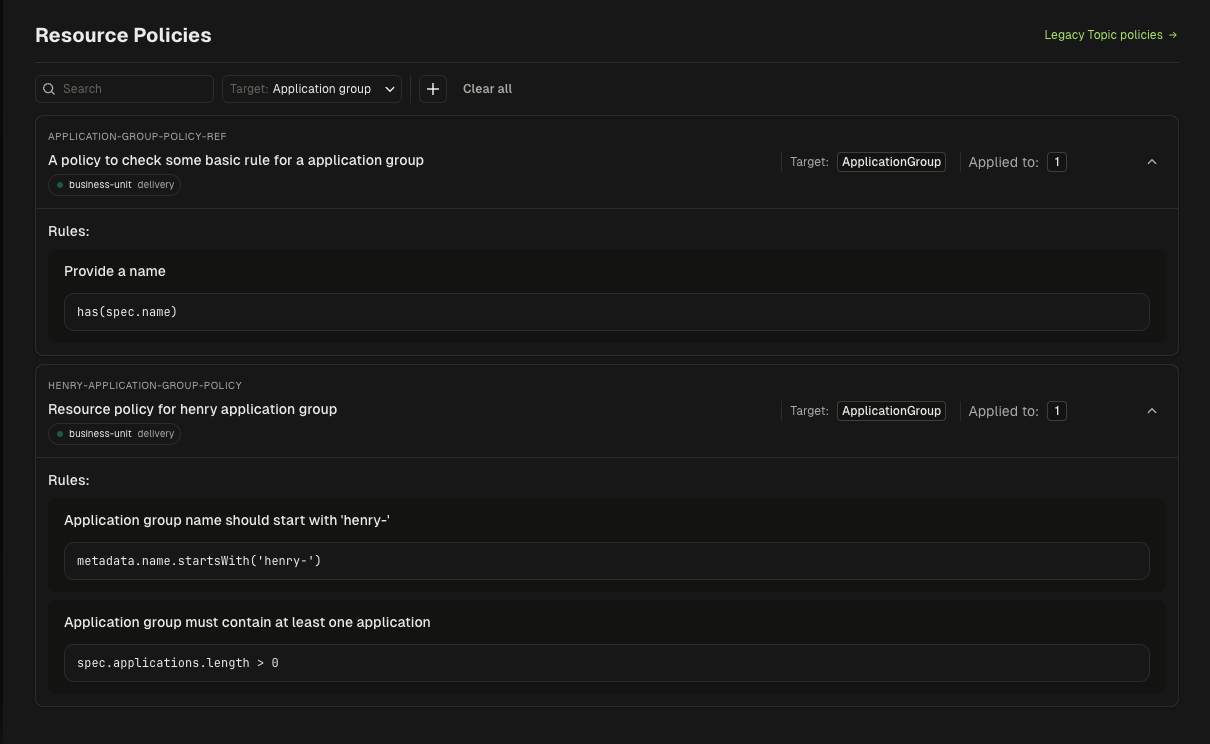
Federated ownership
Guardrails that hold without a ticket queue
Every topic, schema, and connector request in Console is validated against the policies your platform team defines: naming, partitions, retention, replication. Requests that pass are created instantly; requests that fail explain why. Owners approve cross-team access from the catalog instead of a Jira board.
Lenses can route topic creation through an approval request, but there's no application catalog to map resources to accountable teams, so ownership is tracked outside the tool.
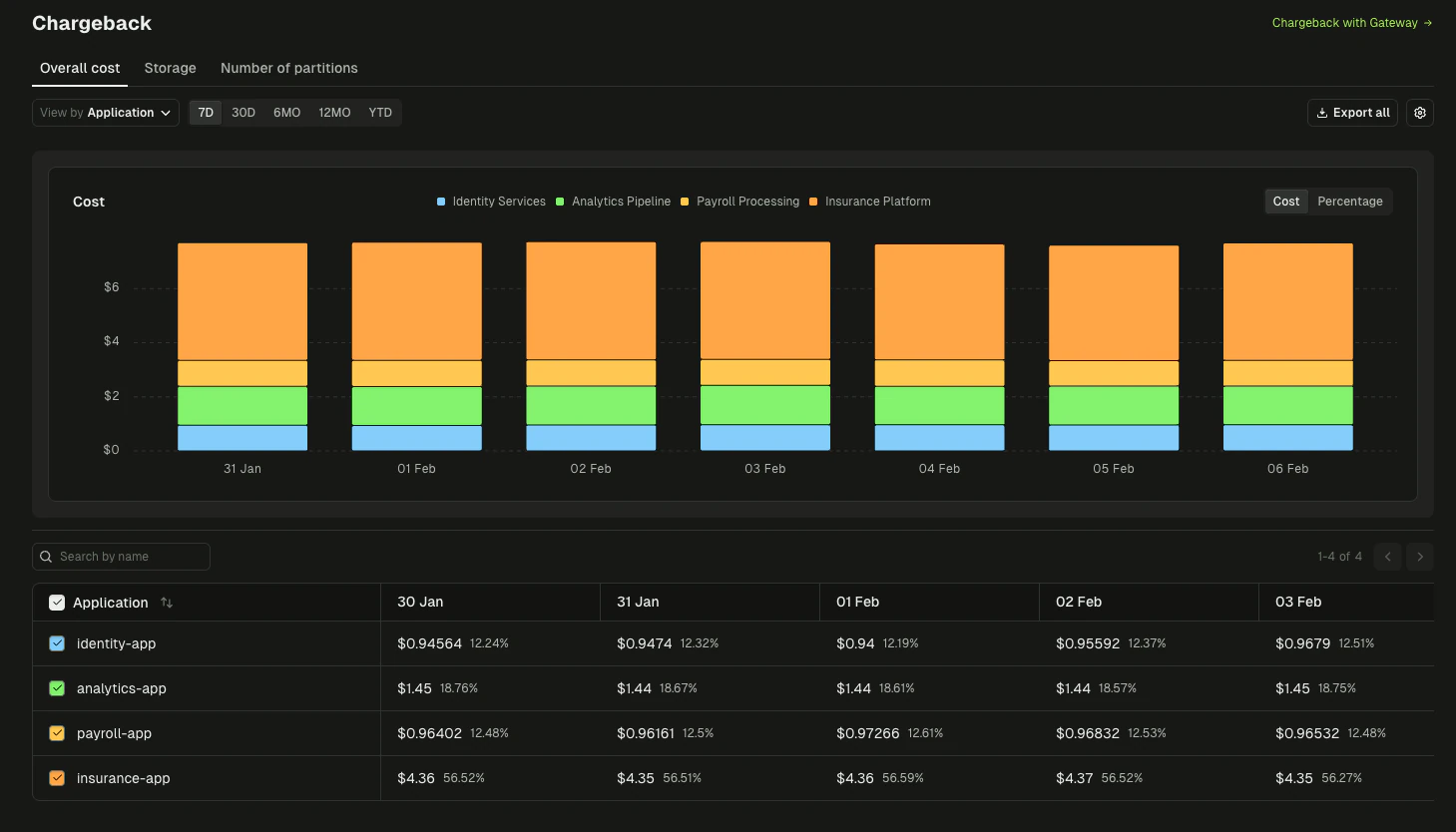
Cost attribution
Know which team drives the Kafka bill
Console attributes cluster spend to topics, applications, and the teams that own them, so a platform team can show finance where the money goes and hold consumers accountable for retention and partition choices. Lenses has nothing comparable.
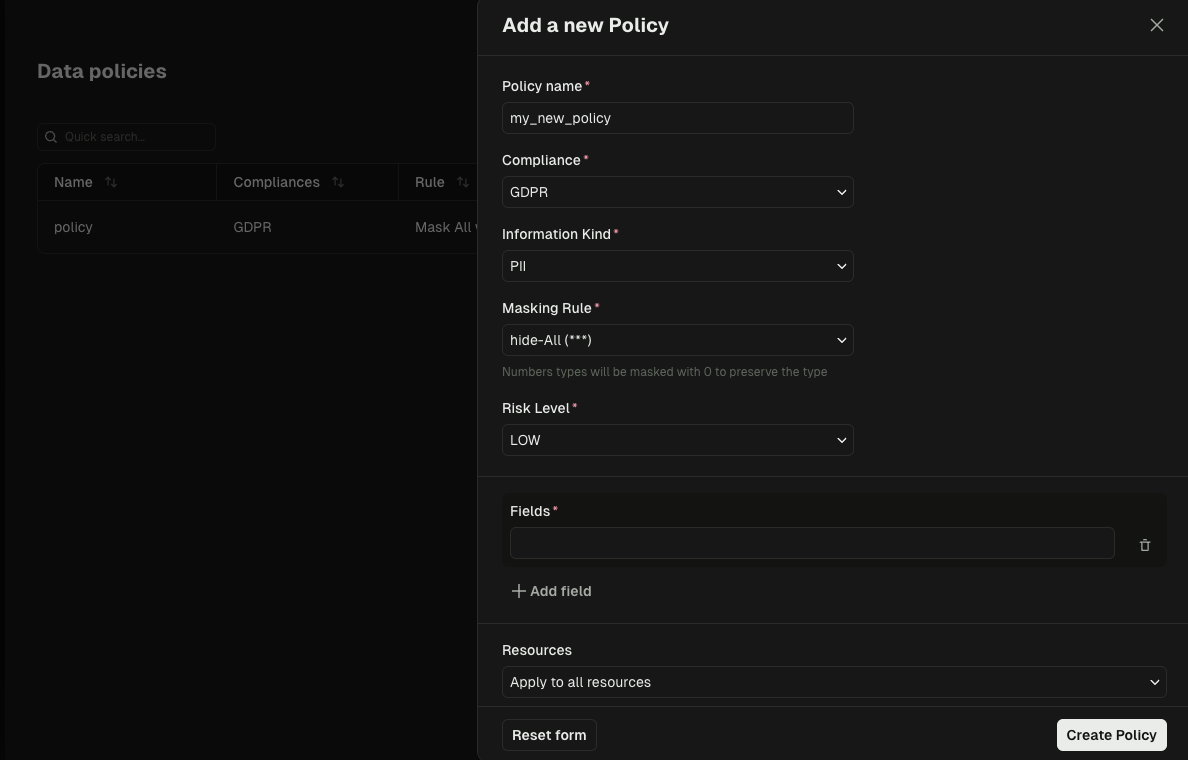
Wire-level security
Masking that applies to every client, not just the UI
A masking rule inside a management UI protects what people see through that UI. Applications, connectors, and stream processors reading Kafka directly still get the raw payload. Conduktor Gateway sits between clients and brokers and enforces field-level encryption, masking, and virtual clusters at the protocol level, with no application changes. Lenses has no proxy layer, so its data policies stop at its own interfaces.
Lenses fits if...
SQL over Kafka topics is your team's primary workflow, you run one or two clusters, and you don't need ownership, chargeback, or wire-level enforcement. Lenses Team Edition is inexpensive at that scale.
Conduktor fits if...
Several teams share Kafka and the platform team needs to enforce standards without becoming the bottleneck: catalogs, guardrails, approval workflows, cost attribution, resource-scoped RBAC, Terraform, and, when compliance requires it, encryption and masking enforced on the wire. Unlimited clusters are included on paid plans.
"With the same team, we managed to support this expansion and scalability. Conduktor plays one of the biggest roles in that. It helps us do a lot of things automatically, and that really supports my team."
Anke Raich
Swiss Post
Read more customer stories


We already use Lenses. Why would we switch to Conduktor?
Lenses covers Kafka visibility and SQL on topics well. The gaps appear at resource ownership, chargeback, and Terraform-driven automation, then widen at the proxy layer, where encryption and wire-level enforcement need an architecture Lenses does not have. Teams usually switch when the number of clusters or teams outgrows what a UI can govern.
Is Conduktor more expensive than Lenses?
The models differ more than the numbers. Lenses Team Edition is $4,000 per year for up to 15 users on a single cluster; the moment you need a second cluster or a sixteenth user you are in a quote-only Enterprise tier. Conduktor's paid plans include unlimited clusters, and the free Community Edition is ten times larger: 50 users and 3 clusters with SSO/LDAP, versus 5 users with basic auth. Pricing has the details.
Does Conduktor have SQL over Kafka like Lenses?
Not SQL. Console's data explorer filters by key, value, headers, offset, and time, with regex and JSON field filters and automatic Avro, Protobuf, and JSON Schema decoding, plus a ksqlDB integration for teams that run it. If ad-hoc SQL over topics is your primary workflow, that's Lenses' strength.
How hard is it to migrate from Lenses to Conduktor?
There's no data migration. Console connects to the same Kafka clusters and Schema Registry instances, so you point it at your brokers and it works. RBAC and topic policies are re-expressed in Console, usually through the Terraform provider so they live in Git from day one. Most teams run both in parallel for a few weeks, then retire Lenses.
Can we run Lenses and Conduktor side by side?
Yes. Neither Console nor Lenses sits in the data path, so pointing both at the same clusters during an evaluation is safe. Conduktor Gateway is the only component that does, and it's optional.
Does Conduktor work with Confluent Cloud, MSK, and Redpanda?
Yes. Console connects to Confluent Platform and Cloud, Amazon MSK, Redpanda, Aiven, and self-managed Apache Kafka as standard clusters, with Confluent Schema Registry and AWS Glue supported for schemas.
See Console on your own clusters
Thirty minutes, your Kafka: ownership catalogs, guardrails, cost attribution, and, if you need it, encryption on the wire.