
A year ago I still wrote most of my code myself. Today, Claude writes most of it. Same for ops: generating Terraform, draining a broker, rotating credentials, debugging consumer lag, scripting a cutover. I describe what I want, the agent does it, I review. It's a different way of working.
I even roll-restarted a Kafka cluster with Claude. The agent checked under-replicated partitions, planned the broker order (controller last), validated min.insync.replicas per topic, drained, restarted, verified ISR convergence between each step.
LLMs know Kafka the way Wikipedia knows Kafka: they can explain partitions, describe consumer group semantics, draft an Avro schema. What they can't do is tell you that
payment-eventsis your only RF=1 topic, that theordersgroup has been lagging for two hours because schema v4 broke deserialization, or that the EncryptPlugin you're about to apply targets a field that doesn't exist on this cluster.
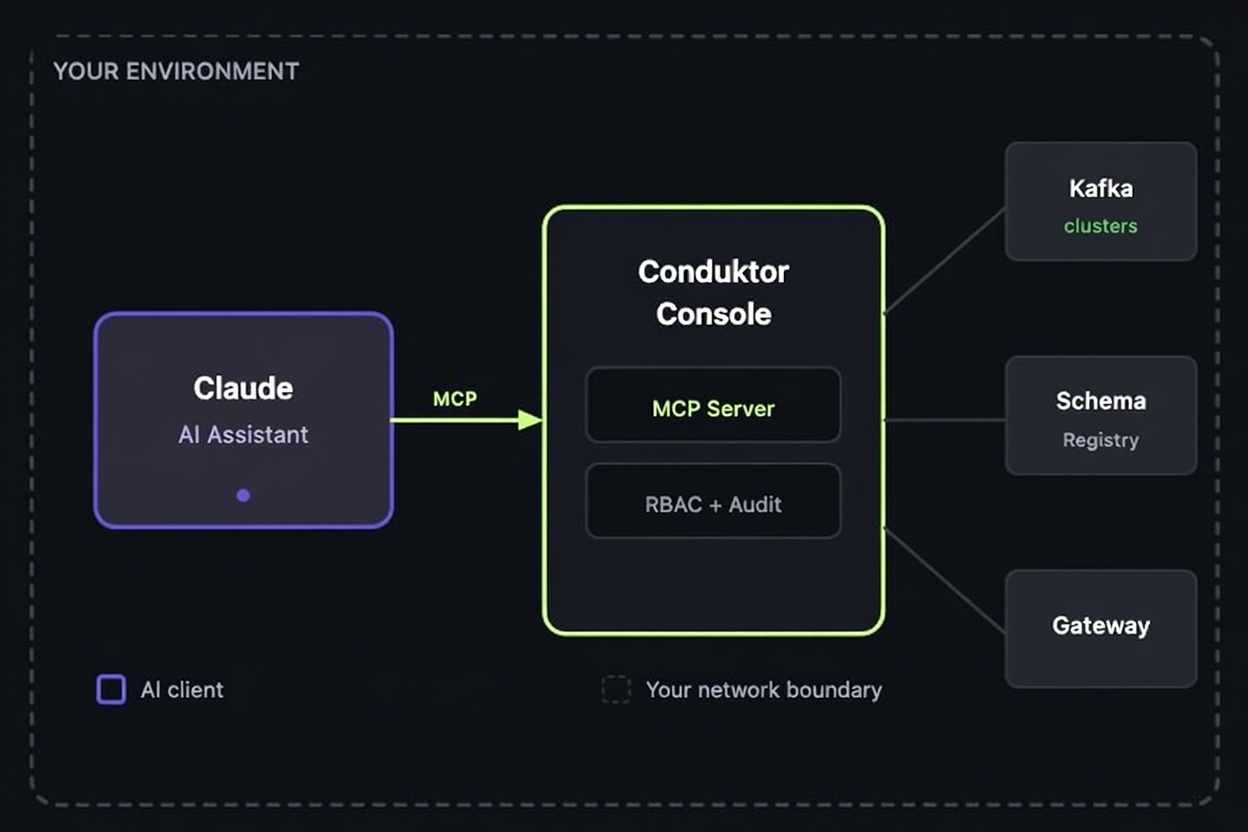
Two things change that. MCP (built into Conduktor Console) gives the agent live access to your infrastructure and governance. Conduktor Skills teach the agent how the platform works: which CLI command to run for your use case, which YAML to generate, and how to stop hallucinating fields. This post covers what Conduktor's MCP tools do, then three concrete use cases.
Which MCP Tools are available?
No separate MCP server to deploy. Conduktor Console hosts it natively, so MCP ships and updates with Console itself: no per-developer install, no fragmented local configs across teams. Bearer-token auth via Personal Access Tokens, permissions inherited from the calling user's RBAC, and a feature flag to turn it off entirely if your security team prefers.
On top of that, Conduktor also runs a separate Documentation MCP any agent can query directly for product docs, configuration references, and edge cases. Useful when the agent hits something it doesn't already know.
Here's what Conduktor MCP supports today:
| Domain | Tools | What you can ask |
|---|---|---|
| Clusters |
| Cluster inventory across environments: bootstrap servers, attached Schema Registry, Kafka Connect, ksqlDB |
| Topics |
| Topic inventory with usage, partitioning, RF compliance, consumer groups attached to a topic, recent messages |
| Insights |
| Where RF=1 lurks, partition skew, stale/empty/tiny topics, retention vs actual usage, self-service and schema coverage gaps; filter and group by any topic label |
| Consumer groups |
| Group inventory per cluster, abandoned groups, lag |
| Schema registry |
| Subject inventory per cluster (coverage and compatibility live in the insights tools) |
| Interceptors |
| Gateway policies enforced per tenant: encryption, masking, rate limits, data quality rules |
query-topics and aggregate-topics: query-topicsaccepts a string-based filter DSL:partitions.gte=3,label.env=production, named filters likeempty,stale,tiny,vip, and combinatorsand/or/not.aggregate-topicsgroups by classification, replication factor, retention bucket, or label, and runscount,sum,avg,min,maxover fields likestorageBytes,consumerCount,messageCount.
The agent is running typed queries against your live metadata, with the same permission model as the user behind the token.
MCP + Skills
MCP gives an agent tools and data, not the patterns for using them well. That's the job of Conduktor Skills. Works with Claude Code, Cursor, VS Code Copilot, Gemini CLI, or any agent compatible with Agent Skills.
npx skills add conduktor/skillsSkills are open-source on GitHub and we keep updating them based on internal usage and user feedback.
How it works:
- Discover — the agent runs the right
conduktor getcommands first, so it knows what's really on your cluster before generating anything - Confirm — it asks one question at a time with concrete options (real topic names, real partition counts, real owners), not open-ended prompts
- Generate — complete YAML with real values from the discovery step. The CLI can emit a YAML template for any entity (
conduktor template), so the agent grabs the exact schema upfront and doesn't hallucinate fields - Apply —
conduktor apply --dry-runfirst, thenconduktor apply -fon your approval - Look up — when its knowledge runs short, the agent automatically queries the Documentation MCP to fill the gap with up-to-date Conduktor docs
Together MCP and Skills turn "explain how to deploy Conduktor" into "I see you have Docker but no Kubernetes, so I'll generate the Compose file with real ports, run conduktor login, and confirm health".
Use Case 1: Onboarding a Platform Engineer
A new platform engineer joins. Their job: stand up Conduktor, encrypt PII on three topics, carve out two team namespaces.
"Install Conduktor."
The agent checks for docker, helm, and kubectl on the machine, asks the user (quick local test or existing cluster?) and produces a working docker-compose.yml or Helm values file. It polls /healthz, sets CDK_BASE_URL and CDK_API_KEY, runs conduktor login.
"Encrypt the
card_numberandcvvfields on thepayments-*topics."
The agent runs conduktor get interceptors and conduktor get topics to find what's already deployed and what matches the glob, then generates an EncryptPlugin YAML with the real topic list, real field paths, and the KMS reference your cluster expects. It offers conduktor apply -f --dry-run, then conduktor apply -f on approval.
For multi-tenancy, the same pattern: discover virtual clusters, ask how many teams and what they're called, generate VirtualCluster + ServiceAccount + Group YAML, apply.
The platform engineer isn't typing YAML from memory or copy-pasting from docs. They're confirming choices. The skill knows the resource model; the CLI grounds it in real state.
Use Case 2: Shipping a New Application
Dev teams need a topic to produce to, credentials to connect with, and permission to read another team's data. Today that flow is a Slack thread and a Jira ticket.
With the skill, a developer asks:
"My
orders-serviceapp must produce to a newshipped-orderstopic."
The agent runs conduktor get appinstance to find the dev's ApplicationInstance, checks the attached ResourcePolicy for naming and partition constraints, and asks one question: topic name and message volume. It picks a partition count that satisfies the policy and a retention that matches the volume class, generates the YAML, and applies it. The dev gets a working topic that already passes self-service review.
"I need access to the
customers-mastertopic owned by the accounts team."
The agent runs conduktor get topics customers-master and conduktor get applicationinstance to find the owner, generates the permission YAML that requests read from the owning AppInstance to the dev's AppInstance, and routes it through the self-service approval flow.
Use Case 3: Insights, Cost, and Compliance Across Clusters
A platform lead asks:
"What should I clean up this sprint? Pull the top wasteful topics across all clusters and group them by owner."
The agent calls insights-topics for each cluster, which returns the full risk and cost picture: most-valuable topics, low-replication risks, partition skew, empty/stale/tiny topics, and self-service or schema coverage gaps. Then aggregate-topics grouped by team label. Then a query-topics call scoped to the worst-offender team to surface the specifics.
The output is a ranked list with owner, projected savings, and the exact conduktor delete or retention-update command. The conversation continues:
"For the payments team's stale topics, was anything consumed in the last 90 days?"
query-topics with idleDays.lt=90, scoped to the payments label.
It's hard to answer such questions in a UI: "Compare my production and staging clusters. Are they proportionally sized, or am I overpaying for environments that don't need it?", "If I right-size the top 20 over-provisioned topics, what are the projected savings?", "All topics labeled pii=true, with retention, encryption, and consumer access. Format for our SOC2 audit."
MCP makes the loop conversational. The skill keeps the agent from inventing data or commands that don't exist or recommending operations the cluster can't run.
What Comes Next
Today's Conduktor MCP is read-only. Anything that mutates production (creating a topic, applying an EncryptPlugin, opening a Partner Zone, carving a Virtual Cluster, throttling a misbehaving client) goes through the CLI, which the Skill already drives end-to-end. That makes MCP additive rather than blocking. With Skills + CLI, the agent already covers the full Conduktor surface:
- Self-service for app teams: topics, schemas, ACLs under platform guardrails
- Cost insights per team, topic, app, and tenant (via MCP insights and the indexer)
- Data quality enforcement with Validation Rules and Policies that catch bad messages before brokers do
- Field-level or full-payload encryption at the Gateway, transparent to clients
- Traffic control at the Gateway: throttle, audit, block clients with interceptor rules
- Partner Zones to expose selective topics to external orgs
- Virtual Clusters for multi-tenant Kafka: one physical cluster, many isolated logical ones with their own ACLs and quotas
What MCP adds over the CLI is centralization: no install per developer, no fragmented configs, one auth boundary across teams. And when a Conduktor capability doesn't map cleanly to a single CLI command, MCP becomes the natural surface to expose it.
Code can live anywhere (local, GitHub, internal repos), but data access has to flow through one system that enforces ownership, audit, and policy. When agents get more autonomous, they'll use the same self-service interface a human would, with the same approval gates and audit trail.
Install with npx skills add conduktor/skills, enable MCP in Console, and try the questions you'd normally hold for the on-call senior.
Related: Set Up a Kafka Platform with an AI Agent (live demo) → · Conduktor MCP → · AI for Kafka Operations → · Conduktor Skills on GitHub →