

Ask ten platform engineers what makes Kafka secure and you'll get ten different answers. Most start with TLS.
When we help our customers strengthen their Kafka security, we work around four pillars. Each one answers a guiding question:
Encryption
Can an outsider read the data?
Authentication
Who can connect to the cluster?
Authorization
What are they allowed to do?
Auditing
What did they actually do?
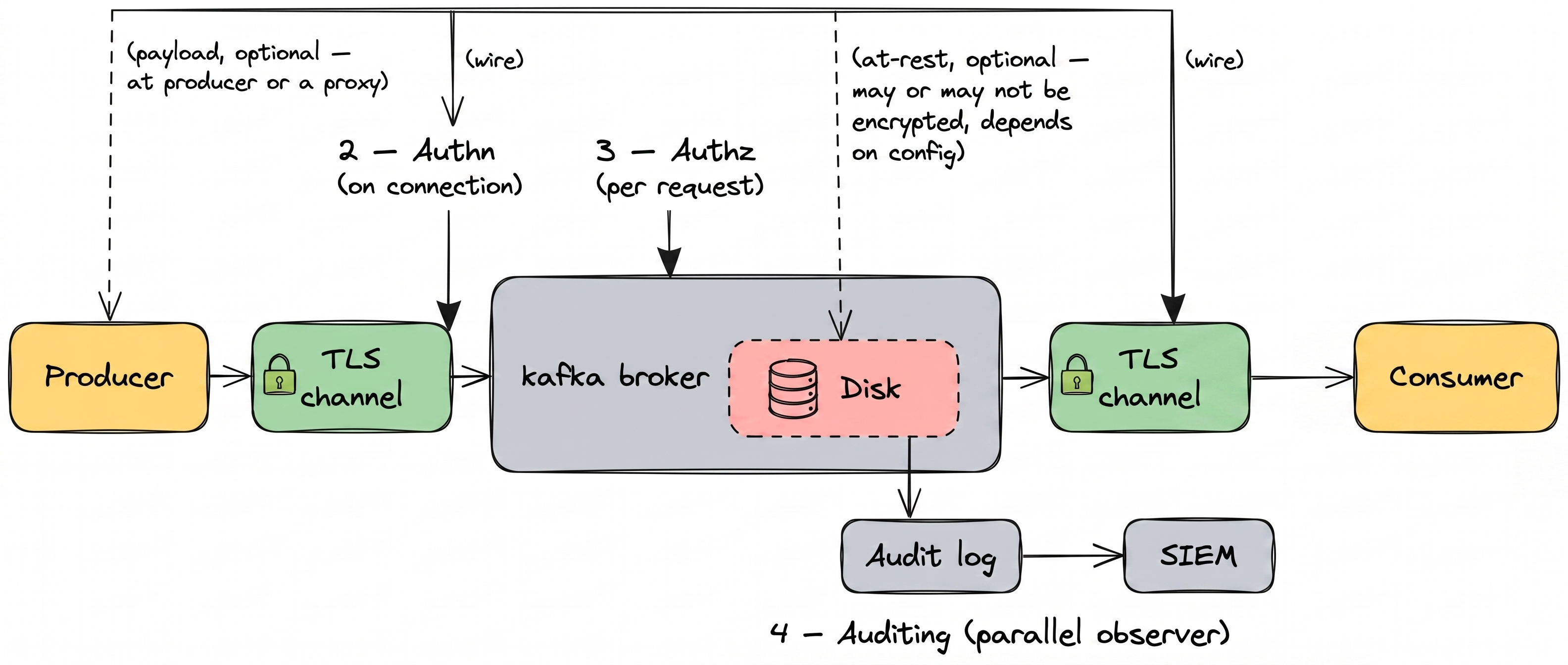
Apache Kafka provides some building blocks already, but the devil's in the details:
- Encryption: TLS encrypts the wire. Cloud providers encrypt the disk. Neither covers what's inside the message. Kafka has no field or message-level encryption, so anyone with read access to a topic sees the full message contents.
- Authentication: Kafka authenticates service accounts, not people. Service accounts are painful to provision and rotate, so apps reuse them and engineers log in with the app's credentials. When you see
User:payments-appin the audit log, you can't tell whether that was the production service or a person. - Authorization: ACLs don't scale. They're flat (no groups, no inheritance) and managed per cluster with no central view. Past a handful of teams or a few dozen topics, onboarding, offboarding, and access reviews each mean running
kafka-aclsmanually on every cluster. They all fall behind reality. - Auditing: Kafka's audit is raw logs, not an audit trail. They live on each broker and inside each client application. Even with every log gathered in one place, you can only see who logged in, who got access to which topic, and who changed topics or ACLs. You can't see which records were actually read or written, or what was in them.
Let's see how we guide our customers to implement strong Kafka security patterns.
Can an outsider read the data?
Encryption in Kafka is three layers: the wire between clients and the cluster, the drive the broker writes to, and the payload inside the message. Each layer covers a different threat, and each has a clean scope you can verify.
Data in transit: TLS
TLS encrypts the connection between a client and the cluster. Once the message reaches the broker, TLS has done its job. From that point on, the broker handles the message in memory and on disk. TLS doesn't touch any of that.
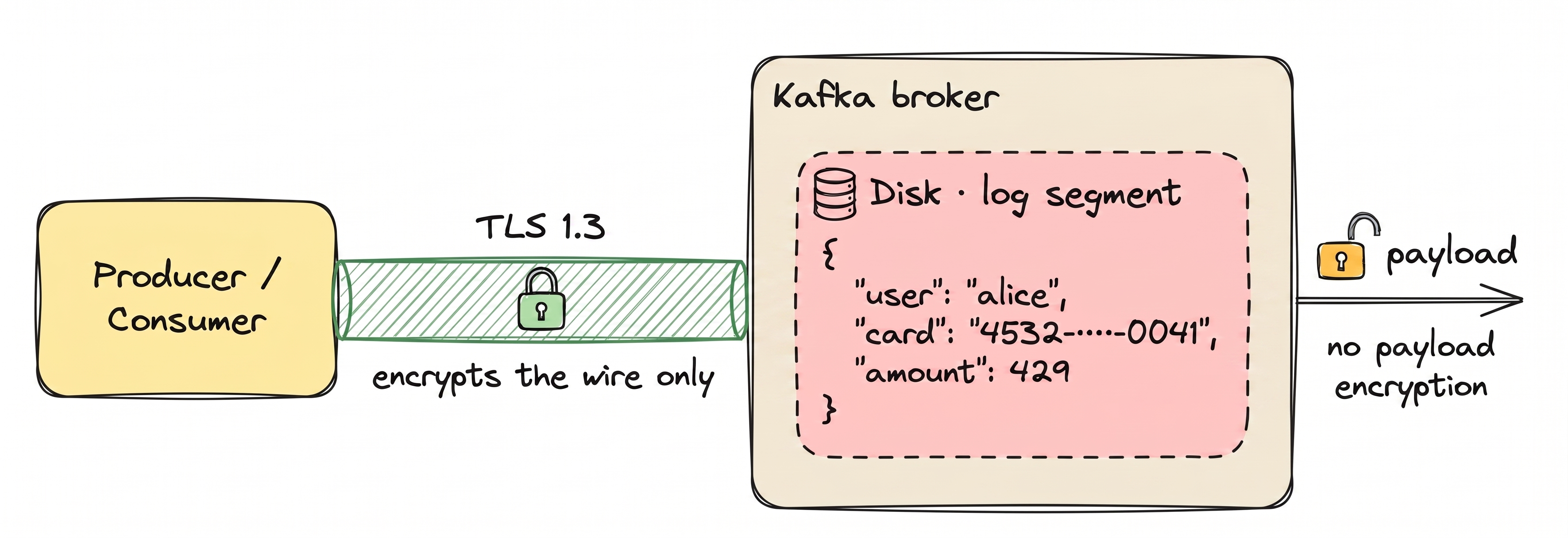
TLS protects the connection. Once the message reaches the broker, TLS is done. Without payload encryption, anything with broker access reads the payload in full: admins, monitoring agents, a leaked credential. With payload encryption, plaintext requires the KMS key.
Data at rest: disk-level encryption
Cloud providers handle disk encryption for you. AWS encrypts EBS volumes. Confluent Cloud, Aiven, and Redpanda Cloud do the same by default. On self-managed setups, LUKS or dm-crypt does it. Disk encryption protects against stolen drives and misconfigured backups. It does not protect against a legitimate read, because the broker decrypts on the way out.
Field-level and message-level encryption
The third layer, application-level encryption, comes in two forms.
Message-level encryption encrypts the entire payload. The broker sees only ciphertext. Downstream processing that depends on payload content (filtering, KSQL, Streams transformations) generally requires decryption. Tokenization (via HashiCorp Vault Transform) can preserve equality, so filters and joins still work on the tokenized value without decryption.
Field-level encryption encrypts only sensitive fields, such as PII or payment data. Routing and filtering on non-sensitive fields still work. The broker never sees the protected values in plaintext.
This becomes mandatory during cloud migrations because your data physically leaves your network and sits inside someone else's infrastructure. When that infrastructure belongs to Confluent Cloud, MSK, or Aiven, the cloud provider has both technical access to its own brokers and legal exposure you no longer control: subpoenas, regional jurisdiction, insider risk. Payload-level encryption with customer-held keys keeps the data unreadable to the provider, no matter what changes outside your boundary. The same requirement is codified in PCI-DSS Requirement 3, the HIPAA Security Rule, GDPR Article 32, and CWE-311. For how each maps to Kafka mechanisms, see Conduktor's Kafka security controls reference.
Of the three layers, payload encryption is the only one that survives a legitimate read inside the cluster. It is also the only one Kafka does not help you with.
Three ways teams configure encryption in practice. Disk encryption is orthogonal: turn it on alongside any of these.
| Strategy | On the wire | On broker disk | Readable by admins | Routing & filtering | Typical use |
|---|---|---|---|---|---|
| TLS only | Encrypted | Plaintext (encrypted at rest if disk encryption is on) | Yes, through a Kafka client | Preserved | Baseline |
| Field-level | Encrypted with TLS | Ciphertext (regardless of disk encryption) | No | Works on non-encrypted fields | PII, PCI, HIPAA |
| Message-level | Encrypted with TLS | Ciphertext (regardless of disk encryption) | No | Lost; full payload is opaque | End-to-end confidentiality |
Read access to the topic sees: $ kafka-console-consumer --bootstrap-server kafka.acme:9092 \
--topic customer-payments --from-beginning --max-messages 1
{"user_id":"u_8211","email":"alice@acme.com","card_number":"4242 4242 4242 4242","ssn":"123-45-6789","amount":247.50}The wire was encrypted. The disk was encrypted. The record still arrived in plaintext. Closing that gap is an architectural decision, not a config flag.
Our recommendation
For regulated data, run encryption at the proxy layer in front of Kafka. The proxy encrypts at the field or message level before your data reaches the broker, so the broker only ever stores ciphertext. Keys live in your key management service (KMS), not in Kafka.
Who can connect to the cluster?
Authentication is the credential check (who you are). Authorization is the ACL check (what you're allowed to do). Both run on every Kafka request. Kafka treats them as completely separate concerns: a valid credential with no matching ACL still gets you nothing.
Authentication produces a principal: the identity that authorization scopes to and audit logs record. mTLS, SASL/SCRAM, and OAUTHBEARER all produce one.
68% of breaches involve the human element: errors, stolen credentials, and social engineering. Not exotic exploits. (Verizon 2024 DBIR)
The harder problem isn't the handshake. It's that Kafka only authenticates service accounts, with no concept of a human user. Engineers log in with the application's credentials when they need to query a topic or debug a consumer. Service accounts are painful to provision and rotate, so applications end up sharing one credential rather than rotating ten secrets every quarter. From Kafka's perspective, every actor on a service account looks identical.
Here is what an action by User:payments-app looks like in the authorizer log:
[2026-05-08 14:22:05,123] DEBUG Principal = User:payments-app is Allowed operation = READ from host = 10.4.12.51 on resource = Topic:LITERAL:customer-payments for request = Fetch with resourceRefCount = 1 based on rule MatchingAcl(acl=...) (kafka.authorizer.logger)That principal could be the deployed payments service in production, Alice on her laptop debugging a stuck consumer, the nightly reconciliation job, or a leaked credential from last quarter's incident. The line is the same every time.
Our recommendation
For humans, the answer isn't a Kafka credential at all. Route them through a management layer that handles SSO and translates each action into scoped Kafka calls. This solves most of what makes Kafka authentication painful:
- Real human identity. Each person signs into the management layer as themselves through SSO. Per-user identity is preserved in the management layer's audit log, so you can tell Alice's session apart from the payments service even though the broker sees one principal.
- Less to leak, less to rotate. Humans don't hold Kafka credentials at all. When the IdP deactivates someone, they can't sign back in or refresh their session.
- IdP policies apply at the door. Multi-factor auth, location restrictions, and IdP session policies enforce when people sign into the management layer.
For applications, the two common authentication methods are client certificates (mTLS) and credential-based logins (SASL or OAuth tokens). Apps connect directly to Kafka, or through a proxy in front of Kafka that lets you choose where credentials live: stored in the proxy or delegated to backend Kafka. Use the management layer to provision a service account per app, with credentials managed centrally instead of via per-cluster CLI. Apps stop sharing one credential to avoid the rotation cost.
What are they allowed to do?
Authentication says who. Authorization says what. Kafka has two main approaches: native ACLs, and role-based access control layered on top.
Access Control Lists (ACLs)
Kafka ACLs are the enforcement layer that maps principals to resources and operations. Every grant is a per-(principal, resource, operation) tuple, with no concept of a role like "Topic Reader" or a team namespace that scopes permissions automatically. Prefixed resource patterns reduce the per-topic count, but every new principal still needs its own grants because there's no group or role to attach them to.
Every grant, every revoke, and every access review is a kafka-acls command on every cluster, and changes require ALTER on the cluster resource: a privilege typically held by a small admin group. That bottlenecks the ACL workflow on a few platform engineers, because the credential that adds an ACL is the same one that can reshape your cluster.
What this looks like at scale, on a single cluster:
$ kafka-acls --bootstrap-server kafka-prod-eu-1:9092 --list

Current ACLs for resource `ResourcePattern(resourceType=TOPIC, name=customer-payments, patternType=LITERAL)`:
	(principal=User:payments-app, host=*, operation=READ, permissionType=ALLOW)
	(principal=User:fraud-app, host=*, operation=READ, permissionType=ALLOW)
	(principal=User:alice, host=*, operation=READ, permissionType=ALLOW)
	(principal=User:bob, host=*, operation=READ, permissionType=ALLOW)

Current ACLs for resource `ResourcePattern(resourceType=TOPIC, name=customer-events, patternType=LITERAL)`:
	(principal=User:payments-app, host=*, operation=READ, permissionType=ALLOW)
	(principal=User:fraud-app, host=*, operation=READ, permissionType=ALLOW)
... [hundreds of resources] ...
That is one cluster. To answer "who has access to customer-payments?", grep that output across every cluster you run.
"For dozens of users and topics, ACLs work. For hundreds or thousands across multiple clusters, they become unmanageable."
Our recommendation
Past a handful of teams or a few dozen topics, layer a role-based control plane on top of ACLs. Default to least privilege: start with no access, and grant exactly what each application and human needs.
For humans, roles in the management layer decide which clusters, applications, and topics each person can read or change. Humans never get a Kafka credential. When they create a topic or browse messages, the management layer runs the Kafka call for them. Connect roles to your IdP so when an account is deactivated, the person loses Kafka access at the same time.
For applications, every app gets its own service account, not a shared one, with permissions on specific topics. The management layer creates the credential and writes the access rules for you. Those rules can live on the broker as ACLs, or at a proxy in front of Kafka. The app connects with its own credential and gets rejected if it tries anything outside its grants.
Both applications and humans live in one place. Onboarding, offboarding, and access reviews stop being per-cluster CLI work.
What did they actually do?
When an auditor asks "who consumed customer PII on March 3 at 2 PM?", the answer should take minutes, not weeks. Auditing captures every action with enough context to reconstruct what happened. For a deeper walkthrough, see Kafka audit logging for compliance and forensics.
What Kafka logs natively
Kafka uses Log4j2 (via SLF4J) to emit authorization and authentication events. With the right configuration, you get records of:
- Successful and failed authentication attempts
- Authorization decisions (allow or deny)
- Admin API calls (topic creation, ACL changes, and config updates)
A typical line from kafka.authorizer.logger:
[2026-03-03 14:22:05,123] DEBUG Principal = User:alice is Allowed operation = READ from host = 10.4.12.51 on resource = Topic:LITERAL:customer-pii for request = Fetch with resourceRefCount = 1 based on rule MatchingAcl(acl=...) (kafka.authorizer.logger)That line answers "was Alice allowed to call fetch on customer-pii?". Compare it with what an auditor actually asks:
"Alice read 47,392 records from
customer-piion March 3 between 14:22 and 14:24. Those records contained 47,392 email addresses and 12,847 SSNs. Was that volume of PII access authorized?"
Kafka can't answer that. It emits no events that show which records were read or written, what was inside them, or how many. The events it does emit (logins, allow/deny decisions, admin calls) live separately on each broker and each client application, so even what's captured ends up scattered.
Compliance reporting
Auditors don't want raw logs. They want evidence: "show me every access to PCI data in Q3." That means:
- Retention policies aligned with regulations (GDPR: case-by-case; PCI-DSS: at least one year; HIPAA: six years)
- Tamper-evidence: signed or write-once audit logs
- Searchable reports filtered by user, resource, time range, or action type
Apache Kafka produces the raw events. Turning them into audit-ready evidence is work most teams end up doing themselves.
If you operate in the EU or DACH, the same access, encryption and audit controls also answer DORA, GDPR and IT-Grundschutz. That is the case for building one Kafka control layer for all three rather than a separate workstream per regulation.
Our recommendation
Capture Kafka traffic events (every produce and fetch, with topic, partition, principal, and timestamp) at the proxy or client layer, and pair them with management events from your management layer (logins, topic lifecycle, permission changes). Ship both to your SIEM, with retention configured on the destination to match whichever regulation governs your data. Audit becomes a stream in its own right, not a log file you grep.
The four together
Each one has known weaknesses on its own. Stacked, the same threat usually doesn't punch through all four. That's defense in depth.
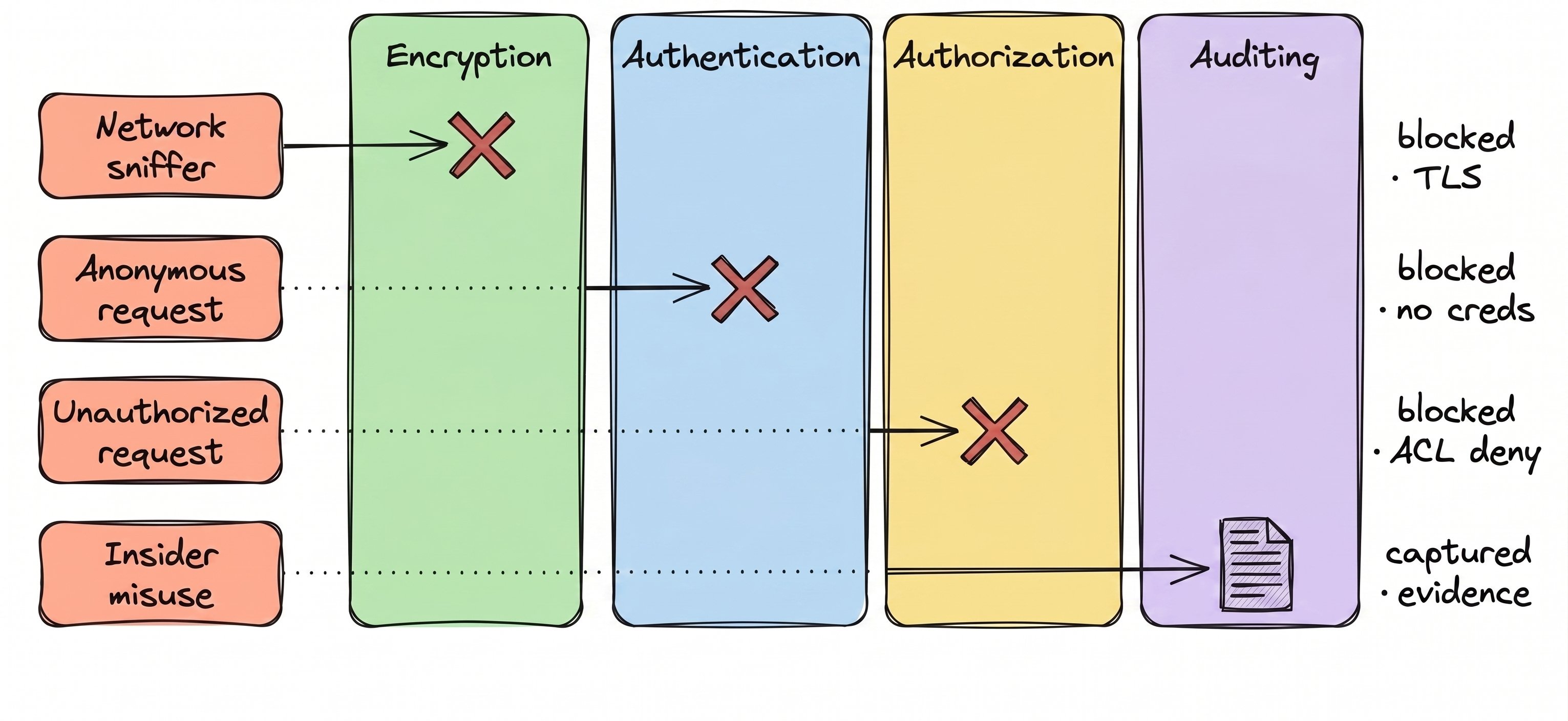
| Control | What it stops | What it leaves open |
|---|---|---|
| Encryption | Network sniffing (TLS), stolen drives (disk encryption) | The payload itself: anyone with read access to a topic reads everything |
| Authentication | Anonymous access | Identity collapse: can't tell humans from applications, or one app from another sharing a credential |
| Authorization | Unauthorized access to resources | Unmanageable ACLs: flat, per-cluster, no central view. Onboarding, offboarding, and reviews lag reality |
| Auditing | Audit-time gaps in encryption, authentication, or authorization | What data actually moved: native logs are scattered and control-plane only |
Want a second opinion?
We do free 30-minute Kafka security reviews. We'll score your cluster against the four pillars, surface the gaps, and hand you an actionable plan to tighten the bolts. No strings attached.