
June 2026
Configuration Templates, Topic Views GA, and Stream Lineage
Configuration Templates ship approved configs by default, Stream Lineage maps access from day one, and Topic Views plus multi-listener Gateway reach GA.
Configuration Templates: Scale Teams Without Scaling Expertise
Platform teams can define approved templates for topics and connectors that include the right defaults, guardrails, and naming conventions. Application teams can then provision topics or connectors directly from these templates and get a validated configuration instantly, without needing to understand every partition, retention, or connector setting.
Because the rules are embedded in the template, misconfigurations are caught before deployment instead of after they cause issues in production. Platform teams spend less time handling tickets, and application teams move faster with fewer ways to get it wrong. Explore Configuration Templates →
Topic Views Are Now Generally Available
Topic Views, introduced in preview last month, are now generally available. They let consumers work with a filtered, projected view of a Kafka topic without duplicating data or running a separate stream processing job. They are lightweight, non-materialized views over data you already have.
This release also expands filtering capabilities. You can now filter on record keys, headers, and metadata in addition to values, compare fields against each other, and use type-aware matching for numeric, boolean, and time-based fields. Unsupported SQL is validated and rejected when the view is created. Explore Topic Views →
Stream Lineage: See Who Can Access What From Day One
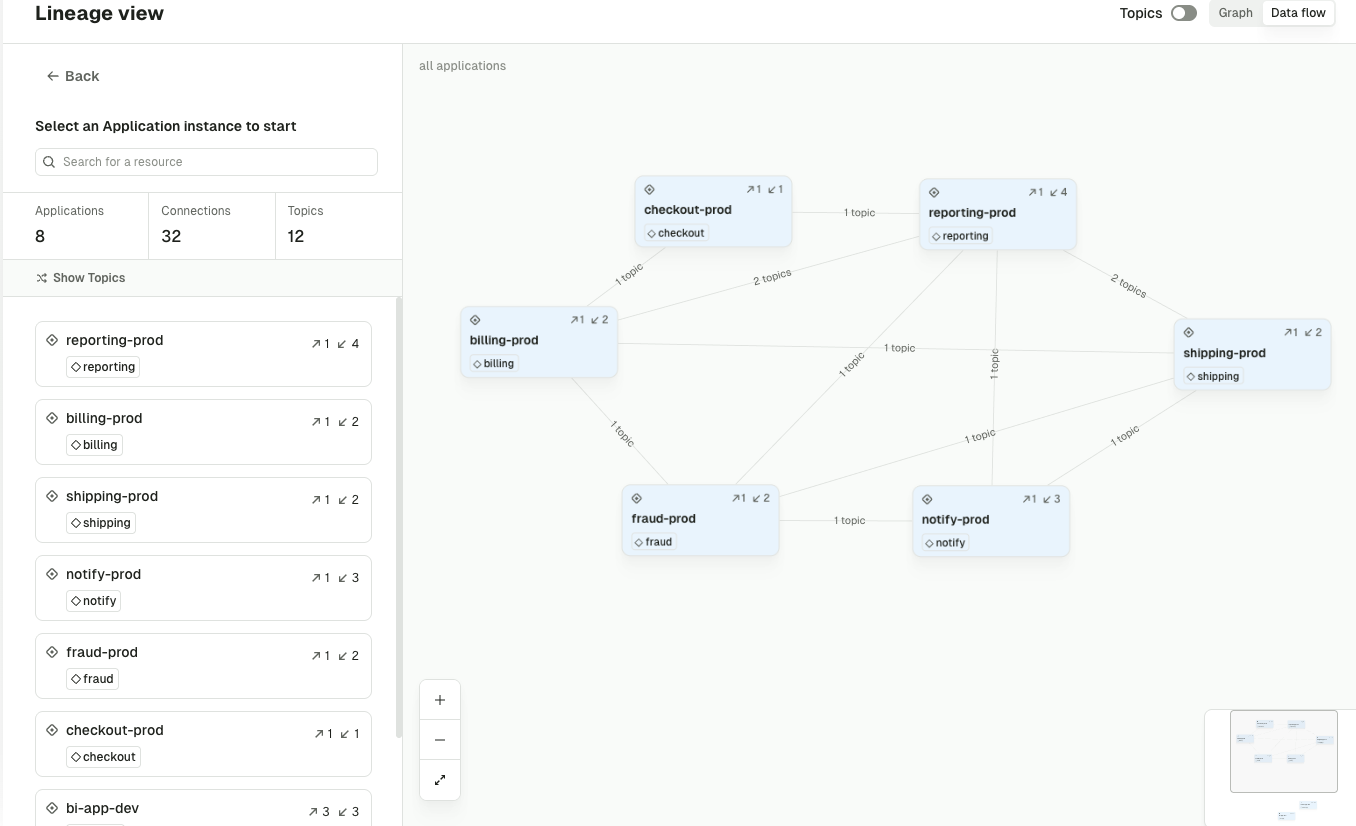
Stream Lineage gives you a connected map of which applications and teams can produce to and consume from topics across your Kafka environment. It is built from access data alone, giving you immediate visibility into who can access what as soon as you connect Conduktor. No live traffic or extra setup required.
It also lets different business units surface relationships across their respective domains, so each team can see its own dependencies without losing the bigger picture.
This static view is the first step in our lineage story, with a live view to follow in a future release. Even today, it answers a key question that comes up before migrations, access changes, and incidents: what depends on this topic? Explore Stream Lineage →
Public API and CLI: Automate Everything, Integrate Anywhere
Platform teams can now manage consumer groups and connectors directly through the API and CLI. This includes describing consumer groups, previewing and resetting offsets, stopping and restarting connectors, pausing and resuming connector tasks, and managing offsets.
This brings full Kafka lifecycle automation into GitOps pipelines, Backstage, and internal tooling, so day-to-day operations no longer require opening a browser. Browse the API and CLI reference →
Chargeback for Connect: Attribute Connector Costs to the Teams That Own Them
Kafka Connect can be expensive, especially with fully managed services, and those costs have been hard to attribute to specific teams. Chargeback now assigns Connect costs to the application teams that own the connectors, using a default task-hour rate per cluster with optional overrides per connector class.
Connect spend now appears alongside storage, partitions, ingress, and egress across cluster, application, and label views, and in CSV exports. Learn about Chargeback →
Multi-Listener Gateway Is Now Generally Available
Multiple listeners on a single Conduktor Gateway are now generally available, each with its own security protocol and network configuration. This lets you serve different access patterns through one Gateway: an internal listener with one set of policies, an external listener for partners or customers with another, all backed by the same Kafka clusters.
This is now the recommended approach for complex networking setups and replaces the legacy global network configuration, which is now deprecated. Configure Gateway Listeners →
For a full list of changes, read the complete release notes.
Enjoying the new features? Share your experience on G2