
Kafka Backup vs Replication: Key Differences
A Kafka backup is a point-in-time, independent, offline or immutable copy of topic records, Schema Registry schemas, and possibly consumer-group offsets, ACLs, and topic configurations.
It is distinct from replication and cross-cluster mirroring: those keep extra live copies for availability, while a backup lets a cluster be restored to an earlier, known-good state after a complete or logical failure. Kafka backup is often a requirement for compliance.
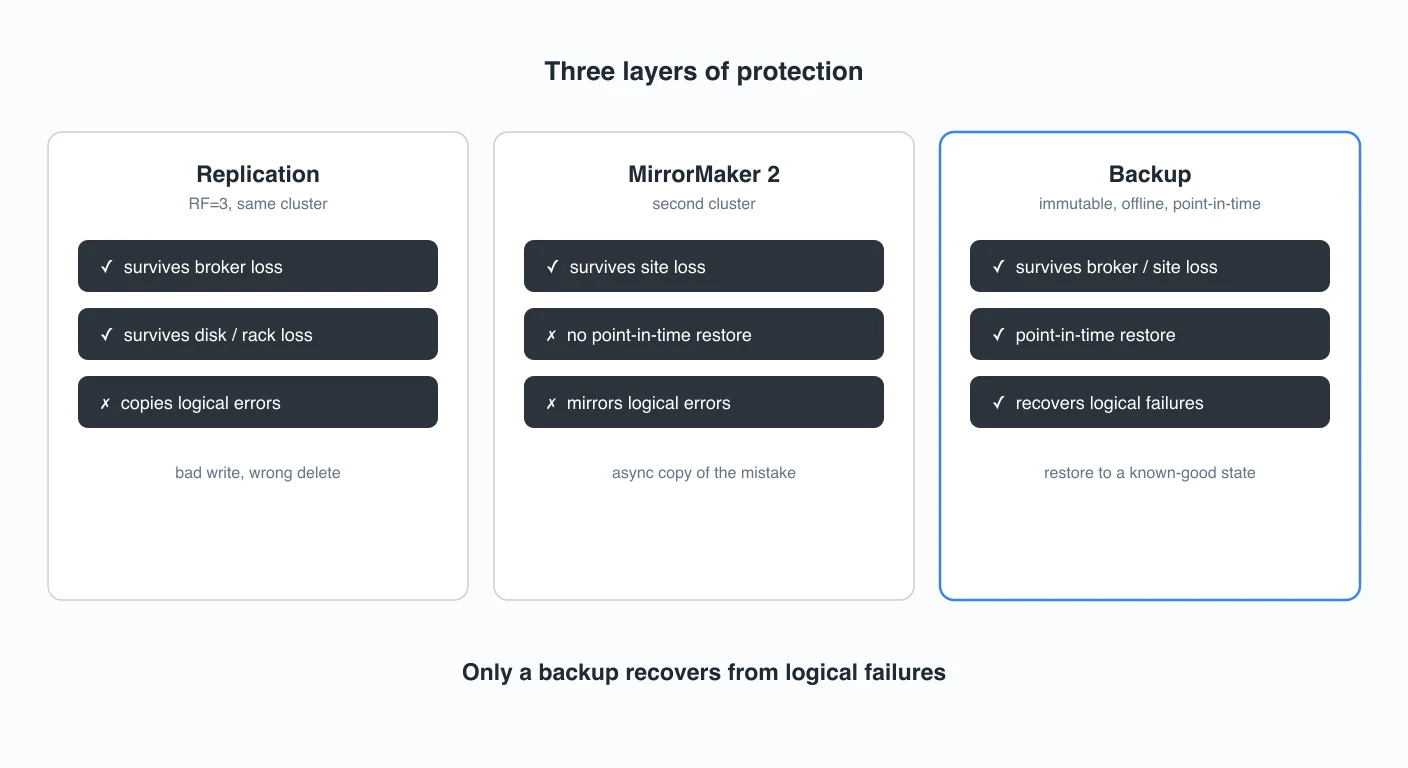
Two different failure classes
Why do you need Kafka backups?
A replication factor defaults to 3 in production, keeping a copy of every partition on multiple brokers or racks to avoid data loss. MirrorMaker 2 does the same across data centers, so an entire site can fail over to a standby cluster.
A backup defends against something different: logical failure:
- An operator deletes the wrong topic.
- A buggy deploy ships a producer that writes poison records.
- A retention misconfiguration expires data early.
- Ransomware encrypts the payloads.
The data was never lost to hardware; it was destroyed by a valid, intentional-looking operation that replication dutifully applies to all copies.
You need all these solutions together:
- Redundancy (RF=3): survives broker and disk failure inside one cluster.
- Geo-replication (MirrorMaker 2, MSK Replicator): survives site failure by keeping a second live cluster.
- Backup: survives logical failure by keeping a restorable point-in-time copy outside the cluster.
Replication is not a backup
With acks=all, a write is acknowledged only after every replica in the current in-sync set (ISR) has it, so those in-sync replicas stay identical within milliseconds.
When a producer writes a corrupt record, it reaches every in-sync replica just as fast, so within one cluster all copies are identical and the corruption is everywhere. The same applies to a topic delete, retention expiry, or compaction: inside a single cluster the operation hits every replica, leaving no unaffected copy to fall back to.
| Replication (RF=3) | MirrorMaker 2 / geo-replication | Backup | |
|---|---|---|---|
| Protects against broker/disk failure | Yes | Yes | Partially (via restore) |
| Protects against site failure | No | Yes | Yes (if stored off-site) |
| Protects against accidental delete | No | Incidental: a source delete is not mirrored, so the target survives, by accident not by design | Yes |
| Protects against poison/corrupt data | No | No | Yes |
| Protects against ransomware | No | No | Yes (if immutable/offline) |
| Point-in-time rollback | No | No | Yes (to a snapshot point) |
| Captures offsets, schemas, ACLs, configs | No (it is the live cluster) | Partial: configs + ACLs; offsets opt-in, inactive groups only; no schemas | Yes |
| RPO / RTO | 0 / near-0 | > 0 / > 0 | RPO > 0 (snapshot gap); RTO scales with topic size |
| Cost / infrastructure | 3x in-cluster storage | Second live cluster + Connect | Cheap object storage |
MirrorMaker 2 is disaster recovery, not backup
MirrorMaker 2 is often mistaken for a backup because it produces a second copy of the data. It is a cross-cluster replication tool built for failover:
- It is asynchronous. Records reach the target cluster after they are committed on the source, so RPO > 0 and RTO > 0.
- It has no point-in-time rollback. MM2 keeps the target current with the source; it does not retain "the state as of T-1h."
- It copies bad data too. A poison record written by a broken producer is a valid record, so MM2 replicates it to the target like any other.
- It needs a second live cluster plus Connect. A backup lives in cheap object storage; MM2 requires running, paying for, and operating a full standby cluster and the Connect runtime.
- Failback is complex. After a failover, resyncing topics and reconciling offsets between clusters is a non-trivial operation, not a one-command restore.
A topic delete does not automatically propagate through MM2. That makes the mirror an accidental, time-bounded survivor of a delete, but it is not a designed, restorable capability. MM2 is the right tool for site failover only.
What a real backup must capture
Restoring Kafka is more than just replaying bytes. A complete backup captures:
- Records: the message payloads and keys, per partition.
- Schema Registry schemas: the contents of the
_schemastopic. Each record embeds a schema ID, so those IDs must be restored identically or the payloads cannot be deserialized. - ACLs: without them the restored cluster is either open or inaccessible.
- Topic and cluster configs: partition counts, retention, compaction, replication factor.
- Consumer-group offsets: so applications resume where they left off. They must be translated into equivalent positions in the target cluster, or consumers reprocess or skip data.
Restore is a bulk re-produce, so the recovery time scales with the size of the topic: a multi-terabyte topic takes real time to replay. Then, offset translation and resetting or repointing consumer groups are part of that restore runbook, not something the cluster does automatically.
How to back up Kafka: tools vs Connect S3 sink vs tiered storage
Kafka Backup tools. Kannika Armory and the open-source OSO kafka-backup write to S3-compatible storage and typically offer point-in-time restore, offset translation, schema-ID mapping, and selective or topic-remapped restore.
Kafka Connect S3 sink. A Connect S3 sink archives records to object storage and is frequently repurposed as a "backup", but it is not really one:
- No point-in-time restore.
- No offset capture.
- No schema or schema-ID translation.
- No ACLs or topic configs.
Tiered storage is not a backup either. Tiered storage (KIP-405) moves cold segments to object storage to cut cost and extend retention, but those segments obey the same retention policy and the same delete path as local data. Deleting the topic deletes the tiered segments too. It lowers the cost of keeping data; it does not make data restorable.
Compliance retention and running both
Regulated environments (audit trails, GDPR, SOX, financial record-keeping) generally require retention that is immutable and point-in-time restorable, with a defined RPO and RTO, properties that replication and tiered retention do not provide.
Prevention belongs alongside recovery. Governance tooling such as Conduktor can add RBAC and audit trails that reduce the odds of an accidental topic delete in the first place, but guardrails narrow the blast radius; they do not remove the need for a restorable copy.
A Kafka backup always has RPO > 0 (it is scheduled or asynchronous by nature). That is precisely why backup complements the zero-RPO replication tier rather than replacing it: replication protects the latest writes; backup protects against the logical failures replication would carry forward.
Apache Kafka ships neither backup nor a built-in restore tool, so the backup layer is always something added deliberately on top.
Does a replication factor of 3 count as a backup?
No. RF=3 keeps three synchronized copies to survive broker or disk failure. A logical failure (an accidental delete, a poison write, ransomware) is applied to all three copies at once, so there is no earlier state to restore from.
Is MirrorMaker 2 a backup?
No, it is a disaster-recovery and migration tool. It replicates asynchronously, keeps the target current rather than as-of an earlier point, carries corrupt records and compacted-topic tombstones forward, and requires a second live cluster plus Connect.
Can I use a Kafka Connect S3 sink as a backup?
Not safely. It is a forward-only archive with no point-in-time restore; offsets reset to 0 when a topic is recreated, schema IDs diverge across registries, and it captures no ACLs or topic configs, so restores become fragile, hand-built replay jobs.
Is tiered storage the same as a backup?
No. Tiered storage moves cold segments to object storage for cost and retention, but those segments follow the same retention and delete path as local data. Deleting a topic deletes its tiered data too.
What does a complete Kafka backup have to include?
Records, consumer-group offsets (with offset translation on restore), Schema Registry schemas (with schema-ID mapping), ACLs, and topic and cluster configs, plus a defined RPO/RTO and the ability to restore to a point in time.
Related Pages
- Disaster Recovery Strategies for Kafka Clusters: how backup fits alongside failover and multi-region design.
- Kafka Replication and High Availability: what the replication factor actually protects.
- Kafka MirrorMaker 2 for Cross-Cluster Replication: the DR/migration tool, and why it is not a backup.
- Tiered Storage in Kafka: cheap long-term retention, which is not the same as recoverability.
- Streaming Audit Logs: the audit trail that helps prevent accidental deletes.
- Exactly-Once Semantics in Kafka: delivery guarantees, and why they do not remove the need for backup.
Sources
- KIP-405: Kafka Tiered Storage, Apache Kafka wiki
- Apache Kafka Documentation, Replication & Operations
- Apache Kafka Backup: Everything You Need To Know, Confluent
- Cross-Data-Center Kafka Replication: Decision Framework, Confluent
- Demystifying Kafka MirrorMaker 2, Red Hat Developer
- Disaster Recovery Using MirrorMaker 2, Red Hat Streams for Apache Kafka docs
- Amazon MSK Replicator and MirrorMaker2: choosing the right strategy, AWS Big Data Blog
- Kafka Connect Isn't a Backup Strategy, Kannika
- kafka-backup: point-in-time recovery to S3/Azure/GCS, OSO / GitHub