
Conduktor vs Building Your Own Kafka Platform
Most teams running Kafka at scale have already built part of this themselves: a UI, a provisioning pipeline, a proxy for reachability, an encryption library. Usually because nothing on the market did it when they needed it. This page is about the point where maintaining that stack costs more than it returns, and what's worth keeping.
You built it because you had to
Nobody writes their own Kafka UI; the free ones are good, and so is Console's free Community Edition. What platform teams build is what the UI doesn't cover: a provisioning pipeline, a naming check, an access-request form, an owners list, a cost report. Each one solved a real problem on the day it shipped, and most of them still work.
The same is true in front of the brokers: a load balancer for reachability, a second one for failover, an encryption library in every application. Each part is sound. The cost shows up later, in the maintenance of the assembly and in the gaps between parts, like the application that never installed the library.
So the question isn't whether you can build it. You did. It's which layer you're on now, whether the next one is worth your team's time, and which of the pieces you already have should stay.
Open-source tool capabilities last checked against vendor documentation, September 2026.
Where the build starts to cost more
Working from the outside in. The first two layers, your existing tooling handles well.
1. Browse topics and groups
Covered. A free UI does this, and so does Console's free Community Edition, with replay and reprocessing on top. Nothing here forces a change.
2. Provision topics as code
Covered. YAML in Git and a pipeline is a good answer, and it keeps working with Console's API and Terraform provider underneath it.
3. Guardrails
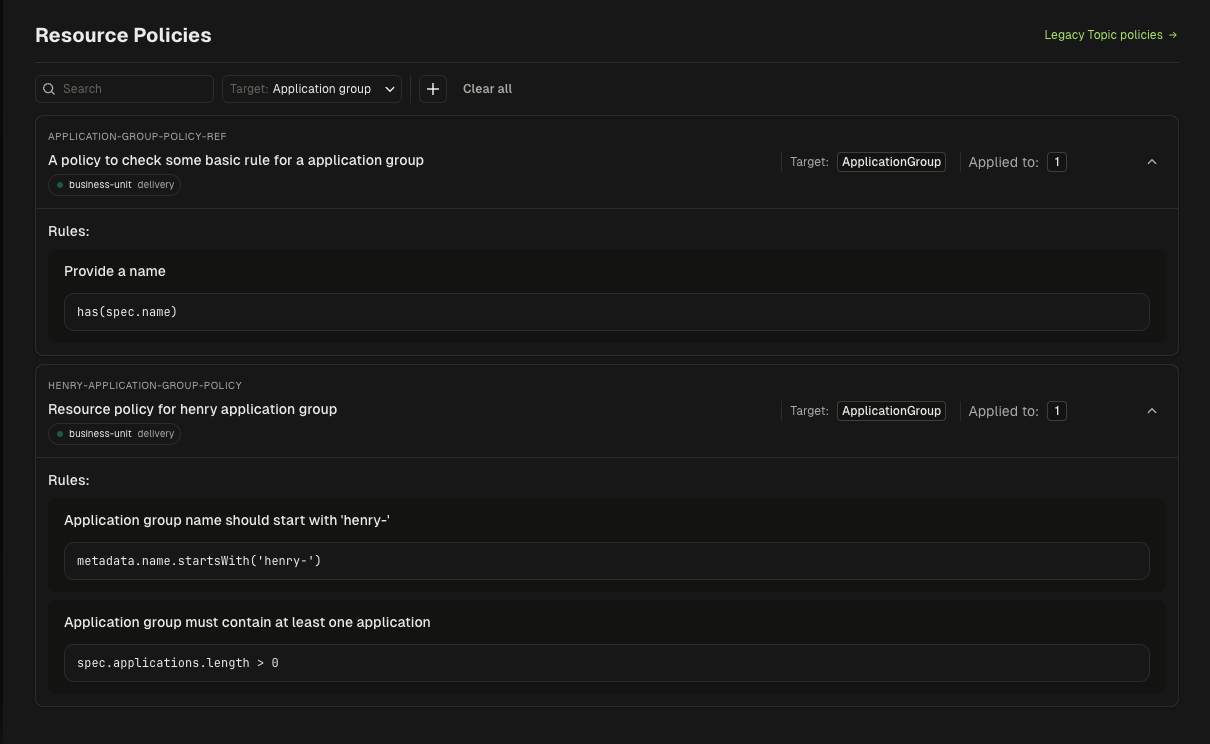
Where it turns. A pipeline check enforces the rules it knows on the requests that pass through it. Enforcing policy on every path, including the UI, the CLI, and what a team may grant itself, is a different kind of system.
4. Access to other people's data
Thousands of topics, dozens of owners, some of whom have moved on. Finding the right owner and recording the approval needs a catalog and a workflow, not a lookup.
Your stack vs Conduktor: layer by layer
Console layers first, then the Gateway layers. Where what you have is enough, the table says so.
| Layer | Conduktor | What you've built |
|---|---|---|
| Browse topics, groups, messages | ✓Console, including replay and DLQ reprocessing; free in Community Edition | ✓Any free Kafka UI does this; nothing here forces a change |
| Provision topics as code | ✓Terraform provider, CLI, API, plus self-service in the UI | ✓YAML in Git and a pipeline; keep it, and point it at Console's API if you adopt Conduktor |
| Guardrails on every path | ✓Topic policies validated on every request, whether it arrives by UI, CLI, API, or Terraform, without a ticket queue | ⚠A pipeline check covers the requests that go through the pipeline; the UI, the CLI, and self-granted access sit outside it |
| Ownership and access to others' data | ✓Application and topic catalogs, owner-approved access requests, audit of who granted what | ⚠An owners list and a request form; keeping it current as people move is manual, and there's no record of who approved what |
| Lineage and live traffic | ✓Who produces and consumes each topic, from live traffic | ✗A producer-consumer map maintained by hand, out of date as soon as a team deploys |
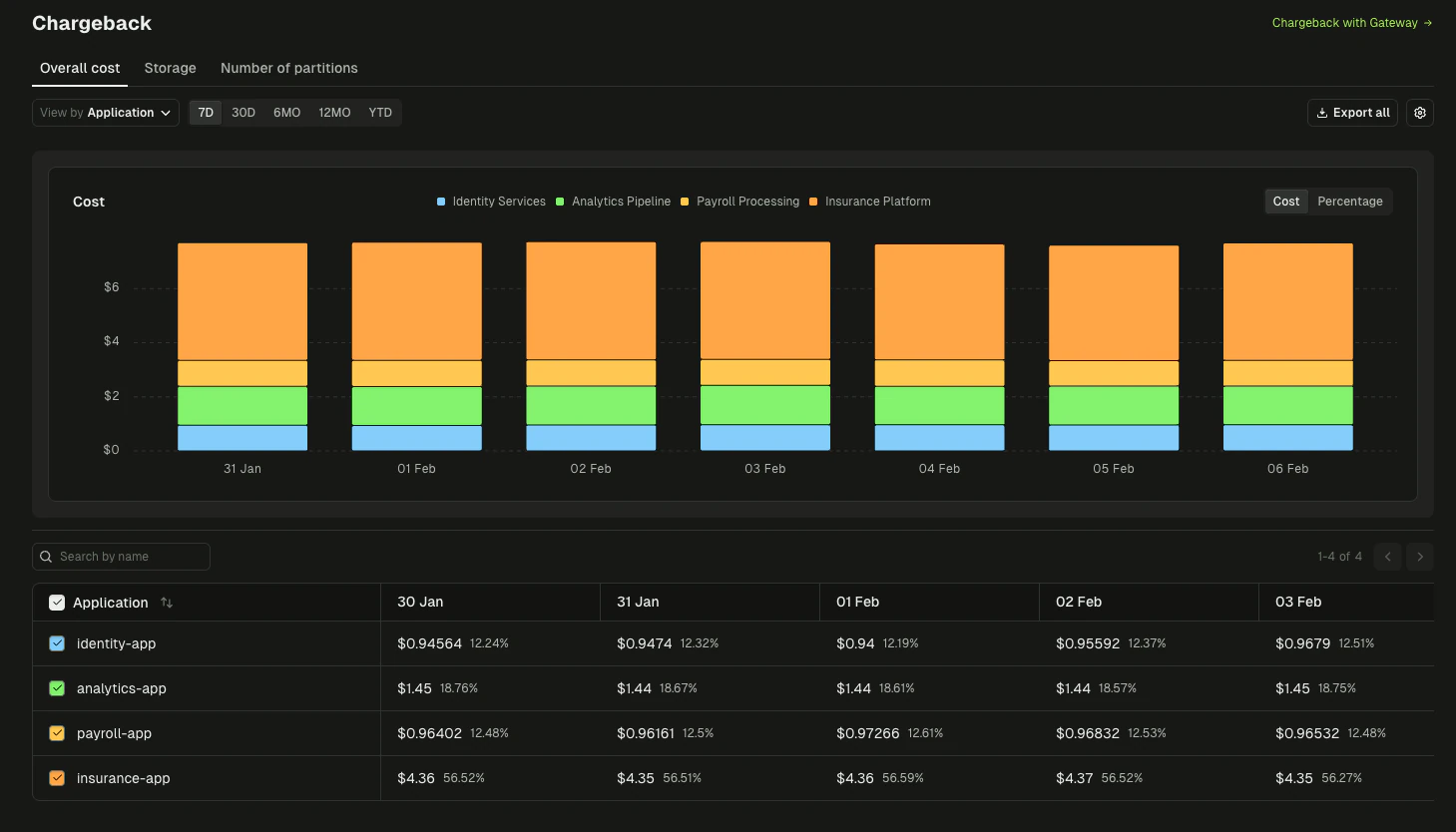
| Chargeback | ✓Cost attributed to topics, applications, and teams | ✗A cost model mapping partitions to teams, reconciled by hand each month |
| Alerting on lag, brokers, connectors | ✓Slack, Teams, email, webhooks | ✓Prometheus and Alertmanager, if you already run them; rules per team are yours to write |
| Reach brokers across networks | ✓Gateway, including the free Community Edition | ✓haproxy or nginx with SNI routing does this; keep it in front of Gateway if you like |
| Failover between clusters | ✓One API call, no client changes; chaos testing to rehearse | ⚠Flip the load balancer; clients reconnect on their own schedule, and there's no way to rehearse it |
| Encryption of sensitive fields | ✓Field-level encryption on the wire with KMS keys; every client covered | ⚠A library in every application and language, kept in sync; coverage depends on every team adopting it |
| Masking per consumer | ✓Gateway masks differently per virtual cluster or partner | ✗Not possible at the network layer; a load balancer can't read a Kafka message |
| Multi-tenancy | ✓Virtual clusters with their own namespaces, credentials, quotas, and policies | ⚠Prefixed ACLs and client quotas on shared brokers, or a cluster per team; no namespace isolation or per-tenant policies |
| Schema Registry authorization | ✓Schema Registry Proxy: OIDC and per-subject authorization for any registry, managed from Console | ⚠Confluent Platform's enterprise security plugin adds subject-level RBAC to its registry; other registries get basic auth or a reverse proxy that can't see subjects |
| Who's on call for it | ⚠Conduktor, under an SLA, and your team for the deployment | ⚠Your team, for each part, alongside everything else it owns |
IncludedPartial or gated behind a higher tierNot available
Layer 3: guardrails
Keep the pipeline. Move the rules under it.
A pipeline check enforces a rule for the requests that go through that pipeline. Console validates every topic, schema, and connector request against your policies no matter how it arrives, explains failures to the developer, and takes the platform team out of the approval loop. The GitOps flow you already have keeps working; it calls Console's API and inherits the guardrails instead of reimplementing them.
Layer 6: chargeback
The cost report that grew into a system
It usually starts as a query against partition counts and grows into a service that maps topics to applications to teams to cost centers, reconciled monthly. Console attributes cluster spend to topics, applications, and the teams that own them, so finance gets a breakdown and the platform team gets the month back.
The Gateway layers
What the network layer can't see
haproxy gets clients to brokers and can move them to another cluster, and it can stay in front of Gateway doing exactly that. What it can't do is encrypt a field, mask a record for one consumer and not another, or give a team its own namespace, because it never sees inside the protocol. An encryption library can, in the applications that adopted it. Gateway does it on the wire for every client, with keys in your KMS and no application changes.
Keep what you have if...
You're on layers one and two: a handful of teams, topics provisioned through Git, and no requirement yet for cross-team ownership, chargeback, or encryption beyond TLS. A free UI (ours or anyone's), a pipeline, and a load balancer are the right answer.
Add Conduktor if...
You've reached layer three or beyond: several teams share Kafka, someone is asking who owns what and who pays, compliance wants field-level encryption that holds for every client, or the maintenance of what you built is crowding out what you'd rather build. Your pipeline and proxy stay; Community Edition is free to start.
"Conduktor easily integrated with our CI/CD pipelines to enhance data governance. It's given us the tools to centralize compliance standards across the business, while allowing team-specific autonomy to speed up our processes."
Taras Slipets
Staff Data Engineer, Flix
"The biggest advice I can give is to think about governance from the moment you stand up the platform, and to design it so you can delegate it to the project teams, inside a frame you can industrialize."
Julien Maillard
Senior Architect, CDC Informatique
Read more customer stories


We already have a GitOps pipeline for topics. Do we need Conduktor?
Keep the pipeline; it's the right pattern. Flix runs 50 teams and 2,300 topics with resources as code on top of Console: the pipeline calls Console's API, and Console's guardrails, catalogs, and ownership apply to every request whether it came from Git, the UI, or the CLI. The rules then live in one place instead of in one pipeline.
Isn't a free Kafka UI plus RBAC enough for several teams?
Often, for a while. It holds as long as one platform team can own the config. The sign it's stopped holding is the ticket queue: every topic, ACL, and access grant routing through the same few people. What's missing at that point is delegation, which needs ownership and approval workflows rather than another dashboard.
Can haproxy or nginx do what Conduktor Gateway does?
For reaching brokers across networks and flipping traffic between clusters, yes, and Gateway Community Edition does that part free too. Neither can read a Kafka message, so encryption, masking, data quality, and virtual clusters aren't possible there. That's the line between a network proxy and a Kafka proxy.
What about an encryption library in every application?
It works for the applications that install it, keep it current, and use a supported language. The one team that didn't, or the connector and stream processor that can't, reads plaintext. Gateway encrypts on the wire, so coverage doesn't depend on the client. Our own Community Edition is free for the Console side of this.
How do we estimate the cost of what we've built?
Count the parts and the people: the pipeline, the naming check, the access form, the owners list, the cost query, the proxy configs, and who is on call for each. Then ask what the same engineers would ship next year if those were someone else's problem. Teams that do the exercise usually find the maintenance bill passes a Conduktor license inside a year; some find it doesn't, and that's a fine answer too.
What if we've already built most of it?
Then you know exactly which layer is costing you, and most of what you built stays. Console's API and Terraform provider slot into an existing GitOps flow, the free UI can stay for developers who prefer it, and Gateway sits behind the load balancer you already run.
See what you'd keep, and what you'd hand off
Thirty minutes, your Kafka and your existing pipeline: guardrails on every path, ownership catalogs, chargeback, and encryption on the wire.