

"Our networking is jacked up." — Platform engineer at a national retailer
Getting Kafka client applications connected to AWS MSK is painful and expensive, especially once you cross VPC or account boundaries. If you've done it, you probably recognize the pattern of errors. First you think you've checked all the boxes to get networking connectivity up: VPC peering, DNS, PrivateLink, and so on. You run netcat successfully:
nc -vz broker-bootstrap.kafka.mycompany.com 9096
Connection to broker-bootstrap.kafka.mycompany.com port 9096 [tcp/*] succeeded!
But your Kafka applications still fail to start. You see broker timeouts in the application logs:
Connection to node 2 (b-2.mycluster.abc123.c1.kafka.us-east-1.amazonaws.com/10.0.4.11)
could not be established. Broker may not be available.
You set up a bootstrap endpoint for connectivity, and it succeeds! What's wrong?
This is the first post in a series on the problems teams run into operating Kafka on AWS MSK, drawn from our AWS MSK Journey webinar. We start with networking because it's the one that tends to stall a rollout before anything else does.
Why the bootstrap succeeds but the brokers don't
A Kafka client never really talks to "the cluster" as a single endpoint. It picks a host from its bootstrap servers list and sends an initial metadata request to ask: which brokers hold the data I am trying to access?. The broker that happens to answer the initial metadata request will respond with the hostnames of the brokers the client is trying to reach. Every subsequent produce and fetch request then goes to those individual brokers, not back through any single bootstrap endpoint.
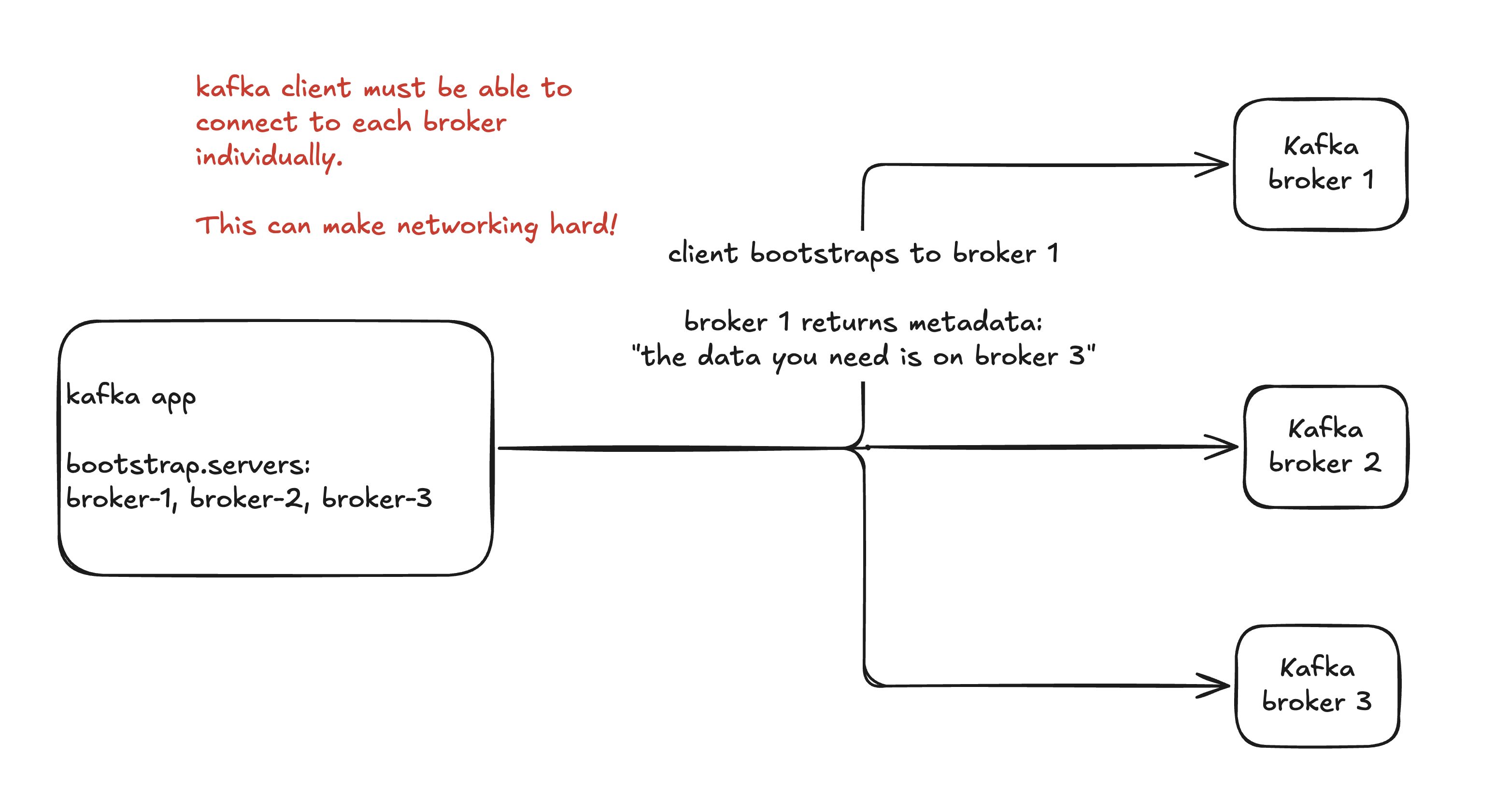
The HTTP mental model breaks. An HTTP load balancer can forward a request to any equivalent backend. Kafka doesn't work that way: each broker hands the client back its own address to reconnect on, and each one holds a specific slice of the data (the partition leaders). The client has to reach the right broker, not just any broker, and a transparent proxy that forwards blindly can't guarantee that.
Although the initial metadata request succeeds, that metadata returns AWS MSK's internal broker hostnames that are unreachable by the client:
b-1.mycluster.abc123.c1.kafka.us-east-1.amazonaws.com:9096
b-2.mycluster.abc123.c1.kafka.us-east-1.amazonaws.com:9096
b-3.mycluster.abc123.c1.kafka.us-east-1.amazonaws.com:9096
A client sitting in another VPC or account has to resolve and route to every one of those hostnames and ports individually, not just the bootstrap endpoint you configured. In this case, these broker hosts resolve over public DNS to private IPs only reachable within the VPC where the MSK cluster resides (plus any peered or connected networks).
Kafka does have a configuration that helps called advertised.listeners. These are the addresses Kafka hands back, i.e. advertises, to the client. You must configure this listener on each broker to advertise the hostname, port, and security protocol the Kafka client application can use to connect and authenticate to that broker.
Jumping through hoops
When I was a Field Engineer at Materialize, the team and I felt this pain every time an AWS MSK customer wanted Materialize Cloud to connect to their private MSK cluster. At the time, AWS documented a few secure connectivity patterns for this; the one simplest to reason about used a separate Network Load Balancer (NLB) and PrivateLink (PL) endpoint per broker, so the client could reach each one individually. Now imagine adding a broker to the cluster: you have to deploy a whole new NLB and PL endpoint, plus the firewall rules that go with them, or your applications break.
This was so onerous for customers that Materialize Cloud engineers built a way to require only a single NLB, which as of this writing you can still see in the Materialize documentation. But even this only moves the manual work around. The customer still has to configure a target group (port) per broker and then create a mapping inside of Materialize that associates each NLB target group port to a broker hostname. And again, if you add a broker, you need to update the NLB with a new target group AND update the Materialize connection object with the target group -> broker host mapping.
🚫 "We're on AWS MSK, so scaling is handled. We'll just add brokers when we need more throughput."
Yes, and you'll break your applications doing it if you're not careful.
AWS multi-VPC private connectivity to the rescue?
In 2023, AWS MSK announced multi-VPC private connectivity. It's a hard feature to discover and search for, but it helps: it automates what Materialize had to build by hand. You can now expose a private MSK cluster through a single PrivateLink endpoint and a single NLB, with MSK handling the automation for:
- Creating and updating the NLB target groups, one port per broker (instead of a dedicated NLB per broker like before)
- Creating and updating an advertised listener on each broker so it will correctly advertise the name of the PrivateLink endpoint host and NLB target group port
The diagram below shows this for oscorp, an AWS account sharing its MSK cluster with an application in another account, buynlarge:
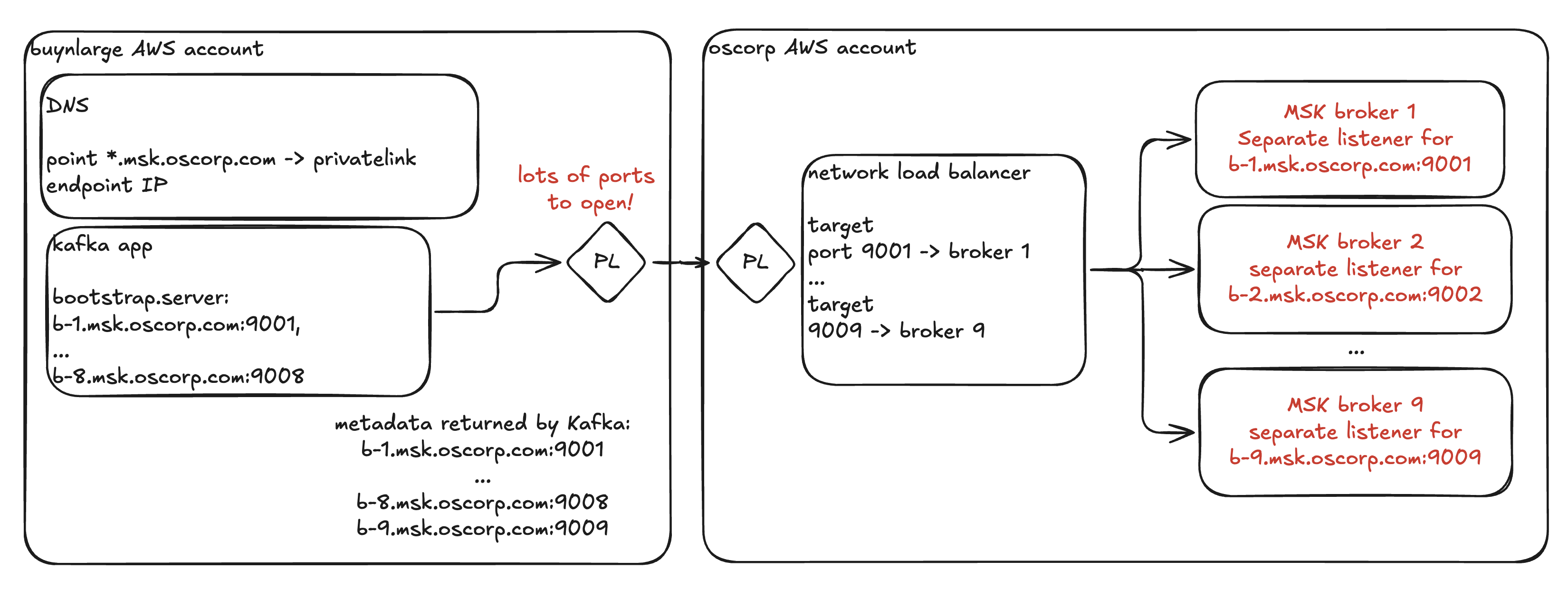
While this is a nice automation win for oscorp, it is not so convenient for buynlarge on the application side. MSK has a pre-allocated port range (14001-14100) but good luck asking the security team to create a security group with 100 open ports that you might use one day. In practice, buynlarge will have to make a new firewall request whenever oscorp decides to change the number of brokers.
It's also not entirely clear MSK's recommended automation will keep working this smoothly on KRaft clusters without a disruptive cluster restart, since KRaft doesn't allow altering advertised listeners dynamically.
Ideally oscorp would just give buynlarge a single bootstrap endpoint with a single port and their applications would just work.
The pattern that scales: a protocol-aware proxy
Everything above is painful for the same underlying reason: we are using standard network solutions to solve a problem that arises from the Kafka protocol. Only a proxy that understands the Kafka protocol can fix it cleanly.
Here's how it works:
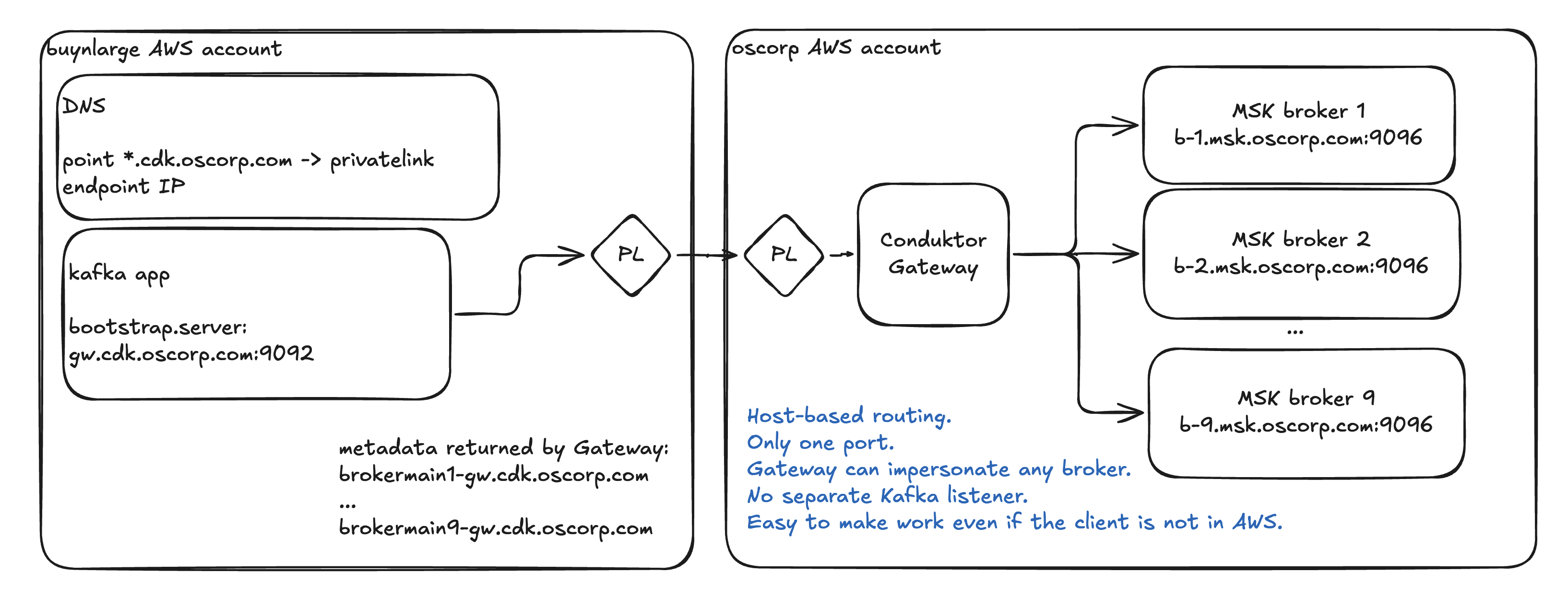
Conduktor Gateway proxy exposes a single bootstrap hostname, gw.cdk.oscorp.com, and a single port, 9092. Gateway then rewrites the broker metadata on its way back to the client, generating a hostname per broker with a configurable hostname pattern:
brokermain0-gw.cdk.oscorp.combrokermain1-gw.cdk.oscorp.combrokermain2-gw.cdk.oscorp.comand so on
DNS is configured so that all of these hostnames are redirected back to the single PrivateLink endpoint. Gateway then uses the hostname it receives from the client to know which broker it needs to forward the request to.
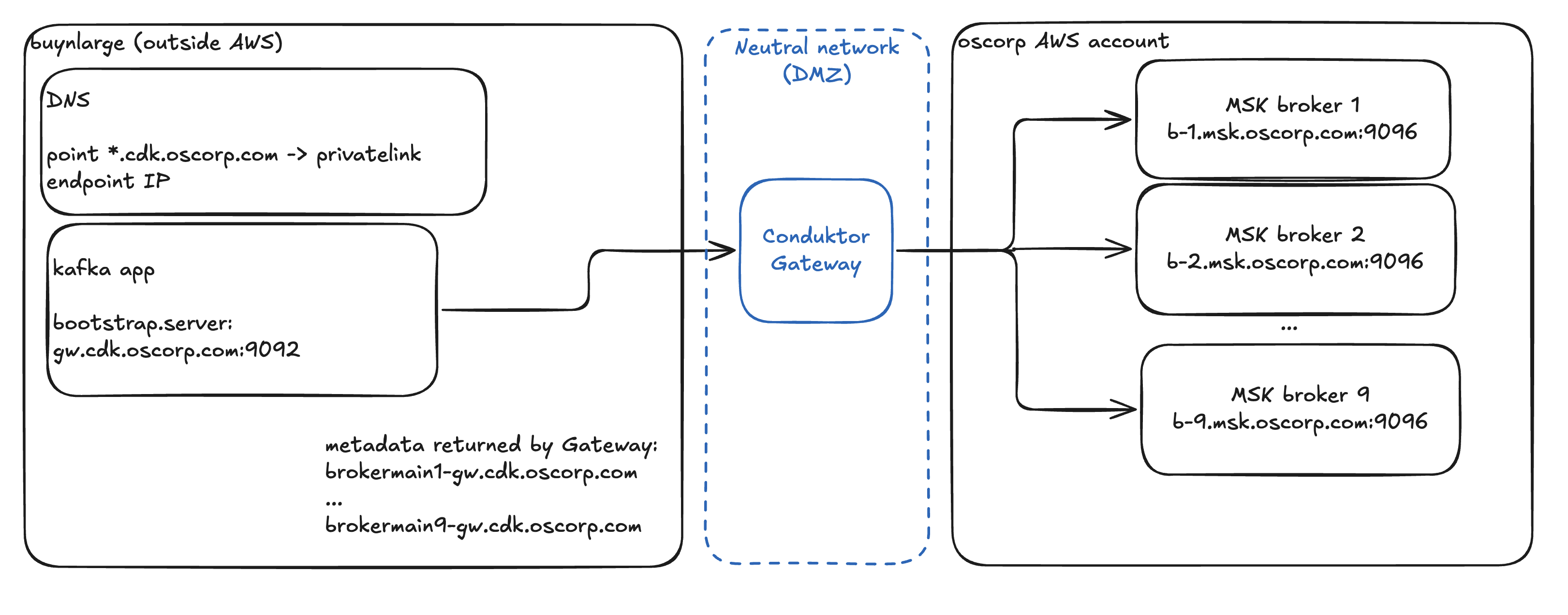
This even works when the clients are outside of AWS, by way of a neutral network, also known as a DMZ ("demilitarized zone").
Single point of failure?
One common objection to running a Kafka proxy in the critical path is that it introduces a single point of failure. It's true that it looks like that on a simplified diagram, but in fact Conduktor Gateway proxy instances act together as a highly available cluster. The Gateway instances keep no durable local state, which makes them straightforward to keep highly available and scalable with scheduling tools like Kubernetes. Even for advanced use cases beyond simple proxying, any shared state is externalized to internal Kafka topics, with instances coordinating through Kafka's group membership protocol.
The nitty gritty
The mechanics (SNI hostname routing, TLS passthrough, certificate SANs for the broker hostnames, deploying on EKS behind an NLB) are addressed step-by-step in Conduktor Gateway on Kubernetes with SNI Routing. On AWS specifically, Gateway preserves the authentication you already have, passing SASL/SCRAM credentials straight through or inheriting AWS MSK IAM roles from ECS, EKS, and EC2, while fixing the discovery layer underneath it. The full Conduktor + AWS story lives on the AWS MSK partnership page.
Cross-network connectivity, for free
When you need a free Kafka proxy for basic connectivity to clusters sitting in other VPCs or across clouds, reach for Conduktor Gateway Community. It rewrites the broker addresses and passes SASL credentials straight through to the backing Kafka cluster, so Kafka client applications only need to point at a new bootstrap endpoint with their existing credentials to get up-and-running.
Because it's the same proxy that powers the enterprise Conduktor Gateway, no effort is wasted. If you later need to encrypt fields or payloads, enforce data quality, or apply traffic policies, you simply unlock those capabilities with an enterprise license key and restart.
Get started with Gateway Community.
And if you are thinking of a proper data sharing use case with external partners, talk to us. Doing Kafka data sharing correctly requires more than simple connectivity.
Coming next in the series
Networking is the first wall teams hit on AWS MSK, and the next two aren't far behind:
- Authentication beyond AWS IAM: how to give clients OIDC or mTLS when the brokers only speak
AWS_MSK_IAM, by terminating the client's scheme at the proxy rather than trying to bolt it onto MSK itself. - Scaling without sprawl: getting multi-tenancy from virtual clusters instead of standing up a new cluster for every team.