

Say a consumer in the order-processing group reads a record on partition 7 of orders that its handler can't parse. The handler throws, the process exits before committing, and Kubernetes restarts the pod. The new instance resumes from the last committed offset, which points at the same record, and the loop starts again.
Every monitoring tool shows the result: lag climbing on partition 7. To debug the consumer, you need four more answers: which member owns that partition, which offset it's stuck on, what the record at that offset contains, and how to move the group past it without losing the record.
Those answers come from different tools. The Kafka CLI covers each one with a separate command, the web UIs put most of them on one screen, and the consumer's own metrics cover the slow-handler case that looks like a stuck one from the outside.
How the common tools cover each step:
| Tool | Group state + members | Committed offset per partition | Read the record at an offset | Decodes Avro / Protobuf | Move group offsets | Re-produce a record | License |
|---|---|---|---|---|---|---|---|
| kafka-consumer-groups.sh | Yes, --state and --members | Yes, snapshot | No | — | Yes, group stopped, --dry-run first | No | Apache 2.0 |
| kafka-console-consumer.sh | No | No | Yes, --partition + --offset | No, prints bytes | No | No | Apache 2.0 |
| kcat | No | No | Yes, -p + -o | Avro with -s avro -r | No | Yes, -P mode | BSD-2-Clause |
| Consumer client metrics (JMX to Prometheus or Datadog) | Rebalance counts, poll timing | Lag seen by the client | No | — | No | No | — |
| AKHQ | Yes | Yes | Yes, with search | Yes, via Schema Registry | Yes | Yes | Apache 2.0 |
| Kafbat UI | Yes | Yes | Yes, with filters | Yes, via Schema Registry | Yes | Yes | Apache 2.0 |
| Redpanda Console | Yes | Yes | Yes, with filters | Yes, via Schema Registry | Yes | Yes | BSL |
| Kpow | Yes | Yes, with history | Yes, with search | Yes, via Schema Registry | Yes | Yes | Commercial, free tier |
| Conduktor Console | Yes | Yes, plus time lag | Yes, from the group's committed offsets | Yes, plus custom deserializers | Yes, group stopped, with preview | Yes, Reprocess | Commercial, free Community Edition |
- kcat is the fastest way to read one record at one offset from a terminal. It decodes Avro only when built with Schema Registry support, and it doesn't manage consumer groups.
- Client metrics live in the consumer process, so they stop when it crashes. They're the only source that measures how long your handler takes between polls.
- Kafbat UI is where the former Provectus kafka-ui contributors work, so point new deployments there.
Group state shows a crash loop before lag does
The group coordinator is the broker that tracks a group's members and their partition assignments. Each time a crashing instance leaves and rejoins, the group goes through a rebalance, and depending on the assignor, the other members pause consuming while it runs. So one bad record on one partition can produce lag on every partition, in short bursts each time the group rebalances.
The CLI shows state and membership with two flags on the same tool:
# State, coordinator and member count
kafka-consumer-groups.sh --bootstrap-server localhost:9092 \
  --describe --group order-processing --state

# Each member, its client ID, host and assigned partitions
kafka-consumer-groups.sh --bootstrap-server localhost:9092 \
  --describe --group order-processing --members --verbose
Both commands print a snapshot. A group flipping between Stable and PreparingRebalance only shows up if you run them at the right moment, or in a loop. A restarted instance without static membership (group.instance.id) rejoins with a new member ID, so a UI that shows state and members on one page makes the restarting member easy to spot.
A flat committed offset points at one partition and one record
Lag is the distance between two positions: the log-end offset, where a producer writes next, and the committed offset, where the group reads next. Compare partitions before you look at the size.
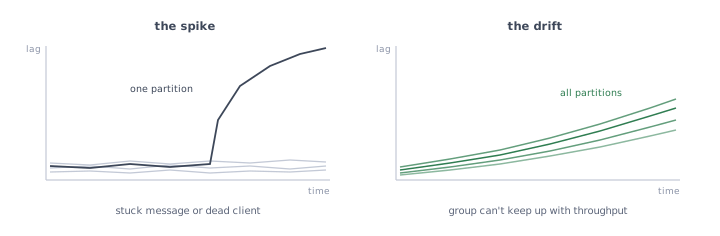
If one partition's committed offset stays put while its log-end offset grows, and the others keep up, the group is stuck on a record or the member that owns that partition is down. If every partition drifts up together, the group consumes slower than producers write, and the fix is more throughput.
kafka-consumer-groups.sh --describe --group order-processing prints both offsets and the lag for each partition, next to the consumer ID that owns it. That's enough to name the partition and the offset. It keeps no history, so you compare two runs to see whether an offset moves. Kpow keeps lag history in Kafka topics of its own. AKHQ, Kafbat UI and Redpanda Console show the current numbers.
For consumer lag alerting and history, the exporters and observability platforms are a separate category, compared in the best tools for monitoring consumer lag.
Reading the stuck record means decoding it with its schema
Once you have partition 7 and its committed offset, you need the record. kafka-console-consumer.sh reads from a given partition and offset, but it prints the value as a string, so an Avro record serialized against Schema Registry comes out as unreadable bytes. Confluent's distribution adds kafka-avro-console-consumer for that case. kcat reads and decodes the record in one command when it's built with Avro support:
kcat -b localhost:9092 -C -t orders -p 7 -o 41822 -c 1 \
  -s value=avro -r http://localhost:8081 \
  -f 'partition %p offset %o key %k\n%s\n'
The UIs decode through the registry once it's connected, and they add search. Filtering on a key, a header or a field value finds every record with the same defect, which tells you whether you're looking at one bad record or a bad batch from a producer.
In the conversations we have with platform teams, this is the step application developers ask for first: look inside the topic, find the poison record, then move it or inject a corrected one.
Getting past the record: shift the offset or dead-letter it
There are two ways out. One leaves the record unprocessed in the topic, the other moves it to a topic of its own:
- Shift the committed offset. Stop every instance of the group, move the partition's offset forward by one, restart. The record stays in the topic but the group never processes it, so note its offset and content before you skip it. Kafka refuses an offset reset while the group has active members.
- Route failures to a dead letter topic. The handler catches the exception, produces the record to a separate topic, and commits. The group keeps moving and failed records collect in one place for review or replay. Kafka Connect does this for sink connectors with
errors.tolerance=allanderrors.deadletterqueue.topic.name. A plain consumer application implements it itself or uses a framework that does, such as Spring Kafka'sDeadLetterPublishingRecoverer. More on the pattern in dead letter queues.
The CLI shift runs as a dry run first:
kafka-consumer-groups.sh --bootstrap-server localhost:9092 \
  --group order-processing --topic orders:7 \
  --reset-offsets --shift-by 1 --dry-run
# Run again with --execute instead of --dry-run to apply it
The dry run prints the new offset per partition. It doesn't show which record you skip, so read it first with the kcat command above. AKHQ, Kafbat UI, Redpanda Console and Kpow all edit group offsets from the UI. Replaying a dead-lettered record after the fix is a produce: kcat's -P mode from a terminal, or the produce screen of a UI.
A slow handler shows up as rebalances
Some groups that look stuck have no bad record at all. The Java consumer must call poll() again within max.poll.interval.ms, five minutes by default. If one batch takes longer, because a downstream API slowed down for example, the consumer leaves the group, a rebalance hands its partitions to another member, and its next commit fails with CommitFailedException.
The new owner gets the same batch, takes just as long, and the cycle repeats. From the outside it looks like the crash loop: lag on a few partitions and a group that keeps rebalancing.
The two settings involved, with their defaults:
max.poll.interval.ms=300000   # 5 minutes allowed between poll() calls
max.poll.records=500          # records returned by one poll()
Broker-side tools can't tell the two cases apart, because the difference sits inside the consumer process. The consumer's own metrics can. A time-between-poll-max close to max.poll.interval.ms points at slow processing, and failed-rebalance-total and last-rebalance-seconds-ago show how often the group churns. Export them through your usual JMX or OpenTelemetry pipeline. The fix is in the application: fewer records per poll, a faster handler, or a longer interval.
Matching the tool to the people who get paged
Conduktor Console puts each of those steps in one UI. The consumer group page shows the group's state, each member with its client ID, host and assigned partitions, and per-partition offsets with lag and a time-lag estimate (how long the backlog takes to drain at the current consume rate). On the topic, the consumer can start from the group's committed offsets, decode records through Schema Registry, and filter on keys, headers and fields.
The offset reset previews the new offset for each partition before applying it. Reprocess sends a record, edited if needed, to the same topic or another one, which is how you replay from a dead letter topic. Each of these ships in the free Community Edition.
Start from who gets paged for consumer incidents, because a tool only helps the people who can open it:
- A platform team comfortable in a terminal.
kafka-consumer-groups.shfor state, offsets and resets, kcat for reading and re-producing records. They're free, always installed, and they work when a UI can't reach the cluster. History is yours to script. - Application developers who own their consumers. They need the record and the offset without a shell on the cluster. AKHQ and Kafbat UI are the standard open-source choices: both browse and decode records and edit group offsets.
- Running Redpanda. Redpanda Console is the UI aligned with that distribution, and it also connects to Apache Kafka. Its license is the BSL.
- Slow handlers more often than bad records. Put the effort into client metrics first, because no broker-side UI sees the time between polls.
- An existing Prometheus stack and a need for a deeper ops UI. Kpow adds message search, offset management and lag history.
- One place from the lag to the fix. Conduktor Console covers group state, the stuck record, the offset reset and the replay in the same UI.
What these tools leave to your application logs
Every tool in the table reads Kafka's view of the group: offsets, members and records. None of them sees your handler. The stack trace that says why the record failed is in the consumer's logs, and you need it before choosing between skipping the record and fixing the code. The limits to plan for:
- The committed offset can sit before the bad record. With
enable.auto.commit=true, the default, the consumer commits a batch's offsets on the nextpoll(). If the handler crashes partway through a batch of 500, the committed offset points at the batch's first record, and the bad one can be up to 499 offsets later. Read forward from the committed offset until you find it. - Resets need a stopped group. Kafka only accepts offset changes for a group with no active members, so every tool asks you to stop the consumers first.
- A skipped record is gone for that group. It stays in the topic until retention deletes it, and it's processed only if someone replays it.
- Conduktor Console's Community Edition shows monitoring data for the last hour only. Lag history and alerts need a paid plan.
Lag tells you which group to look at. Debugging that group takes the partition, the offset, the decoded record and the exception from the consumer's logs, then a deliberate choice to skip, dead-letter or fix. Pick tools that give the people on call the first three without a ticket, and make sure the same people can open the consumer's logs.
How do I find which Kafka consumer is stuck?
Run kafka-consumer-groups.sh --describe --group <group> twice, a minute apart. A partition whose CURRENT-OFFSET doesn't move while LOG-END-OFFSET grows is stuck, and the CONSUMER-ID on that row names the member that owns it.
How do I skip a poison message in Kafka?
Stop every instance of the group, then shift that partition's offset by one with kafka-consumer-groups.sh --group <group> --topic <topic>:<partition> --reset-offsets --shift-by 1 --execute. Read the record first so you can replay it after the fix.
Why does my Kafka consumer keep rebalancing?
The two common causes are an instance that crashes and restarts, and processing that takes longer than max.poll.interval.ms between poll() calls. The consumer's logs and its time-between-poll-max metric tell them apart.
Can I read a message at a specific offset in Kafka?
Yes. kafka-console-consumer.sh --topic <topic> --partition <p> --offset <o> --max-messages 1 reads it as a string. For Avro, use kcat with -s value=avro -r <registry-url>, or a UI connected to Schema Registry.
Related: Best Tools for Monitoring Kafka Consumer Lag → · Kafka Debugging Has Landed → · The Kafka Debugging Playbook →