
November 2026
Bring Kafka expertise to every team
Console takes care of the Kafka chores your team doesn't have time for and finds the apps causing problems. Gateway now takes records over HTTP.
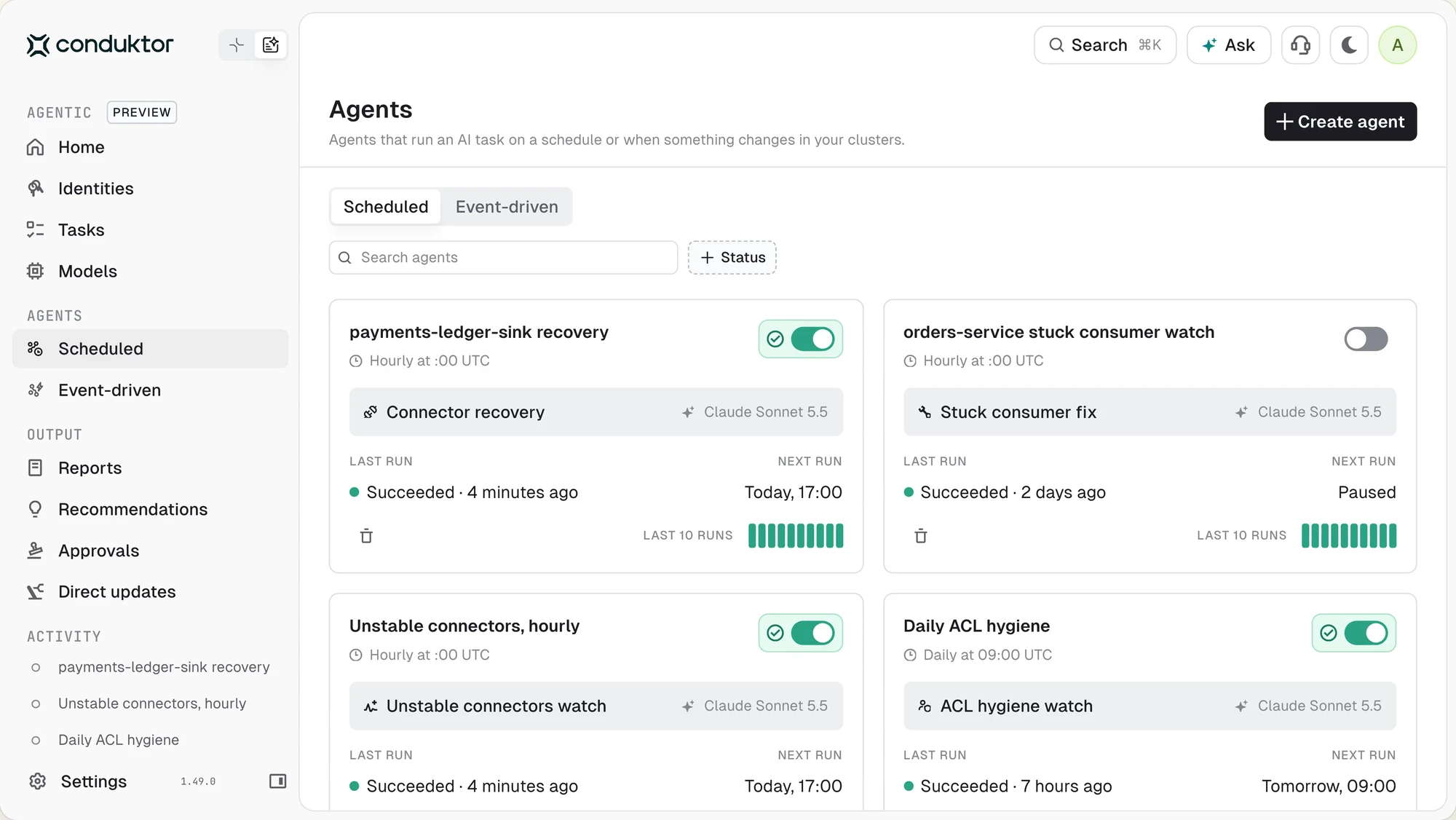
Let AI handle the Kafka checks your team keeps repeating
Conduktor Agents now run the checks platform teams repeat by hand, on a schedule or when something changes. They spot expiring certificates, schema drift, stuck consumers, failing connectors and issues with access rules or ownership. Each run returns a report, recommendations or fix steps for a person to approve.
Agents run with their own machine identity, limited to their owner's permissions, and teams beyond administrators can create and run their own. Agents are in preview and on after you upgrade to Console 1.49: connect a model (Anthropic, Amazon Bedrock or any OpenAI-compatible endpoint) and start from a ready-made task. Create your first agent →
Get a Kafka expert on every Console page
Ask Conduktor opens beside any Console page with Cmd+J. Ask in plain language about your clusters, the page you're on or Conduktor's documentation, and it answers with your permissions. It also does the work in Console with you:
- ask for a topic, and it opens the form, fills it in and leaves you to confirm
- say "check this every Monday", and it sets up an agent, stopping before Create agent
- run any of the agents' ready-made tasks on demand
Over the Conduktor MCP server, Claude Code, Cursor and other assistants can now create and configure topics, register schemas and change connectors, within the token's permissions and as a dry run by default. Ask and the MCP tools are in preview, and Ask is limited to Console administrators in this release. Turn on Ask Conduktor →
Produce to Kafka over HTTP, under the same rules as Kafka clients
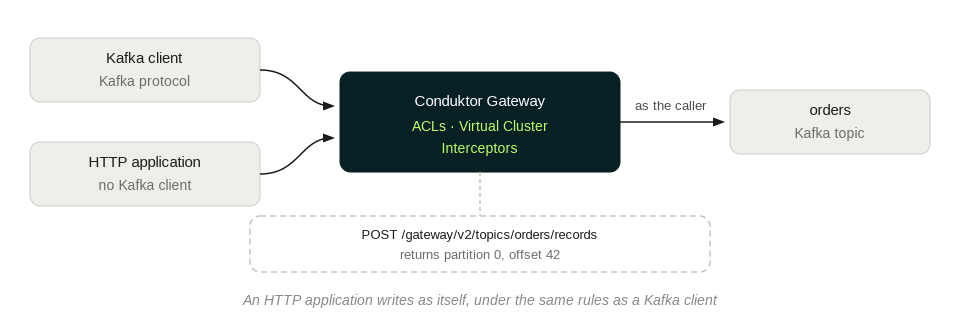
Many applications can't or shouldn't embed a Kafka client: legacy applications, scripts and serverless functions, web backends. Their events usually reach Kafka through a bridge or a homemade script with its own credentials, or never reach it. Gateway now takes records in an HTTP POST:
- each application calls as itself, with its own credentials
- its ACLs, Virtual Cluster and Interceptors apply, as for any Kafka client
- the response gives the partition and offset of each record
Request fields follow Confluent REST Proxy v3. HTTP produce is in preview and off by default. Produce records over HTTP →
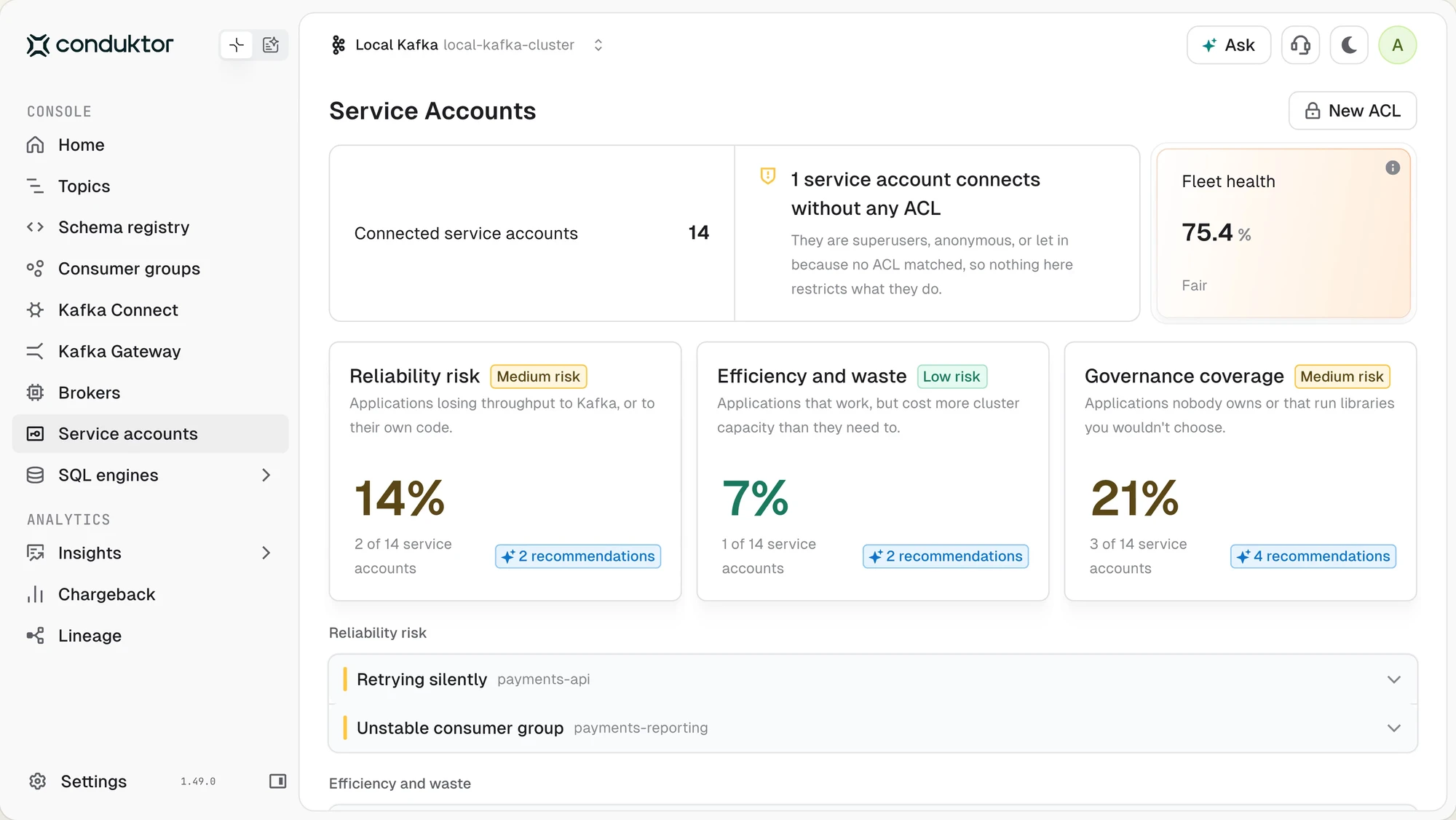
Find the application behind a Kafka problem, and who owns it
The brokers can look healthy while one application retries silently or keeps a consumer group rebalancing, and finding which one means asking team after team. Console now reads the metrics clients already publish (KIP-714) and names the service account, application and client library behind:
- producers sending inefficiently or retrying silently
- consumer groups that keep rebalancing
- clients without an owner or authentication
- outdated Kafka client libraries
Each finding says what to change, with values such as linger.ms and batch.size to hand to the application's owner. Turning it on needs no change to the applications. Client metrics is in preview. Set up client metrics →
Give each team only the records it should see, from one topic
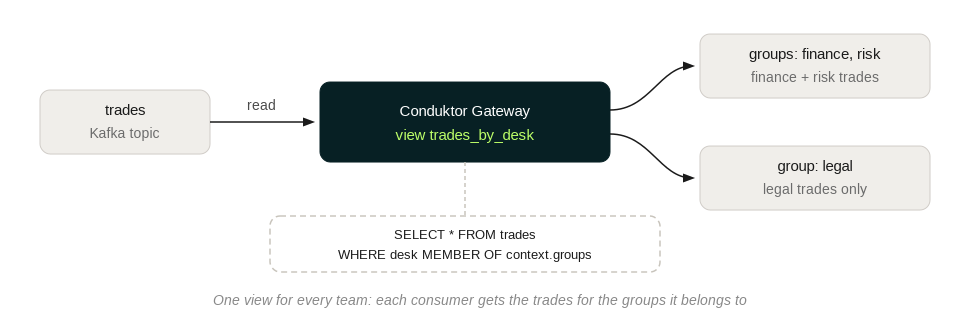
Gateway can show consumers a filtered version of a topic, a topic view, without copying the data. Until now, each team that needed different records needed its own view. One view can now return different records depending on who's reading, using:
- the consumer's service account
- its Gateway groups, with the new
MEMBER OFoperator - claims in its OAuth token, such as roles
A single view of a trades topic can return finance records to the finance team and legal records to the legal team. Keep ACLs on the underlying topic so consumers read through the view. Filter a topic view by consumer →
Also in this release
- Find Kafka resources faster:
Cmd+Ksearches the current cluster andCmd+Shift+Kevery cluster, and record browsing can show JSON fields as columns. - For Console administrators: import user attributes from your identity provider, limit live consume sessions and greet new users with a first-run welcome.
- Thales CipherTrust Manager can now hold the keys for Gateway encryption.
- Large messages: multipart S3 uploads, tunable S3 connections, and the option to run without a local disk.
- Steadier connections for librdkafka and Sarama clients, which now stay on the same Gateway node for a given broker.
- Kafka 4.0 consumer groups (KIP-848) work through Gateway, including on Virtual Clusters, aliases and topic views. In preview.
- Faster and steadier: quicker permission checks and topic consumption, steadier database and Vault connections, and over 25 fixes.
New to Conduktor? Get started in five minutes →
Upgrading? Read the breaking changes for Console 1.49 and Gateway 3.23 first, then the upgrade guide →
For every change, see the complete release notes.
Enjoying the new features? Share your experience on G2