Retiring a topic, onboarding a consumer, chasing a hot connection, cutting over a migration: each one comes down to the same questions. Who owns this topic, who reads it, and what breaks if it changes. Kafka records part of the answer in its ACLs, but not in a form you can hand to another team.
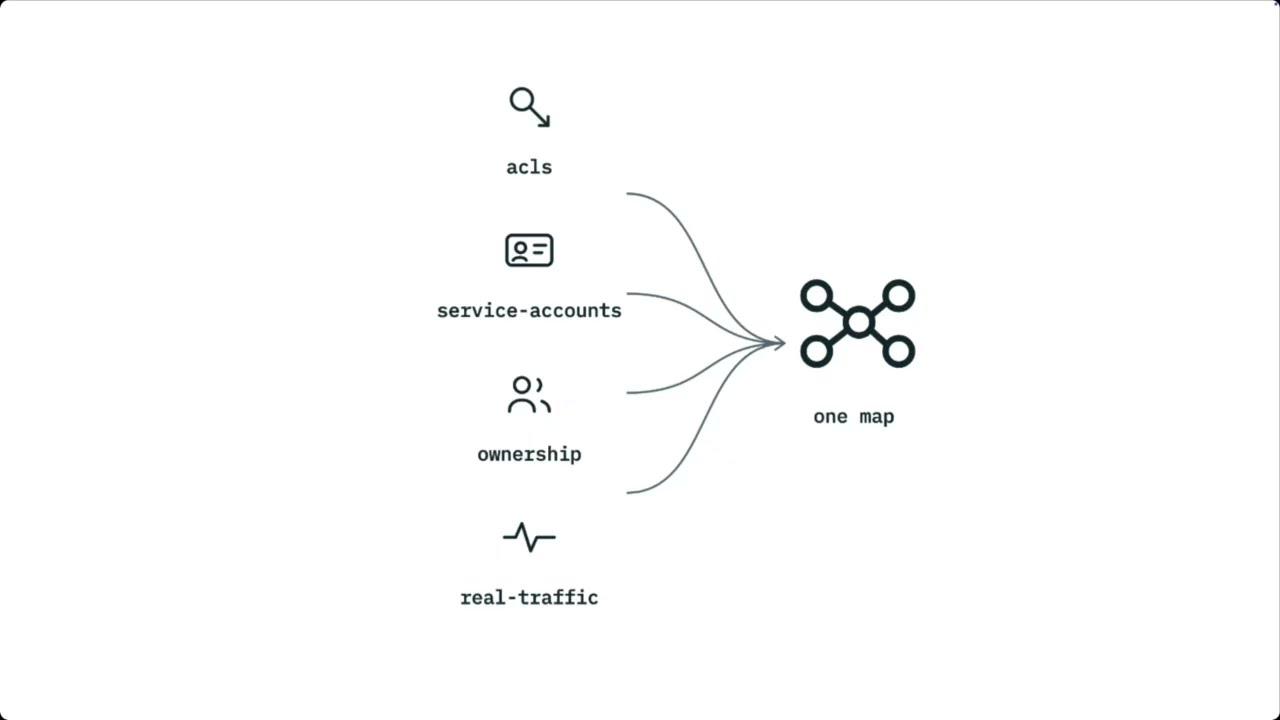
Stream Lineage in Conduktor Console shows how data flows between Kafka topics and the service accounts that produce and consume them. It reads that map off the ACLs already on the cluster, attaches the owners you've declared, and on Gateway clusters, shows live throughput on every connection.
An Airline Running on Kafka
Take an airline running flight operations on Kafka. Five applications, six topics.
Kafka doesn't store that graph. It stores the ACLs the broker checks on every request, which makes them the one record of access that is guaranteed to be current. The crew service account, trimmed to the rows that matter:
Current ACLs for resource `ResourcePattern(resourceType=TOPIC, name=flight-scheduled, patternType=LITERAL)`:
    (principal=User:sa-crew, host=*, operation=READ, permissionType=ALLOW)

Current ACLs for resource `ResourcePattern(resourceType=TOPIC, name=crew-assigned, patternType=LITERAL)`:
    (principal=User:sa-crew, host=*, operation=WRITE, permissionType=ALLOW)

Current ACLs for resource `ResourcePattern(resourceType=GROUP, name=cg-crew-, patternType=PREFIXED)`:
    (principal=User:sa-crew, host=*, operation=READ, permissionType=ALLOW)
Those rows say what crew may read and write. Every service account on the cluster has rows like these, and together they are the dependency map, stored as principal strings.
Four Requests Every Platform Team Gets
| The request | What answers it today | What's missing |
|---|---|---|
| A new team needs flight data. Which topic, and who owns it? | A topic catalog. | Nothing. This one is already solved. |
| One connection is running hot. Which one? | Broker metrics, per topic. flight-scheduled is busy. | Which of its three consumers. Metrics stop at the topic. |
We're retiring flight-delayed. Who breaks? | kafka-acls --list for permitted principals, kafka-consumer-groups for active ones. | Names. User:sa-passenger doesn't say which team. Neither list is complete on its own. |
We've migrated off flight-delayed. Can we delete it? | Bytes-in on the old topic, consumer lag. | Whether quiet means finished, and who still holds a grant and could start reading again. |
How Teams Build the Map Today
- A wiki page or a diagram. A Confluence page listing topics and owners, or an architecture diagram in Lucidchart. Accurate the week it's written. Nothing updates it when a team adds a consumer, and nothing tells you it's stale.
- A script. A cron job runs
kafka-acls --list, joins the principals to a service catalog like Backstage, and renders the result with Graphviz. It works, it's owned by whoever wrote it, and it knows nothing about traffic. - The lineage view your provider ships. It shows principals and topics, because that's what a broker stores. It doesn't know which team owns a principal, it can't tell you how much traffic is on a connection, and it stops at the edge of that provider's cluster.
What Stream Lineage Does
Stream Lineage is a dependency graph that maps your Kafka clusters' permissions visually. Nodes are applications, and edges are the topics each one reads or writes. It's built from three inputs.
- ACLs. Every
READandWRITEgrant on the cluster is an edge between a service account and a topic. Lineage draws them. - The ownership model. Registering a service account as an application in Console gives its node a name and an owning team. If you use Self-service, this is already done.
- Gateway traffic. On clusters behind Conduktor Gateway, the proxy sees every fetch and produce, so it knows the throughput on each connection. Lineage overlays that on the graph.
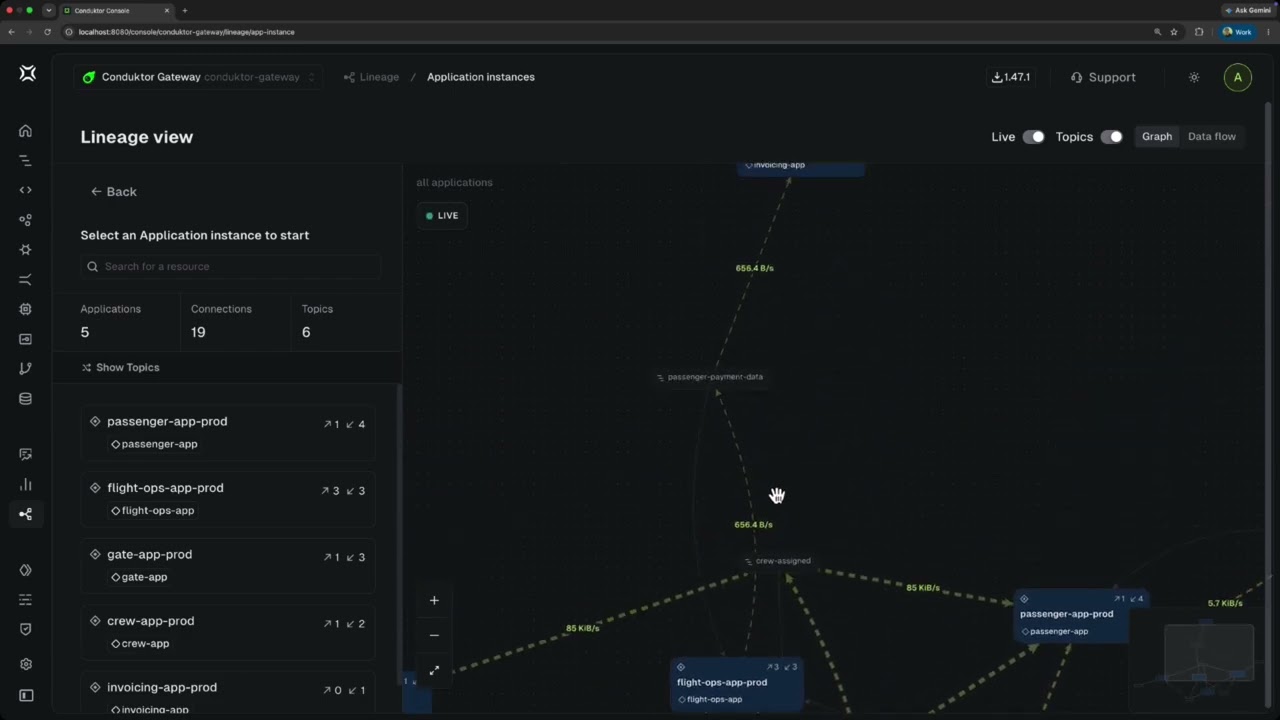
The Application instance view. With Topics off, applications connect directly; switch it on and every topic that links two of them appears as its own node.
Trace How a Topic Is Read and Written
Let's assume we're retiring flight-delayed and need to know which applications break.
We can examine our topic through transitive hops. One hop out shows who writes it and who reads it: flight ops and passenger. Two hops out shows what passenger produces from it, rebooking-issued, so anything reading that is affected too. In the Application instance view that comes back as one application, passenger, owned by the passenger team. Now you know who to speak to before retiring the topic.
Expanding flight-delayed into its own subgraph, then widening from one hop to two with the HOPS control.
Identify Which Service Accounts Depend on the Topic
The Service account view shows every principal the cluster knows about, as opposed to a pure appliation instance state. This is especially useful for finding drift between over-permissive ACLs, and properly scoping resources access across your cluster
The Service account view lists six principals, not five. Expanding sa-legacy-dcs shows the ACL that puts it on the graph.
Let's zoom in on sa-legacy-dcs: one connection, one read, no writes, with the ACL that puts it there on screen. Kafka can't tell you what it is, so you ask, and it's a departure control system granted that ACL before the ownership model existed and never registered as an application. That's why it was missing from the notify list.
You can fix it from this screen: register it so it gets an owner, or revoke the grant.
Watch Live Throughput to Find the Hot Connection
flight-scheduled carries every scheduled flight, and three applications read it. Broker metrics say the topic is busy, but not which of the three consumers is doing the reading.
The Live toggle at the top of the graph asks Gateway for the current throughput on every connection and redraws the edges. Busy connections become thick dashed lines animating in the direction of flow, idle ones stay thin and grey, and each is labelled with its rate.
Switching Live on. The rates come from Gateway, and the thickness of each edge follows its throughput.
flight-scheduled is the busiest path by a factor of three, on every hop into crew, gate and passenger, so that's where I'd put partitions or a quota. passenger-payment-data barely registers, and one reader is what you want for card data, though it does make invoicing a single point of failure for refunds. It also settles the previous section: sa-legacy-dcs is pulling the same traffic as passenger, so it's a live consumer, not a stale grant.
See What's Actually Being Consumed
Live Lineage is also useful for working out which data is actively being read, as opposed to which data are consumers allowed to read from. From the ACLs alone, an unused grant and an active consumer look identical.
In other words, a grant with nothing behind it is a candidate to revoke, and when every edge into a topic reads zero, nothing is consuming it any more.
What Stream Lineage Doesn't Do
Stream Lineage maps who may touch what and, on Gateway clusters, what they actually touch. Two things it won't do:
- Field-level lineage. It doesn't inspect message contents, so it can't tell you that a field was renamed or derived between two topics.
- History. The graph and its rates are current state, not a record of who was reading last quarter.
- One graph across clusters. Lineage is drawn per cluster, so a migration between two of them means comparing two graphs.
🚫 "We checked the ACLs. Nobody reads it."
An ACL says who may read, not who does. A principal holding READ with no traffic is an unused grant, one with traffic is a consumer whether or not anyone registered it, and only Live tells them apart. The Application instance view is as complete as your ownership model, and whatever you haven't registered shows up in the Service account view.
See It Run
Stream Lineage is in Console 1.46 and later. Live throughput arrived in 1.47 and needs a Gateway cluster with the observability Interceptor deployed, the same one Chargeback uses. Check out the full walkthrough below, and the Stream Lineage docs for setup.