

"We need to migrate our Kafka clusters. Which tool should we use?"
We hear this question a lot in the Kafka community, and it carries a hidden assumption: that one tool does the migration.
To be frank, no one tool does it all out of the box. A Kafka migration is five distinct jobs, each with its own tools, and the replication tools that dominate the conversation only cover the first.
So without further ado, here's the migration stack as we see it at Conduktor:
| Layer | The job | The tools | Skip it and... |
|---|---|---|---|
| Data replication | Copy topic data to the target cluster | MirrorMaker 2, Confluent Cluster Linking, Confluent Replicator, AWS MSK Replicator | You have no migration |
| Offset continuity | Make consumers resume in the right place | MM2 checkpoints, Cluster Linking (exact), Replicator interceptors | Consumers reprocess or skip data |
| Schemas | Move Schema Registry contents, preserving IDs | Schema Linking, Schema Registry IMPORT mode | Consumers deserialize garbage |
| Identity and ACLs | Recreate service accounts, credentials, ACLs | Conduktor Console + CLI, provider CLIs/Terraform | Nothing can connect |
| Client cutover | Repoint every producer and consumer | Per-app reconfiguration; a Kafka proxy (Conduktor Gateway) pays off on the next move | The schedule slips by months |
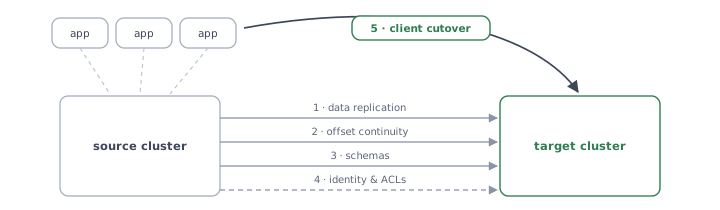
Layer 1: data replication
The best-served layer, with four options that have been around for a while. The real decision is usually MirrorMaker 2 vs Cluster Linking, and it comes down to what each tool runs between, and what it does to offsets (which decides layer 2 for you).
| Tool | Works between | Offsets on target | Cost/licensing |
|---|---|---|---|
| MirrorMaker 2 | Any Kafka to any Kafka | Different from source | Open source (Kafka Connect) |
| Cluster Linking | Apache Kafka 2.4+ source, Confluent destination (CP 7.0+, or a Confluent Cloud Dedicated or Enterprise cluster) | Identical, byte-for-byte | Confluent-licensed |
| Confluent Replicator | Apache Kafka or Confluent clusters | Different from source | Confluent-licensed, Connect-based |
| MSK Replicator | MSK to MSK, same AWS account only | Different from source | AWS-managed service |
- MirrorMaker 2 is the universal option and the only one with no vendor constraint on either end. It renames topics by default (prefixing them with the source cluster alias, so
ordersbecomesonprem.orders) unless you configure an identity replication policy, and its offset story requires real attention (next section). - Cluster Linking is genuinely the cleanest replication for a migration into Confluent, because mirror topics are byte-for-byte, offset-preserving copies. The constraints: the destination must be Confluent (on Confluent Cloud, a Dedicated or Enterprise cluster), and mirror topics are read-only, enforced by the broker, until you promote them.
promotesucceeds only when replication lag is zero and is the safe path for a planned migration;failovercuts immediately, and any records not yet mirrored don't make it across. - MSK Replicator is for MSK-to-MSK moves only, in the same AWS account. For on-prem into MSK, you're back to MirrorMaker 2.
- None of these guarantees zero data loss during an unplanned cutover. Whatever hasn't replicated when you switch is the loss window. For a planned cut, lag doesn't have to be zero: the data each consumer needs next must already be on the target, meaning replication lag stays below consumer lag (a monitoring problem), with a brief producer pause at the very end to drain the rest.
Some teams look at this table and opt out entirely:
"We told them, you need to recreate your topics. We will not use something like Replicator or cluster linking to get your topics to the new platform. We forced them to recreate them." — IT project lead, automotive manufacturer
That's a legitimate strategy (fresh topics, producers first, consumers rebuild state), and it trades replication complexity for a much longer parallel-run period. It works best when topics are short-retention and consumers can rebuild from live traffic. A stricter variant is more common than the table suggests: accept a pause, drain the consumers, cut over, and replicate nothing at all. Teams choose it precisely to avoid running and babysitting a replication bridge.
Layer 2: consumer offset continuity
Committed offsets live in __consumer_offsets and are positions in one specific cluster's logs. On a different cluster, the same numbers point at different records, or none at all. Unless your replication preserved offsets exactly, a consumer that connects to the target with its old positions will reprocess or silently skip data.
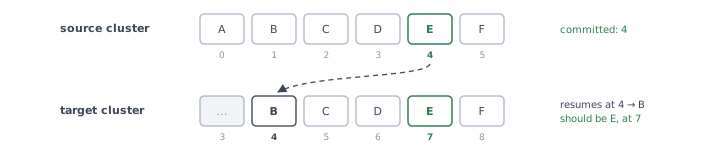
This is the layer practitioners bring up unprompted:
"Replicator and MirrorMaker are notoriously bad for offset management and potential duplicate messages." — IT architect, bank
How each replication choice resolves it:
- Cluster Linking: no translation needed. Offsets are identical on the mirror topic, and the link can sync consumer group offsets. This is its strongest argument.
- MirrorMaker 2: translation, not preservation. The MirrorCheckpointConnector translates committed offsets; with
sync.group.offsets.enabled=true(KIP-545, Kafka 2.7+) it writes them into the target's__consumer_offsets, but only for groups with no active consumers there.- ➡ Translation is conservative: consumers resume near where they left off and may re-read some records, so they must tolerate duplicates (they should anyway; for the usual consume-process-commit loop, Kafka's default delivery guarantee is at-least-once).
- ➡ Translation had real bugs around compacted topics and transaction markers before a rework in Kafka 3.5/3.6, so run a current version.
- Confluent Replicator: timestamp-based translation. Every consumer must run Confluent's
ConsumerTimestampsInterceptor, which writes commit timestamps to a__consumer_timestampstopic that Replicator uses to find the equivalent destination offset. Offset translation needs Confluent Platform 5.1+ on both clusters and Java clients only, and it's a per-application dependency change, which turns a replication decision into a fleet-wide rollout. - MSK Replicator: automatic translation when consumer-group offset sync is enabled, with the same "near, not exact" semantics as MM2.
If offset exactness matters to you and your destination is Confluent, this layer alone often decides for Cluster Linking. If it can't be (open-source destination, cross-vendor move), budget testing time for MM2 checkpoint behavior with your actual consumer groups.
Layer 3: schemas
If you use Schema Registry, every serialized message carries a magic byte plus a 4-byte schema ID. Those IDs reference your source registry. Copy the schemas to a new registry naively and they get new IDs, and every already-produced message now points at the wrong schema (or none).

Two supported paths, both Confluent-documented:
- Schema Linking: schema exporters continuously sync schemas to the target registry, preserving IDs and subject names.
- IMPORT mode on the target registry: lets you register schemas with explicit IDs. The catch: a subject can only enter IMPORT mode while it has no schemas, so this is a start-clean operation, not a retrofit.
Either way, do this layer before consumers touch the target cluster, not after the first deserialization failure.
Layer 4: identity and ACLs
The least glamorous layer and the one with the least tooling. Service accounts, credentials, and ACLs don't replicate; they get recreated. On Confluent Cloud, Kafka API keys are scoped to a single cluster, so a new cluster means minting and distributing new keys for every client. Terraform and provider CLIs help you recreate the objects; distributing new secrets to every application team is the part that doesn't automate well, because it crosses team boundaries.
Conduktor Console helps on two ends of this. Its Service Accounts view aggregates ACLs per principal, so you can inventory what the source cluster actually grants before recreating it, and with Confluent Cloud connected as a provider it can create the new cluster's API keys. The Conduktor CLI then applies each account's ACL set to the target declaratively, as YAML (creating the accounts themselves stays with the provider). Nothing auto-syncs two clusters, though, and distributing the new secrets is still on you.
Recreating the accounts, ACLs, and keys isn't a one-time cost either: they're tied to the cluster, so the next migration means doing it all again. Two ways to break the cycle with Conduktor:
- Move authentication to the proxy, with Gateway. Clients behind Gateway authenticate to the Gateway and keep the same credentials no matter which cluster sits behind it.
- Move access definitions above the cluster, with Console Self-service. Self-service applications define who gets what; apply the same definitions to the new cluster and its ACLs and permissions come back with them.
If you were ever going to a proxy architecture, a migration can be the moment to do so.
Layer 5: client cutover
Everything so far moves data and metadata. None of it moves the clients: every producer and consumer still points at the old cluster, with the old credentials, and someone has to change that. For a large cluster this is the layer where migrations actually spend their months.

Two ways to do it:
- Per-application reconfiguration. Each team updates
bootstrap.servers, credentials, and truststores, then redeploys, in a coordinated order. This is the default, it requires no new infrastructure, and it is the reason Confluent's own migration guidance quotes three to nine months for large deployments. Getting the order right needs a dependency map: Console's stream lineage maps which service accounts produce to and consume from each topic, derived from the ACLs and Self-service definitions, so you can see what moves independently and, through Self-service ownership, which teams to contact in which order. Whatever path you take, move consumers before producers: with replication running, the data exists on both clusters, so consumers can move independently while producers keep writing to the source. - A Kafka proxy layer. Gateway still means a per-app reconfiguration this time around, since clients repoint to the Gateway endpoint. But that one change carries more than the migration:
- Authentication and encryption requirements the target can't satisfy on its own, like an mTLS mandate that would otherwise block a cloud move, can be met at the Gateway in front of any cluster.
- Networking: the Gateway can act as the network proxy between your environment and the target.
- DR and failover between synced clusters comes with the same architecture once it's in place.
- Future migrations get easier to manage: clients keep the Gateway endpoint, and cluster credentials stay server-side (see layer 4).
The proxy isn't a magic bullet for migration, but it's a very natural moment to put one in place, as you're touching every client and orchestrating per-app changes anyway.
Three migrations, three stacks
| Migration | Replication | Offsets | Schemas |
|---|---|---|---|
| On-prem Apache Kafka → Confluent Cloud | Cluster Linking | Exact (preserved) | Schema Linking |
| MSK → MSK (new region/account setup) | MSK Replicator | Auto-translated, near-exact | IMPORT mode / Schema Linking |
| Anything → open-source Kafka | MirrorMaker 2 | Checkpoint translation, test it | IMPORT mode |
We hope this helps you scope your own move. The tool conversation around Kafka migration usually stops at replication (and is truthfully one-dimensional), so there's a conversation worth having about the other critical moving parts.
Related: Benchmarking the Conduktor Gateway → · What is a Kafka Proxy? → · Conduktor Gateway →