

I like ClickHouse's speed and flexibility for time-series analysis. Paired with Kafka, it gives you an operational event backbone with fast SQL analytics. I remember struggling with latency and eventual consistency when I needed aggregates to be available immediately, but that's another story.
A few days ago, Tinybird's co-founder published some lessons from operating petabyte-scale ClickHouse clusters. I recognized similar patterns that the Kafka community is dealing with. It all comes down to shared infrastructure. As Tinybird puts it:
Setting up a cluster is easy, the hard part is keeping it running.
The same is true of Kafka. In this article, I'll cover ingestion pressure, competing workloads, and configuration choices for production. Kafka and ClickHouse do different jobs, but both can become critical infrastructure for many teams, and an outage can bring the business down. Each new application brings its own traffic, priorities, and expectations.
Sharing Kafka or ClickHouse requires limits, rules, and accountable owners. For the platform team, the challenge is making those arrangements work at scale as more teams use the system. At Conduktor, we help platform teams enforce those rules and delegate work to application owners.
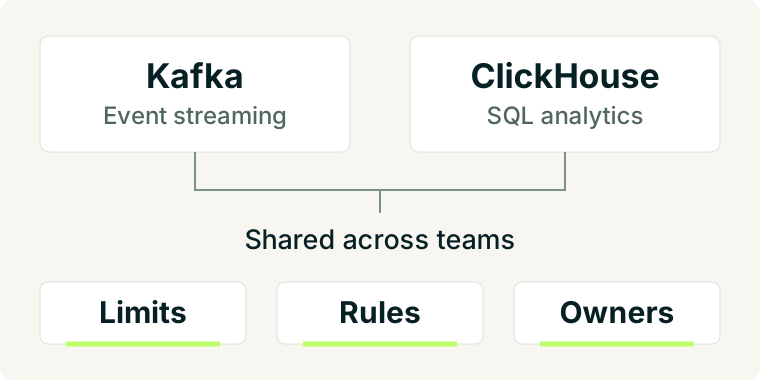
Shared capacity needs enforceable limits
Balancing the resources used by ClickHouse ingestion, user and application queries, and background work is an art, especially when each has different latency requirements. If you run a shared Kafka cluster, this may sound familiar: rogue or misconfigured applications consume capacity that everyone else needs, like an internal DDoS. It's not unusual for a prospect to tell us how one of their consumers affected their Kafka cluster and, with it, other products' performance and availability.
A typical response is to split Kafka clusters by business unit or product line for better isolation. But Kafka is used to exchange data across products, so this can mean a more complex network topology, data replication, or changes to how services exchange data, such as moving away from streaming to object storage.
Beyond sizing the platform, teams must decide how to protect it:
- Traffic: how much traffic each application can generate.
- Access: what data each application needs to read or write.
- Isolation: which workloads can safely share infrastructure.
A traffic burst, a Kafka connector snapshot of a large database, or a full replay of a very large topic can expose missing controls and limits.
Kafka provides quotas for reads, writes, and request processing. The platform team's job is to assign and maintain those limits as applications are added or change. Permission to consume a topic does not mean permission to use all the available cluster capacity.
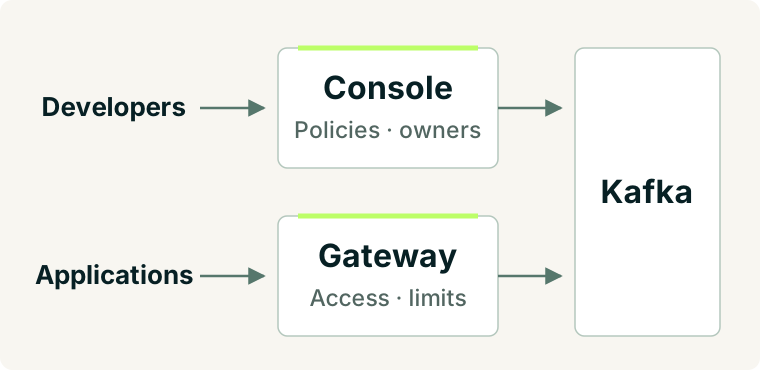
Conduktor Gateway traffic policies are more granular and enforce producer and consumer rate limits for traffic routed through the proxy. Where teams or partners need separate Kafka namespaces, virtual clusters provide them on the same shared physical infrastructure without mirroring data.
Self-service needs rules teams can follow
For instance, in ClickHouse, max_threads limits how many processing threads a query can use. Increasing it can speed up a large query, but can also reduce overall throughput when many queries run at once. Platform teams need rules for what developers can change and how much capacity they can use. The same applies when developers create and configure Kafka topics or connectors.
Platform teams often start by reviewing every request so they can understand and control what's happening and guide developers. But this makes them a bottleneck and limits how freely other teams can work. Self-service policies let developers make those requests themselves:
| Team request | Agreed rule |
|---|---|
| Create a production topic | Use the application's namespace and production durability settings |
| Increase retention | Stay within the agreed range, or have the exception reviewed |
| Read another team's data | Obtain access from the team responsible for it |
Our customers use Conduktor Console self-service to connect applications to their owners, resources, and permissions. ResourcePolicy lets platform teams enforce requirements on topic names, configuration, and metadata used to enable policies automatically. Developers can then create compliant resources without waiting for the same manual checks each time.
Every workload needs an owner
CPU and memory metrics alone are not enough to understand queries, replication, queues, and background work. When several teams share Kafka, you need to know which applications are consuming resources and which teams own them. Which applications retain the most data? Who chose the retention period, and what limits apply? Who can decide whether the data is still needed? Many of these questions are specific to the application, so only its owners can answer them.
Application owners should understand the rules and responsibilities that affect their use cases:
- Traffic limits
- Retention settings and exceptions
- Unused topics (who can confirm whether they are safe to remove)
Taking inventory of topics is the first step. Next, map applications to teams and decide what permissions each team needs. A tool cannot do all of this by itself: it requires connecting code and infrastructure to people and processes.
Conduktor Console brings topics, consumers, connectors, and ownership into one place. It also provides cost-control insights to help flag anomalies. These insights give the platform team concrete data to discuss with application owners, understand what's happening, and decide what to prioritize.
Make the rules part of the platform
For Kafka, Conduktor Console handles ownership and self-service policies, while Gateway applies controls to application traffic (the data plane).
Explore Kafka self-service and guardrails, or talk through your shared Kafka setup with us.