
What is a Kafka Topic? Definition & Examples
A Kafka topic is a named, durable, append-only log to which producers write records and from which consumers read. Topics are the fundamental organizational unit in Kafka: every record belongs to exactly one topic, and every producer and consumer references topics by name. Topics are immutable after write and retained independently of consumption.
What Is a Kafka Topic?
Think of a topic as a category or feed. user-events, payment-transactions, and audit-logs are all topics. Producers publish records to a topic; any number of consumer groups can independently read the same topic without interfering with each other.
Topics are schema-agnostic at the broker level. Brokers store raw bytes. Producers and consumers agree on a data format (JSON, Avro, Protobuf) externally, typically enforced via a Schema Registry. See Schema Registry and Schema Management for details.
Structure: The Append-Only Log
Each topic is physically implemented as one or more partition logs (see Kafka Partitions Explained). Within a partition, records are:
- Append-only: new records are always added to the tail
- Immutable: once written, a record cannot be updated or deleted
- Offset-indexed: each record has a monotonically increasing integer offset, unique within its partition
Partition 0: [offset 0][offset 1][offset 2][offset 3] …
Partition 1: [offset 0][offset 1][offset 2] …
Partition 2: [offset 0][offset 1][offset 2] …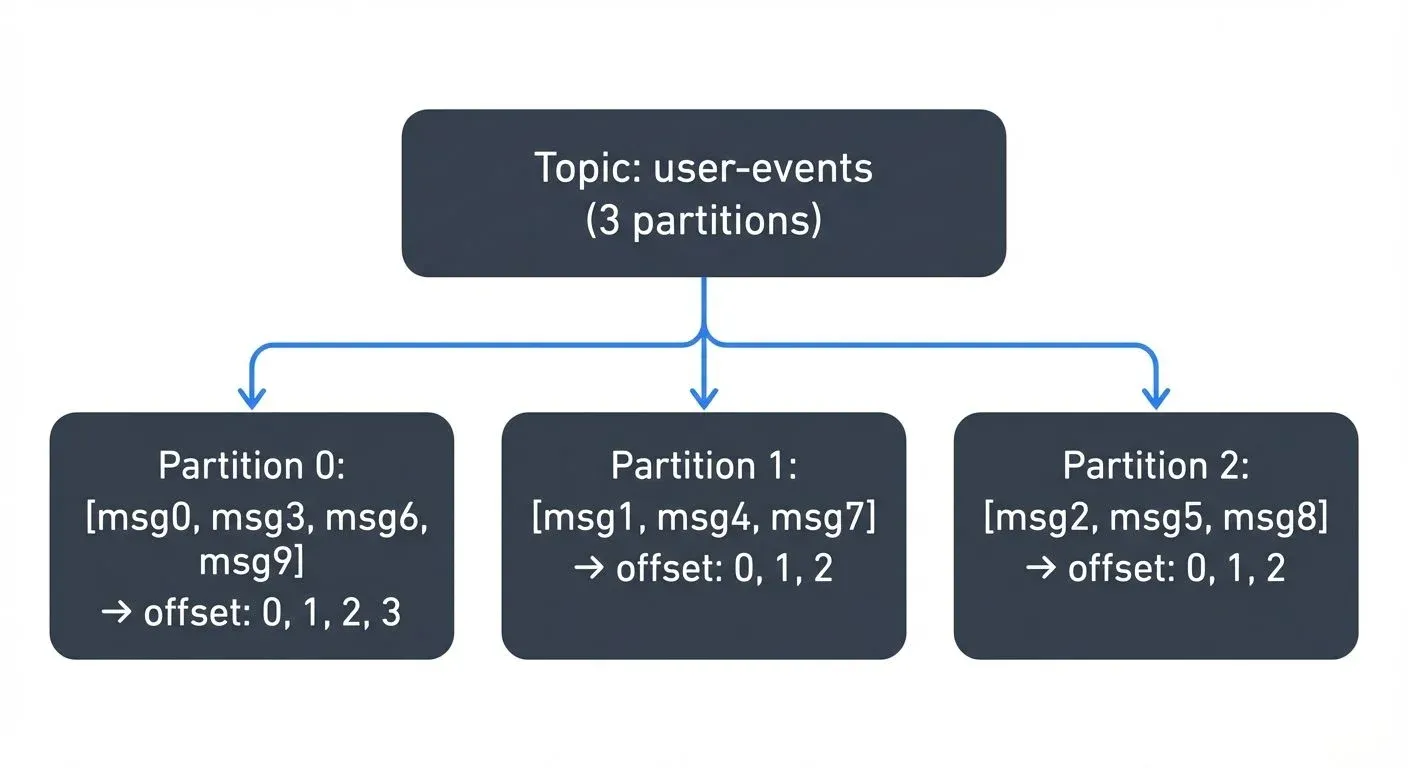
Offsets are per-partition, not per-topic. A consumer tracks its position in each partition independently. This design enables replay: a consumer can reset its offset to any past position and re-read records as many times as needed.
Topics vs. Partitions
A topic is the logical unit; a partition is the physical unit. When you create a topic you choose how many partitions it has. Partitions determine:
- Parallelism: each partition can be consumed by one consumer within a consumer group simultaneously
- Ordering: ordering is guaranteed within a partition, not across partitions
- Distribution: partitions are spread across brokers for load balancing
For a full treatment of how partitions work, how leaders and followers are elected, and how to choose partition counts, see What is a Kafka Partition?.
Retention: Data Lives Until Expired, Not Until Consumed
Unlike a queue, Kafka does not delete records when they are consumed. Retention is controlled by two independent policies:
| Policy | Config key | Default |
|---|---|---|
| Time-based | retention.ms | 7 days (604 800 000 ms) |
| Size-based | retention.bytes | -1 (unlimited) |
Log compaction is an alternative retention strategy for changelog-style topics (e.g., a CDC stream for a database table). Kafka retains the latest record per key indefinitely, allowing consumers to reconstruct current state. See Kafka Log Compaction Explained.
Naming Conventions
Topic names must match [a-zA-Z0-9._-]+. Common conventions in production:
- Dot-separated namespacing:
payments.transactions.created,users.profile.updated - Service-prefixed:
orders-service.order-placed - Environment-prefixed:
prod.payments.refunds
Avoid dots and underscores in the same name, Kafka internally converts dots to underscores in some metrics contexts, causing collisions. Pick one separator and be consistent.
Common Topic Operations
Create a topic
# Kafka 4.0+ with KRaft
kafka-topics.sh --bootstrap-server localhost:9092 \
  --create \
  --topic user-events \
  --partitions 10 \
  --replication-factor 3 \
  --config min.insync.replicas=2 \
  --config retention.ms=604800000
List topics
kafka-topics.sh --bootstrap-server localhost:9092 --listDescribe a topic
kafka-topics.sh --bootstrap-server localhost:9092 \
  --describe \
  --topic user-events
Output shows partition count, replication factor, leader broker, ISR list, and any non-default configs.
Alter configuration
kafka-configs.sh --bootstrap-server localhost:9092 \
  --entity-type topics \
  --entity-name user-events \
  --alter \
  --add-config retention.ms=86400000
Delete a topic
kafka-topics.sh --bootstrap-server localhost:9092 \
  --delete \
  --topic user-events
Deletion is asynchronous. The topic is marked for deletion and removed once all replicas have been cleaned up.
Multi-Subscriber Model
Multiple independent consumer groups can read the same topic simultaneously without any coordination. Each group maintains its own committed offsets. This is one of Kafka's key architectural advantages over traditional message queues:
- An analytics pipeline and an alerting system can both consume
payment-transactionswithout one blocking or competing with the other - A new consumer group starts at the earliest available offset by default, enabling replay
- Consumer groups scale horizontally: add consumers up to the partition count for linear throughput increase
See Kafka Consumer Groups Explained for group coordination, rebalancing, and offset management details.
Topic Design Guidelines
Choosing the right topic granularity matters:
- One event type per topic: mixing unrelated event types in one topic complicates consumer logic and schema management
- Avoid too many small topics: Kafka has per-partition overhead; thousands of single-partition topics can strain the controller
- Plan for partition count early: increasing partitions later breaks key-based ordering guarantees for existing consumers
For comprehensive guidance on topic structure, key selection, and sizing calculations, see Kafka Topic Design Guidelines and Kafka Partitioning Strategies and Best Practices.
Managing Topics with Conduktor
At scale, managing topics across multiple clusters requires tooling beyond the CLI. Conduktor provides a UI and API for creating, configuring, and monitoring topics across clusters, including visibility into partition distribution, consumer lag per partition, and configuration drift. See the Topics Management documentation for details.
Related Pages
- What is a Kafka Partition?, how topics are physically split for parallelism and ordering
- What is a Kafka Broker?, where topic partitions are stored and served
- Kafka Architecture: Diagram & Components, how topics, partitions, and brokers fit together
- Kafka Producers and Consumers, how records are written to and read from topics
- Kafka Topic Design Guidelines, practical rules for naming, sizing, and structuring topics
- Kafka Log Compaction Explained, alternative retention for stateful topics
- Apache Kafka, overview of the Kafka ecosystem