

A producer drops a field. Downstream, a consumer that expected it falls over. The change that caused it shipped hours earlier, in a different team's repo, and looked completely harmless.
It isn't a schema problem. It's a contract problem.
"It happens very often that they change something... some fields are not filled anymore. And these campaigns fail suddenly, for some data change reason in the sources." — A team at a European telecoms operator
No alert said "schema changed". The data just stopped meaning what the consumer thought it meant. By the time anyone connects the dent in the dashboard to the deploy upstream, it's an incident, not a code review comment.
We treat schema evolution as an implementation detail. Producers change the shape of their data when it's convenient, consumers find out when they break. The missing piece is a data contract: an agreement about how the data is allowed to change, that something actually enforces before the change ships.
Most teams have schemas. Far fewer have contracts.
A schema is structure. A contract is a promise.
A schema describes the shape of a message: fields, types, a few constraints. Avro, Protobuf, JSON Schema. It's machine-readable, so you get code generation and validation for free. Useful. Necessary. Not sufficient.
A contract is the schema plus the rules for how it's allowed to evolve, plus someone who answers for it. Can you add a field? Drop one? Change a type? Who gets to make that call, and what happens to the twelve consumers reading the topic when they do?
A schema sitting in a registry answers none of that on its own. It's a snapshot of today's shape with no opinion about tomorrow.
"There is no contract between a producer and a possible list of consumers. And there's no way of enforcing it today." — Principal enterprise architect at a telecoms infrastructure company
Teams document what they expect from each other: a wiki page, an AsyncAPI file, a Slack thread. Then a producer ships a change that violates it, and nothing stops them, because documentation is not enforcement.
A contract you can't enforce is just a strongly-worded suggestion.
The four compatibility modes
The enforceable part of a contract starts with a compatibility mode: the rule the registry uses to decide whether a new schema version is even allowed. There are four of them, and the names mislead, so here they are by what they actually guarantee.
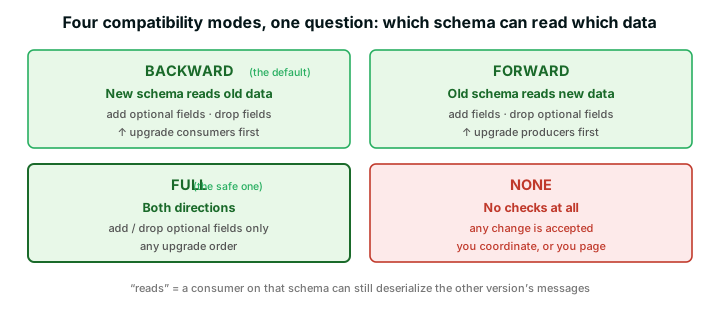
The confusion is always about direction. "Backward" does not mean "old clients keep working". It means a new schema can read old data:
- BACKWARD (the default): a consumer on the new schema can still read messages written with the old one. Add fields with defaults, or drop fields, and upgrade consumers first. This is what you want when you replay or reprocess history.
- FORWARD: a consumer on the old schema can read messages written with the new one. Add fields, or drop optional ones, and upgrade producers first. This is the data-warehouse case, where the producer moves ahead and old readers have to cope.
- FULL: both directions hold, in any upgrade order, as long as you only add or drop optional fields (the ones with defaults). The sane choice for microservices where nobody coordinates release trains.
- NONE: no checks, anything goes. Fine if one team owns both ends and can run a flag-day. In a multi-team setup, NONE is a guarantee of a future incident, not a mode.
Pick BACKWARD or FULL and the registry rejects most breaking changes before they ship. (If you want the full Avro mechanics, we go deep in schema evolution and Avro compatibility.) But a mode is the floor, not the ceiling.
What breaks compatibility
Most breaking changes are the same handful of moves:
- Deleting a required field. Old consumers expect it, it's gone, deserialization fails. The fix is never "just delete it".
- Adding a required field with no default. Old producers don't send it, new consumers demand it, same crash from the other side.
- Changing a type.
amountgoes from a number to a string and everything doing arithmetic on it breaks. There's no safe in-place type change. You add a new field and migrate. - Renaming a field. Kafka has no idea you "renamed" anything. It sees one field vanish and another appear: a delete and an add, both breaking.
The pattern under all of them: you can't remove or repurpose a field while something still reads it. So you don't. You do it in two phases.
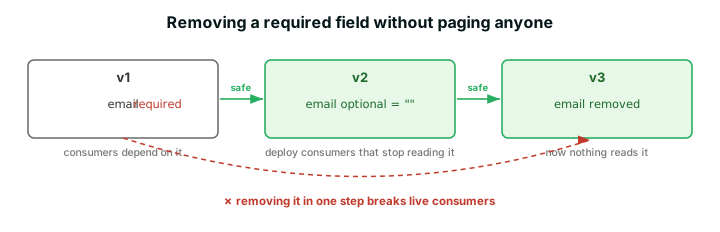
Make the field optional with a default. Ship the consumers that stop depending on it. Then, once nothing reads it, remove it. Boring, two deploys, no incident. The shortcut (delete it in one step) is the one that breaks live consumers.
When you genuinely need a breaking change
Sometimes the change really is incompatible and no amount of two-phasing helps. firstName and lastName collapse into a single fullName: that drops two fields and adds one, and it breaks both directions. Your honest options mostly hurt:
- a brand-new topic (data duplication, migrate every consumer)
- dual-writing both shapes (producer complexity, drift risk)
- a coordinated flag-day (good luck getting the calendar)
Confluent's migration rules give you a fourth. You attach a small transformation to the schema, and it runs at read time, turning old data into the new shape on the fly.
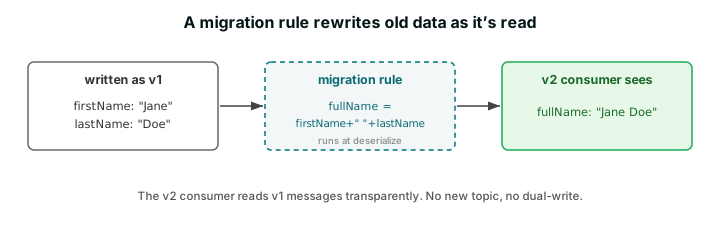
The consumer asks for v2 and gets v2, even from a v1 message. No new topic, no dual-write. (Confluent also ships compatibility groups for the same goal: fence a hard break into its own group so the old and new lineages coexist on one topic while consumers migrate across.)
It isn't free, and it isn't universal. The transform runs for every message, and the rule is code you now have to test and maintain. It also runs in the client serde, and support is strongest in Java. Non-JVM clients are uneven (JavaScript and .NET, for example, can't run migration rules for Protobuf at all), so in a polyglot estate the migration your Java consumers get isn't guaranteed for the rest. Reach for it for the breaking change you genuinely can't avoid, not as a way to skip thinking about schema design. (..that second one always comes back to bite.)
There's a boundary-side take on the same idea. Conduktor Gateway's Topic Views (tech preview) apply a transformation to records as they're consumed, inside the proxy, so every consumer sees the reshaped data regardless of client or language, with nothing to ship in the apps. Today that's SQL projection and filtering over JSON (Avro and Protobuf are on the roadmap), so it's earlier-stage than Confluent's rules. But it puts the reshaping at the one place this whole post keeps returning to: the boundary every client has to cross.
What a registry doesn't do
🚫 "We've got a Schema Registry. We're covered."
A registry is real progress. But it isn't a contract. Three gaps:
- It checks shape, not meaning. It confirms
amountis still a number, not whether that number is in cents or dollars, positive, or a currency anyone downstream expected. Structurally valid, semantically garbage. (Garbage in, disaster out, as we keep saying.) - It checks only at registration, and only if the client opts in. A producer on the raw Kafka client with auto-registration off, or pointed at the wrong subject, sails straight past. A check you can skip is not a check.
- It says nothing about who can change what. Who can register a new version of the payments schema? In most setups, anyone with the credentials. That's not a contract, it's a shared mutable global.
"If someone else is changing a schema you own, who's responsible to manage it? That's a tricky question we don't have an answer to yet." — Kafka competence lead at a European utility
Why do these gaps survive? Because the registry was built to store and version schemas, not to enforce a contract across teams who don't coordinate. That job has to live somewhere producers can't route around.
Two places to enforce a contract
Two places make a contract real, and you want both.
In CI, before the change merges. The Maven and Gradle plugins check a new schema against the registered versions and fail the build on an incompatible change:
# fails the build if the schema breaks compatibility
mvn schema-registry:test-compatibility
That catches the break at review time, where it's a one-line comment instead of an incident. But CI only covers the producers that go through your pipeline. The third-party connector, the contractor's Python job, the service another team forgot to mention: none of them run your build.
At the broker boundary, where every producer has to pass. The one chokepoint no producer can skip is the path to the broker. Put enforcement there and "did the client opt in?" stops being a question.
That's what Conduktor Gateway does. It's a proxy in the data path, and every produce request passes through it, where you can:
- validate that messages carry a valid schema ID
- validate the payload against the registered schema
- write a data quality rule for the semantics the registry can't see (amount positive, currency in a known set)
A message that violates the contract is rejected before it reaches the topic, whatever client or language produced it. And the Schema Registry Proxy puts authorization back on schema changes: who can create, who can modify, who's read-only, so a schema you own isn't something anyone can rewrite without asking.
Registry for the shape. CI for the producers you control. The proxy for everyone else.
Schema incidents are enforcement gaps
Go back to the telco at the top. Nobody there wanted to break those campaigns. Someone made a reasonable-looking change to a field, and nothing between them and the consumer could say no.
A schema incident is rarely about the schema. It's about a promise nothing was enforcing, at the one point where it could have been.
Schemas describe your data. Contracts defend it.
Build the second one, and put it somewhere nobody can route around.
See where your schemas aren't enforced yet. Book a demo, or read why a schema registry isn't optional and how to go from schema chaos to confidence.