
Kafka UI: Beyond the Browse Button
A Kafka UI should do more than show you topics. The right one gives your team three things the CLI can't: visibility into what's happening, ownership over who's responsible, and autonomy to act without waiting on the platform team. Most Kafka UIs still only deliver the first.
- A good Kafka UI answers three questions: what's happening, who owns it, can my team act? That's Visibility, Ownership, Autonomy.
- Every UI hits Visibility. Most stop there.
- Ownership needs real catalogs (topic, application, service account), RBAC with SSO, and audit trails shippable to your SIEM.
- Autonomy needs self-service within guardrails, plus a CLI and REST API so Kafka fits into the same CI/CD pipelines as the rest of your stack.
- Open-source tools (Kafbat, AKHQ, Redpanda Console) are solid at Visibility, thinner at Ownership, rarely do Autonomy at all.
- Conduktor Console does all three, through a UI, CLI, and REST API against the same cluster.
A Kafka UI is a web interface for inspecting, managing, and operating Apache Kafka clusters without the CLI. It's where developers browse topics, read messages, debug consumer lag, and manage schemas. For platform teams, it's also where access, ownership, and compliance get enforced.
The question that matters isn't "does it have a UI?" Every Kafka tool does. The question is whether the UI lets your team answer three things fast, without tripping over each other:
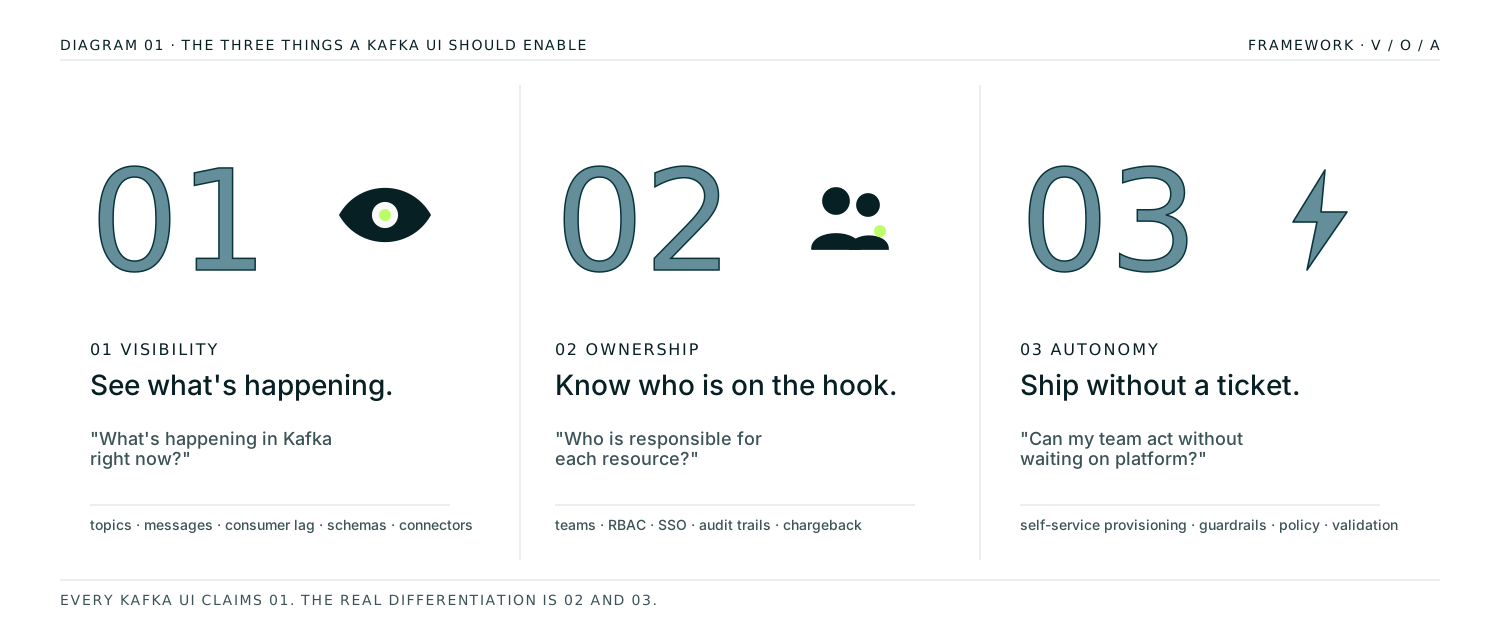
01. Visibility
See what's in Kafka right now: topics, messages, consumer lag, schemas, connector health, across every cluster.
02. Ownership
Know who owns which topic, which team is on the hook, who changed what. Provable to an auditor.
03. Autonomy
Developers move without filing tickets. Platform teams keep control through guardrails, not gatekeeping.
Every Kafka UI claims Visibility. Most stop there. The real differentiation is how far each tool goes on Ownership and Autonomy, and whether it works past a single developer on a single cluster.
Pillar 01 — Kafka UI Visibility
What's happening in Kafka right now?
Visibility is what every Kafka UI advertises. The floor is topic browsing and consumer group status. The ceiling, what separates a good UI from a great one, is whether your developers can debug a production issue in the UI alone, without SSH'ing into a broker or piping kcat output through jq.
Core Kafka operations
At a minimum, a usable UI shows you:
- Topics. List, filter, inspect configuration, view partition layout, see replication status.
- Schemas. Browse Schema Registry, compare versions, check compatibility mode.
- Connectors. Deploy, monitor, and restart Kafka Connect tasks from the UI instead of curl-ing the REST API.
- Clusters. Manage multiple Kafka clusters (self-managed, MSK, Confluent Cloud, Redpanda) from one place.
If your UI can't do these four things in one view, your platform team ends up maintaining side-tools for the rest. That's how "one UI" turns into a graveyard of half-documented internal scripts.
Data exploration (the troubleshooting test)
The real test of Visibility is what happens when production breaks. Can a developer browse to the topic, filter messages by key or header, decode the Avro or Protobuf payload, and see the offending record in under a minute, without asking the platform team for help?
A Kafka UI that passes this test needs:
- Message browsing with offset and time-based navigation
- Filtering by key, value fields (JQ expressions), headers, or timestamp
- Native deserialization for Avro, JSON Schema, Protobuf, and raw bytes
- The ability to produce test messages directly to a topic without deploying code
- Replay and reprocess without writing one-off consumer scripts
Most open-source UIs handle the basics here. What they don't give you is the loop all the way back to production. Once you find the bug, can you fix it in the UI, or do you need a platform team ticket to redeploy a connector with the right config? That part straddles Visibility and Autonomy.
Observability
Visibility without alerting is just a dashboard. A production-grade Kafka UI shows you:
- Consumer lag in real time, with alert thresholds
- Broker health (CPU, disk, network) and partition distribution
- Cluster-level trends: ingestion rate, message size, replication delay
- Integration with your existing stack (Prometheus, Datadog, Slack, PagerDuty)
The distinction here is observability that drives action, not observability that prints a pretty graph. If your UI shows you consumer lag is rising but there's no way to alert the right team before it becomes an incident, you're still operating reactively.
Go deeper: Visibility in Conduktor Console →
Pillar 02 — Kafka UI Ownership
Who is responsible for each resource?
Ownership is where most Kafka UIs go quiet. Open-source tools were built on the assumption that one person, or maybe one team, operates the cluster. As soon as you have five teams sharing a Kafka deployment, that assumption breaks. The UI shows you a list of 400 topics and there's no way to tell which team owns each one.
Fixing this needs more than a label field.
Catalogs and team-to-resource mapping
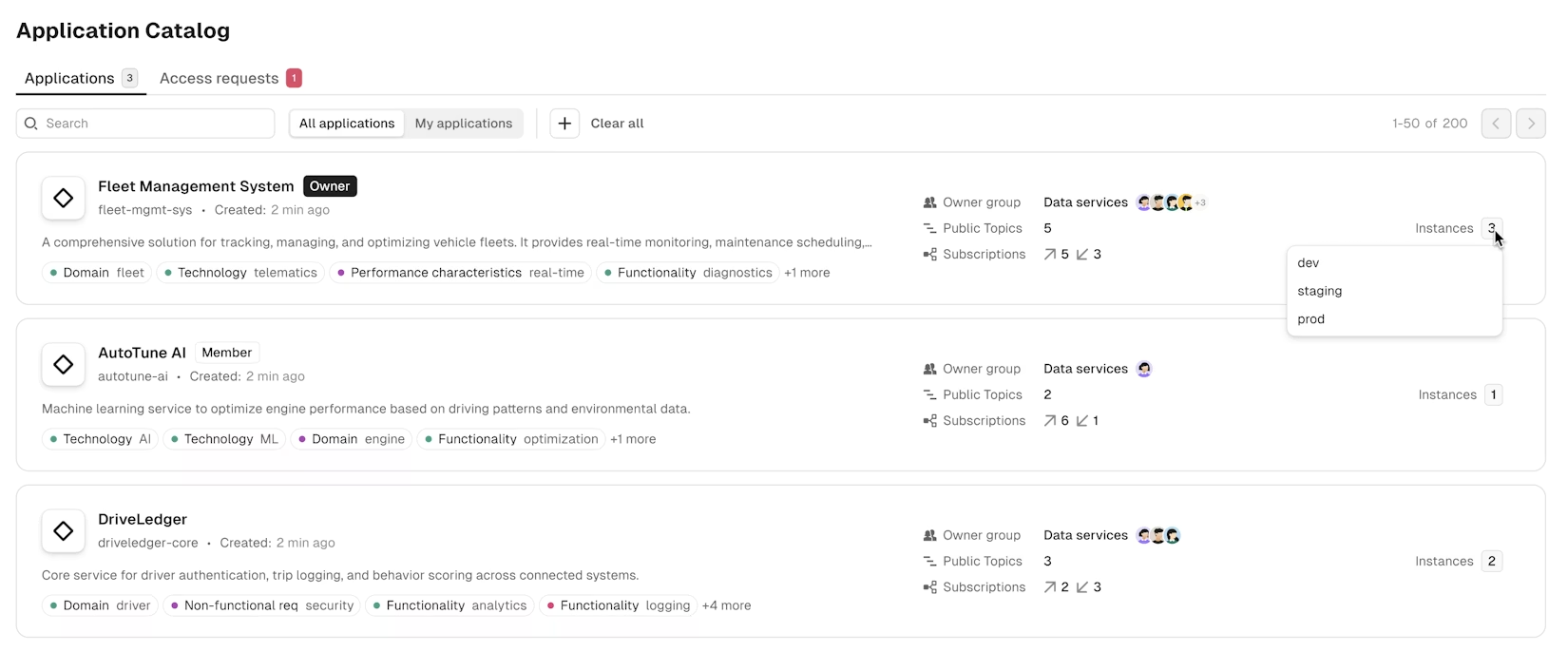
A real Ownership model goes beyond labels. The UI needs catalogs that map every resource to the team and application responsible for it, so any developer can answer "who owns this?" in seconds without opening a ticket:
- Topic catalog showing every topic with its owner team, schema, data classification, and the apps consuming or producing it
- Application catalog mapping each producer and consumer app to its owner team, with the topics it touches and its current state
- Service account catalog for non-human principals (pipelines, connectors, batch jobs), so machine access isn't invisible
- Consumer groups inheriting ownership from the applications that run them
- Schemas with a subject owner separate from the topics that use them
- Cross-cluster searches scoped to what your team owns and what you've been granted access to
If your UI shows every developer a flat list of everything, it's not a UI. It's a filesystem browser.
Access controls and RBAC
Ownership without enforcement is documentation. A Kafka UI that takes Ownership seriously lets platform teams:
- Define roles at the user, group, and resource level
- Grant scoped permissions per topic, cluster, and operation
- Mask sensitive fields (PII, PHI) for users without data-access rights, while still letting them debug
- Replace shared admin credentials with per-user accounts that produce audit trails
The SSO layer matters here too. If your developers still use a different login for the Kafka UI than they do for everything else, your access list is going to drift the day someone joins or leaves.
Insights and audit trails
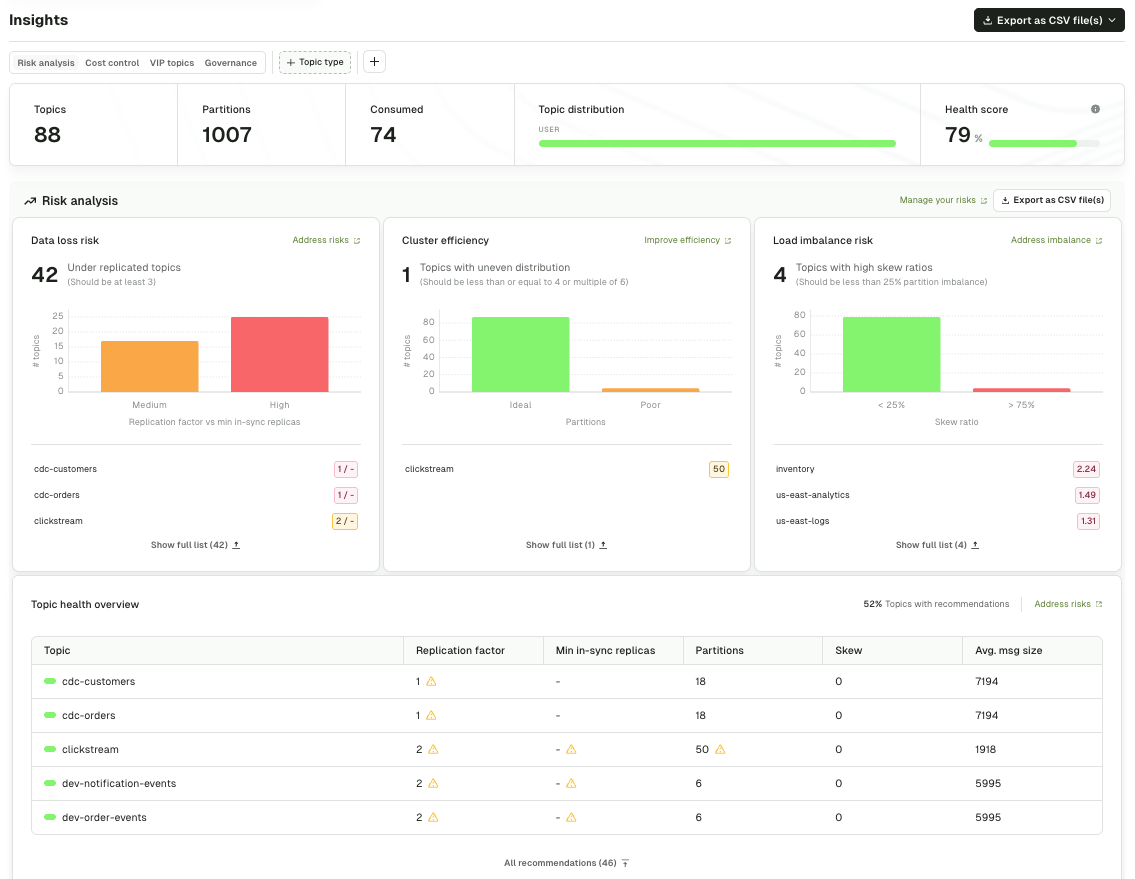
Ownership becomes real when it's auditable. The UI should give you:
- Who created, modified, or deleted each topic, consumer group, and schema, with timestamps
- Cost attribution per team or application (so you can hand a chargeback sheet to finance)
- Data quality visibility: which topics have invalid payloads, which producers are out of spec
- Long-retention audit logs that ship to your SIEM (Splunk, ELK, Datadog) for compliance
If the UI can't produce these on demand, especially the "who changed what" record, you're going to fail a SOC 2 audit the first time one asks.
Go deeper: federated ownership in Console → · RBAC and audit trails →
Pillar 03 — Kafka UI Autonomy
Can my team act without waiting on the platform team?
Autonomy is the hardest pillar, and it's the one that separates Kafka UIs designed for platform-scale teams from Kafka UIs designed for a developer's laptop. It answers one question: can a developer get their work done without a ticket sitting in the platform team's queue for three days?
The right UI lets developers operate within policy. The policy is the platform team's way of delegating authority without giving up control.
Self-service within guardrails
Autonomy at scale means:
- Developers create topics through the UI (or API, or Terraform) without waiting on ops
- The platform team defines naming conventions, replication factors, retention policies, and partition limits that are enforced at creation time
- Invalid configurations get rejected with clear error messages, not with a ticket bouncing back a day later
- Approval workflows route to the resource owner via the ownership catalogs. Sensitive actions like deleting a prod topic flow to the team that owns it, not to a generic platform-team inbox. Routine requests auto-approve.
The key invariant: the platform team doesn't approve each request. They approve the policy. Once the policy is in place, the UI enforces it automatically on every request.
Independent troubleshooting
Autonomy for debugging means developers resolve their own production issues without escalating. The UI gives them:
- Message browsing, filtering, and decoding, so they can find the bad record themselves
- Consumer group inspection, so they can see if their app is stuck, lagging, or rebalancing
- Connector restart and reconfiguration, so they can recover from transient failures without waking the platform team
- Safe production access: read-only for sensitive resources, write access to their own
Most Kafka incidents are either a bad message or a misconfigured consumer. When developers can solve those themselves, your platform team stops being a bottleneck for every production issue.
Automation that catches misconfigurations early
Autonomy fails the first time a developer ships a topic that takes down the cluster. Prevention means the UI validates changes before they hit production:
- Static analysis of topic configs against policy
- Schema compatibility checks before a producer deploys
- Impact analysis for deletions ("this topic has 12 active consumers, are you sure?")
- Integration with CI/CD so changes go through review before they merge, not after they break
A common misconception: a shell script that enforces naming conventions is a guardrail. It isn't.
If the platform team is still approving every request, handling every exception, and checking that the script even ran, what you've built is a weekend project moonlighting as a production control. Real automated guardrails are enforced by the system, declared by the platform team, and largely invisible to the developer who just wants to ship.
Kafka-as-code
The deepest form of autonomy isn't a UI form. It's Kafka-as-code.
A good Kafka UI treats the interface as one client of its own API, and exposes the same operations through a CLI and an infrastructure-as-code provider. Same RBAC, same guardrails, same audit trail. Developers provision Kafka resources the way they provision everything else: a YAML file in Git, a pull request, a CI pipeline that applies on merge.
That matters for two reasons. First, CI/CD integration. Topic and schema creation shouldn't live in a different universe from the rest of your infrastructure. If your team provisions AWS resources through Terraform and deploys services through GitHub Actions, Kafka resources should flow through the same pipeline, reviewed and approved by the same tooling, audited in the same place.
Second, scale. At 50 topics, clicking through a UI is fine. At 500, it isn't. Teams running Kafka at real scale need declarative resource files in a Git repo, automated linting in CI, and pull requests gating production changes. A UI that can't be driven from the outside caps your team at a size it won't stay at for long.
What this looks like in practice: a topic defined in YAML, committed alongside the service that produces to it, rolled out by a pipeline that applies the YAML with a service account token. No tickets. No UI clicks. No platform team in the loop. The same policies that would reject a bad topic in the UI reject the pull request.
The UI is the front door for interactive work. The CLI and API are the front door for everything else. A tool that only ships the first is one your platform team is going to outgrow.
Autonomy without validation is chaos with a better login screen. Autonomy without a CLI and an API is a ceiling.
Go deeper: self-service workflows in Console → · the conduktor CLI on GitHub →
A scan of the market (open-source and commercial), scored through the V/O/A lens. This is the short version. For a side-by-side feature table, see Kafka UI Tools Compared.
Kafbat UI
Community-maintained continuation of Provectus kafka-ui, which Provectus paused in September 2023. Kafbat's fork is the active successor. Strong on Visibility (topics, messages, schemas, connectors). Limited Ownership (basic RBAC, no team namespacing). No Autonomy layer (no policy enforcement, no approval workflows).
AKHQ
Mature open-source tool. Solid Visibility across topics, consumer groups, schemas, Connect. Multi-cluster RBAC in recent versions. No ownership model or self-service workflows.
Redpanda Console
Polished UI, optimized for Redpanda but works with Apache Kafka. Good Visibility and UX. No ownership or autonomy layer for platform-scale use.
Confluent Control Center
First-party UI from Confluent, bundled with Confluent Platform. Deep integration with the Confluent stack including Schema Registry, ksqlDB, and Connect. RBAC ships in Confluent Platform Enterprise (not the Community edition). No catalog-based ownership model or automated guardrails for self-service. Best fit for teams standardized on Confluent.
Kpow
Commercial Kafka UI from Factor House. Strong on multi-distribution support and operational features. Decent Ownership tooling. Autonomy is more limited than dedicated platform-team products.
Lenses.io
Commercial Kafka management UI. Signature feature is SQL-based topic querying. RBAC available in paid tiers (none in Community). Topic approval workflows and environment-based namespace permissions, enforced through Lenses' own interfaces rather than at a proxy or wire layer. No native chargeback or cost attribution.
Three older tools (Kafka Manager / CMAK, Offset Explorer, and Provectus kafka-ui) aren't actively developed anymore. They're covered in the migration section below.
Where to go from here: every open-source Kafka UI delivers some version of Visibility. What separates them from each other, and from the commercial options, is how seriously they take Ownership and Autonomy.
That's not the kind of thing a scorecard resolves. It depends on your team size, your compliance requirements, and how many clusters you run. Kafka UI Tools Compared walks through the feature-by-feature matrix if you want to go deep.
Migrating off Kafka Tool, Offset Explorer, Kafka Manager, or Provectus
A few of the most-searched Kafka UI tools aren't being actively developed. If your team is on any of these, you're on a deprecation timeline whether you've noticed or not:
- Kafka Tool → Offset Explorer. Same tool, renamed a few years back. Desktop app, single-user, no team features. Still functional, still sold, but hasn't added anything material for teams in years.
- Kafka Manager / CMAK. Yahoo's original Kafka UI. Still technically maintained (release 3.0.0.6 shipped in 2025 after a ~10-month gap), but the cadence is slow enough that most teams have moved on. If you're running it, treat it as a tool to plan off of rather than one to bet on.
- Provectus kafka-ui. Provectus announced a pause on active development in September 2023. The project continues as a community fork at
github.com/kafbat/kafka-ui(same project name, new org). If your docs still point to the oldprovectus/kafka-uirepo, update them, because the active work is happening on the Kafbat fork.
What to evaluate when you migrate
The mistake most teams make is migrating one-for-one. They replace Offset Explorer with Kafbat, and end up with the same "single user, no ownership" gap dressed in newer CSS. The migration is the moment to ask whether you need Visibility only, or whether your team has outgrown that.
Three honest questions before you pick a replacement:
- How many teams touch Kafka today, versus a year ago? If the number grew, you need an Ownership story that didn't exist in your old tool.
- How often does the platform team get pulled into a Kafka issue that wasn't theirs to begin with? That's the Autonomy tax. Measure it, and pick a tool that reduces it.
- What did your auditor ask for last time? If you can't produce a "who modified this topic on March 14" record, the tool has to change, not just the UI.
Multi-cloud Kafka UI
Most teams don't run Kafka on one provider anymore. A typical platform has MSK in one AWS account, Confluent Cloud for a different business unit, a self-managed cluster on Kubernetes, and maybe a Redpanda instance for a specific workload.
Open-source Kafka UIs can connect to multiple clusters. What they usually can't do is:
- Show a unified view of topics across clusters with ownership metadata
- Apply the same RBAC policy to MSK, Confluent, and self-managed clusters from one place
- Route a consumer lag alert to the team that owns the topic, regardless of which cluster it's on
- Produce a single audit trail that spans all of them
A multi-cloud Kafka UI is only a multi-cloud Kafka UI if it treats your clusters as an estate, not as separate apps sharing a login page.
Kafka UI vs CLI, kcat, and kafka-console-consumer
The honest answer: you still need the CLI for some things. kafka-topics.sh and kafka-console-consumer are irreplaceable when you're debugging at the protocol level, running one-off scripts, or working on a cluster that's in a degraded state where the UI can't reach it.
A Kafka UI isn't a CLI replacement. It's a force multiplier for everyone who shouldn't have to use the CLI. Your senior Kafka engineers will keep using it for specialized work. Your application developers should not need to use it to figure out why their consumer group is lagging.
The practical rule: UI for routine debugging, configuration, and monitoring. CLI for protocol-level investigation and emergency recovery. Any team insisting developers learn the CLI to do routine work is paying a tax that a decent UI eliminates.
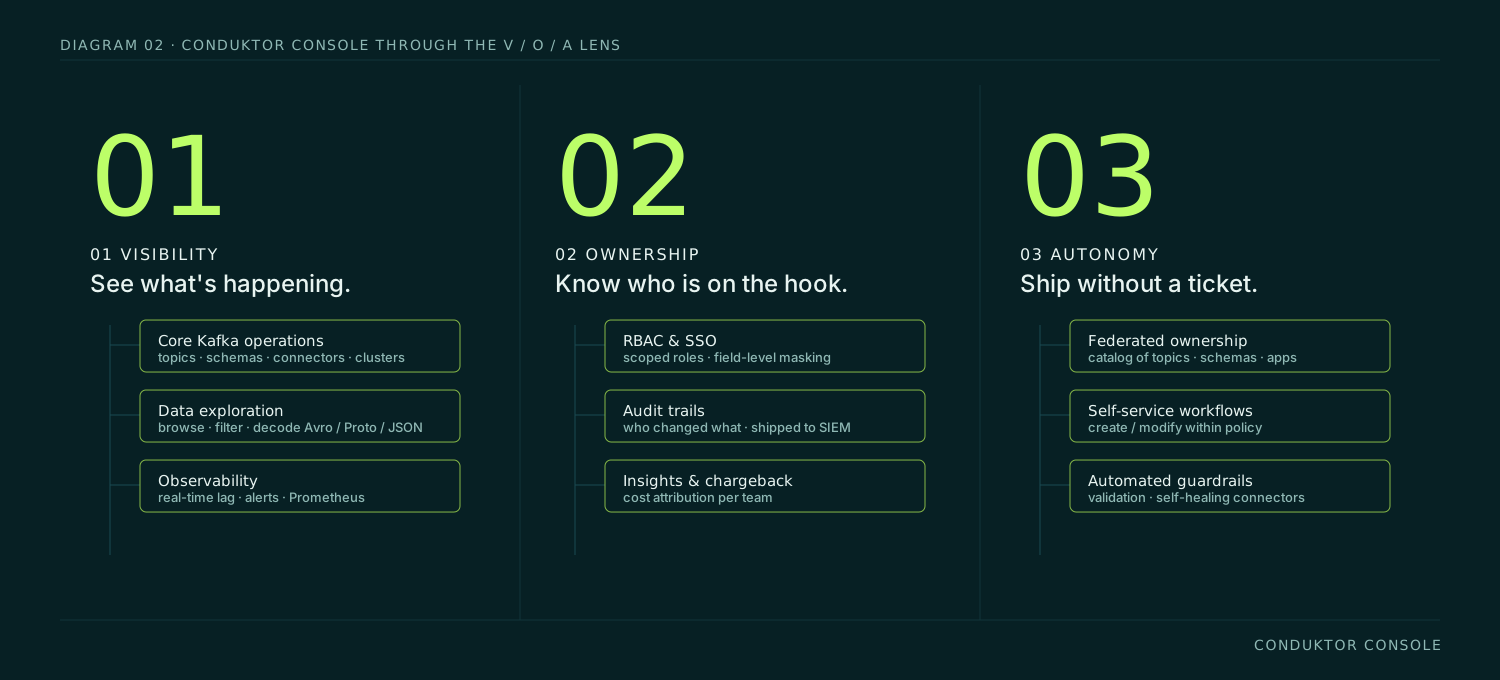
Conduktor Console is a Kafka UI designed around all three pillars from the start, not bolted on after the fact. Every capability on the Console page maps to one of them.
Visibility
Core Kafka operations for topics, schemas, and connectors. Data exploration with message browsing, filtering, and decoding. Observability with real-time lag, alerting, and Prometheus integration. Across every cluster you run.
Explore Visibility → →Ownership
SSO, RBAC, and field-level masking for people. Insights and chargeback for cost attribution. Federated ownership catalogs for topics, schemas, and applications. Audit trails shippable to your SIEM.
Explore Ownership → →Autonomy
Self-service within platform-defined guardrails. Every operation exposed through CLI, REST API, and a Terraform provider, so Kafka fits into the same CI/CD pipelines as the rest of your infrastructure. Automated validation and self-healing connectors so developers recover without tickets.
Explore Autonomy → →The same operations, three surfaces
Console exposes every resource through the UI, a CLI, and a REST API. Same RBAC, same guardrails, same audit trail across all three. Your team picks the surface that fits each workflow.
- UI. Interactive work, debugging, and the 90% of everyday operations.
- CLI.
conduktor apply -f ./resources/applies topics, schemas, users, groups, RBAC policies, connectors, and data quality rules from YAML. Bulk operations, state tracking, dry-run mode, remote state in S3, GCS, or Azure Blob. Installable via Homebrew or Docker. Source at github.com/conduktor/ctl. - REST API. 20+ resource kinds, OpenAPI-documented, Bearer-token auth. Live at
/docson every deployment. - Terraform provider.
conduktor/conduktoron the Terraform registry. Same resources, same RBAC, declarative IaC workflow. - MCP server. Read-only cluster context for AI assistants. List clusters, inspect topics and schemas, preview messages, surface insights, without handing an AI a platform-team credential.
Read more customer stories
Is there a free Kafka UI?
Yes, several. Kafbat UI (the fork of Provectus kafka-ui) is the most feature-complete open-source option. AKHQ is a strong alternative, particularly if you already use Java-based tooling. Redpanda Console works with Apache Kafka, not just Redpanda. All three are fine for single-developer or single-team use. They stop being enough once you need team ownership, RBAC at scale, or self-service with guardrails.
What is the best Kafka UI?
The honest answer is "it depends on your team's stage." Solo developers and small teams usually do fine with Kafbat or AKHQ. Teams with 5+ developers sharing a cluster start running into ownership and access control gaps. Platform teams supporting 20+ teams need a tool with federated ownership and policy enforcement, which is where the open-source options tap out.
Does Confluent have a UI?
Yes, Confluent Control Center is their first-party Kafka UI. It's bundled with Confluent Platform and works best if you're fully on the Confluent stack. It's less commonly used with self-managed Apache Kafka, MSK, or Redpanda, which is the gap most multi-vendor teams are trying to close.
What happened to Provectus kafka-ui?
Development was paused by Provectus. The open-source community maintains a fork under the name Kafbat UI, which continues active development. If you're running Provectus kafka-ui today, plan a migration to Kafbat or an enterprise alternative.
Is Kafka Manager (CMAK) still maintained?
Not meaningfully. Yahoo's original Kafka Manager was renamed to CMAK and handed off; it hasn't seen a substantive release in years. If you're still on it, you're maintaining an orphan.
What's the difference between Kafka Tool and Offset Explorer?
They're the same product. The tool was renamed from Kafka Tool to Offset Explorer in 2020 and is still sold as a desktop application. It's single-user and not designed for team-scale use.
What's the difference between a Kafka UI and a CLI?
The CLI (kafka-topics.sh, kafka-console-consumer, kcat) works at the protocol level and is ideal for scripting, one-off debugging, and emergency recovery. A Kafka UI is a web interface that makes the same operations approachable for developers who don't specialize in Kafka. A good UI doesn't replace the CLI. It means 90% of your team doesn't have to learn it.
Does Conduktor Console run in Docker?
Yes. Console ships as container images and includes a docker-compose quickstart. See the get-started guide for the current setup.
Can I search Kafka messages by field value in the UI?
Yes, in Conduktor Console. You can filter by key, value, header, timestamp, and use JQ expressions against decoded JSON or Avro payloads. Most mature Kafka UIs support this; the depth varies.
Does Kafka have a native web UI?
No. Apache Kafka ships with CLI tools only. Every Kafka web UI (Kafbat, AKHQ, Conduktor Console, Confluent Control Center) is a separate project on top of Kafka.
Can one Kafka UI manage MSK, Confluent Cloud, and self-managed Kafka together?
The open-source options can connect to all three but show them as separate clusters with no unified ownership or policy layer. Conduktor Console treats them as one estate, with the same RBAC, ownership model, and audit trail across all of them.
I have more questions.
Drop us a line and we'll get back to you.
Ready to see a Kafka UI built for platform teams?
In a 30-minute demo, we'll walk through your current Kafka operations and show you where Conduktor Console closes the gaps in visibility, ownership, and autonomy, without changing how your developers work.