# Producer default partitioner and sticky partitioner
*Learn how Kafka partitioners affect message distribution in 15 minutes*
Kafka producer partitioners determine which partition receives each message, affecting load distribution, ordering guarantees, and overall system performance. Understanding partitioning strategies helps you optimize for your specific use case.
**What you'll learn:**
- How partitioners route messages to partitions
- The difference between sticky and round-robin partitioning
- When to use key-based vs keyless partitioning
- How to implement custom partitioners
## How partitioning works
When a producer sends a message, the partitioner decides which partition receives it based on:
1. **Message key**: If present, used to determine partition assignment
2. **Partition specification**: Explicit partition number in ProducerRecord
3. **Partitioner logic**: Default or custom partitioning algorithm

```mermaid
flowchart TD
M["Message"] --> Check{"Has key?"}
Check -->|"Yes"| Hash["hash(key) % partitions"]
Check -->|"No"| Sticky["Sticky partitioner
(Kafka 2.4+)"]
Check -->|"No"| RR["Round-robin
(Kafka < 2.4)"]
Hash --> P0["Same key → Same partition
(ordering guaranteed)"]
Sticky --> P1["Fill current batch
then switch partition"]
RR --> P2["Cycle through all partitions"]
```
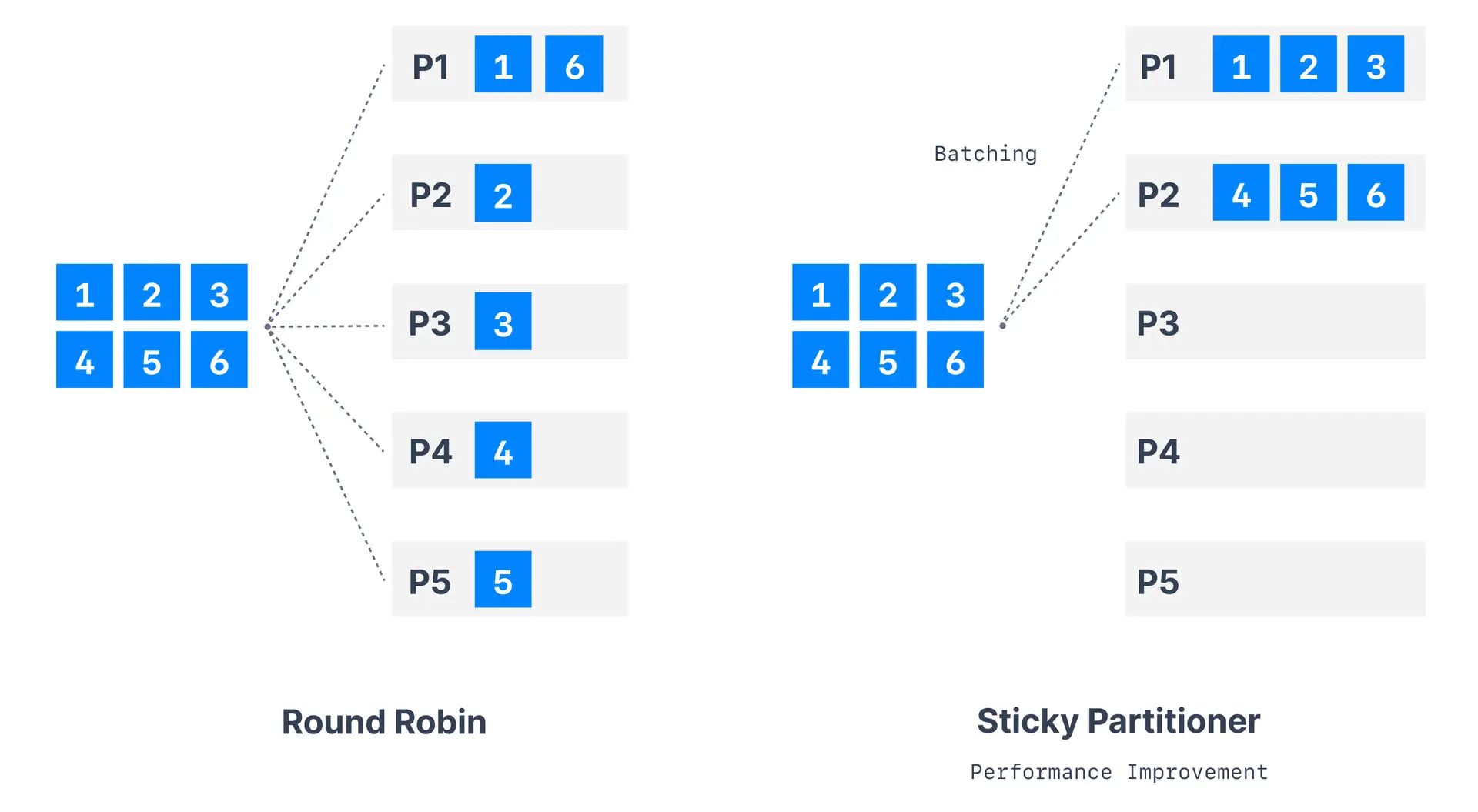
> **Partition assignment impact**
> Partitioning affects message ordering, consumer distribution, load balancing, and data locality. Choose your partitioning strategy carefully based on your use case requirements.
## Default partitioner behavior
### With message keys
When messages have keys, the default partitioner uses a hash-based approach:
```java
partition = hash(key) % number_of_partitions
```
> **Hot keys**
> If one key appears far more often than others (e.g., a single tenant generating most traffic), all those messages land on the same partition. This creates a "hot partition" that overwhelms one broker and one consumer. Monitor per-partition message rates and consider key redesign or a custom partitioner if distribution is uneven.
**Characteristics:**
- Same key always goes to same partition (within same topic configuration)
- Provides ordering guarantees per key
- Distributes load based on key distribution
- Changes when partition count changes
### Without message keys
For messages without keys, behavior depends on Kafka version:
| Kafka version | Partitioner | Behavior |
|---------------|-------------|----------|
| < 2.4 | Round-robin | Cycles through partitions sequentially |
| >= 2.4 | Sticky | Sticks to one partition until batch is full |
## Sticky partitioner
The sticky partitioner, introduced in Kafka 2.4, improves performance for messages without keys.
### How sticky partitioner works
1. **Partition selection**: Choose random available partition
2. **Batch filling**: Send all messages to chosen partition until batch fills
3. **Partition switching**: Switch to different partition for next batch
4. **Repeat process**: Continue cycle for optimal batching
### Benefits of sticky partitioner
| Benefit | Description |
|---------|-------------|
| **Improved throughput** | Better batch utilization (more messages per batch) |
| **Fewer network requests** | Reduced overhead from larger batches |
| **Better compression** | Larger batches compress more efficiently |
| **Even distribution** | Over time, messages distribute evenly across partitions |
### Configuration
Sticky partitioner is enabled by default in Kafka 2.4+:
```properties
# Explicitly configure (usually not needed)
partitioner.class=org.apache.kafka.clients.producer.internals.DefaultPartitioner
```
## Round-robin partitioner
The original default partitioner (pre-2.4) that cycles through partitions.
```properties
partitioner.class=org.apache.kafka.clients.producer.RoundRobinPartitioner
```
> **Round-robin performance impact**
> Round-robin partitioning creates smaller batches and reduces throughput compared to sticky partitioning for keyless messages.
## Partitioning strategies decision guide

```mermaid
flowchart TD
Start["Choosing partition strategy"] --> Q1{"Need ordering
guarantees?"}
Q1 -->|"Yes, per entity"| Key["Use message keys
(e.g., user_id, order_id)"]
Q1 -->|"Yes, global"| Single["Use single partition
(limits throughput)"]
Q1 -->|"No"| Q2{"Need custom
routing?"}
Q2 -->|"Yes"| Custom["Implement custom partitioner"]
Q2 -->|"No"| Sticky["Use sticky partitioner
(default)"]
Key --> Monitor["Monitor partition distribution"]
Custom --> Monitor
Sticky --> Monitor
```
## Custom partitioner implementation
Create custom partitioners for specific business requirements:
```java
public class CustomPartitioner implements Partitioner {
@Override
public int partition(String topic, Object key, byte[] keyBytes,
Object value, byte[] valueBytes, Cluster cluster) {
List partitions = cluster.partitionsForTopic(topic);
int partitionCount = partitions.size();
if (key == null) {
return ThreadLocalRandom.current().nextInt(partitionCount);
}
// Custom key-based partitioning logic
String keyString = key.toString();
if (keyString.startsWith("priority-")) {
return 0; // Route priority messages to partition 0
}
// Use hash for other messages
return Utils.toPositive(Utils.murmur2(keyBytes)) % partitionCount;
}
@Override
public void configure(Map configs) { }
@Override
public void close() { }
}
```
Register your custom partitioner:
```properties
partitioner.class=com.example.CustomPartitioner
```
## Partition count considerations
> **Partition count changes**
> Changing partition count breaks key-to-partition mapping and can disrupt ordering guarantees. Plan partition counts carefully and avoid frequent changes.
### Impact of adding partitions
```
Original: hash(key) % 3 partitions → key "user123" → partition 2
After adding: hash(key) % 6 partitions → key "user123" → partition 5
```
**Consequences:**
- Same key may go to different partition
- Breaks ordering guarantees temporarily
- May create temporary hotspots
## Best practices
| Scenario | Recommendation |
|----------|----------------|
| Need ordering per entity | Use message keys |
| Maximum throughput | Use sticky partitioner (no keys) |
| Custom routing logic | Implement custom partitioner |
| Even distribution | Monitor for hot keys |
Always test custom partitioners with realistic data distributions and load patterns. Partition assignment affects performance significantly.
> **See it in practice with Conduktor**
> [Conduktor Console](https://docs.conduktor.io/guide/manage-kafka/kafka-resources/topics) displays partition distribution and message counts per partition. Monitor how your partitioning strategy affects load balance across your topic partitions.
## Next steps
- [Configure producer batching](https://www.conduktor.io/kafka/kafka-producer-batching) to optimize throughput
- [Understand message keys](https://www.conduktor.io/kafka/kafka-producers#message-keys) for ordering
- [Explore topic partitioning](https://www.conduktor.io/kafka/kafka-topics-choosing-the-replication-factor-and-partitions-count) decisions