# Kafka producer batching
*Learn how to optimize producer throughput with batching*
Kafka producer batching groups multiple messages together before sending them to brokers, dramatically improving throughput at the cost of slightly increased latency. Understanding batching is essential for building high-performance producer applications.
**What you'll learn:**
- How producer batching works internally
- Key configuration parameters and their effects
- How to tune for throughput vs latency
- Memory management and monitoring strategies
## How batching works
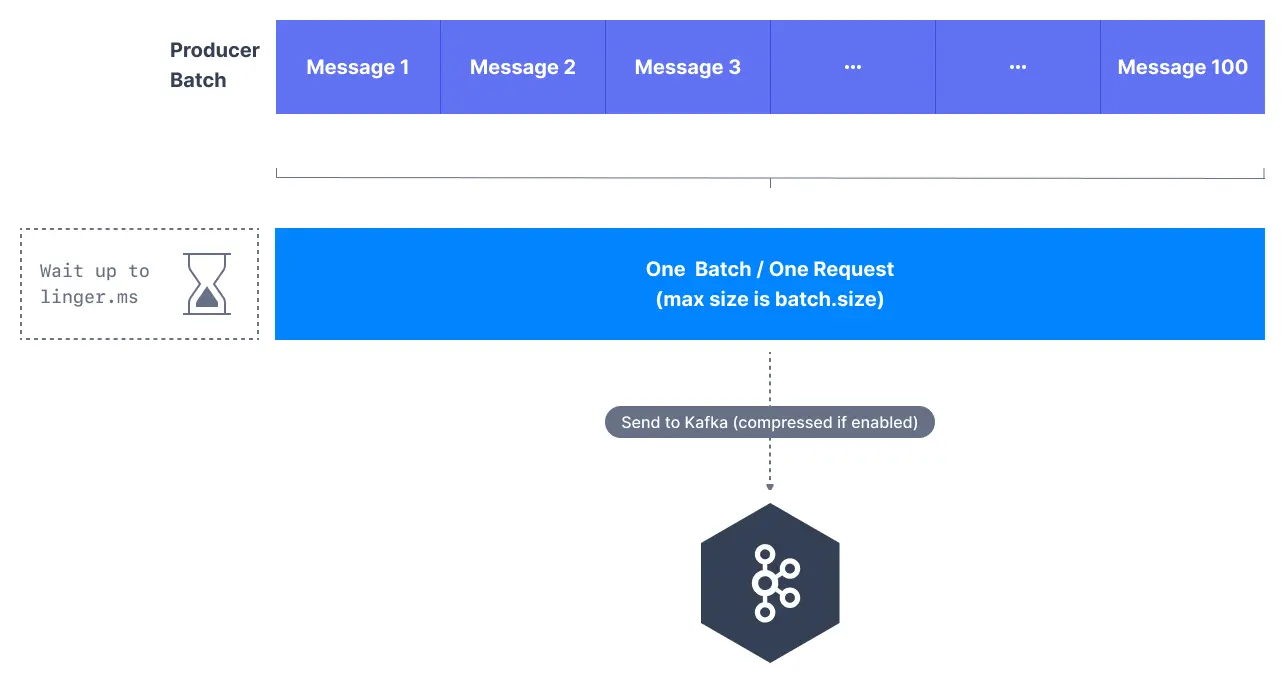
Instead of sending messages individually, the Kafka producer accumulates messages in memory and sends them in batches:

```mermaid
flowchart LR
subgraph Producer["Producer"]
M1["Message 1"] --> Buffer["Batch Buffer"]
M2["Message 2"] --> Buffer
M3["Message 3"] --> Buffer
end
Buffer -->|"When batch.size reached
OR linger.ms elapsed"| Broker["Broker"]
Broker --> P0["Partition 0"]
```
1. **Message accumulation**: Producer collects messages in memory buffers per partition
2. **Batch creation**: Messages are grouped into batches based on size or time limits
3. **Network transmission**: Complete batches are sent to brokers in single network requests
4. **Broker processing**: Brokers process entire batches more efficiently than individual messages
> **Batching is automatic**
> Kafka producers handle batching automatically - you only need to configure the parameters that control when batches are sent.
## Key batching parameters
### batch.size
Controls the maximum size of a batch in bytes.
```properties
# Default: 16384 (16KB)
batch.size=32768 # 32KB batches
```
**Behavior:**
- Larger batches improve throughput but increase memory usage
- Batches are sent when they reach this size, regardless of time
- Each partition has its own batch buffer
- Messages spread across many partitions reduce per-partition batch efficiency — this is why the sticky partitioner was introduced
### linger.ms
Controls how long to wait for additional messages before sending a batch.
```properties
# Default: 0 (send immediately)
linger.ms=10 # Wait up to 10ms for more messages
```
**Behavior:**
- Adds artificial delay to allow batches to fill up
- Improves throughput by creating larger batches
- Increases end-to-end latency slightly
### buffer.memory
Total memory available for batching across all partitions.
```properties
# Default: 33554432 (32MB)
buffer.memory=67108864 # 64MB total buffer
```
**Behavior:**
- Shared across all partitions and topics
- Producer blocks when buffer is full
- Must accommodate batch.size × number of active partitions
## When batches are sent
Batches are sent when ANY of these conditions are met:
| Condition | Description |
|-----------|-------------|
| **Batch size reached** | Batch reaches `batch.size` bytes |
| **Linger time elapsed** | `linger.ms` milliseconds have passed |
| **Buffer full** | Producer needs space for new messages |
| **Producer flush** | Explicit `flush()` call or producer close |
## Tune for throughput vs latency
### Decision guide

```mermaid
flowchart TD
Start["Tuning batching"] --> Q1{"Priority?"}
Q1 -->|"Throughput"| HT["High throughput
batch.size=64KB
linger.ms=20ms"]
Q1 -->|"Latency"| LL["Low latency
batch.size=16KB
linger.ms=0ms"]
Q1 -->|"Balanced"| BL["Balanced
batch.size=32KB
linger.ms=5ms"]
HT --> Monitor["Monitor batch utilization
and memory usage"]
LL --> Monitor
BL --> Monitor
```
### High-throughput configuration
```properties
# Optimize for maximum throughput
batch.size=65536 # 64KB batches
linger.ms=20 # Wait for full batches
buffer.memory=134217728 # 128MB buffer
compression.type=lz4 # Fast compression
acks=1 # Balance durability/speed
```
### Low-latency configuration
```properties
# Optimize for minimum latency
batch.size=16384 # Moderate batch size
linger.ms=0 # Send immediately
buffer.memory=33554432 # Default buffer
compression.type=none # No compression delay
acks=1 # Fast acknowledgment
```
### Balanced configuration (recommended)
```properties
# Balance throughput and latency
batch.size=32768 # 32KB batches
linger.ms=5 # Short wait time
buffer.memory=67108864 # 64MB buffer
compression.type=snappy # Fast compression
acks=1 # Reasonable durability
```
## Memory management
### Memory allocation formula
```
Available batches = buffer.memory / batch.size
```
For example, with defaults:
- `buffer.memory=32MB`, `batch.size=16KB`
- Available batches = 32MB / 16KB = 2,048 batches
### Memory pressure handling
When buffer memory is exhausted:
1. `send()` calls block until memory available
2. After `max.block.ms`, throw `TimeoutException`
3. Existing batches complete and free memory
> **Memory blocking**
> When buffer memory is exhausted, the producer will block `send()` calls. Monitor `buffer-available-bytes` to prevent blocking in production systems.
## Monitor batching performance
### Key metrics
| Metric | Description | Target |
|--------|-------------|--------|
| `batch-size-avg` | Average batch size | Close to `batch.size` |
| `records-per-request-avg` | Messages per batch | Higher is better |
| `request-latency-avg` | Batch send latency | Stable |
| `buffer-available-bytes` | Free buffer memory | > 0 |
### JMX monitoring path
```
kafka.producer:type=producer-metrics,client-id=
```
## Common issues and solutions
| Issue | Cause | Solution |
|-------|-------|----------|
| Low batch utilization | `linger.ms` too low | Increase `linger.ms` |
| High memory usage | Too many partitions | Reduce `batch.size` or increase `buffer.memory` |
| Increased latency | `linger.ms` too high | Decrease `linger.ms` |
| Producer blocking | Buffer exhausted | Increase `buffer.memory` or reduce send rate |
The `batch.size` parameter is a target, not a strict limit. Batches can exceed this size if single messages are larger, and will be smaller if `linger.ms` timeout occurs first.
> **See it in practice with Conduktor**
> [Conduktor Console](https://docs.conduktor.io/guide/manage-kafka/kafka-resources/topics) lets you produce test messages and observe batching behavior. Monitor producer metrics to validate your batching configuration works as expected.
## Next steps
- [Choose a partitioner](https://www.conduktor.io/kafka/producer-default-partitioner-and-sticky-partitioner) to control how batches map to partitions
- [Configure compression](https://www.conduktor.io/kafka/kafka-message-compression) to reduce batch sizes
- [Understand producer acks](https://www.conduktor.io/kafka/kafka-producer-acks-deep-dive) for durability