# Consumer poll and heartbeat settings
*Learn how to tune Kafka consumer settings for optimal performance*
Kafka consumers use sophisticated polling and heartbeat mechanisms to efficiently fetch data while maintaining group membership. Understanding these settings is essential for building high-performance, reliable consumer applications.
**What you'll learn:**
- How the consumer poll loop works internally
- The relationship between heartbeat and poll threads
- Key configuration settings and their impact
- How to tune for throughput vs latency
## Consumer poll behavior
Kafka consumers poll the Kafka broker to receive batches of data. Once the consumer is subscribed to Kafka topics, the poll loop handles all details of coordination, partition rebalances, heartbeats, and data fetching, leaving the developer with a clean API that simply returns available data from assigned partitions.
> **Internal code optimization**
> If the consumer successfully fetched some data from Kafka, it will start sending the next fetch requests ahead of time, so that while processing the current batch, there will be less waiting on the next `.poll()` call.
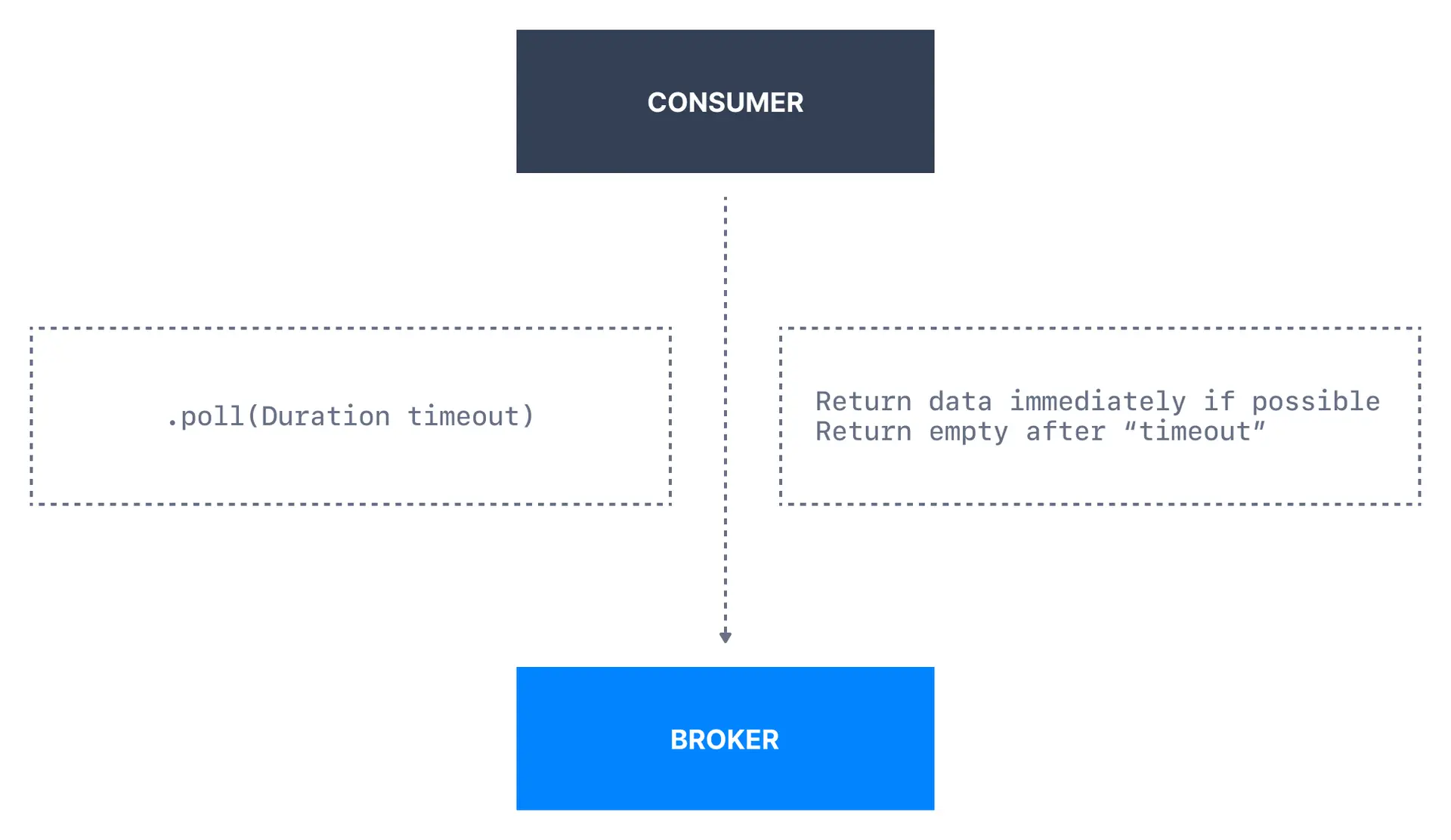
Polling allows consumers to control:
- From where in the log they want to consume
- How fast they want to consume
- Ability to replay events
## Internal poll thread and heartbeat thread
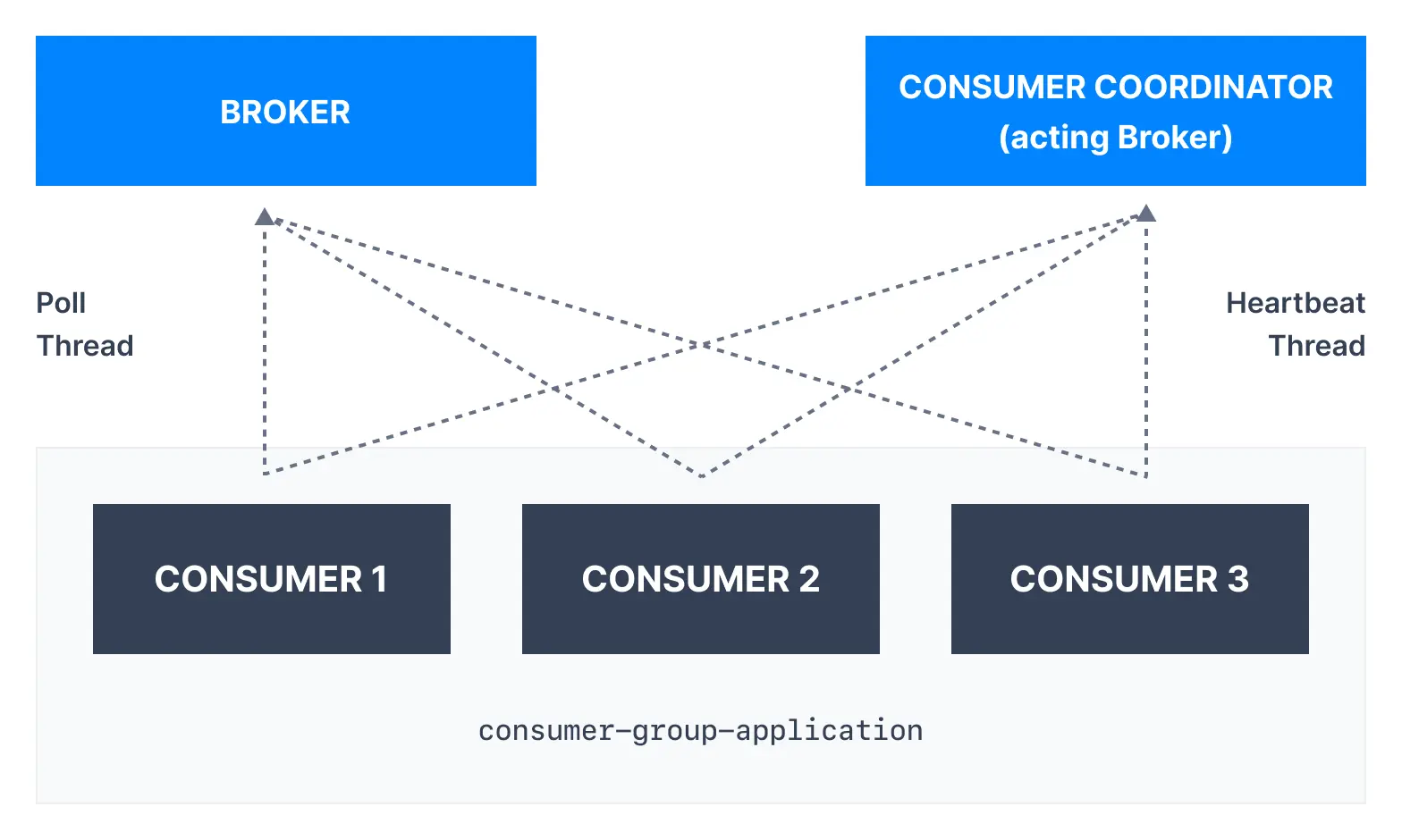
The way consumers maintain membership in a consumer group and ownership of partitions is by sending `heartbeats` to a Kafka broker designated as the **group coordinator**.

```mermaid
flowchart LR
subgraph Consumer["Consumer Application"]
PT["Poll Thread
(Your code)"]
HT["Heartbeat Thread
(Background)"]
end
subgraph Kafka["Kafka Cluster"]
GC["Group Coordinator"]
B["Broker"]
end
PT -->|"poll()"| B
HT -->|"heartbeats"| GC
B -->|"records"| PT
GC -->|"rebalance
signals"| HT
```
### Kafka consumer heartbeat thread
Heartbeats help to determine consumer liveliness:
- As long as the consumer sends heartbeats at regular intervals, it is assumed to be alive and processing messages
- If the consumer stops sending heartbeats long enough, its session will time out and trigger a rebalance
Key configurations:
- `heartbeat.interval.ms` (default: 3 seconds)
- `session.timeout.ms` (Kafka v3.0+: 45 seconds)
> This mechanism detects consumer application downtime or network failures.
### Kafka consumer poll thread
Consumers poll brokers periodically using the `.poll()` method.
Key configuration:
- `max.poll.interval.ms` (default: 5 minutes)
This controls the maximum time between calls to `poll()`. If this interval is exceeded, the consumer is considered failed and triggers a rebalance.
## Important consumer settings
### Poll behavior settings
| Setting | Default | Description |
|---------|---------|-------------|
| `max.poll.records` | 500 | Maximum records returned in single `poll()` |
| `fetch.min.bytes` | 1 | Minimum data to return for a fetch request |
| `fetch.max.wait.ms` | 500ms | Maximum wait time if insufficient data |
**max.poll.records**
- Lower values can improve latency but may reduce throughput
- Higher values improve throughput but may increase processing time per batch
**fetch.min.bytes**
- Setting higher values can improve throughput by reducing request overhead
- May increase latency as consumer waits for more data
### Session and heartbeat settings
| Setting | Default (Kafka 3.0+) | Description |
|---------|---------------------|-------------|
| `session.timeout.ms` | 45 seconds | Timeout for detecting consumer failures |
| `heartbeat.interval.ms` | 3 seconds | Expected time between heartbeats |
| `max.poll.interval.ms` | 5 minutes | Maximum delay between `poll()` calls |
> **Heartbeat interval rule**
> Set `heartbeat.interval.ms` to approximately 1/3 of `session.timeout.ms`. This ensures the consumer sends enough heartbeats within the session timeout.
## Performance tuning guidelines
### For high throughput
```properties
# Maximize batch sizes and reduce overhead
max.poll.records=1000
fetch.min.bytes=1048576 # 1MB
fetch.max.wait.ms=1000
# Allow more time for processing large batches
max.poll.interval.ms=300000 # 5 minutes
```
### For low latency
```properties
# Return data quickly, small batches
max.poll.records=100
fetch.min.bytes=1
fetch.max.wait.ms=100
# Shorter timeouts for faster rebalances
session.timeout.ms=10000 # 10 seconds
heartbeat.interval.ms=3000 # 3 seconds
```
### For long processing times
```properties
# Accommodate slow processing without triggering rebalance
max.poll.interval.ms=600000 # 10 minutes
session.timeout.ms=60000 # 1 minute
heartbeat.interval.ms=20000 # 20 seconds
# Smaller batches to stay within poll interval
max.poll.records=100
```
### Decision tree

```mermaid
flowchart TD
Start["Tuning consumer"] --> Q1{"Priority?"}
Q1 -->|"Throughput"| HT["High throughput config
max.poll.records=1000
fetch.min.bytes=1MB"]
Q1 -->|"Latency"| LL["Low latency config
max.poll.records=100
fetch.min.bytes=1"]
Q1 -->|"Processing time"| LP["Long processing config
max.poll.interval.ms=10min
max.poll.records=100"]
HT --> Monitor["Monitor consumer lag"]
LL --> Monitor
LP --> Monitor
```
## Best practices
1. **Tune `max.poll.records`** based on your processing time per message
2. **Set `max.poll.interval.ms`** higher than your worst-case processing time
3. **Monitor consumer lag** to ensure settings are appropriate
4. **Test rebalance behavior** under your expected load conditions
5. **Consider batch processing** patterns when setting poll configurations
> **Avoid blocking in poll loop**
> Never perform long-running operations in the thread that calls `poll()`. This can trigger unnecessary rebalances and degrade performance. Use separate worker threads for heavy processing.
## Common anti-patterns
| Anti-pattern | Problem | Solution |
|--------------|---------|----------|
| Blocking in poll loop | Triggers rebalance | Use async processing |
| `max.poll.interval.ms` too low | Constant rebalances | Increase or reduce batch size |
| Ignoring heartbeat settings | Slow failure detection | Tune for your SLAs |
| Same config for all consumers | Suboptimal performance | Tune per use case |
> **See it in practice with Conduktor**
> [Conduktor Console](https://docs.conduktor.io/guide/monitor-brokers-apps) displays real-time consumer lag and rebalance events. Monitor how your configuration changes affect consumer performance and identify optimal settings for your workload.
## Next steps
- [Configure auto offset reset](https://www.conduktor.io/kafka/consumer-auto-offsets-reset-behavior) for new consumers
- [Understand delivery semantics](https://www.conduktor.io/kafka/delivery-semantics-for-kafka-consumers) for reliable processing
- [Implement incremental rebalancing](https://www.conduktor.io/kafka/consumer-incremental-rebalance-and-static-group-membership) to reduce disruption