# Kafka consumer groups and offsets
*Learn how consumer groups enable parallel processing*
Consumer groups allow multiple consumers to work together to process data from Kafka topics. Understanding consumer groups and offsets is essential for building scalable, fault-tolerant applications.
**What you'll learn:**
- How consumer groups coordinate partition assignment
- How offsets track consumption progress
- The different delivery semantics (at-most-once, at-least-once, exactly-once)
- Best practices for consumer group configuration
## Kafka consumer groups
We have seen that consumers can consume data from Kafka topics partitions individually, but for horizontal scalability purposes it is recommended to consume Kafka topics as a group.
Consumers that are part of the same application and therefore performing the same "logical job" can be grouped together as a Kafka consumer group.
A topic usually consists of many partitions. These partitions are a unit of parallelism for Kafka consumers.
The benefit of leveraging a Kafka consumer group is that the consumers within the group will coordinate to split the work of reading from different partitions.
### Kafka consumer group ID
In order for indicating to Kafka consumers that they are part of the same specific group, we have to specify the consumer-side setting `group.id`.
Kafka Consumers automatically use a `GroupCoordinator` and a `ConsumerCoordinator` to assign consumers to a partition and ensure the load balancing is achieved across all consumers in the same group.
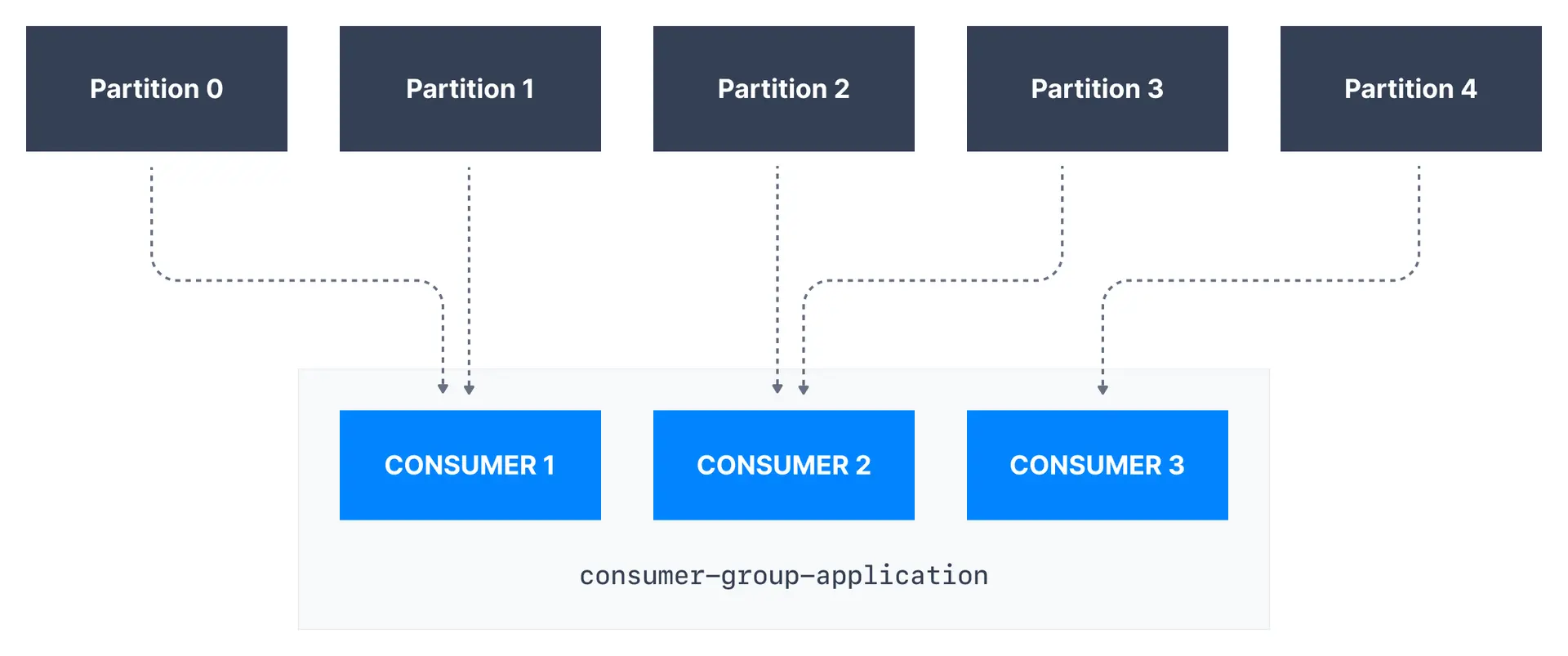
It is important to note that each topic partition is only assigned to one consumer within a consumer group, but a consumer from a consumer group can be assigned multiple partitions.

In the example above, **Consumer 1** of consumer group `consumer-group-application` has been assigned *Partition 0* and *Partition 1*, whereas **Consumer 2** is assigned *Partition 2* and *Partition 3*. Finally, **Consumer 3** is assigned *Partition 4*. Only **Consumer 1** receives messages from *Partition 0* and *Partition 1*, while only **Consumer 2** receives messages from *Partition 2* and *Partition 3*, with only **Consumer 3** receiving messages from *Partition 4*.
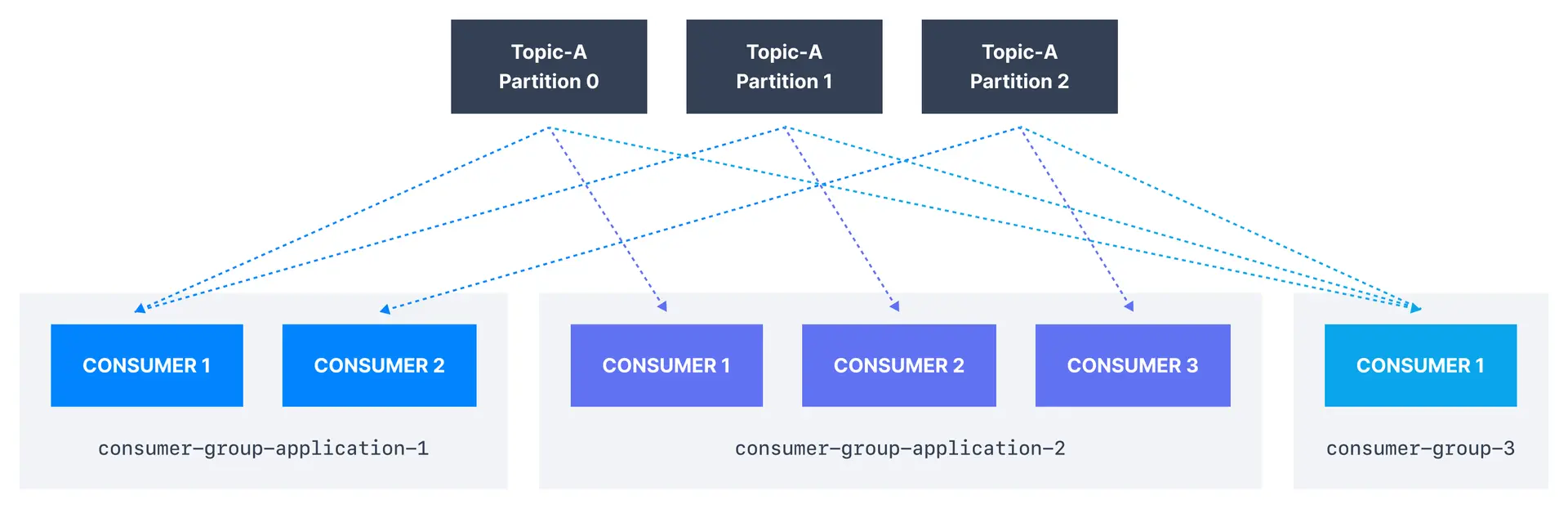
Each of your applications (that may be composed of many consumers) reading from Kafka topics has to specify a different `group.id`. That means that multiple applications (consumer groups) can consume from the same topic at the same time:
### Consumer scaling limits
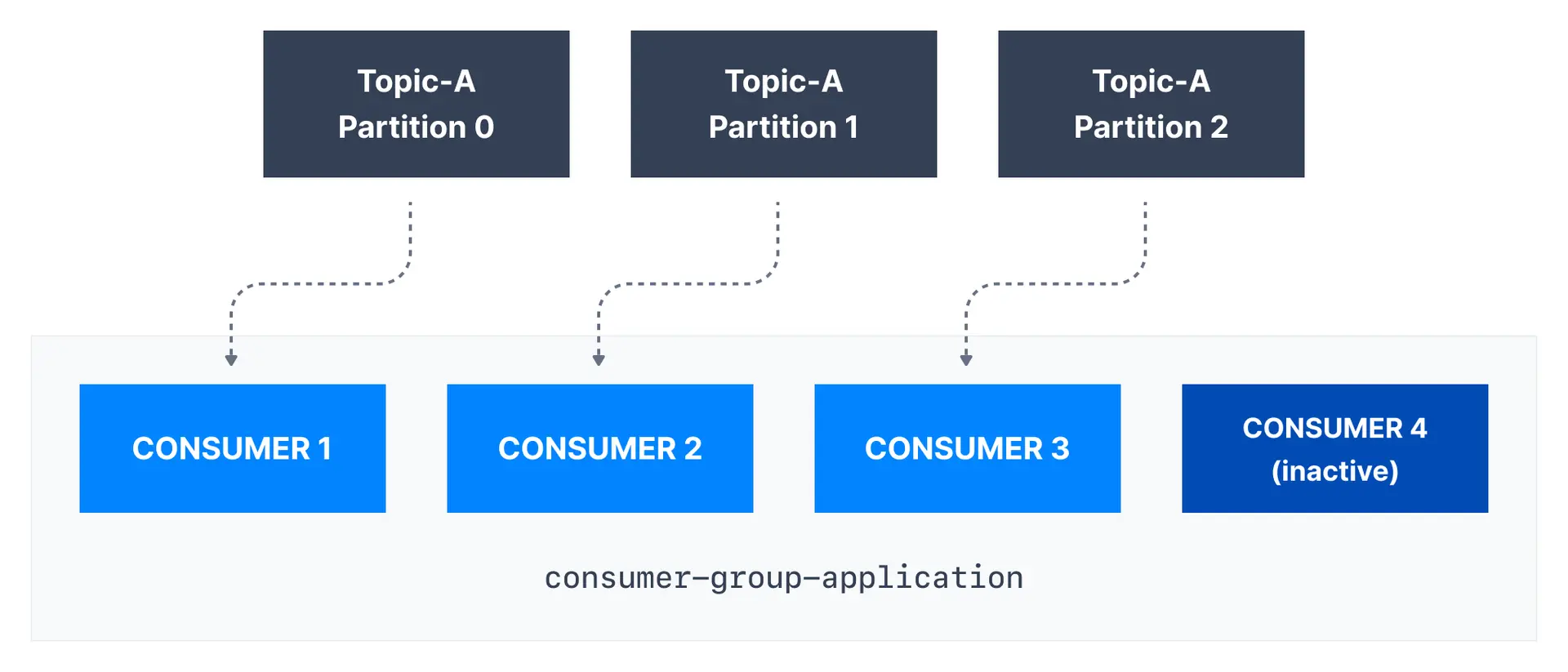
If there are more consumers than the number of partitions of a topic, then some consumers will remain inactive as shown below. Usually, we have as many consumers in a consumer group as the number of partitions. If we want more consumers for higher throughput, we should create more partitions while creating the topic. Otherwise, some of the consumers may remain inactive.
> **Maximum parallelism**
> The maximum number of active consumers in a group equals the number of partitions. Adding more consumers than partitions results in idle consumers.
### Consumer group scaling formula
| Partitions | Consumers | Result |
|------------|-----------|--------|
| 3 | 1 | 1 consumer handles all 3 partitions |
| 3 | 2 | Each consumer handles 1-2 partitions |
| 3 | 3 | Each consumer handles 1 partition (optimal) |
| 3 | 5 | 2 consumers idle, 3 active |
## Kafka consumer offsets
Kafka brokers use an internal topic named `__consumer_offsets` that keeps track of what messages a given **consumer group** last successfully processed.
As we know, each message in a Kafka topic has a partition ID and an offset ID attached to it.
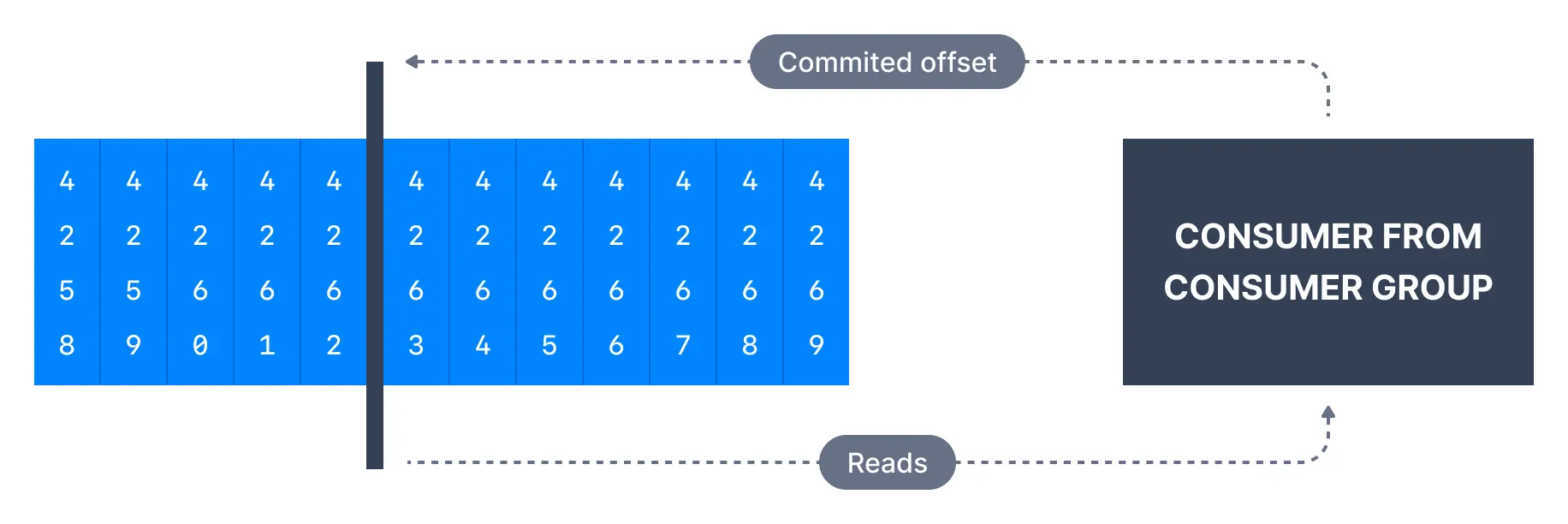
Therefore, in order to "checkpoint" how far a consumer has been reading into a topic partition, the consumer will regularly **commit** the latest processed message, also known as **consumer offset**.
In the figure below, a consumer from the consumer group has consumed messages up to offset `4262`, so the consumer offset is set to `4262`.
Most client libraries automatically commit offsets to Kafka for you on a periodic basis, and the responsible Kafka broker will ensure writing to the `__consumer_offsets` topic (therefore consumers do not write to that topic directly).
The process of committing offsets is not done for every message consumed (because this would be inefficient), and instead is a periodic process.
This also means that when a specific offset is committed, all previous messages that have a lower offset are also considered to be committed.
## Why use consumer offsets?
Offsets are critical for many applications. If a Kafka client crashes, a rebalance occurs and the latest committed offset help the remaining Kafka consumers know where to restart reading and processing messages.
In case a new consumer is added to a group, another consumer group rebalance happens and consumer offsets are yet again leveraged to notify consumers where to start reading data from.
Therefore consumer offsets have to be committed regularly.

```mermaid
flowchart LR
subgraph Before["Before crash"]
C1["Consumer"] -->|"Reading"| P["Partition
Offset: 100"]
C1 -->|"Committed"| O1["Offset: 95"]
end
subgraph After["After recovery"]
C2["Consumer
(restarted)"] -->|"Resume from"| O2["Offset: 95"]
C2 -->|"Reprocess"| M["Messages 95-100"]
end
Before --> After
```
### Delivery semantics for consumers
By default, Java consumers automatically commit offsets (controlled by the `enable.auto.commit=true` property) every `auto.commit.interval.ms` (5 seconds by default) when `.poll()` is called.
Details of that mechanism are discussed in [Delivery Semantics for Consumers](https://www.conduktor.io/kafka/delivery-semantics-for-kafka-consumers).
A consumer may opt to commit offsets by itself (`enable.auto.commit=false`). Depending on when it chooses to commit offsets, there are delivery semantics available to the consumer. The three delivery semantics are explained below.
### At most once
- Offsets are committed as soon as the message is received.
- If the processing goes wrong, the message will be lost (it won't be read again).
### At least once (usually preferred)
- Offsets are committed after the message is processed.
- If the processing goes wrong, the message will be read again.
- This can result in duplicate processing of messages. Therefore, it is best practice to make sure data processing is idempotent (i.e. processing the same message twice won't produce any undesirable effects)
### Exactly once
- This can only be achieved for Kafka topic to Kafka topic workflows using the transactions API. The Kafka Streams API simplifies the usage of that API and enables exactly once using the setting `processing.guarantee=exactly_once_v2` (`exactly_once` on Kafka < 2.5)
- For Kafka topic to External System workflows, to *effectively* achieve exactly once, you have to use an idempotent consumer.
> **Recommended approach**
> In practice, at least once with idempotent processing is the most desirable and widely implemented mechanism for Kafka consumers.
| Semantic | Commits when | Risk | Use case |
|----------|--------------|------|----------|
| At most once | Before processing | Data loss | Metrics, logs |
| At least once | After processing | Duplicates | Most applications |
| Exactly once | With transaction | Complexity | Financial, critical |
> **See it in practice with Conduktor**
> [Conduktor Console](https://docs.conduktor.io/guide/manage-kafka/kafka-resources/consumer-groups) provides a visual interface to manage Kafka consumer groups. View consumer group details, monitor lag per partition, track offset commits, and perform operations like resetting offsets or deleting consumer groups.
## Next steps
- [Meet the brokers that run the cluster](https://www.conduktor.io/kafka/kafka-brokers) to see the servers that store partitions and serve clients
- [Understand incremental rebalancing](https://www.conduktor.io/kafka/consumer-incremental-rebalance-and-static-group-membership) to minimize disruption
- [Explore delivery semantics](https://www.conduktor.io/kafka/delivery-semantics-for-kafka-consumers) in depth