# Kafka advertised host setting
*Learn how to configure advertised listeners for client connectivity*
The advertised listeners setting is one of the most important Kafka configurations. Mis-configuring it is a common cause of client connection failures.
**What you'll learn:**
- How Kafka clients discover and connect to brokers
- Why advertised host configuration matters
- How to configure advertised listeners for different network topologies
- Common pitfalls and how to avoid them
## Connecting to a Kafka cluster
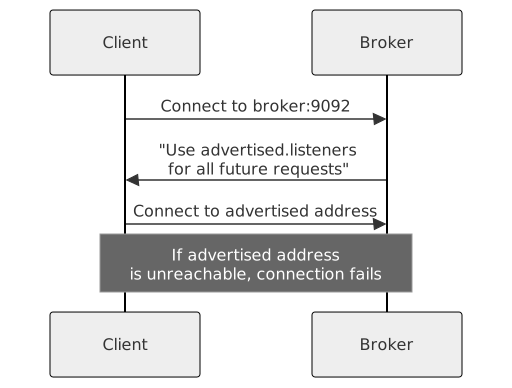
When a client connects to a Kafka cluster, the broker responds with the advertised host that the client MUST use for all future communications - regardless of how the initial connection was made.
```mermaid
sequenceDiagram
participant C as Client
participant B as Broker
C->>B: Connect to broker:9092
B->>C: "Use advertised.listeners
for all future requests"
C->>B: Connect to advertised address
Note over C,B: If advertised address
is unreachable, connection fails
```
> **Common misconception**
> Just because a Kafka hostname and port are reachable doesn't mean clients can establish a Kafka-protocol connection. The client has to be able to reach the advertised address, not just the initial bootstrap address.
## Setting advertised host as localhost
If you set the Advertised Host as localhost, the Kafka client will successfully connect to the cluster if it is running on the same machine as the broker.
## Setting advertised host as public IP
If you set the Advertised Host as the broker's Public IP, the Kafka client will successfully connect to the cluster as long as the Public IP doesn't change. It may change if the broker re-boots. If that happens, the connection cannot be re-established.
## Configure advertised host
| Client location | Recommended setting |
|-----------------|---------------------|
| Same network as broker | Internal private IP or DNS hostname |
| Public network | External public IP or DNS hostname |
| Both internal and external | Configure multiple listeners |
### Example: Internal clients only
```properties
listeners=PLAINTEXT://0.0.0.0:9092
advertised.listeners=PLAINTEXT://internal-broker1.company.com:9092
```
### Example: External clients only
```properties
listeners=PLAINTEXT://0.0.0.0:9092
advertised.listeners=PLAINTEXT://public-broker1.example.com:9092
```
### Example: Both internal and external clients
```properties
listeners=INTERNAL://0.0.0.0:9092,EXTERNAL://0.0.0.0:9093
advertised.listeners=INTERNAL://internal-broker1.company.com:9092,EXTERNAL://public-broker1.example.com:9093
listener.security.protocol.map=INTERNAL:PLAINTEXT,EXTERNAL:SSL
```
> **Use DNS hostnames**
> Prefer DNS hostnames over IP addresses. IP addresses can change when instances reboot, but DNS can be updated to point to new addresses without client configuration changes.
For an in-depth explanation of Kafka Listeners, see [Kafka Listeners Explained](https://rmoff.net/2018/08/02/kafka-listeners-explained/).
> **See it in practice with Conduktor**
> [Conduktor Console](https://docs.conduktor.io/guide/manage-kafka/kafka-resources/brokers) displays broker listener configurations and helps diagnose connectivity issues. Test connections from different network locations to verify your advertised listener settings.
## Next steps
- [Return to the administration overview](https://www.conduktor.io/kafka/kafka-administration) to revisit the full operations path
- [Configure security](https://www.conduktor.io/kafka/kafka-security) for your listeners
- [Monitor broker health](https://www.conduktor.io/kafka/kafka-monitoring-and-operations) to validate connectivity in production